


Welcome back to this ongoing series on optimizing your content management on CloudCannon. So far I’ve explored how to enhance your Visual Editor for efficient page building, allowing you to lay out your landing page with ease. I’ve also talked through the process of optimizing the Content Editor for long-form content, empowering writers to draft and craft compelling narratives with all the styling options and additional functionality they’ll need.
Most recently, I examined strategies to optimize your CMS for SEO success, ensuring that your content reaches its intended audience. Today, I’ll take a step back to look at the bigger picture of your website editing and updating processes. I’ll be exploring how CloudCannon's workflows can tie all of your optimizations together, offering enhanced control, flexibility, and coordination for your team.
As we've seen throughout this series, an efficient and well organized CMS is crucial for creating and maintaining a successful website. However, the process of creating, reviewing, and publishing changes can be complex, especially when multiple team members are involved.
One of the most valuable aspects of CloudCannon's CMS is its robust staging workflow, which lets you create private copies of your website (”branch sites”) to test out new content and features.
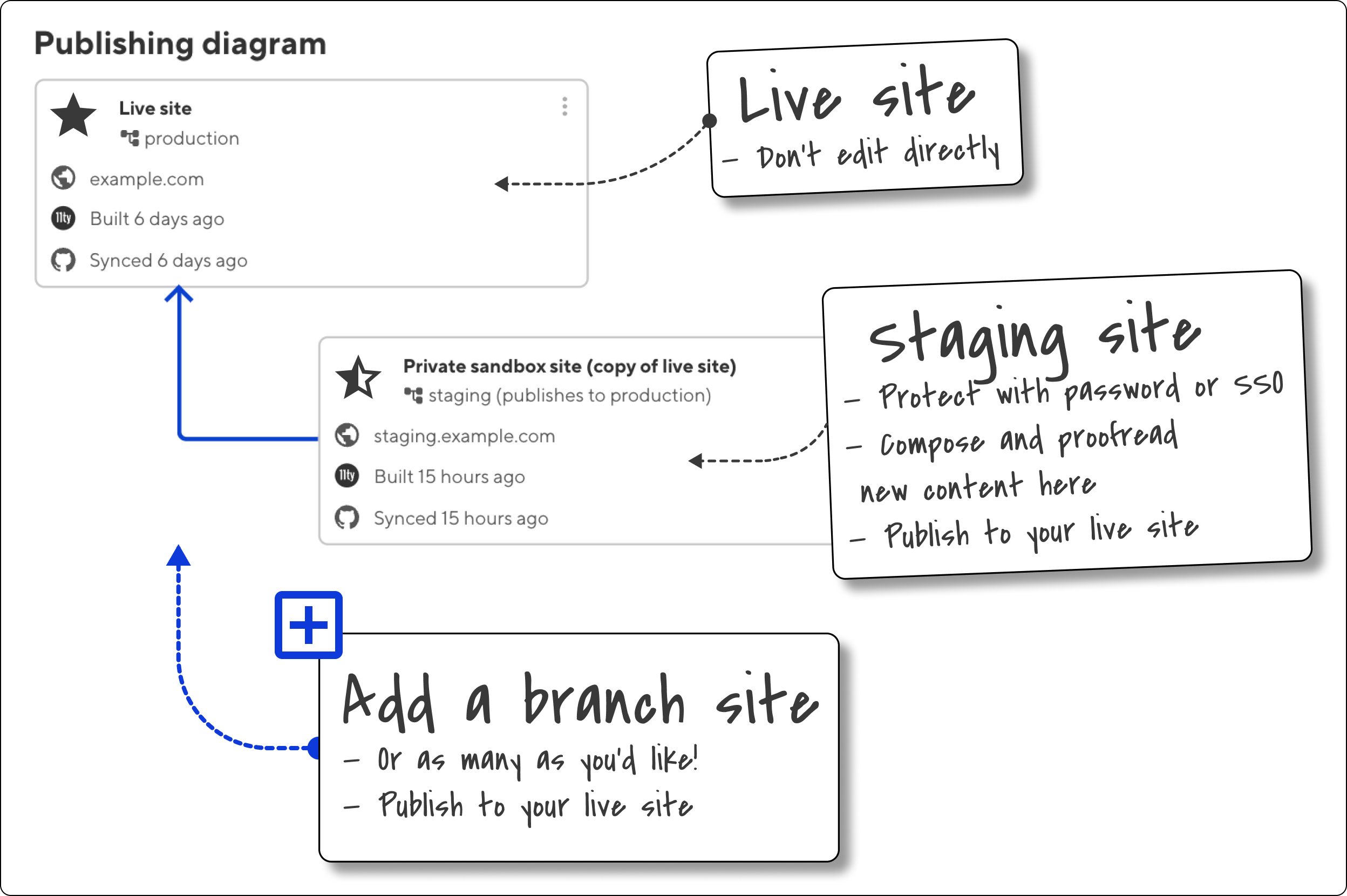
You can think of these site copies as playgrounds for testing new ideas within the full context of your existing site — and once you’re happy with your changes you can publish them back to your live, public site. This kind of approach significantly reduces the risk of introducing errors to your production website, and can be a great way to get feedback on content or features.
As most marketers will know, work on websites doesn’t always follow a linear process. That’s where CloudCannon’s branch sites really shine — multiple team members can work simultaneously on different branches, and merge their content together as soon as each task is finished.
Branching means content teams can work and publish in parallel, and no one person’s work — or unavoidable delays completing it — need to hold up anyone else’s work.
Depending on how your team wants to work together, you can choose between two primary methods for publishing changes from branch sites:

Both methods offer flexibility in workflow management, allowing teams to choose the approach that best suits their needs and project requirements.
Your workflow can be as complex or as simple as you’d like! If you’d like to live on the edge and make edits directly to your live site, that’s possible! If you’re slightly more cautious, or your workplace requires sign-off on new content before it’s published, a single staging branch might suffice. And if you’re in a larger team, with multiple team members working on your site, you might want to try something like this:
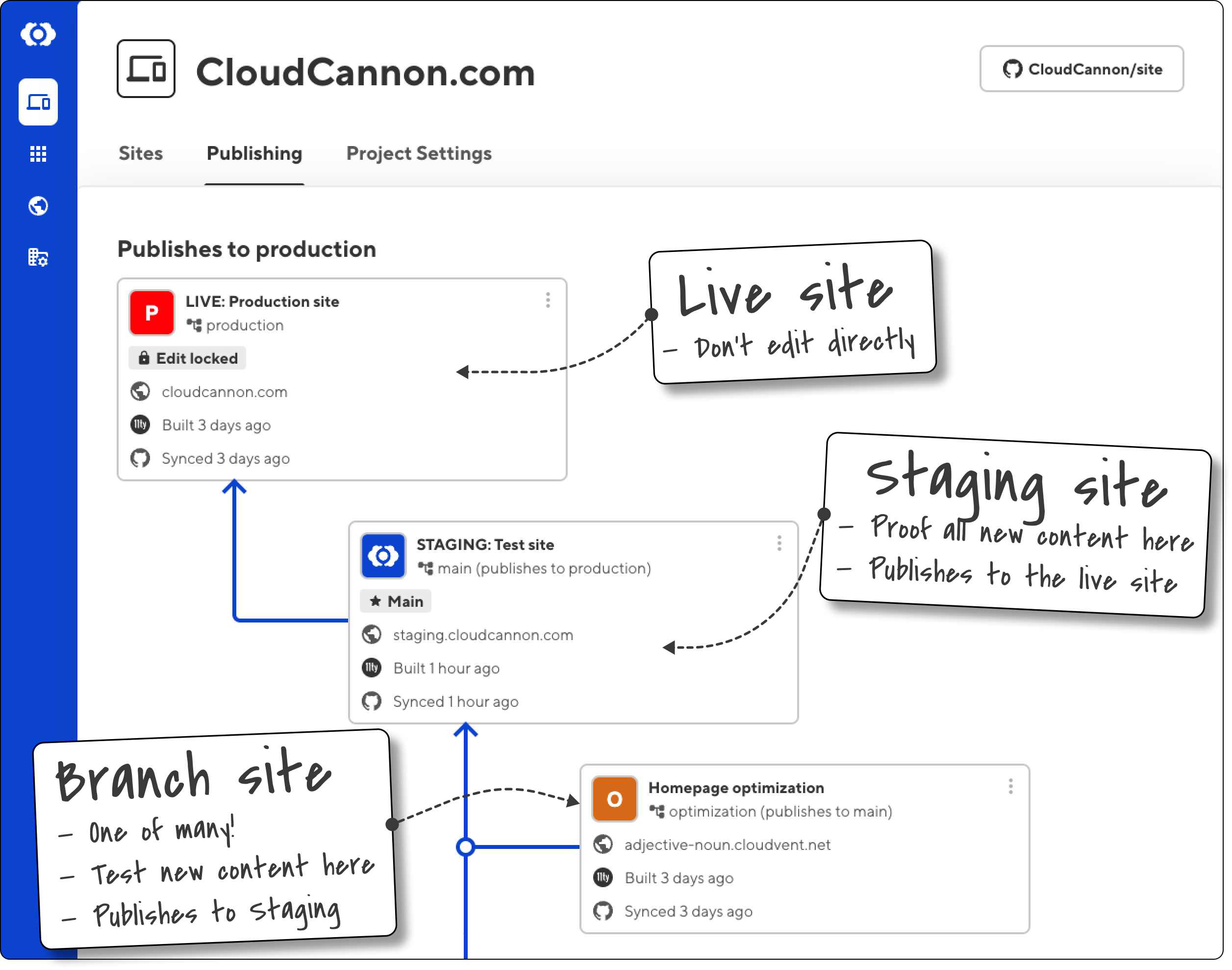
For our work on cloudcannon.com, as illustrated above, we have three layers of branches set up: new content is made on a branch (1) of our staging site (2) that publishes to the live, public website (3). We’ve locked editing on the live site itself, so that the only way our team can update it is with a Publish action from our staging site.
This way, our team can work on multiple features and content changes simultaneously and publish them independently when each is ready. I can create and test a new Snippet on one branch, while my colleagues are drafting blog posts and adding new landing pages on completely separate branches. We can work individually or we can collaborate on a single branch, and we can move quickly and publish multiple updates to our site whenever we need to.
Best of all, CloudCannon keeps a record of all the actions that we take on a website — meaning it’s easy to know exactly who published what, and when. (That’s the benefit of a Git CMS!)
It’s really useful to be able to automatically delete branch sites after successful publication. This functionality helps maintain a clean project structure by removing branches that are no longer needed, reducing clutter and potential confusion.
Not all of your branches are suitable for publication — and sometimes, we’re aware of this ahead of time! CloudCannon provides the ability to disable publishing for specific branch sites. This feature offers an additional layer of control, preventing accidental publications and allowing you the freedom to experiment.
Branches are great, but as with any shared file system, they can get confusing! Users on Teams and Enterprise plans can create a Project, which will act as a centralized management system for sites connected to a single source.
Projects allow teams to establish a main branch, which will receive new changes from other branched sites, while enabling team members to create and work independently.
Key benefits of using Projects include:
CloudCannon workflows are both structured and flexible, so teams can work more efficiently, reduce errors, and maintain better control over the page layout, editing, and publication processes.
If you’d like some assistance getting set up with workflows, we're happy to help with a range of web services.
此内容由惯性聚合(RSS阅读器)自动聚合整理,仅供阅读参考。 原文来自 — 版权归原作者所有。