
Ask Your Favorite AI
Copy the link to a markdown format of this article for ChatGPT, Claude, Gemini, or your favorite AI.
If you love the block editor, you’ll adore Full Site Editing with WordPress 6.0.
With the release of 6.0 in May, Full Site Editing made a giant leap forward. There’s a lot to be excited about and a few things to be cautious about. In this post, we’ll break down:
- What’s included in Full Site Editing
- When to use Full Site Editing
- How to enable Full Site Editing
- How FSE features work with the rest of your site
What is Full Site Editing?
Full Site Editing is the umbrella term for enhancements designed to extend WordPress’s block editing experience beyond posts and pages and to all parts of a site.
Elements of Full Site Editing in WordPress include:
- Site Editor. The site editor allows you to use blocks to edit and style different site elements independently from your theme.
- Template Editing. The features enable direct editing from a post or page template.
- Block Themes. Block Themes use blocks as their primary structure to allow the full use of the Site Editor.
- Theme Blocks. These new blocks enable functionality traditionally only available in templates. WordPress 6.0 added blocks for post comments, read more, no results in query loop, post author biography, and avatars.
- Styling. These features allow you to modify styles across local blocks, theme defaults, and global modifications. The styling updates in WordPress 6.0 unlocked the ability for global style switching, which essentially lets you reskin your website without changing the theme by using a set of saved style preferences.
- Browsing. This improvement makes it easier to navigate editing the various types of elements, such as templates and pages.
- Navigation Block. With this enhancement, you can edit your site’s navigation structure and design.
- Query Block. This block replaces the classic WP_Query to enable more customization.
Many of the Full Site Editing features were improved or introduced in WordPress 6.0. Read our post on what’s new in WordPress 6.0 to learn more about these features.
Should You Use Full Site Editing?
Full Site Editing is the natural evaluation of the Gutenberg editing experience. The project looks to extend the block functionality and make editing websites’ design and layout more intuitive. Like the original release of Gutenberg blocks, Full Site Editing marks a big change in how WordPress works.
Also, much like the original Gutenberg release, not every website will be ready or need to adopt these features right away. Many themes and plugins are still incompatible with all of the Full Site Editing features. Also, the Site Editor, which powers many of these changes, is still in beta as of the 6.0 release.
Depending on which themes and plugins your site uses, you may want to wait before trying out many of the Full Site Editing features. But if you’re ready to dig into this new experience, keep reading to learn how to enable Full Site Editing on your site.
How To Enable Full Site Editing with WordPress 6.0
You’ll need to use a compatible theme to use the complete set of Full Site Editing features. Only Block Themes, which utilize the block structure, presently work with the Site Editor. If the active theme for your site is not a Block Theme, you won’t be able to access the Site Editor. After installing and activating a compatible theme, you can access the editor by clicking Appearance then Editor.

Editing Your Site With the Site Editor
Once you enable the Site Editor, you’re ready to start editing. Click the WordPress logo in the top left corner to navigate through the different structural elements you can edit, including the live site, templates, and template parts.
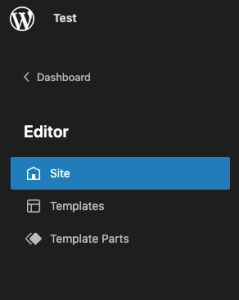
From there, you can edit the different elements with the same visual editing experience you use to edit posts or pages built with blocks.

How FSE Features Work With the Rest of Your Site
How do you know what to use to edit each element of your site with all these new options? The Site Editor is incredibly flexible and allows you to edit your site in new ways.
WordPress offers this advice on when to use the site editor and when to use alternatives:
- When editing the site structure, like headers, footers, and the structural appearance of pages and posts, use the Site Editor.
- When updating a page’s content, such as the text or images, edit the page individually through the Pages link in your dashboard.
- Similar to pages, when editing the content of a blog post, it’s best to edit it individually by selecting the post from the complete list of posts in your dashboard.
Quality Hosting for Full Site Editing with WordPress 6.0
Building a site in WordPress and utilizing all the new Full Site Editing features requires a quality hosting service. At Pressable, we specialize in WordPress. Each WordPress installation on Pressable includes a staging environment, so you can try out the new Full Site Editing features in a safe testing environment without impacting your live site. Want to learn more about how Pressable can help you make the most of WordPress? Sign up for a personalized demo.

Amanda Nadhir
With over a decade of experience in the tech industry, Amanda's experience demonstrates her sales expertise. Her commitment to building, training, and guiding high-performing teams has been instrumental in driving Pressable's success. Amanda's extensive background in sales and marketing, coupled with her sharp business acumen, has made her an invaluable asset to the tech community. Her ability to identify and foster talent, combined with her passion for developing winning sales strategies, has propelled her to the forefront of the industry.
When she's not expertly navigating the tech sales landscape, she loves spending quality time with her family, loves travel and adventure, lounging pool/beach-side, playing tennis, working out, and meeting people/making friends all along the way!






