





Copy the link to a markdown format of this article for ChatGPT, Claude, Gemini, or your favorite AI.
The new WordPress block editor has improved a lot since its initial release. If you skipped making the switch to the Gutenberg block editor because you thought it wouldn’t work for your site or it would be more trouble than it was worth, it’s time to rethink that decision.
Keep reading to learn why you don’t want to miss out on some of the recent WordPress Gutenberg updates.
The release of the WordPress Gutenberg project was in 2018. WordPress 5.0 introduced the new Gutenberg Block editor for posts and pages that year.
Instead of a text field with some basic options for inserting media, the new editing experience made everything into its own block. Each paragraph is a block, but you’re not limited to text. You can also use slideshows, galleries, and images. You can also drag and drop the blocks to rearrange the order.
Here’s a look at the block editor in action. Just click the “Add block” plus button.
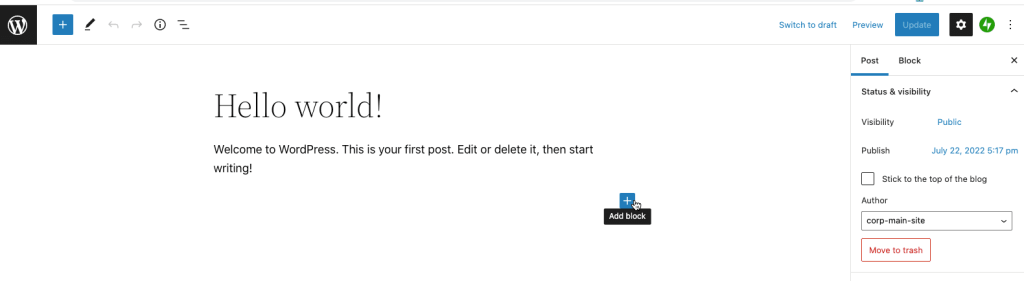
Now you’ll see the block selection menu. Click “Browse all” to see all the different blocks available.

If you haven’t looked at the block editor in a while, one of the biggest Gutenberg updates is that there are many more available blocks. More theme builders and plugin developers are taking advantage of the block experience. And if you can’t find a block to fit your needs, you can always create a custom Gutenberg block.
If you want to play around with Gutenberg block editor yourself, check out this demo.
The Gutenberg project is about more than the screen you use to edit a post.
The WordPress team is breaking out the project into four phases.
The Gutenberg project is in Phase 2, with some planning and development already occurring on the future phases. The Gutenberg updates around customization should make it possible to tweak your site’s design and layout without needing extra plugins or extensive custom code. This low-code approach should lead to faster sites with less code bloat.
The Phase 2 customization options are real game changers. Here are some of the coolest time-saving features you’ll want to explore.
WordPress introduced Full Site Editing with version 5.9 in January 2022. They added additional features with the release of WordPress 6.0 in May and 6.1 in November. Full Site Editing unlocks the block experience to edit your entire site, not just individual posts or pages.
It’s great for creating a custom page template or adding a custom navigation. Download our new Full Site Editing e-book to learn more about how to put the FSE tools to work on your site.
To use Full Site Editing, you’ll need to run WordPress 6.0 or later and have a block-compatible theme. Don’t have a compatible theme? Don’t worry. We listed some of our favorites in Chapter 2 of the e-book. Finding a block-compatible theme is probably the most significant barrier most sites face in trying to implement Full Site Editing. Fortunately, more theme developers are building themes that work with blocks.
Block Patterns are like mini-templates you can use as a starting point in your designs. Need a pricing table or a hero section? There’s a pattern for that. A pattern is a group of blocks with a pre-configured look. You can customize the content and look yourself, but you don’t have to start from scratch. Read this post for more about the advantages of using Block Patterns.
Global Style Switching allows you to reskin a page or post without changing themes. You can easily apply a different style, such as a light or dark mode.
The global style settings include fonts, colors, and other CSS settings. This feature saves you time when you want to create a unique look for a specific section of your site or if you need to quickly change your entire site’s color scheme or style without changing your theme.
This feature is great for web designers who have clients or other people updating content on a site. You can lock the block layout in place so someone can only add and edit the block content, not its appearance or style. This feature was added in WordPress 6.1, which debuted on Nov. 1.
As screen sizes start to vary more widely between phones and giant desktop monitors, how your typography displays matters even more. A giant headline could look out of place on a mobile phone while strangely small on a large desktop screen. Gutenberg now includes support for fluid typography to solve this problem. Font sizes automatically scale up or down with changes in screen size.
One of the ways to ensure you’re not missing out on all the new Gutenberg features is to keep your site updated to the latest version of WordPress. Pressable’s managed hosting service takes updates off your to-do list. All Pressable clients receive automatic updates to the latest version of WordPress.
Automatic updates ensure you always have the latest WordPress Gutenberg updates, and your site will also get the latest security fixes and features. Keep your site up to date, fast, and secure with Pressable. Pick a managed WordPress hosting plan and sign up today.

Zach brings a wealth of knowledge to Pressable with more than 15 years of experience in the WordPress world. His journey in WordPress began with creating and maintaining client websites, fostering a deep understanding of the intricacies and challenges of WordPress. Later, his knack for problem-solving and commitment to service led him to pursue a role at Automattic, where he excelled in providing customer support for WooCommerce. His expertise extends beyond technical proficiency to encompass a deep understanding of the WordPress community and its needs. Outside of work, Zach enjoys spending time with his family, playing and watching sports, and working on projects around the house.
此内容由惯性聚合(RSS阅读器)自动聚合整理,仅供阅读参考。 原文来自 — 版权归原作者所有。