

惯性聚合 高效追踪和阅读你感兴趣的博客、新闻、科技资讯
阅读原文 在惯性聚合中打开

推荐订阅源

GbyAI
GbyAI
钛媒体:引领未来商业与生活新知
钛媒体:引领未来商业与生活新知
A
About on SuperTechFans
The Last Watchdog
The Last Watchdog
A
Arctic Wolf
S
Schneier on Security
Cisco Talos Blog
Cisco Talos Blog
K
Kaspersky official blog
Spread Privacy
Spread Privacy
The Hacker News
The Hacker News
P
Proofpoint News Feed
Attack and Defense Labs
NISL@THU
NISL@THU
AWS News Blog
AWS News Blog
Schneier on Security
TaoSecurity Blog
TaoSecurity Blog
H
Hacker News: Front Page
L
LangChain Blog
Y
Y Combinator Blog
T
Tenable Blog
Microsoft Security Blog
L
Lohrmann on Cybersecurity
量子位
N
News and Events Feed by Topic
cs.AI updates on arXiv.org
The GitHub Blog
The GitHub Blog
云风的 BLOG
云风的 BLOG
W
WeLiveSecurity
Martin Fowler
Martin Fowler
Cloudbric
Cloudbric
S
SegmentFault 最新的问题
Project Zero
Project Zero
D
Darknet – Hacking Tools, Hacker News & Cyber Security
博客园 - 叶小钗
V
Vulnerabilities – Threatpost
小众软件
小众软件
Exploit-DB.com RSS Feed
腾讯CDC
博客园 - 聂微东
F
Full Disclosure
WordPress大学
WordPress大学
PCI Perspectives
PCI Perspectives
P
Privacy International News Feed
M
MIT News - Artificial intelligence
Forbes - Security
Forbes - Security
Blog — PlanetScale
Blog — PlanetScale
T
The Blog of Author Tim Ferriss
Webroot Blog
Webroot Blog
S
Security @ Cisco Blogs
Last Week in AI
Last Week in AI

编程笔记

AI|AI面试题,AI来解答 译|为什么 TypeScript 7.0 用 Go 重写 解决Fish Shell中使用vfox报错,Lacks hook support 股票配债缴款操作指南 Deepseek大模型越狱/破甲提示词 用DeepSeek-V4-Pro大模型写长篇小说,网文 全网寻找的同花顺板块同列网页版来了!盯盘效率提升 5 倍的黑科技 等一个黄金坑:中海物业跌到什么价位,到手股息率能有6%? Claude Code(1)在 WSL Ubuntu 上安装和配置指南 (译)AI 裁员潮:亚马逊、微软等科技巨头将 2025 年裁员归因于人工智能 AI|L2和L3级自动驾驶有什么区别 AI|Gemini CLI 实用技巧与窍门 AI|Gemini CLI Tips & Tricks 限制 Microsoft Edge 浏览器的内存占用 (Repost)4.3 Million Browsers Infected,Inside ShadyPanda's 7-Year Malware Campaign (译)430万浏览器被感染,揭秘 ShadyPanda 持续 7 年的恶意软件活动 github Fine-grained personal access token 使用 必应搜索屏蔽垃圾网站 译|Linux 启动过程:从按下电源到内核 独立开发:AI图生图获得第一位付费用户,现在支持在线支付了 译|面试官引诱我安装恶意软件(我是如何在一次“工作面试”中差点被黑的) 译|在 Go 中防止 CSRF 的现代方法,CrossOriginProtection AI图生图:释放你的无限创造力,免费在线生成惊艳图像 AI & Tech 最新发展 Serverless|在阿里云FC上部署Go,构建环境中GO版本的切换 AI|Gemini CLI,自定义斜杠命令(译)
AI|Gemini CLI,Custom slash commands(转载)
本文作者: yigmmk · 2025-09-10 · via 编程笔记

July 31, 2025

Jack Wotherspoon, Developer Advocate

Abhi Patel, Software Engineer
custom_slash_commands_header

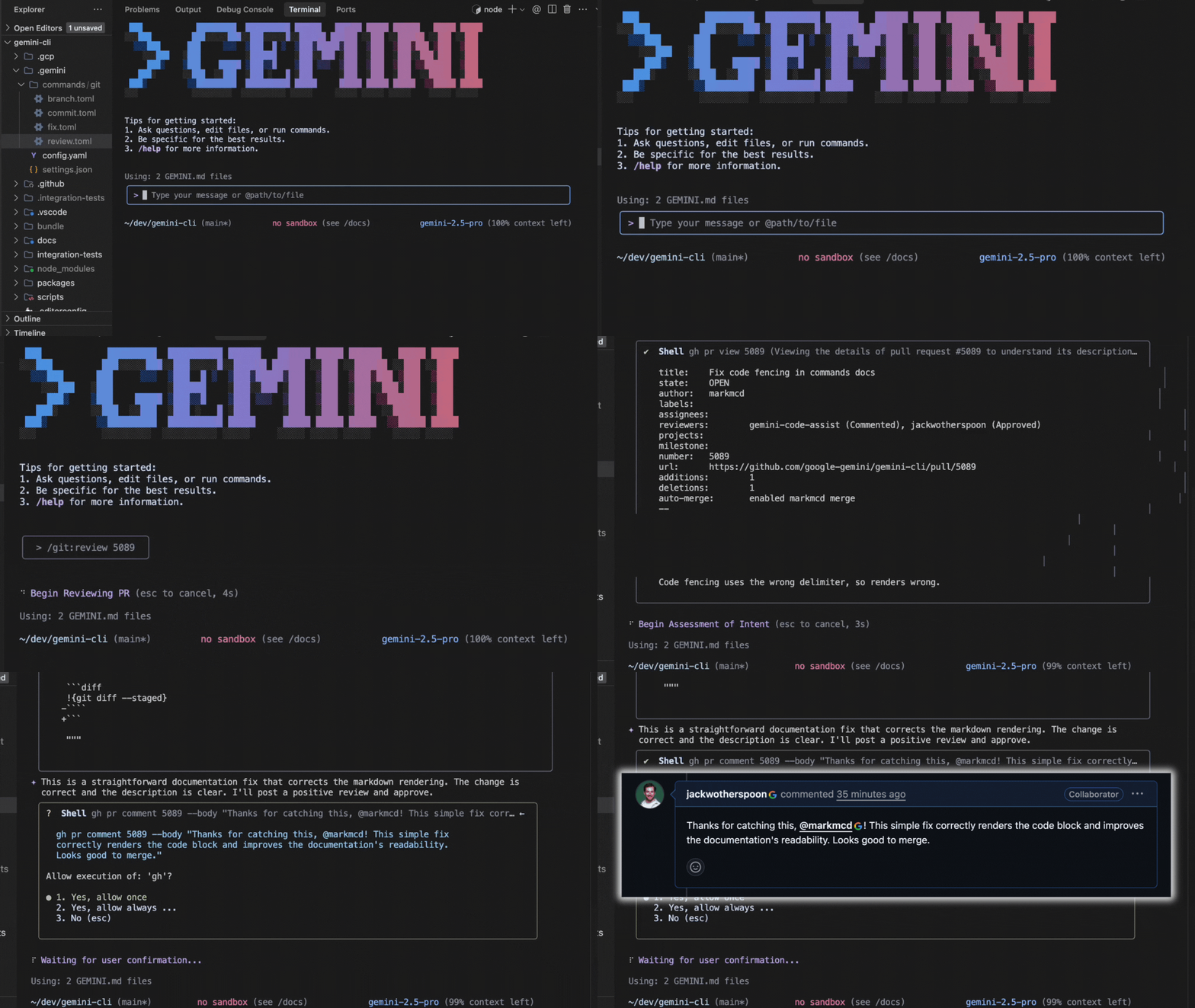
Today, we’re announcing support for custom slash commands in Gemini CLI! This highly requested feature lets you define reusable prompts for streamlining interactions with Gemini CLI and helps improve efficiency across workflows. Slash commands can be defined in local .toml files or through Model Context Protocol (MCP) prompts. Get ready to transform how you leverage Gemini CLI with the new power of slash commands!
custom_slash_commands_review

To use slash commands, make sure that you update to the latest version of Gemini CLI.

Update npx:

1
npx @google/gemini-cli

Update npm:

1
npm install -g @google/gemini-cli@latest

Powerful and extensible foundation with .toml files

The foundation of custom slash commands is rooted in .toml files.

The .toml file provides a powerful and structured base on which to build extensive support for complex commands. To help support a wide range of users, we made the required keys minimal (just prompt). And we support easy-to-use args with {{args}} and shell command execution !{...} directly into the prompt.

Here is an example .toml file that is invoked using /review <issue_number> from Gemini CLI to review a GitHub PR. Notice that the file name defines the command name and it’s case sensitive. For more information about custom slash commands, see the Custom Commands section of the Gemini CLI documentation.

1
2
3
4
5
6
7
8
9
10
11
12
13
14
15
16
17
18
description="Reviews a pull request based on issue number."
prompt = """
Please provide a detailed pull request review on GitHub issue {{args}}.
Follow these steps:
1. Use `gh pr view {{args}}` to pull the information of the PR.
2. Use `gh pr diff {{args}}` to view the diff of the PR.
3. Understand the intent of the PR using the PR description.
4. If PR description is not detailed enough to understand the intent,
make sure to note it in your review.
5. Make sure the PR title follows Conventional Commits, here are some recent
commits to the repo as examples: !{git log --pretty=format:%s -n 10}
6. Search the codebase if required.
7. Write a concise review of the PR, keeping in mind to encourage high
quality and best practices.
8. Use `gh pr comment {{args}} --body {{review}}` to post the review.
Remember to use the GitHub CLI (`gh`) with the Shell tool for all
GitHub-related tasks.
"""

Namespacing

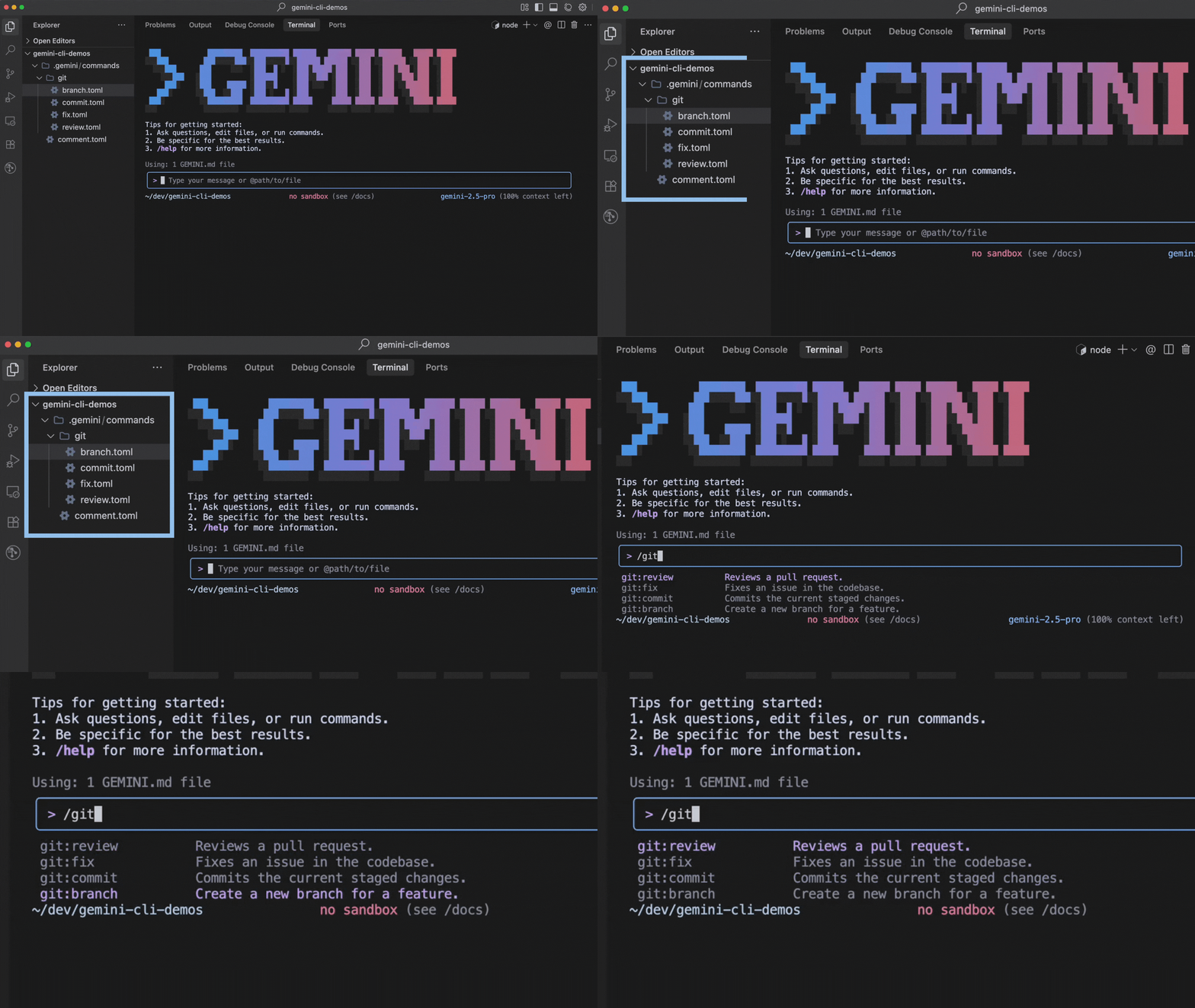
The name of a command is determined by its file path relative to the commands directory. Sub-directories are used to create namespaced commands, with the path separator (/ or ) being converted to a colon (:).

  • A file at <project>/.gemini/commands/test.toml becomes the command /test.
  • A file at <project>/.gemini/commands/git/commit.toml becomes the namespaced command /git:commit.
custom_slash_commands_namespaces

This allows grouping related commands under a single namespace.

Building a slash command

The next few sections show you how to build a slash command for Gemini CLI.

1 - Create the command file

First, create a file named plan.toml inside the ~/.gemini/commands/ directory. Doing so will let you create a /plan command to tell Gemini CLI to only plan the changes by providing a step-by-step plan and to not start on implementation. This approach will let you provide feedback and iterate on the plan before implementation.

Custom slash commands can be scoped to an individual user or project by defining the .toml files in designated directories.

  • User-scoped commands are available across all Gemini CLI projects for a user and are stored in ~/.gemini/commands/ (note the ~).
  • Project-scoped commands are only available from sessions within a given project and are stored in .gemini/commands/.

Hint: To streamline project workflows, check these into Git repositories!

1
2
mkdir -p ~/.gemini/commands
touch ~/.gemini/commands/plan.toml

2 - Add the command definition

Open plan.toml and add the following content:

1
2
3
4
5
6
7
8
9
10
11
12
13
14
15

description="Investigates and creates a strategic plan to accomplish a goal."
prompt = """
Your primary role is that of a strategist, not an implementer.
Your task is to stop, think deeply, and devise a comprehensive strategic plan.
You MUST NOT write, modify, or execute any code. Your sole focus is on the plan.
Use your available "read" and "search" tools to research and gather information.
Present your strategic plan in markdown. It should be the direct and only output.
1. **Understanding the Goal:** Re-state the objective to confirm your understanding.
2. **Investigation & Analysis:** Describe the investigative steps you will take.
3. **Proposed Strategic Approach:** Outline the high-level strategy.
4. **Verification Strategy:** Explain how the success of the plan will be verified.
5. **Anticipated Challenges & Considerations:** Based on your analysis, list potential issues.
Your final output should be ONLY this strategic plan.
"""

3 - Use the command

Now you can use this command within Gemini CLI:

1
/plan How can I make the project more performant?

Gemini will plan out the changes and output a detailed step-by-step execution plan!

Enriched integration with MCP Prompts

Gemini CLI now offers a more integrated experience with MCP by supporting MCP Prompts as slash commands! MCP provides a standardized way for servers to expose prompt templates to clients. Gemini CLI utilizes this to expose available prompts for configured MCP servers and make the prompts available as slash commands.

The name and description of the MCP prompt is used as the slash command name and description. MCP prompt arguments are also supported and leveraged in slash commands by using /mycommand --<argument_name>="<argument_value>" or positionally /mycommand <argument1> <argument2>.

The following is an example /research command that uses FastMCP Python server:

custom_slash_commands_mcp

Easy to get started

So what are you waiting for? Upgrade your terminal experience with Gemini CLI today and try out custom slash commands to streamline your workflows. To learn more, check out the Custom Commands documentation for the Gemini CLI.

原文