











共计 1428 个字符,预计需要花费 4 分钟才能阅读完成。
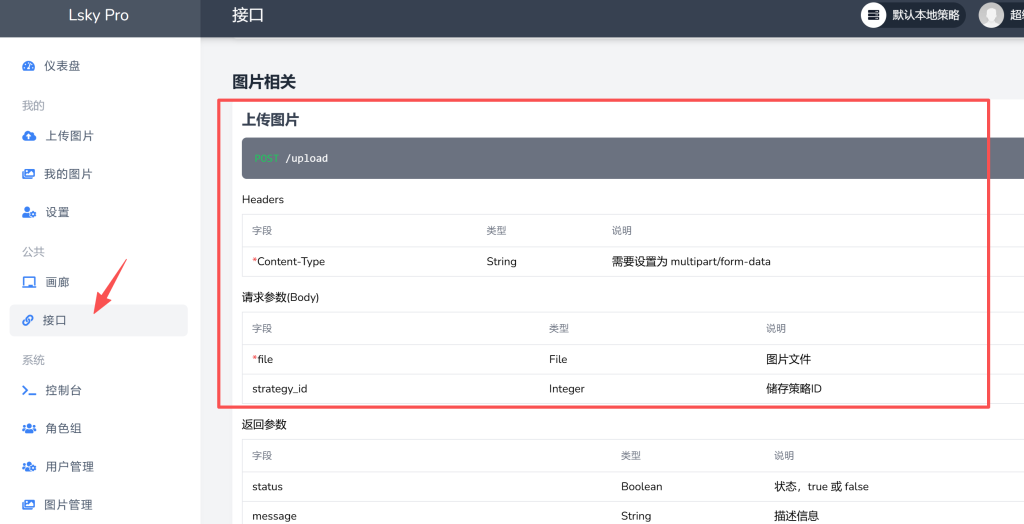
采用的宝塔 docker 方式部署,登录后可以看到,该服务有上传图片接口, 后续的上传代码参照这块。
#!/usr/bin/env python3
import os
import sys
import requests
import json

# Lsky Pro 配置
LSKY_PRO_URL = "https://oss.nwnusun.cn"  # 替换为你的 Lsky Pro 域名
LSKY_API_TOKEN = "Bearer 1|327xxx"      # 替换为你的 API Token
UPLOAD_FOLDER_ID = 1  # 可选:上传到指定相册 ID

def upload_image_to_lsky(image_path):
    """上传图片到 Lsky Pro"""
    url = f"{LSKY_PRO_URL}/api/v1/upload"
    headers = {
        "Authorization": LSKY_API_TOKEN,
        "Accept": "application/json",
    }

    # 从路径获取文件名
    filename = os.path.basename(image_path)

    # 根据文件扩展名确定 MIME 类型
    mime_mapping = {
        ".png": 'image/png',
        '.gif': 'image/gif',
        '.jpg': 'image/jpeg',
        '.jpeg': 'image/jpeg'
    }

    file_ext = os.path.splitext(image_path)[1].lower()
    mime_type = mime_mapping.get(file_ext, 'image/png')

    files = {"file": (filename, open(image_path, "rb"), mime_type)
    }

    data = {}
    if UPLOAD_FOLDER_ID:
        data["strategy_id"] = UPLOAD_FOLDER_ID

    try:
        response = requests.post(url, headers=headers, files=files, data=data)
        response.raise_for_status()
        result = response.json()

        if result.get("status"):
            # 只返回图片 URL 而不是完整的 Markdown 格式
            image_url = result["data"]["links"]["url"]
            return image_url
        else:
            return f"Error: {result.get('message','Unknown error')}"
    except Exception as e:
        return f"API Request Error: {str(e)}"

def main():
    # 检查是否提供了图片路径作为参数
    if len(sys.argv) < 2:
        print("用法: python typora_lsky_uploader.py < 图片路径 1 > [ 图片路径 2] ...")
        return

    # 上传命令行参数中的每个图片
    for img_path in sys.argv[1:]:
        if not os.path.exists(img_path):
            print(f"找不到文件: {img_path}")
            continue

        result = upload_image_to_lsky(img_path)
        print(result)

if __name__ == "__main__":
    main()
此内容由惯性聚合(RSS阅读器)自动聚合整理,仅供阅读参考。 原文来自 — 版权归原作者所有。