




大小写敏感(case sensitivity)是软件开发领域的议题,指同一个“词”拼写的大小写字母的不同可能会导致不同效果的场景。
接下来,我们谈谈前端开发领域中一些常见的大小写敏感/不敏感的场景:
- HTTP Header
- HTTP Method
- URL
- Cookie
- E-Mail Address
- HTML5 Tags and Attribute name
- CSS Property
- File’s name in Git
HTTP Header 的名称字段是不区分大小写的。
RFC 7230 - Hypertext Transfer Protocol (HTTP/1.1)#section-3.2 中规定:
Each header field consists of a case-insensitive field name followed by a colon (”:”), optional leading whitespace, the field value, and optional trailing whitespace.
但是需要注意的是,HTTP/2 多了额外的限制,因为增加了头部压缩,要求在编码前必须转成小写。
RFC 7540 - Hypertext Transfer Protocol Version 2 (HTTP/2)#section-8.1.2 中规定:
However, header field names MUST be converted to lowercase prior to their encoding in HTTP/2.
而如今大多数客户端与 HTTP 服务端都默认会把 HTTP Header 的名称字段统一改成小写,避免使用方再重复做大小写转换的处理逻辑。
比如 NodeJS 中的 HTTP 模块就会自动将 Header 字段改成小写 node/_http_outgoing.js at main · nodejs/node · GitHub:
// lib/_http_outgoing.js
ObjectDefineProperty(OutgoingMessage.prototype, '_headers', {
  __proto__: null,
  get: internalUtil.deprecate(function() {
    return this.getHeaders();
  }, 'OutgoingMessage.prototype._headers is deprecated', 'DEP0066'),
  set: internalUtil.deprecate(function(val) {
    if (val == null) {
      this[kOutHeaders] = null;
    } else if (typeof val === 'object') {
      const headers = this[kOutHeaders] = ObjectCreate(null);
      const keys = ObjectKeys(val);
      // Retain for(;;) loop for performance reasons
      // Refs: https://github.com/nodejs/node/pull/30958
      for (let i = 0; i < keys.length; ++i) {
        const name = keys[i];
        headers[StringPrototypeToLowerCase(name)] = [name, val[name]];
      }
    }
  }, 'OutgoingMessage.prototype._headers is deprecated', 'DEP0066')
});
PS. 在写这篇文章的时候,发现 NodeJS 的这部分文档有处错误,示例中的获取 headers 存在大写字母,于是顺手提了个 PR,现已经合入了。doc: fix typo in http.md by airingursb · Pull Request #43933 · nodejs/node · GitHub
除此之外,Rust 的 HTTP 模块也会将 Header 的字段名默认改成小写,理由是 HeaderMap 会处理地更快。
文档可见http::header - Rust:
The
HeaderNametype represents both standard header names as well as custom header names. The type handles the case insensitive nature of header names and is used as the key portion ofHeaderMap. Header names are normalized to lower case. In other words, when creating aHeaderNamewith a string, even if upper case characters are included, when getting a string representation of theHeaderName, it will be all lower case. This allows for fasterHeaderMapcomparison operations.
源码可见:src/headers/name.rs - http 0.1.3 - Docs.rs
作为前端开发,会更加关注 Chromium 和 WebKit 对这块的处理。
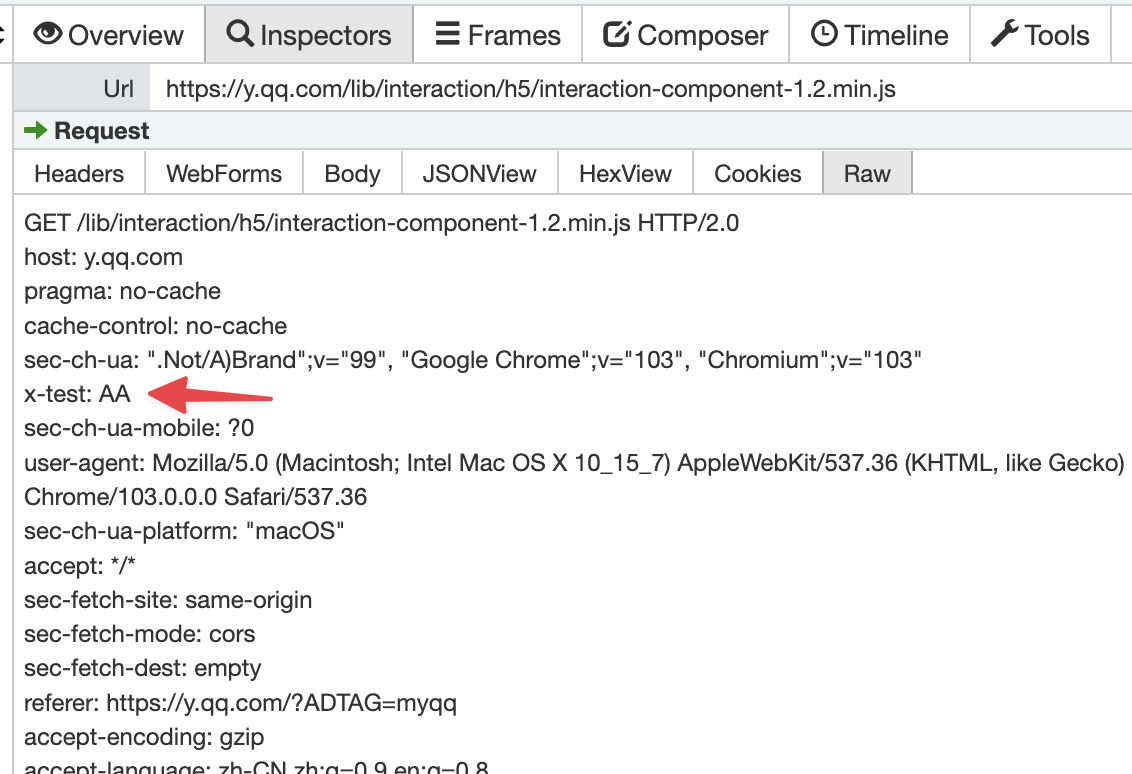
对于请求头而言,我们在 Chrome 中做个实验:
var ajax = new XMLHttpRequest();
ajax.open("GET", "https://y.qq.com/lib/interaction/h5/interaction-component-1.2.min.js");
ajax.setRequestHeader("X-test", "AA");
ajax.send();
对于 HTTP2 的请求,抓包之后可以发现,这里的 X-test 被改写成了小写 x-test:
 为了严谨起见,这里又使用了 Chrome 自带的 netlog-viewer 去抓包查看,这里的请求头确实是被转成小写了没有问题:
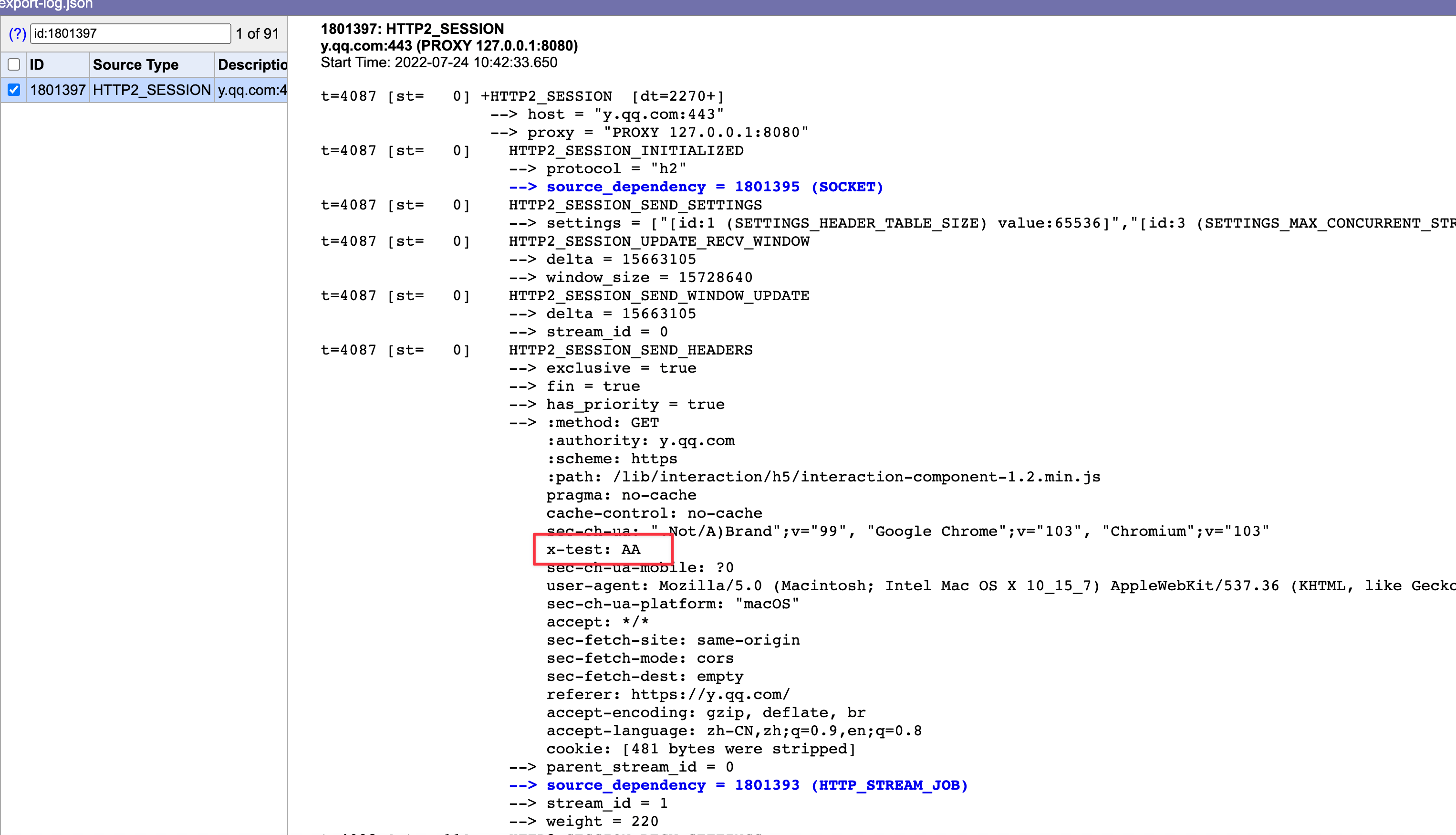 > 注:以上测试在 Safari 中也会得到同样的结果,但是必须要抓包看,如果只是在 Safari 的控制台看,它展示大小写是有问题的,而 Chrome 的 Devtools 则没有问题。这里猜测是 Safari 的 Bug。
于是去阅读 Blink 中 XMLHTTPRequest 的源码,可惜的是没有找到在哪里转成了小写。
我也去查 XMLHTTPRequest 的标准,XMLHttpRequest Standard 中也没有提到需要将 header 字段名改成小写。
甚至在 XHR 标准中也曾有人建议过直接在 XHR 把 Header 字段名转成小写(Should XHR store and send HTTP header names in lower case? · Issue #34 · whatwg/xhr · GitHub),但是被拒绝了。
按照规范 HTTP2 的 Header 名都需要转成小写,但我找了个 HTTP1.1 的站点测试了一下:
var ajax = new XMLHttpRequest();
ajax.open("get", "http://www.cn1t.com/airing.js");
ajax.setRequestHeader("X-test", "AA");
ajax.send();
发现这里的 Header 字段名则并不会转成小写:
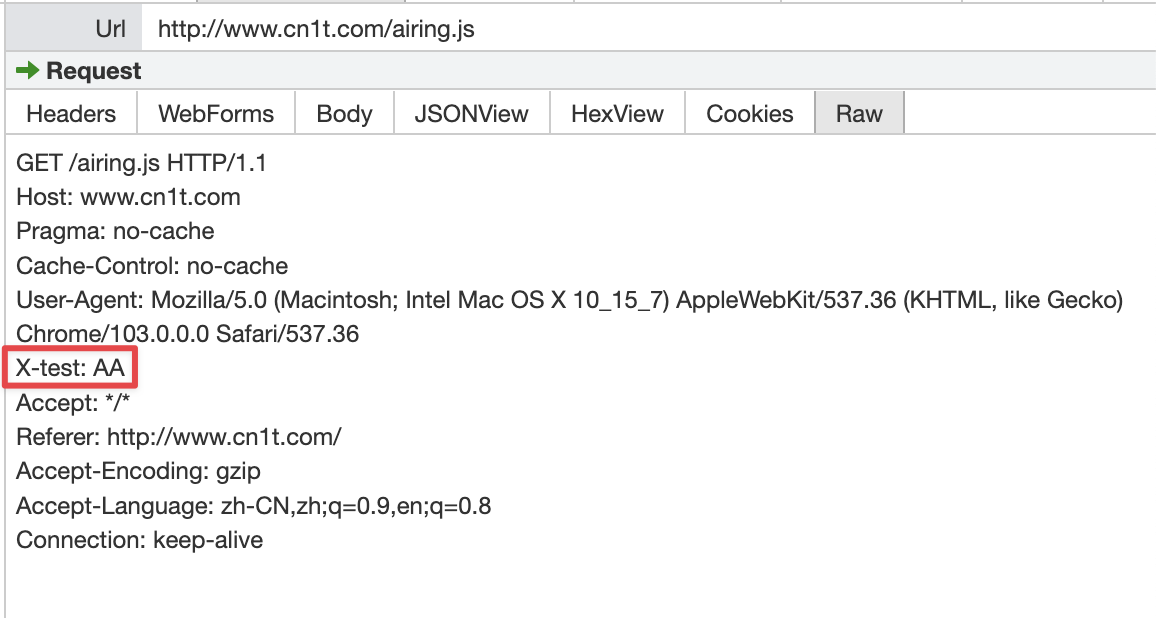 可以得知,请求头的字段名大小写转换不是 XMLHTTPRequest 做的事情,而是底层网络库的逻辑。
PS. 我这里 Debug 了许久,没有找到更底层具体是哪里转成了小写,若有知晓的同学可以直接评论告知,万分感谢。
而响应头中的字段名则不一样了。如果你使用 XMLHTTPRequest 的 getAllResponseHeaders 等方法去获取响应头,Blink 会将 Header 的名称字段改成小写:
String XMLHttpRequest::getAllResponseHeaders() const {
  // ...
  for (const auto& header : headers) {
    string_builder.Append(header.first.LowerASCII());
    string_builder.Append(':');
    string_builder.Append(' ');
    string_builder.Append(header.second);
    string_builder.Append('\r');
    string_builder.Append('\n');
  }
  // ...
}
此外,Chromium 在解析网络响应包的时候,如果走 HTTP2 协议,发现了 Header 字段名有大写字母,会直接导致网络包解析失败:
absl::optional<ParsedHeaders> ConvertCBORValueToHeaders(
    const cbor::Value& headers_value) {
  // |headers_value| of headers must be a map.
  if (!headers_value.is_map())
    return absl::nullopt;

  ParsedHeaders result;

  for (const auto& item : headers_value.GetMap()) {
    if (!item.first.is_bytestring() || !item.second.is_bytestring())
      return absl::nullopt;
    base::StringPiece name = item.first.GetBytestringAsString();
    base::StringPiece value = item.second.GetBytestringAsString();

    // If name contains any upper-case or non-ASCII characters, return an error.
    // This matches the requirement in Section 8.1.2 of [RFC7540].
    if (!base::IsStringASCII(name) ||
        std::any_of(name.begin(), name.end(), base::IsAsciiUpper<char>))
      return absl::nullopt;
// ...other
  }

  return result;
}
HTTP Method 区分大小写吗?
根据规范 RFC 7230 - Hypertext Transfer Protocol (HTTP/1.1)#section-3.1.1:
The method token indicates the request method to be performed on the target resource. The request method is case-sensitive.
HTTP Method 是区分大小写的,并且全部为大写。
但其实如果你的 XMLHttpRequest 实例传入小写的 Method 也是没有关系的(如调用 ajax.open("get", "https://ursb.me")),Blink 等浏览器内核会将其规范化改成大写 Source/core/xmlhttprequest/XMLHttpRequest.cpp - chromium/blink - Git at Google:
void XMLHttpRequest::open(const AtomicString& method,
                          const KURL& url,
                          bool async,
                          ExceptionState& exception_state) {
  //...
  method_ = FetchUtils::NormalizeMethod(method);
  // ...

}
AtomicString FetchUtils::NormalizeMethod(const AtomicString& method) {
// https://fetch.spec.whatwg.org/#concept-method-normalize
// We place GET and POST first because they are more commonly used than
// others.
const char* const kMethods[] = {
"GET", "POST", "DELETE", "HEAD", "OPTIONS", "PUT",
};
for (auto* const known : kMethods) {
if (EqualIgnoringASCIICase(method, known)) {
// Don't bother allocating a new string if it's already all
// uppercase.
return method == known ? method : known;
}
}
return method;
}URL 区分大小写吗?
根据规范 RFC 7230 - Hypertext Transfer Protocol (HTTP/1.1)#section-2.7.3 中的描述:
The scheme and host are case-insensitive and normally provided in lowercase; all other components are compared in a case-sensitive manner.
HTTP 协议 (scheme / protocol) 和域名 (host) 不区分大小写,但 path、query、fragment 是区分的。
在 Chromuim 中,URL 统一使用 kUrl 类管理,其内部会对 protocol 与 host 做规范化处理(canonicalization),这个过程会将 protocol 与 host 改为小写。
除此之外,其中比较有意思的是 path,虽然规范约定了 path 是区分大小写的,但实际情况却取决于 Web Server 的底层文件消息,因此 path 有可能也是不区分大小写的。
比如 IIS 服务器就是不区分的,因为它取决于 Windows 的文件系统,Windows 使用的 NTFS 和 FAT 系列文件系统,默认大小写不敏感(但大小写保留)。对应的,如果 Apache 服务器部署在大小写不敏感的 Mac(HFS) 上,也同样不区分大小写。
扩展介绍一些主流操作系统的底层文件系统:
- Windows 使用的 NTFS 和 FAT 系列文件系统,默认大小写不敏感,但大小写保留
- macOS 使用的 APFS 和 HFS+ 文件系统,默认大小写不敏感,但大小写保留
- Linux 使用的 ext3/ext4 文件系统,默认大小写敏感
除此之外,还和服务器的策略有关系,比如 https://en.wikipedia.org/wiki/Case_sensitivity 和 https://en.wikipedia.org/wiki/case_sensitivity 指向同一篇文章,但是就不能简单认为它大小写不敏感,因为 https://en.wikipedia.org/wiki/CASE_SENSITIVITY 就直接 404 了。
Cookie 区分大小写吗?
先说结论,符合直观,Cookie 的名称是区分大小写的。但是规范的演进比较坎坷。
早期的规范 RFC 2109 - HTTP State Management Mechanism Cookie 的名字是不区分大小写的:
Attributes (names) (attr) are case-insensitive. White space is permitted between tokens. Note that while the above syntax description shows value as optional, most attrs require them.
This document reflects implementation experience with RFC 2109 and obsoletes it.
但是在 Cookie 的最新规范 RFC 6265 中并没有写明 Cookie 是否区分大小写,那么默认可以认为是区分的,主流浏览器 Chrome 与 FireFox 的实现也都是区分 Cookie 的大小写。
E-Mail 地址区分大小写吗?
根据规范 RFC 5321: Simple Mail Transfer Protocol#section-2.3.11:
The standard mailbox naming convention is defined to be “local-part@domain”; contemporary usage permits a much broader set of applications than simple “user names”. Consequently, and due to a long history of problems when intermediate hosts have attempted to optimize transport by modifying them, the local-part MUST be interpreted and assigned semantics only by the host specified in the domain part of the address.
而 domain 部分遵循 RFC 1035: Domain names - implementation and specification#section3.1:
“Name servers and resolvers must compare [domains] in a case-insensitive manner”
综上所述:邮箱中的域名不区分大小写,而用户名(local-part)是否区分大小写,则取决于电子邮件服务商。
HTML5 标签和属性名区分大小写吗?
根据规范 HTML Live Standard#section-13.1,HTML 标签和属性名不区分大小写:
Many strings in the HTML syntax (e.g. the names of elements and their attributes) are case-insensitive, but only for characters in the ranges U+0041 to U+005A (LATIN CAPITAL LETTER A to LATIN CAPITAL LETTER Z) and U+0061 to U+007A (LATIN SMALL LETTER A to LATIN SMALL LETTER Z). For convenience, in this section this is just referred to as “case-insensitive”.
这意味着文档类型 <!DOCTYPE html> 写成 <!doctype html> 也是可以的。
需要注意的是,data attribute 是个例外,它必须要小写。HTML Live Standard#section3.2.6.6:
A custom data attribute is an attribute in no namespace whose name starts with the string “
data-”, has at least one character after the hyphen , is XML-compatible, and contains no ASCII upper alphas.
Blink 有纠错逻辑,即便写了 <div data-Name="airing"></div>,最后也会被转成 <div data-Name="airing"></div>。但考虑到兼容性,这里的属性名还是需要小写 data-name 的。
CSS 区分大小写吗?
All Selectors syntax is case-insensitive within the ASCII range (i.e. [a-z] and [A-Z] are equivalent), except for parts that are not under the control of Selectors. The case sensitivity of document language element names, attribute names, and attribute values in selectors depends on the document language. For example, in HTML, element names are case-insensitive, but in XML, they are case-sensitive. Case sensitivity of namespace prefixes is defined in [CSS3NAMESPACE].
CSS 的选择器语法不区分大小写,而属性名与属性值是否区分大小写,取决于所在的文档语言。 如在 XHTML DOCTYPE 中它们区分大小写,但是在 HTML DOCTYPE 则不区分。
Git 文件名区分大小写吗?
Git 默认不区分文件名大小写。
因此,如果我们平常不注意文件的大小写,在实际使用中可能会遇到这样的问题:
- 如果团队中有人在 Linux 系统或者开启文件系统大小写敏感的 macOS 或 Window 上开发,他无视了已经存在的
RankItem.tsx文件,创建了新的rankItem.tsx文件,并提交成功了; - 那么此时 Git 服务器上同时存在
RankItem.tsx与rankItem.tsx文件,在 Windows 或 macOS (默认文件系统)上开发的人,则无法正常拉取到这两个文件。
这里建议关闭 Git 的忽略大小写功能:
git config --global core.ignorecase false同时在 Windows 或 macOS 上重命名大小写时,使用 git mv:
git mv --force rankItem.jsx RankItem.jsx如果没有开启的话,这里举个例子,将 readme.md 改成 README.md,这个时候 git status 无法检测到更变记录:
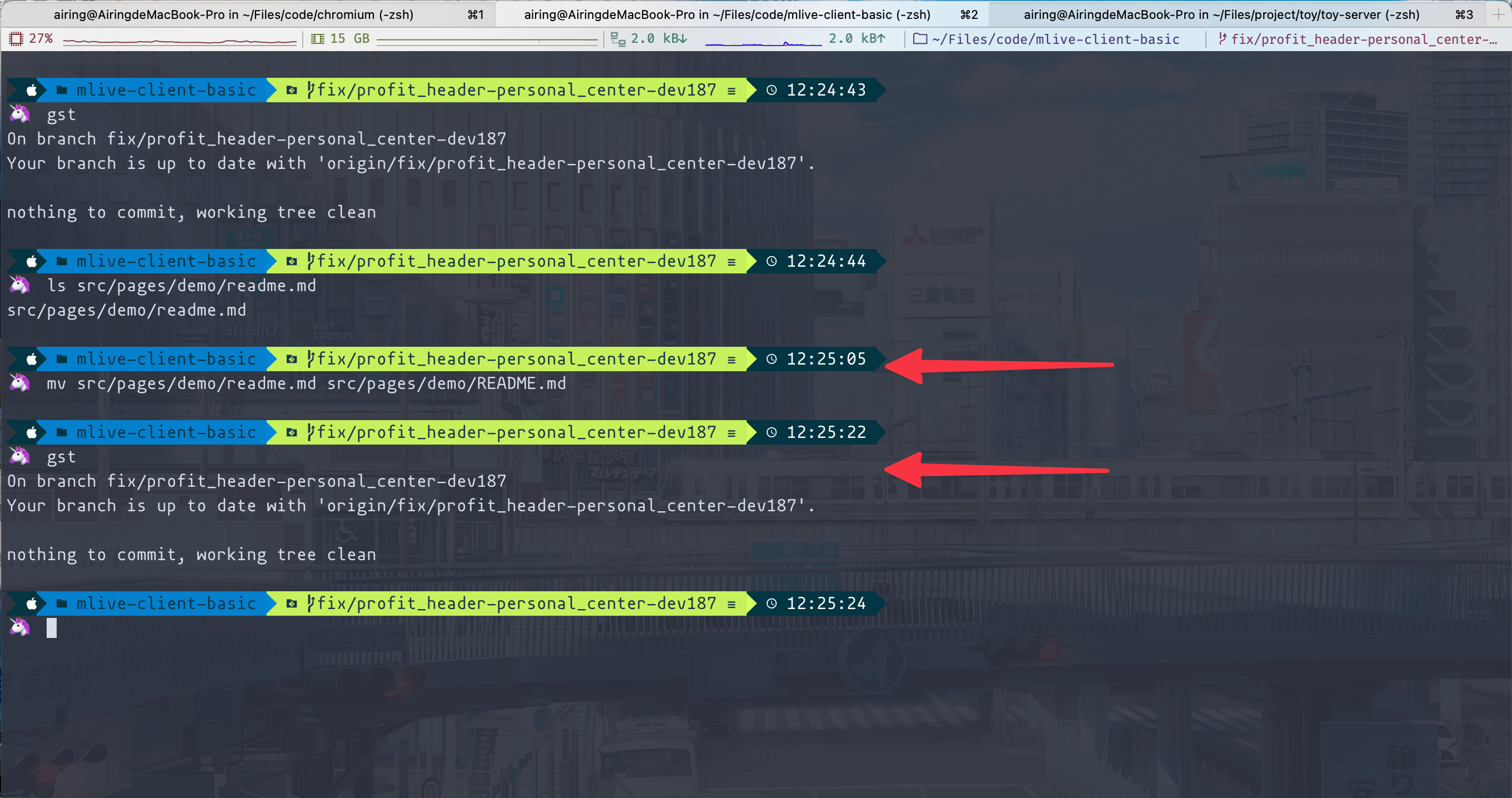 如果用
如果用 git mv,则是可以正常检测到的:
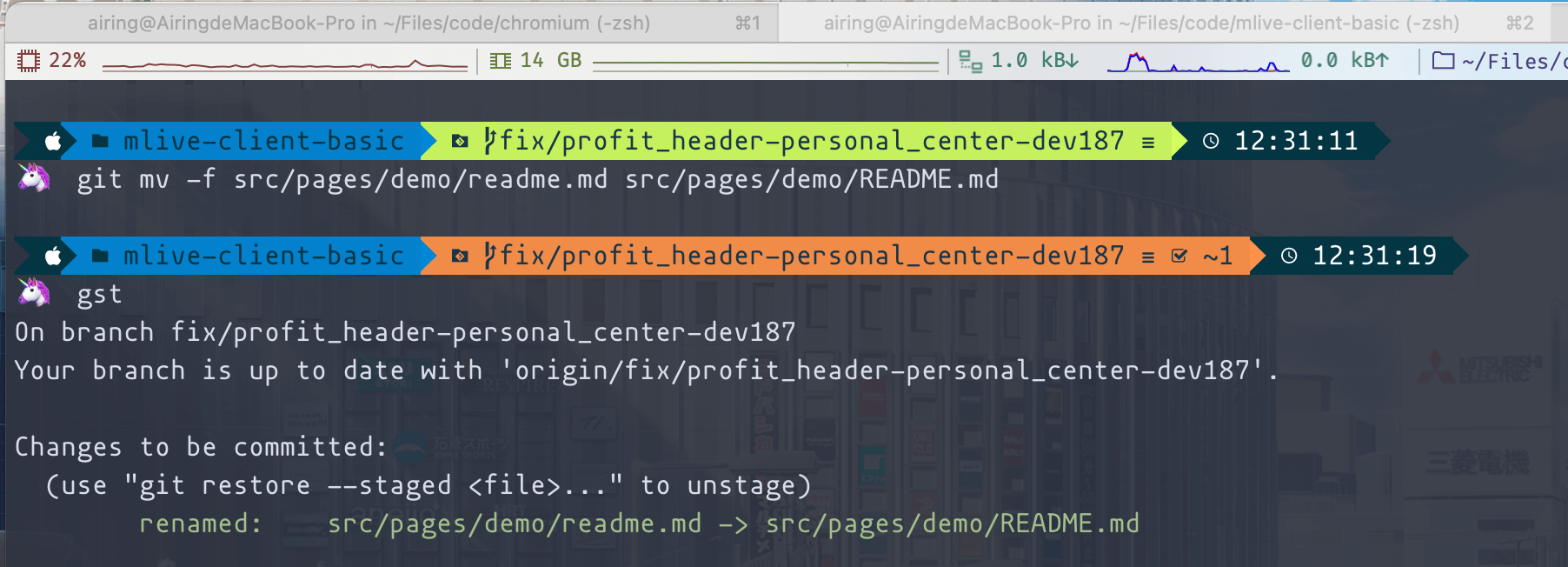 因此在开发的时候,强烈推荐关闭 Git 大小写忽略的配置,并且使用
 git mv 进行重命名操作。若条件允许的话,亦可以修改 macOS 或 Windows 默认的文件系统,将卷宗的文件系统改成大小写敏感。
以上便是前端开发中的一些大小写敏感问题,总结一下:
- HTTP Header 的 key 不区分大小写,但是绝大多数框架会将响应头的 key 改成小写。[RFC 7230]
- HTTP2 则因为头部压缩,要求必须小写,浏览器会将其改成小写。[RFC 7540]
- HTTP Method 区分大小写,且必须为大写。[RFC 7230]
- URL 的 protocol 和 host 不区分大小写,浏览器会自动改成小写。[RFC 7230]
- URL 的 path 按规范而言是区分大小写的,但实际是否区分大小写取决于 Web Server 的文件系统和服务端配置。[RFC 7230]
- URL 的 query 与 fragment 是区分大小写的。[RFC 7230]
- Cookie 的 key 是区分大小写的,虽然规范并没有明说这点。 [RFC 6265]
- E-Mail 的域名部分是不区分大小写的 [RFC 1035]
- E-Mail 的用户名部分是否区分大小写,取决于邮件服务商。 [RFC 5321]
- HTML5 的标签名和一般的属性 key 是不区分大小写的。[HTML Live Standard 13.1]
- HTML5 的 data- 属性是区分大小写的。[HTML Live Standard 3.2.6.6]
- CSS 的选择器语法不区分大小写,而属性名与属性值是否区分大小写,取决于所在的文档语言。[CSS Selectors Level 3]
- Git 默认是忽略文件大小写的。
- Windows 使用的 NTFS 和 FAT 系列文件系统,默认大小写不敏感,但大小写保留。
- macOS 使用的 APFS 和 HFS+ 文件系统,默认大小写不敏感,但大小写保留。
- Linux 使用的 ext3/ext4 文件系统,默认大小写敏感。