







开始
最近玩了一些有意思的东西,然后流水账式的给大家分享一下
镜像站
我这里以wiki为例子
代码如下
// 反代目标网站.
const upstream = 'zh.wikipedia.org'

// 反代目标网站的移动版.
const upstream_mobile = 'zh.m.wikipedia.org'

// 访问区域黑名单(按需设置).
const blocked_region = ['TK']

// IP地址黑名单(按需设置).
const blocked_ip_address = ['0.0.0.0', '127.0.0.1']

// 路径替换.
const replace_dict = {
'$upstream': '$custom_domain',
'//archiveofourown.org': ''
}

addEventListener('fetch', event => {
event.respondWith(fetchAndApply(event.request));
})

async function fetchAndApply(request) {

const region = request.headers.get('cf-ipcountry').toUpperCase();
const ip_address = request.headers.get('cf-connecting-ip');
const user_agent = request.headers.get('user-agent');

let response = null;
let url = new URL(request.url);
let url_host = url.host;

if (url.protocol == 'http:') {
    url.protocol = 'https:'
    response = Response.redirect(url.href);
    return response;
}

if (await device_status(user_agent)) {
    var upstream_domain = upstream;
} else {
    var upstream_domain = upstream_mobile;
}

url.host = upstream_domain;

if (blocked_region.includes(region)) {
    response = new Response('Access denied: WorkersProxy is not available in your region yet.', {
        status: 403
    });
} else if(blocked_ip_address.includes(ip_address)){
    response = new Response('Access denied: Your IP address is blocked by WorkersProxy.', {
        status: 403
    });
} else{
    let method = request.method;
    let request_headers = request.headers;
    let new_request_headers = new Headers(request_headers);

    new_request_headers.set('Host', upstream_domain);
    new_request_headers.set('Referer', url.href);

    let original_response = await fetch(url.href, {
        method: method,
        headers: new_request_headers
    })

    let original_response_clone = original_response.clone();
    let original_text = null;
    let response_headers = original_response.headers;
    let new_response_headers = new Headers(response_headers);
    let status = original_response.status;

    new_response_headers.set('cache-control' ,'public, max-age=14400')
    new_response_headers.set('access-control-allow-origin', '*');
    new_response_headers.set('access-control-allow-credentials', true);
    new_response_headers.delete('content-security-policy');
    new_response_headers.delete('content-security-policy-report-only');
    new_response_headers.delete('clear-site-data');

    const content_type = new_response_headers.get('content-type');
    if (content_type.includes('text/html') && content_type.includes('UTF-8')) {
        original_text = await replace_response_text(original_response_clone, upstream_domain, url_host);
    } else {
        original_text = original_response_clone.body
    }

    response = new Response(original_text, {
        status,
        headers: new_response_headers
    })
}
return response;
}

async function replace_response_text(response, upstream_domain, host_name) {
let text = await response.text()

var i, j;
for (i in replace_dict) {
    j = replace_dict[i]
    if (i == '$upstream') {
        i = upstream_domain
    } else if (i == '$custom_domain') {
        i = host_name
    }

    if (j == '$upstream') {
        j = upstream_domain
    } else if (j == '$custom_domain') {
        j = host_name
    }

    let re = new RegExp(i, 'g')
    text = text.replace(re, j);
}
return text;
}


async function device_status (user_agent_info) {
var agents = ["Android", "iPhone", "SymbianOS", "Windows Phone", "iPad", "iPod"];
var flag = true;
for (var v = 0; v < agents.length; v++) {
    if (user_agent_info.indexOf(agents[v]) > 0) {
        flag = false;
        break;
    }
}
return flag;
}
总之就是cf worker那里填写对应的代码即可,我尝试了几个网站,不过成功的只有wiki
我搭建的wiki的镜像站,bili.zhecydn.link,大家可以尝试着访问看看
google和youtube等网站就无法进行镜像了,这里大家可以用其他的方式去搭镜像站
比如我就用宝塔的反向代理搭了一个google的镜像站,大家可以进行参考
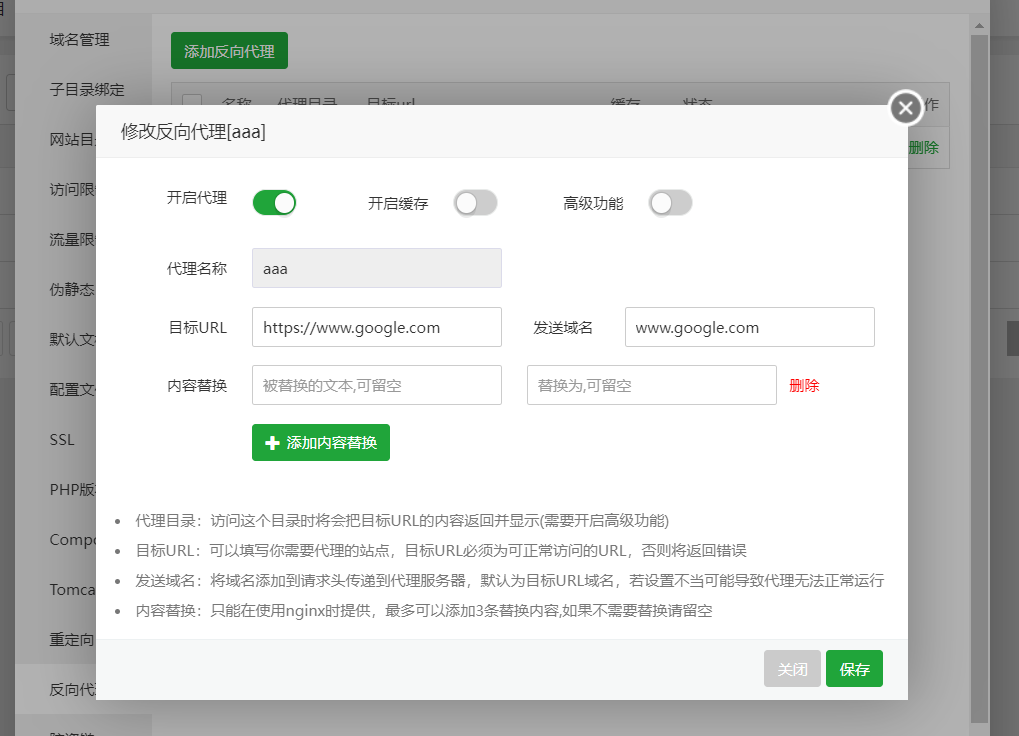
网址的话不太方便透露,大家如果有兴趣就自己在服务器上搭一个试试看
随机壁纸api
这个呢,我之前做过一期在服务器上部署壁纸api的过程
但是我发现cf worker也可以做到这件事,因此我也把源码发出来给大家参考一下
addEventListener('fetch', event => {
    event.respondWith(handleRequest(event.request))
})

async function handleRequest(request) {

	var background_urls = [
'https://cdn.jsdelivr.net/gh/cypicbed/cypic@master/img/mt1.jpg',
'https://cdn.jsdelivr.net/gh/cypicbed/cypic@master/img/mt2.jpg',
'https://cdn.jsdelivr.net/gh/cypicbed/cypic@master/img/mt3.jpg',
'https://cdn.jsdelivr.net/gh/cypicbed/cypic@master/img/mt4.jpg',
'https://cdn.jsdelivr.net/gh/cypicbed/cypic@master/img/mt5.jpg',
'https://img.400511.net/2022/02/24/Ne5Wu0HV.jpg'
 /*需要随机到的图片的链接*/
    ]
	var index = Math.floor((Math.random()*background_urls.length));
	res = await fetch(background_urls[index])
    return new Response(res.body, {
        headers: { 'content-type': 'image/jpeg' },
    })
}
使用的话替换var background urls下面的图片链接为自己的就ok了,我自己搭建的就不给大家分享了,大家自行搭建吧
b站港澳台代理
这里我不是很想多讲,我只讲一下方案吧,其实我也没验证过是否可行
如果有成功的朋友可以跟我私底下来讲讲
前面我们讲过镜像站了,所以这里我们可以尝试使用cdn反代api.bilibili.com
然后把这个worker项目绑定到自定义域名上
最后优选ip,把dns改到优选的ip再去访问,我这里没有合适的优选ip,感觉超麻烦就没弄了,而且我也有对应地区的服务器
所以我就停在了这一步没有再进行尝试
其他
其实我以前的图床站就是用cloudflare的worker搭建的
虽然现在我早就不用了,但是我觉得大家如果需要的话也可以搭建一个,使用起来还是很方便的
结语
最近还是有在玩一些好玩的小玩意的,今天给大家分享一下