


阅读本文需要了解 scss angular
核心代码
.nav-bar {
    display:flex;
    flex-direction:column;
    .bar-top {
        overflow-y: auto;
        flex: 1;
    }
}12345678
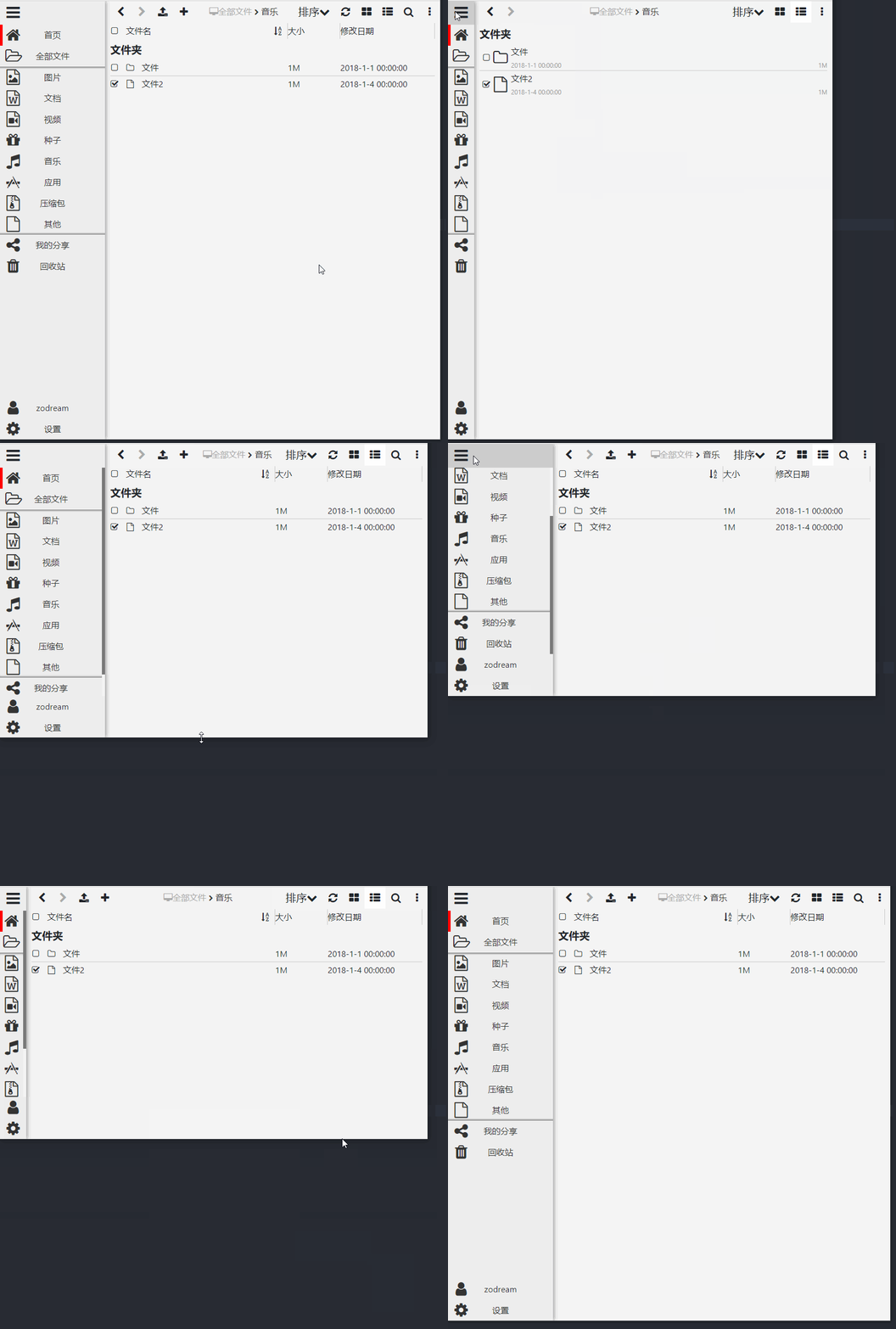
这样就实现中间菜单超长滚动,底部菜单自动增高
效果
代码
注意这个代码是使用在 angular 上的,没有做静态页面,可以考虑自己转化一下
使用的图标是 iconfont 图标
navToggle 是 顶部汉堡按钮 控制菜单收缩用的
router-outlet 是 angular 用来加载右侧内容的标签
<div class="page-box" [ngClass]="{'nav-toggle': navToggle}">
    <div class="nav-bar">
        <i class="iconfont icon-bars nav-toggle-icon" (click)="navToggle = !navToggle"></i>
        <ul class="bar-top">
            <li class="bar-item active">
                <a routerLink="/disk">
                    <i class="iconfont icon-home"></i>
                    <span class="bar-name">首页</span>
                </a>
            </li>
            <li class="bar-item">
                <a routerLink="/disk/catalog">
                    <i class="iconfont icon-folder-open-o"></i>
                    <span class="bar-name">全部文件</span>
                </a>
                <ul class="bar-children">
                    <li class="bar-item">
                        <a routerLink="/disk/catalog">
                            <i class="iconfont icon-file-image-o"></i>
                            <span class="bar-name">图片</span>
                        </a>
                    </li>
                    <li class="bar-item">
                        <a routerLink="/disk/catalog">
                            <i class="iconfont icon-file-word-o"></i>
                            <span class="bar-name">文档</span>
                        </a>
                    </li>
                    <li class="bar-item">
                        <a routerLink="/disk/catalog">
                            <i class="iconfont icon-file-movie-o"></i>
                            <span class="bar-name">视频</span>
                        </a>
                    </li>
                    <li class="bar-item">
                        <a routerLink="/disk/catalog">
                            <i class="iconfont icon-gift"></i>
                            <span class="bar-name">种子</span>
                        </a>
                    </li>
                    <li class="bar-item">
                        <a routerLink="/disk/catalog">
                            <i class="iconfont icon-music"></i>
                            <span class="bar-name">音乐</span>
                        </a>
                    </li>
                    <li class="bar-item">
                        <a routerLink="/disk/catalog">
                            <i class="iconfont icon-APP"></i>
                            <span class="bar-name">应用</span>
                        </a>
                    </li>
                    <li class="bar-item">
                        <a routerLink="/disk/catalog">
                            <i class="iconfont icon-file-archive-o"></i>
                            <span class="bar-name">压缩包</span>
                        </a>
                    </li>
                    <li class="bar-item">
                        <a routerLink="/disk/catalog">
                            <i class="iconfont icon-file-o"></i>
                            <span class="bar-name">其他</span>
                        </a>
                    </li>
                </ul>
            </li>
            <li class="bar-item">
                <a routerLink="/disk/share">
                    <i class="iconfont icon-share-alt"></i>
                    <span class="bar-name">我的分享</span>
                </a>
            </li>
            <li class="bar-item">
                <a routerLink="/disk/trash">
                    <i class="iconfont icon-trash"></i>
                    <span class="bar-name">回收站</span>
                </a>
            </li>
        </ul>
        <ul class="bar-bottom">
            <li class="bar-item">
                <a routerLink="/disk/my">
                    <i class="iconfont icon-user"></i>
                    <span class="bar-name">zodream</span>
                </a>
            </li>
            <li class="bar-item">
                <a routerLink="/disk/setting">
                    <i class="iconfont icon-cog"></i>
                    <span class="bar-name">设置</span>
                </a>
            </li>
        </ul>
    </div>

    <div class="page-body">
        <router-outlet></router-outlet>
    </div>
</div>123456789101112131415161718192021222324252627282930313233343536373839404142434445464748495051525354555657585960616263646566676869707172737475767778798081828384858687888990919293949596979899
下面是 css 样式
scrollbar() 这个是设置滚动条样式的,默认的太大了
@mixin scrollbar() {
    &::-webkit-scrollbar{
        height:6px;
        width:6px;
        margin-right:5px;
        background: #f5f5f5;
        transition:all 0.3s ease-in-out;
        border-radius:0px
    }
    &::-webkit-scrollbar-track {
        -webkit-border-radius: 0px;
        border-radius: 0px;
    }
    &::-webkit-scrollbar-thumb{
        -webkit-border-radius: 0px;
        border-radius: 0px;
        background: rgba(0,0,0,0.5);
        &:hover{
            background:rgba(0,0,0,0.6);
        }
        &:active{
            background:rgba(0,0,0,0.8);
        }
        &:window-inactive {
            background: rgba(0,0,0,0.4);
        }
    }
}

ul,
li {
    margin: 0;
    padding: 0;
}
.nav-bar {
    position: fixed;
    left: 0;
    width: 200px;
    bottom: 0;
    background-color: #eee;
    top: 0;
    z-index: 99;
    box-shadow: rgba(51,51,51,.7) 0 0 10px;
    display:flex;
    flex-direction:column;
    .nav-toggle-icon {
        font-size: 30px;
        padding: 0 10px;
        display: inline-block;
        &:hover {
            background-color: #ccc;
        }
    }
    .bar-top {
        overflow-y: auto;
        flex: 1;
        @include scrollbar();
    }
    a {
        text-decoration: none;
        color: #333;
    }
    .bar-item {
        list-style: none;
        line-height: 40px;
        text-align: center;
        font-size: 16px;
        a {
            display: block;
            box-sizing: border-box;
            position: relative;
        }
        .iconfont {
            position: absolute;
            left: 10px;
            top: 0;
            font-size: 30px;
            display: block;
        }
        &:hover {
            >a {
                background-color: #ccc;
            }
        }
    }
    .bar-children {
        box-shadow: inset 0 5px 5px -5px #000, inset 0 -5px 5px -5px #000;
    }
    .bar-item {
        &.active {
            >a {
                &::before {
                    content: " ";
                    display: block;
                    position: absolute;
                    left: 0;
                    width: 5px;
                    height: 40px;
                    background-color: red;
                }
            }
        }
    }
}

.page-body {
    margin-left: 200px;
}

.nav-toggle {
    .nav-bar {
        width: 50px;
        .bar-name {
            display: none;
        }
        .bar-item {
            .iconfont {
                position: static;
            }
        }

    }
    .page-body {
        margin-left: 50px;
    }
}

@media screen and (max-width: 769px) {
    .nav-bar {
        width: 50px;
        .bar-name {
            display: none;
        }
        .bar-item {
            .iconfont {
                position: static;
            }
        }

    }
    .page-body {
        margin-left: 50px;
    }

    .nav-toggle {
        .nav-bar {
            width: 200px;
            .bar-name {
                display: inline-block;
            }
            .bar-item {
                .iconfont {
                    position: absolute;
                }
            }

        }
    }
}123456789101112131415161718192021222324252627282930313233343536373839404142434445464748495051525354555657585960616263646566676869707172737475767778798081828384858687888990919293949596979899100101102103104105106107108109110111112113114115116117118119120121122123124125126127128129130131132133134135136137138139140141142143144145146147148149150151152153154155156157158159
整体项目代码:Angular-ZoDream
当前项目未使用服务端数据对接,所以可以查看实际效果
转载请保留原文链接: https://zodream.cn/blog/id/139.html