







前言
以前使用 SiteServer CMS 6.8 在 Windows server 12 的服务器上部署了两个企业站,现在需要换到 Linux 服务器上。
SiteServer CMS 6.8 使用的是 Asp.net 不支持Linux 系统,所以需要升级到 SiteServer CMS 7
SiteServer CMS 7 使用的是 .NET Core 支持跨平台。
这里干脆升级到最新的 SiteServer CMS 7.30 (.NET 8)
先决条件
Windows 服务器未过期或拥有Windows电脑并安装了 IIS + MySQL + Asp net core 运行时
概念讲解
SSCMS 的模板语法不需要变动;
主要是数据表的变动;
分步指导
假设旧版本的数据已经在MySQL数据库中
- 在Windows上部署 SSCMS 7.30
从 官网 直接下最新的 windows 版本即可
解压放到一个文件里,例如 D:/sscms
根据 “SSCMS老版本升级” 升级文档进行操作即可
- 更新数据表
新建一个文件 D:/sscms/old.json
{
    "Database": {
        "Type": "MySql",
        "ConnectionString": "Server=127.0.0.1;Uid=root;Pwd=root;Database=sqldb_old;SslMode=none;CharSet=utf8"
    }
}123456
在 D:/sscms 文件夹中打开终端 PowerShell,运行命令更新数据
.\sscms data backup -d backup -c old.json

.\sscms data update -d backup123
新建一个文件 D:/sscms/sscms.json,
注意:sqldb_new 数据库必须为空
{
    "Database": {
        "Type": "MySql",
        "ConnectionString": "Server=127.0.0.1;Uid=root;Pwd=root;Database=sqldb_new;SslMode=none;CharSet=utf8"
    }
}123456
运行命令恢复数据
sscms data restore -d update1
完成数据恢复后,需要在浏览器中进入 http://<域名>/ss-admin/syncDatabase/ 数据库升级界面,点击升级按钮,完成数据库升级。
注意: D:/sscms/sscms.json 需要增加 SecurityKey 字段,不然后台登录验证码无法显示
{
    "IsProtectData": false,
    "IsSafeMode": false,
    "SecurityKey": "2cf8fcc7150b6f839784231b8b959217cc0840f20623813b",
    "Database": {
        "Type": "MySql",
        "ConnectionString": "Server=127.0.0.1;Uid=root;Pwd=root;Database=sqldb_new;SslMode=none;CharSet=utf8"
    },
    "Redis": {
        "ConnectionString": ""
    },
    "IsDisablePlugins": false,
    "AdminRestriction": {
        "Host": "",
        "AllowList": [],
        "BlockList": []
    },
    "Cors": {
        "IsOrigins": false,
        "Origins": []
    }
}12345678910111213141516171819202122
- 升级中的一些问题
后台登录验证码无法显示
D:/sscms/sscms.json 需要增加 SecurityKey 字段,具体值需要新安装一个SSCMS系统(删除D:/sscms/sscms.json文件即可),复制新的 sscms.json 文件更改 Database.ConnectionString 值即可
老版本的密码不能用了
新安装一个SSCMS系统(删除D:/sscms/sscms.json文件即可),设置管理员密码,然后到数据库中 找到表 siteserver_administrator 复制 Password、 PasswordSalt 两个字段值即可。
后台登录提示字段不存在
需要手动复制新系统的数据表结构。因为SSCMS版本变动表结构也发生了变动。
登录进入显示需要创建站点
需要修改数据表 siteserver_site 的字段 SiteType 值为 web
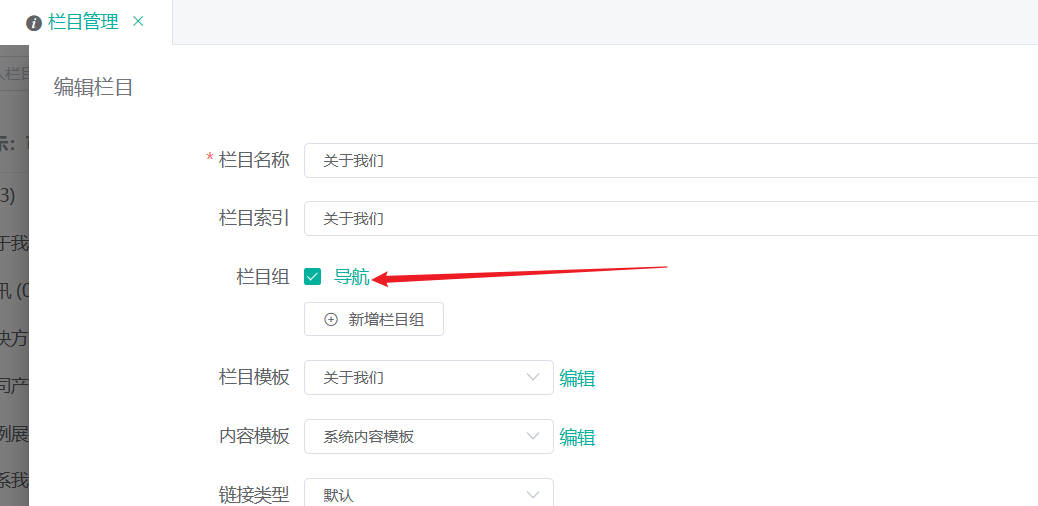
前台页面导航栏显示不全
需要到后台的栏目管理->编辑栏目手动勾选 栏目组 导航即可
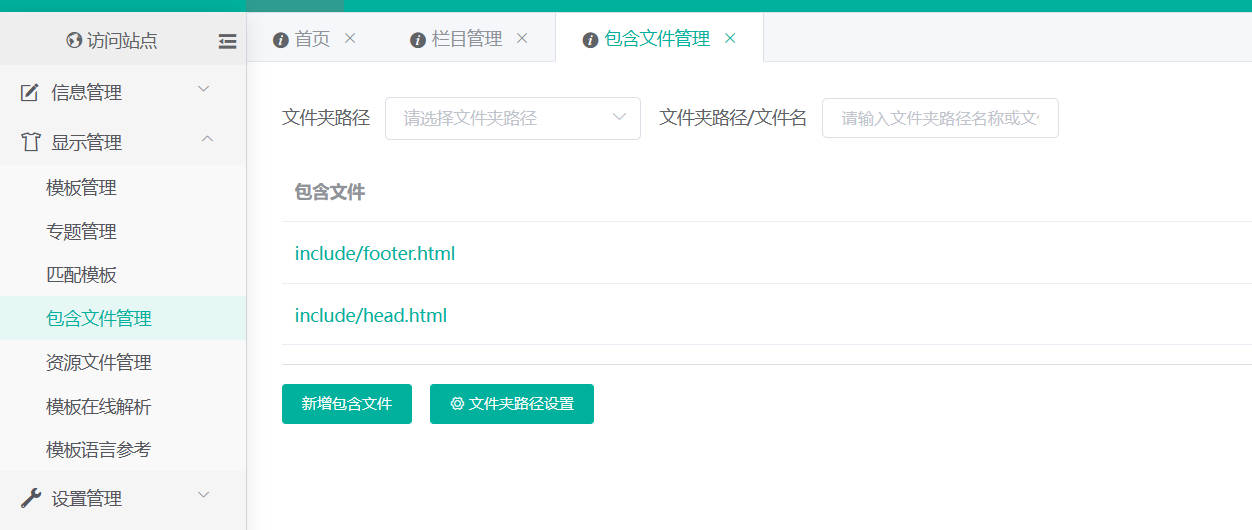
前台页面的包含文件不加载
需要到后台的显示管理-> 包含文件管理 添加即可
- 在 linux 系统安装 netcore 环境
这里使用的是阿里云ECS服务器
使用命令 lsb_release -a 查询的系统信息为
LSB Version:    :core-4.1-amd64:core-4.1-noarch
Distributor ID: AlibabaCloud
Description:    Alibaba Cloud Linux release 3 (Soaring Falcon)
Release:        3
Codename: SoaringFalcon12345
所以安装 netcore 的方法参考:在RHEL和CentOS Stream中运行SSCMS
sudo rpm -Uvh https://packages.microsoft.com/config/centos/8/packages-microsoft-prod.rpm

sudo dnf install aspnetcore-runtime-8.0

# 验证dotnet core runtime是否安装成功
dotnet --info123456
- 配置站点
假设已安装过 Nginx
a站点
nginx 配置
server {
        listen       80;
        server_name  a.com;
        root         /data/a; # 设置站点根目录
        location / {
            proxy_pass         http://localhost:5000;
            proxy_http_version 1.1;
            proxy_set_header   Upgrade $http_upgrade;
            proxy_set_header   Connection keep-alive;
            proxy_set_header   Host $host;
            proxy_cache_bypass $http_upgrade;
            proxy_set_header   X-Forwarded-For $proxy_add_x_forwarded_for;
            proxy_set_header   X-Forwarded-Proto $scheme;
            proxy_set_header   X-Real-IP $remote_addr;
            proxy_connect_timeout       600;
            proxy_send_timeout          600;
            proxy_read_timeout          600;
            send_timeout                600;
        }
}1234567891011121314151617181920
a 站点的 /data/a/sscms.json
{
    "IsProtectData": false,
    "IsSafeMode": false,
    "SecurityKey": "2cf8fcc7150b6f839784231b8b959217cc0840f20623813b",
    "Database": {
        "Type": "MySql",
        "ConnectionString": "Server=127.0.0.1;Uid=root;Pwd=root;Database=sqldb_a;SslMode=none;CharSet=utf8"
    },
    "Redis": {
        "ConnectionString": ""
    },
    "IsDisablePlugins": false,
    "AdminRestriction": {
        "Host": "",
        "AllowList": [],
        "BlockList": []
    },
    "Cors": {
        "IsOrigins": false,
        "Origins": []
    }
}12345678910111213141516171819202122
创建 a 站点的服务文件 /etc/systemd/system/a.service
[Unit]
Description=a

[Service]
WorkingDirectory=/data/a
ExecStart=/usr/bin/dotnet /data/a/SSCMS.Web.dll
Restart=always
# Restart service after 10 seconds if the sscms service crashes:
RestartSec=10
KillSignal=SIGINT
SyslogIdentifier=sscms
User=root
Environment=ASPNETCORE_ENVIRONMENT=Production
Environment=DOTNET_PRINT_TELEMETRY_MESSAGE=false

[Install]
WantedBy=multi-user.target1234567891011121314151617
b 站点
a站点
nginx 配置
server {
        listen       80;
        server_name  b.com;
        root         /data/b; # 设置站点根目录

        location / {
            proxy_pass         http://localhost:5001;
            proxy_http_version 1.1;
            proxy_set_header   Upgrade $http_upgrade;
            proxy_set_header   Connection keep-alive;
            proxy_set_header   Host $host;
            proxy_cache_bypass $http_upgrade;
            proxy_set_header   X-Forwarded-For $proxy_add_x_forwarded_for;
            proxy_set_header   X-Forwarded-Proto $scheme;
            proxy_set_header   X-Real-IP $remote_addr;
            proxy_connect_timeout       600;
            proxy_send_timeout          600;
            proxy_read_timeout          600;
            send_timeout                600;
        }
}123456789101112131415161718192021
b 站点的 /data/b/sscms.json
{
    "Urls": "http://localhost:5001",
    "IsProtectData": false,
    "IsSafeMode": false,
    "SecurityKey": "2cf8fcc7150b6f839784231b8b959217cc0840f20623813b",
    "Database": {
        "Type": "MySql",
        "ConnectionString": "Server=127.0.0.1;Uid=root;Pwd=root;Database=sqldb_b;SslMode=none;CharSet=utf8"
    },
    "Redis": {
        "ConnectionString": ""
    },
    "IsDisablePlugins": false,
    "AdminRestriction": {
        "Host": "",
        "AllowList": [],
        "BlockList": []
    },
    "Cors": {
        "IsOrigins": false,
        "Origins": []
    }
}1234567891011121314151617181920212223
创建 b 站点的服务文件 /etc/systemd/system/b.service
[Unit]
Description=b

[Service]
WorkingDirectory=/data/b
ExecStart=/usr/bin/dotnet /data/b/SSCMS.Web.dll
Restart=always
# Restart service after 10 seconds if the sscms service crashes:
RestartSec=10
KillSignal=SIGINT
SyslogIdentifier=sscms
User=root
Environment=ASPNETCORE_ENVIRONMENT=Production
Environment=DOTNET_PRINT_TELEMETRY_MESSAGE=false

[Install]
WantedBy=multi-user.target1234567891011121314151617
- 启动服务
sudo systemctl enable a.service

sudo systemctl start a.service

sudo systemctl status a.service # 验证服务是否启动
123456
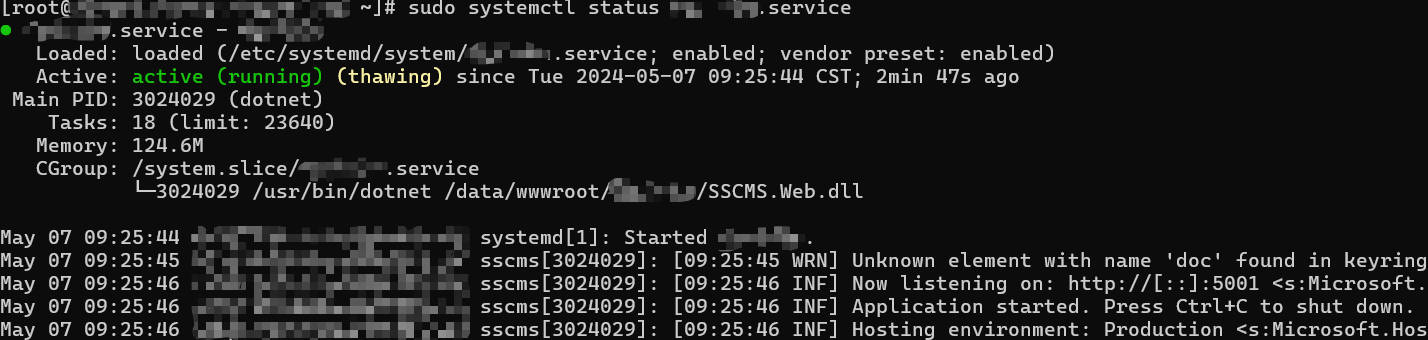
没有报错即配置正确,
b站点服务同理
- 导入数据
这里需要注意
在 Windows 中数据表表名都是小写,但是在Linux 环境下是区分大小写的,所以需要手动更改 sql 文件中的数据库表名,再导入
例如 siteserver_administratorsinroles 需要改为 siteserver_AdministratorsInRoles
具体对应表需要重新再 linux 下安装即可
- 导入模板文件、资源文件
总结
升级过程还是比较繁琐的,需要有耐心。
转载请保留原文链接: https://zodream.cn/blog/id/261.html