


适用系统:大多数 Linux(内核已启用
tc、sch_*、act_*模块) 涉及组件:qdisc(队列规则)、class(类)、filter(过滤器)、action(动作)
1:、1:10。根通常是 root 或 ingress。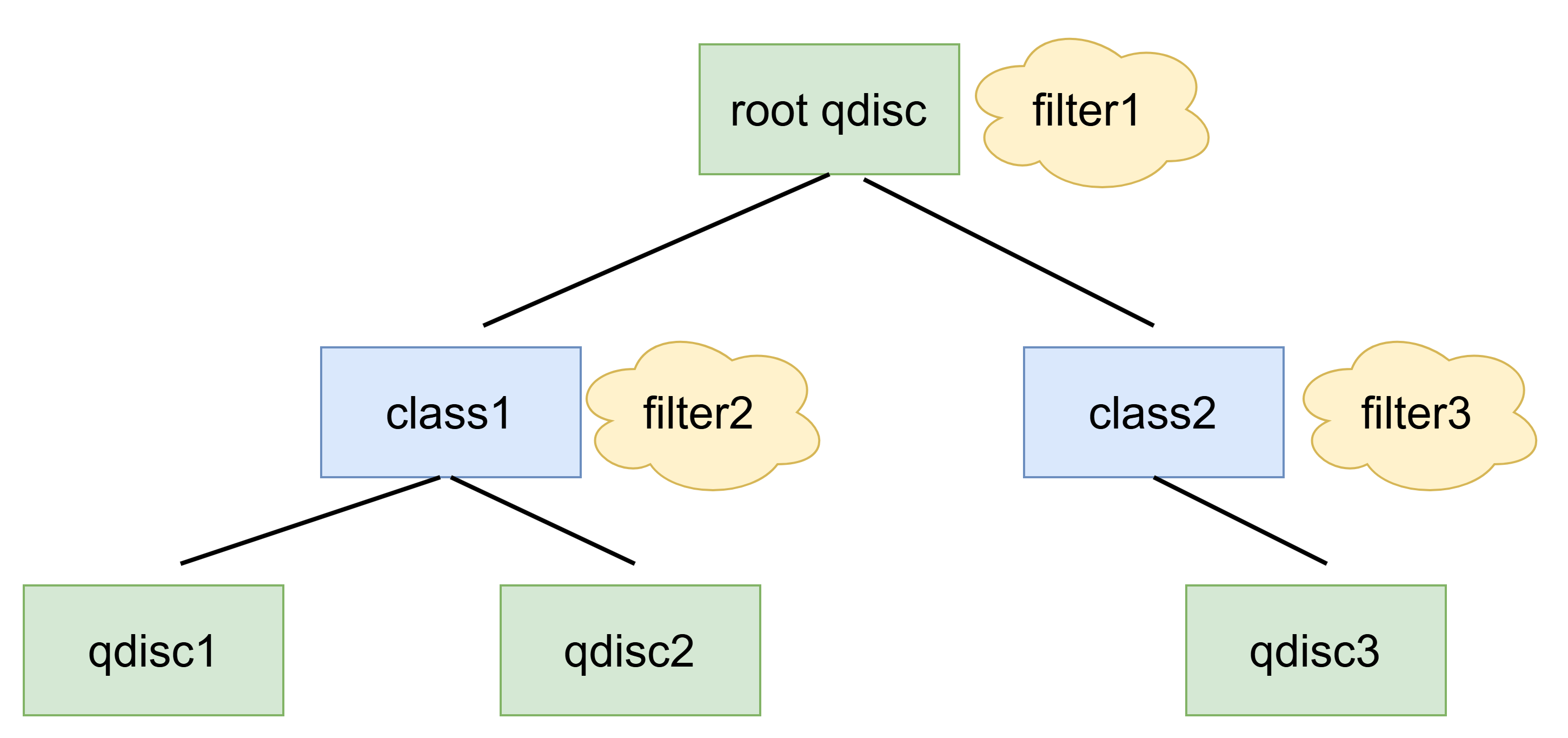
# 查看网卡 egress 的 qdisc
sudo tc qdisc show dev eth0

# 查看 class(以 HTB 为例)
sudo tc class show dev eth0

# 查看 filter(包含 match 条件与去向)
sudo tc filter show dev eth0# 删除根 qdisc(恢复内核默认)
sudo tc qdisc del dev eth0 root
# 删除 ingress qdisc
sudo tc qdisc del dev eth0 ingress提示:若提示“没有此对象”,说明当前并未设置对应 qdisc。
最适合模拟弱网,默认作用于 egress。
# 固定延迟 100ms
sudo tc qdisc add dev eth0 root netem delay 100ms

# 延迟 100ms,抖动 20ms,相关性 25%
sudo tc qdisc replace dev eth0 root netem delay 100ms 20ms 25%

# 丢包 2%
sudo tc qdisc replace dev eth0 root netem loss 2%

# 丢包 1%,相关性 25%
sudo tc qdisc replace dev eth0 root netem loss 1% 25%

# 组合:延迟 + 丢包 + 抖动
sudo tc qdisc replace dev eth0 root netem delay 80ms 10ms 20% loss 1%

# 取消
sudo tc qdisc del dev eth0 root易错点:netem 并不做限速;它是时延/丢包/乱序等“质量”模拟。
适合简单、稳定的限速。关键参数:rate、burst(桶大小)、latency(排队上限)。
# 将上传(egress)限速到 10Mbit,桶 32KB,最大等待 400ms
sudo tc qdisc add dev eth0 root tbf rate 10mbit burst 32kbit latency 400ms

# 调整为 20Mbit
sudo tc qdisc replace dev eth0 root tbf rate 20mbit burst 64kbit latency 400ms

# 取消
sudo tc qdisc del dev eth0 root技巧:burst 过小会导致速度“上不去”或抖动大;合理取值一般为几倍 MTU 到几十 KB。
支持 class 树与最小/最大带宽(rate/ceil)。适合多业务/多 IP/端口的带宽分配。
# 根 qdisc
tc qdisc add dev eth0 root handle 1: htb default 30

# 根 class,带宽上限 100Mbit
sudo tc class add dev eth0 parent 1: classid 1:1 htb rate 100mbit ceil 100mbit

# 子类:视频流(保证 60M,上限 100M)
sudo tc class add dev eth0 parent 1:1 classid 1:10 htb rate 60mbit ceil 100mbit

# 子类:普通业务(保证 20M,上限 60M)
sudo tc class add dev eth0 parent 1:1 classid 1:20 htb rate 20mbit ceil 60mbit

# 默认类(兜底 5M,上限 20M)
sudo tc class add dev eth0 parent 1:1 classid 1:30 htb rate 5mbit ceil 20mbit

# 过滤:把目的端口 1935(RTMP)流量打到 1:10
sudo tc filter add dev eth0 parent 1: protocol ip prio 1 \
  u32 match ip dport 1935 0xffff flowid 1:10

# 过滤:把源网段 10.0.0.0/24 打到 1:20
sudo tc filter add dev eth0 parent 1: protocol ip prio 2 \
  u32 match ip src 10.0.0.0/24 flowid 1:20

# 查看
sudo tc -s class show dev eth0
备注:
u32过滤器简单直接;更复杂可用flower(支持 IPv6/VLAN/TCP flags 等)。
ingress 端无法像 egress 一样“排队后再发”,常见两种做法:
1)policer:超速即丢(或标记),实现简单但体验差。
# 对下载方向做 policer,超过 50Mbit 的直接丢弃
sudo tc qdisc add dev eth0 handle ffff: ingress
sudo tc filter add dev eth0 parent ffff: protocol ip prio 1 \
  u32 match u32 0 0 police rate 50mbit burst 100k drop flowid :1
2)IFB:把 ingress 重定向到 ifb0,再在 ifb0 的 egress 上用 tbf/htb 整形(用户体验更好)。
# 启动 IFB
action_ifb() {
  sudo modprobe ifb
  sudo ip link add ifb0 type ifb || true
  sudo ip link set ifb0 up
  # 把 eth0 的 ingress 重定向到 ifb0
  sudo tc qdisc add dev eth0 handle ffff: ingress 2>/dev/null || true
  sudo tc filter add dev eth0 parent ffff: protocol ip prio 1 \
    u32 match u32 0 0 action mirred egress redirect dev ifb0
}

# 对下载做 30M 限速(在 ifb0 的 egress 使用 tbf)
sudo tc qdisc add dev ifb0 root tbf rate 30mbit burst 64kbit latency 400ms

# 恢复
sudo tc qdisc del dev ifb0 root
sudo tc qdisc del dev eth0 ingresssudo tc qdisc replace dev eth0 root netem delay 120ms 30ms 25% loss 1%sudo tc qdisc replace dev eth0 root handle 1: htb default 20
sudo tc class replace dev eth0 parent 1: classid 1:1 htb rate 8mbit ceil 8mbitsudo modprobe ifb
sudo ip link add ifb0 type ifb || true
sudo ip link set ifb0 up
sudo tc qdisc add dev eth0 handle ffff: ingress 2>/dev/null || true
sudo tc filter add dev eth0 parent ffff: protocol ip prio 1 \
u32 match u32 0 0 action mirred egress redirect dev ifb0
sudo tc qdisc add dev ifb0 root tbf rate 20mbit burst 64kbit latency 400mssudo tc qdisc del dev eth0 root 2>/dev/null || true
sudo tc qdisc del dev eth0 ingress 2>/dev/null || true
sudo tc qdisc del dev ifb0 root 2>/dev/null || truetc -s qdisc show dev eth0 查看统计(-s 显示字节/包数与丢包统计)。iperf3 验证吞吐、ping/mtr 验证时延、curl -w 观测首包时间。tcpdump/wireshark 观察乱序、重传与 ECN 标记。burst 太小或 CPU 不足;检查 latency、MTU 与网卡 offload。root/parent 层级是否正确,避免被后续 replace 覆盖。# 查看现状
sudo tc -s qdisc show dev eth0
# egress 限速:tbf
sudo tc qdisc replace dev eth0 root tbf rate 10mbit burst 32kbit latency 400ms
# 弱网模拟:netem(延迟+丢包)
sudo tc qdisc replace dev eth0 root netem delay 100ms 20ms 25% loss 1%
# Ingress policer(超速丢)
sudo tc qdisc add dev eth0 handle ffff: ingress
sudo tc filter add dev eth0 parent ffff: protocol ip prio 1 \
u32 match u32 0 0 police rate 50mbit burst 100k drop flowid :1
# IFB 下载限速(重定向后整形)
sudo modprobe ifb && sudo ip link add ifb0 type ifb && sudo ip link set ifb0 up
sudo tc qdisc add dev eth0 handle ffff: ingress
sudo tc filter add dev eth0 parent ffff: protocol ip prio 1 \
u32 match u32 0 0 action mirred egress redirect dev ifb0
sudo tc qdisc add dev ifb0 root tbf rate 20mbit burst 64kbit latency 400ms
# 清理
sudo tc qdisc del dev eth0 root; sudo tc qdisc del dev eth0 ingress; sudo tc qdisc del dev ifb0 rootnetem 还原弱网;tbf/htb 保证关键业务;fq_codel 优化排队时延;此内容由惯性聚合(RSS阅读器)自动聚合整理,仅供阅读参考。 原文来自 — 版权归原作者所有。