








🕒 阅读时间:4 分钟 📝 字数:1474 👀 阅读量: Loading...
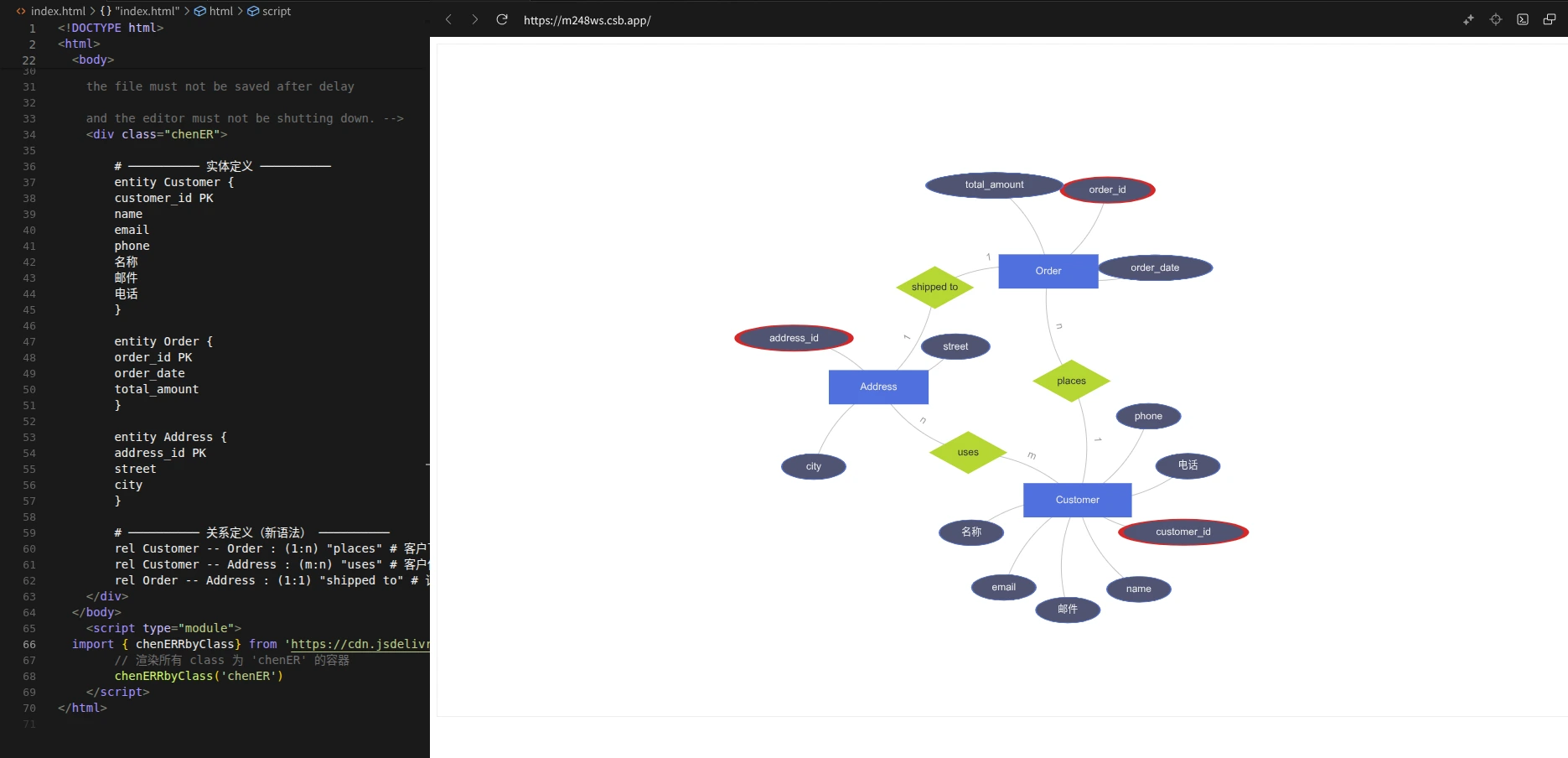
现代 Web 的各种图形库基本上都默认存在 ER 图 渲染,尤其是 Mermaid 这种“文本到图形”更是不例外,但遗憾的是,这些图形库完全都是按照 Crow’s Foot 方法
Crow’s Foot 方法(也称 “乌鸦脚表示法”)是一种用于数据库设计的实体 - 关系 (ER) 图可视化表示方法,以其表示 “多” 关系的独特三分支符号(类似鸟爪)得名。它是数据库设计中最流行的 ER 表示法之一,广泛应用于软件工程、信息工程和数据库建模领域。
来写的,但学校是按照 Chen’s Notation,也就是经典的 菱形关系、椭圆属性、矩形实体
Chen 表示法(也称 “陈式 ER 表示法”)是由华裔计算机科学家陈品山(Peter Pin-Shan Chen) 于 1976 年在《ACM Transactions on Database Systems》发表的《The Entity-Relationship Model—Toward a Unified View of Data》中首次提出的实体 - 关系(ER)模型可视化规范,是原始 ER 模型的官方表示法,也是数据库建模、软件工程教学中最经典的 ER 可视化范式。
个人来讲,ER 图 表示法是我在学校的数据库课中学来的。为了方便自己快速从文本绘制 ER 图(就像 Mermaid 那样)而不是通过第三方工具手动拖拽拼凑那样繁琐麻烦
那么作为计算机学生,发现网上缺少这样的实现,不免心痒,于是就诞生了下面的 npm 包
github/chen-er: https://github.com/xingwangzhe/chen-er/
npm/chen-er: https://www.npmjs.com/package/chen-er
在线体验!!!: https://codesandbox.io/p/sandbox/m248ws
chen-er 是基于 Peggy 和 ECharts 开发的、从文本转到 ER 图 的 npm 包,其中,Peggy 用来将文本进行解析/序列化,ECharts 用来实现图形渲染与自动布局
这点要感谢 AI 的推荐,这个库看起来没什么人用,但我敢说这绝对是宝藏:它对语法的解析绝对比自己手撸正则要好很多!!!
我们可以自定义**“宏”**,来方便复用一些常用的方法
// Peggy 语法通用规则库
_ // 可选空白 + 注释
= (comment / [ \t\n\r])*
__ // 至少一个空白字符
= [ \t\n\r]+
// 行内空白(不含换行)
hws = [ \t]*
// 跨平台换行符
newline
= "\r\n" / "\n" / "\r"
// 标识符(支持 Unicode 字母和数字)
Identifier
= id:$[^ \t\n\r{}():\"#\-]+ &{ return /^[\p{L}_][\p{L}\p{N}_]*$/u.test(id); } { return id; }
// 行注释(不吞掉换行)
comment
= "#" [^\n\r]* { return null; }
接下来我们可以定义实体与关系。显然,只要我们学过 C++ 或 Java 这种 OOP 范式的编程语言,自然知道应该如何定义它,一个简单的格式就定好了
entity Customer {
customer_id PK # 主键下划线用PK标记
name
email
phone
}
接下来就开始定义了,当你看到下面的 Peggy 代码,你会发现,这个定义非常符合编程直觉;即使你从未学过编译原理或者正则表达, 也能看懂很多!这正是 Peggy 的魅力所在!!!
// 引用公共规则
import { Identifier, hws, newline, _ , __, comment } from "./common.peggy"
// start // 解析入口
// = _ entities:entity+ _ { return entities; }
// 注释在 common.peggy 中
entity // 解析实体定义(允许前置空白)
= _ "entity" __ name:Identifier _ "{" _ fields:fieldBlock _ "}" {
return { type: "entity", name: name, fields: fields };
}
// 字段块:零到多行字段,每行以换行结束
fieldBlock
= fieldLine*
fieldLine // 解析多行字段定义(行首至少一个空白,避免空匹配;行尾可注释)
= hws f:field hws comment? hws newline { return f; }
field // 解析字段定义(行内不吞换行)
= name:Identifier hws pk:("PK")? {
return { type: "field", name, pk: pk !== null };
}
类似的对于关系,我们可以这么定义
rel Customer -- Order (1:n) "places" # 客户下订单
rel Customer -- Address (m:n) "uses" # 客户使用地址
rel Order -- Address (1:1) "shipped to" # 订单发货地址
相应的代码实现
// 引用公共规则
import { Identifier, hws, newline, _ , __, comment } from "./common.peggy"
// start // 解析入口
// = _ rels:rel+ _ { return rels; }
// 关系定义:rel <实体1> -- <实体2> : (基数) "<关系名>"
rel
= _ "rel" __ left:Identifier __ "--" __ right:Identifier _ ":" _ "(" card:Cardinality ")" _ name:QuotedString _ comment? newline? {
return { type: "relation", left, right, cardinality: card, name };
}
// 基数:如 1:n, m:n, 1:1
Cardinality
= chars:[^)]* { return chars.join("").trim(); }
// 双引号字符串
QuotedString
= '"' chars:[^"]* '"' { return chars.join(""); }
这两个重点写好了,那么汇总一下
// 引用公共规则
import { _ } from "./common.peggy"
// 引用实体规则
import { entity } from "./entities.peggy"
// 引用关系规则
import { rel } from "./sample.peggy"
start // 解析入口:支持实体和关系混合定义
= _ elements:(entity / rel)+ _ {
return elements;
}
至此,语法解析的部分基本结束。同时,这些 Peggy 编译后输出的 JS 代码会自动输出序列化的数据,接下来将在 ECharts 中使用。
首先简单定义一下类型
/**
* 字段定义
*/
export interface ERField {
type: "field";
name: string;
pk: boolean;
}
/**
* 实体定义
*/
export interface EREntity {
type: "entity";
name: string;
fields: ERField[];
}
/**
* 关系定义
*/
export interface ERRelation {
type: "relation";
left: string;
right: string;
cardinality: string;
name: string;
}
/**
* ER 图 JSON 节点类型
*/
export type ERJson = EREntity | ERRelation;
“桥接”点,方便引入 Peggy 编译产生的 JS 解析器和序列化功能
// @ts-ignore 使用 peggy 生成的解析器(ESM,命名导出 parse)
// 生成脚本见 package.json -> scripts.pg
import { parse as peggyParse } from "../grammar/peggy/all-parser.js";
import type { ERJson } from "./type";
/**
* 解析 ER 图文本为 AST
* @param input 多行 ER 图定义文本
* @returns 解析后的 AST 数组
*/
export function parseERSchema(input: string): ERJson[] {
try {
return peggyParse(input) as ERJson[];
} catch (e: any) {
console.error("解析失败:", e?.message, "\n位置:", e?.location);
throw e;
}
}
/**
* 解析 ER 图文本并输出 JSON
* @param input 多行 ER 图定义文本
* @returns JSON 字符串
*/
export function parseERSchemaToJSON(input: string): string {
return JSON.stringify(parseERSchema(input), null, 2);
}
为了方便叙述,下面代码改成高度概括的版本
仅保留三个关键步骤——解析(parseERSchema)→ 映射(实体/属性/关系三类节点与连边)→ 渲染(ECharts Graph + 力导向布局)。形状遵循 Chen 表示法:实体=矩形,属性=椭圆(主键红色描边),关系=菱形;基数标注到边标签上。通过 chenERRbyClass/chenERRbyId 即可把容器内的 ER 文本 直接渲染为可交互图。
import * as echarts from "echarts/core";
import { GraphChart } from "echarts/charts";
import { TooltipComponent } from "echarts/components";
import { CanvasRenderer } from "echarts/renderers";
import type { ComposeOption } from "echarts/core";
import type { GraphSeriesOption } from "echarts/charts";
import { parseERSchema } from "./main";
// 仅注册必需组件(图 + 提示 + 渲染器)
echarts.use([GraphChart, TooltipComponent, CanvasRenderer]);
type ECOption = ComposeOption<GraphSeriesOption>;
// 椭圆属性节点(Chen)
const ELLIPSE = "path://M50 0 A50 50 0 1 1 49.999 0 Z";
// AST -> Graph(节点、连边)
function astToGraph(ast: any[]) {
const nodes: any[] = [];
const edges: any[] = [];
for (const it of ast) {
if (it.type === "entity") {
const id = it.name;
nodes.push({
id,
name: id,
symbol: "rect",
category: "entity",
symbolSize: [Math.max(140, id.length * 14 + 40), 48],
label: { show: true },
attrs: (it.fields || []).map((f: any) => ({ name: f.name, pk: !!f.pk })),
});
for (const f of it.fields || []) {
const aid = `${id}.${f.name}`;
nodes.push({
id: aid,
name: f.name,
symbol: ELLIPSE,
symbolKeepAspect: false,
symbolSize: [Math.max(90, f.name.length * 16), 36],
category: "attribute",
label: { show: true },
itemStyle: {
borderColor: f.pk ? "#d62728" : "#5470c6",
borderWidth: f.pk ? 3 : 1,
},
});
edges.push({ source: aid, target: id });
}
} else if (it.type === "relation") {
const rid = `rel:${it.name}-${it.left}-${it.right}`;
const [l = "", r = ""] = (it.cardinality || "").split(":");
nodes.push({
id: rid,
name: it.name,
symbol: "diamond",
symbolSize: [110, 60],
category: "relation",
label: { show: true },
});
edges.push({ source: rid, target: it.left, name: l });
edges.push({ source: rid, target: it.right, name: r });
}
}
return { nodes, edges };
}
// 批量渲染指定类名容器
export function renderChenER(cls = "chenER") {
const list = document.getElementsByClassName(cls) as HTMLCollectionOf<HTMLElement>;
for (let i = 0; i < list.length; i++) {
const el = list[i];
const { nodes, edges } = astToGraph(parseERSchema(el.textContent || ""));
el.innerHTML = "";
const chart = echarts.init(el);
const option: ECOption = {
series: [
{
type: "graph",
layout: "force",
roam: true,
data: nodes,
links: edges,
categories: [{ name: "entity" }, { name: "relation" }, { name: "attribute" }],
label: { show: true, position: "inside" },
edgeLabel: { show: true, formatter: (p: any) => p?.data?.name ?? "" },
edgeSymbol: ["none", "none"],
lineStyle: { color: "#888", curveness: 0.2 },
force: { repulsion: 600, edgeLength: 140, friction: 0.2 },
tooltip: {
show: true,
formatter: (p: any) => {
if (p.dataType === "node" && p?.data?.category === "relation") {
return p.data.name || "";
}
if (p.dataType === "node" && p?.data?.category === "entity") {
const d = p.data as any;
const attrs = (d.attrs || []).map((a: any) =>
a.pk ? `*${a.name}` : a.name,
);
return [d.name, ...attrs].join("<br/>");
}
return p.name || "";
},
},
},
],
};
chart.setOption(option);
addEventListener("resize", () => chart.resize());
}
}
export const chenERRbyClass = renderChenER;
export function chenERRbyId(id: string) {
const el = document.getElementById(id) as HTMLElement | null;
if (!el) throw new Error(`Container #${id} not found`);
el.classList.add("chenER");
renderChenER("chenER");
}
此内容由惯性聚合(RSS阅读器)自动聚合整理,仅供阅读参考。 原文来自 — 版权归原作者所有。