


CODEEP
An autonomous AI agent that reads your whole project, runs commands, and writes & verifies code on its own — going deeper than autocomplete. Bring any model, hosted or local.
Download for Mac1.0.5View on GitHubVS Code Extension2.5.0
Works with any model
ClaudeGeminiDeepSeekGLMOpenAIMiniMaxOllamaOpenRouter
50+Built-in skills
9+AI providers
30+Slash commands
FreeOpen source
How it works
Codeep handles the full development loop autonomously — no context switching, no copy-pasting.
Type your request in plain language. No special syntax required. Codeep reads your project structure and key files automatically to understand the context.
Codeep breaks the task into steps, executes them one by one — editing files, running commands, fetching documentation. You watch it work in real-time.
After making changes, Codeep runs your build, tests, or typecheck to verify everything works. If something breaks, it fixes it automatically.
Use cases
Codeep understands your codebase and executes real work — not just suggestions.
Capabilities
From autonomous agent tasks to git workflows — Codeep handles the full development loop from your terminal. Green “New” tags mark what shipped in 2.0.
Reads files, runs shell commands, edits code, and auto-verifies the result (build / typecheck / tests) — all in one loop. You describe the goal; Codeep handles the steps.
File editsShell execAuto-verify
New
Delegate a self-contained sub-task to a specialist that runs in its own fresh context and reports back — researcher, reviewer, tester, or your own. Keeps the main thread focused; optional auto-review after every change.
delegate/agentsAuto-review
New
Preview the agent's full plan — files it'll touch, commands it'll run, risk it self-assesses — before any code changes. `/plan <task>` → review → `/go` to execute.
/plan/goPre-execution review
Auto-scans your project structure, detects language and framework, reads key files. No manual context setup. Project memory + lifecycle hooks persist across sessions.
Auto-scan/memory.codeep/hooks/
New
Switch agent tone mid-conversation: concise, verbose, security-paranoid, senior-reviewer, junior-mentor, ship-it. Or drop your own Markdown file in `.codeep/personalities/`.
6 presetsCustom .mdPer-project
New
Tell Codeep how you like to work — reply language, response style, default stack, hard rules — and it adapts on every project and surface. Opt-in auto-learn picks up your preferences from sessions; sync across machines and the dashboard.
/meAuto-learnSynced
AI review of your diff — bugs, security, performance, edge cases. Semantic commit messages. Works with any git repository. Hooks let you gate commits on custom checks.
/review/diff/commit
New
100+ models from Anthropic, OpenAI, Google, Meta, DeepSeek, Mistral via one key. Authoritative cost from `usage.cost` — your dashboard sees the same numbers as your invoice.
100+ modelsReal per-call cost/openrouter
New
Automatic on Anthropic (and OpenRouter → Anthropic routes). Cache hits bill at 0.1× input rate; typical agent session is 60-90% cheaper. No config, just upgrade.
Anthropic60-90% cheaper/cost shows savings
New
Curated catalog of 12 Model Context Protocol servers — filesystem, GitHub, Postgres, browser, Slack, more. One command install. Sampling guards keep credits safe.
12 serversstdio + HTTP/mcp install
New
Write a SKILL.md (Markdown + YAML frontmatter), agent auto-invokes when triggers match. Publish to share — `/skills install <owner>/<slug>` from any machine. Claude Code-compatible.
SKILL.mdBrowse + publishAuto-invoke
New
Native agent inside VS Code and Zed via Agent Client Protocol. Same CLI binary, same commands, native diff viewer, image paste, manual confirmation mode.
VS CodeZedACP
New
Link with `codeep account` to sync sessions, profiles, skills, and API keys across machines. Track cost-per-model, file bug reports, manage devices — all at codeep.dev.
Multi-device syncCost trackingBug reports
API keys stored locally (encrypted at rest, synced encrypted if you opt in). Dangerous commands require confirmation. Full undo history. `/checkpoint` snapshots for safety.
Local keys/checkpoint/undo
MCP marketplace
Codeep speaks the Model Context Protocol — connect to your filesystem, GitHub, databases, browsers, Slack, anything that exposes an MCP server. Curated catalog, install with /mcp install <id>.
Read, list, and (optionally) write files in a sandbox directory.
/mcp install filesystemBrowse repositories, issues, PRs, and commits via the GitHub API.
/mcp install githubRead-only SQL access to a Postgres database — schema introspection + query.
/mcp install postgresRead channels, post messages, look up users and threads.
/mcp install slackFetch arbitrary URLs and return the markdown-converted contents.
/mcp install fetchHeadless Chromium for navigating, screenshotting, and scraping pages.
/mcp install puppeteerPlus /mcp add for any custom server (npx, binary, or HTTP endpoint)
Skill marketplace
Drop a SKILL.md in .codeep/skills/ and the agent auto-invokes it when triggers match. Publish to share — install on any machine with one command. Claude Code-compatible format.
Build, debug, package and deploy SharePoint Framework (SPFx) web parts, extensions and apps for SharePoint Online and Microsoft Teams.
/skills install VladoIvankovic/sharepoint-spfxOr write your first skill — Markdown + YAML frontmatter, ~5 minutes
Installation
Choose your preferred install method. Codeep runs on macOS, Linux, and Windows (WSL). No configuration required — just run codeep to start.
✓
Any terminal (zsh, bash, fish, PowerShell)
✓
API key for your preferred AI provider
$ curl -fsSL https://raw.githubusercontent.com/VladoIvankovic/Codeep/main/install.sh | bash
AI Providers
Codeep works with all major AI providers. Switch between them at any time from the settings menu. Your keys are stored securely on your machine.
All providers use the OpenAI-compatible API format or Anthropic protocol. Switch anytime with /settings
Native app
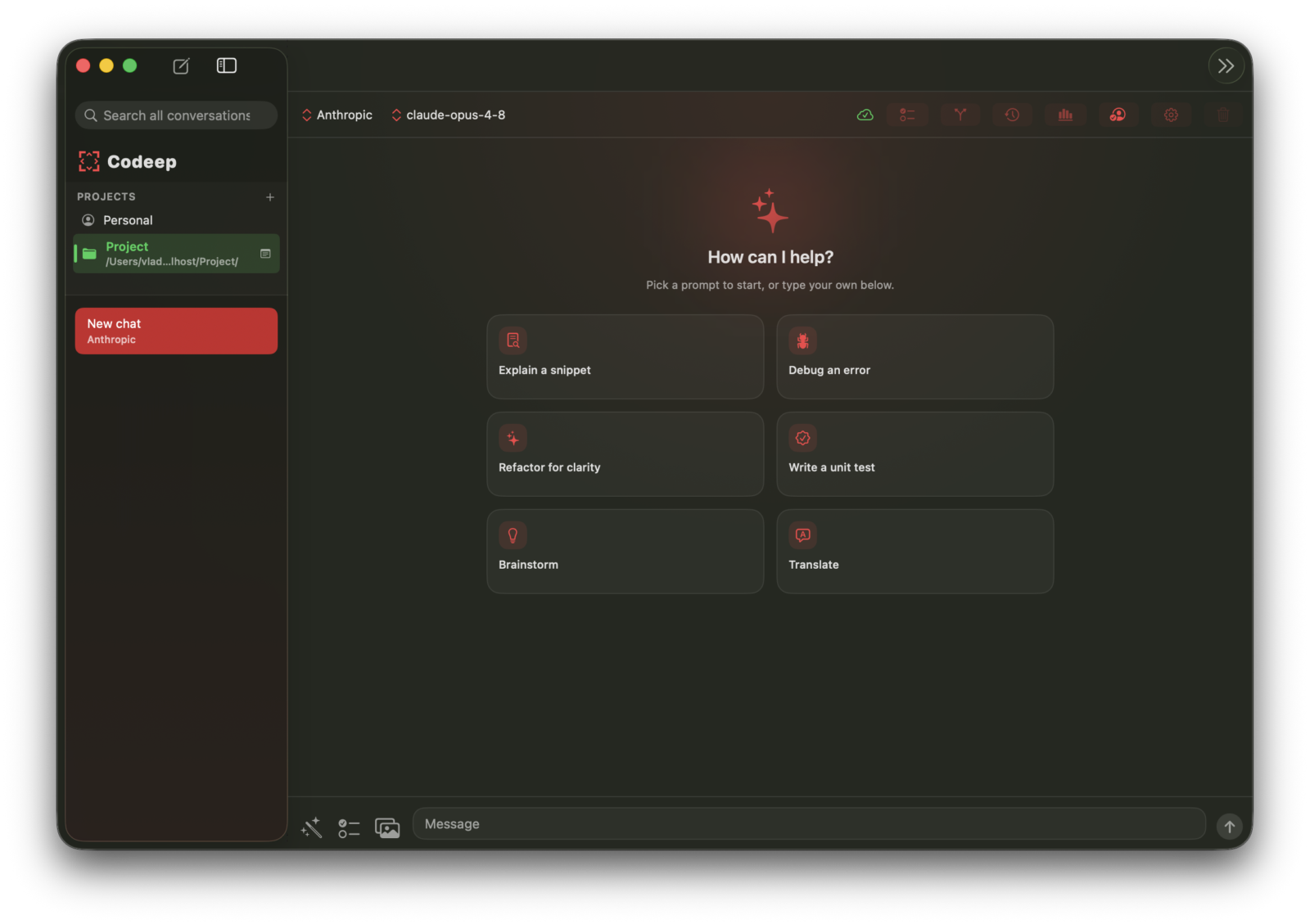
A first-class native desktop app — the same agent as the CLI, with a chat window, a project sidebar, inline diffs, and a real Settings pane. Built in SwiftUI, not an Electron wrapper.
New
Codeep runs as a native AI agent inside Zed via the Agent Client Protocol (ACP). Use all 30+ Codeep commands directly from the Zed chat panel.
$ npm install -g codeep
"agent_servers": {
"Codeep": {
"type": "custom",
"command": "codeep",
"args": ["acp"]
}
}
New
Codeep is now available as a VS Code extension. Get the full AI coding agent experience directly in your editor — no terminal required.
$ code --install-extension VladoIvankovic.codeep
Cmd+Shift+X → search "Codeep"
Cmd+Shift+C or click the ⟨⟩ icon
$ npm install -g codeep
New: codeep review (offline, CI-friendly code review) and Continue (a paused-at-the-limit run resumes when you say "continue" instead of dead-ending). Plus a fix where file edits or skill params containing a $ could be…
Stability: an unexpected error no longer crashes Codeep to a garbled terminal — it's logged, your conversation is saved, and recoverable background errors keep the session alive. Also fixes codeep account occasionally…
MiniMax M3: the new MiniMax flagship replaces M2.7 across all three MiniMax providers (subscription, pay-per-use, China), with updated pricing and context window so cost tracking stays accurate.
Only to the LLM provider you choose, only when you invoke the agent. Codeep is a thin client over your API key — file contents, prompts, and tool calls go straight to Anthropic / OpenAI / Z.AI / OpenRouter / etc. We don't proxy anything through codeep.dev. The optional dashboard sync (opt-in via codeep account) uploads session metadata and learning preferences only — never raw code. Privacy details.
Yes — pick ollama as your provider. Codeep talks to a local Ollama daemon, so no network call leaves your machine. Tool calls (read/write files, run commands) are unchanged. Smaller local models are slower at multi-step reasoning, so set /settings → Max Iterations higher and expect more back-and-forth. Provider docs.
Codeep itself is free + open source (Apache 2.0). You pay your LLM provider directly. For OpenRouter, Codeep shows the exact usage.cost from each response on your dashboard. Prompt caching (default on Anthropic)typically reduces a session bill by 60-90%. For Z.AI on the GLM Coding Plan, it's flat-rate. How caching works.
For coding: Claude Opus 4.8 (Anthropic) or GPT-5.5 are the strongest. For cost-per-token: DeepSeek V4 Pro or GLM-5.1 are 5-10× cheaper with little quality drop on typical tasks. For local: Llama 3.1 70B via Ollama (needs 24GB+ VRAM). Or set provider to openrouter and model openrouter/auto — the router picks for you per request. Provider matrix.
Codeep is terminal-native (TUI + ACP for Zed / VS Code), multi-provider by design, and open-source. Cursor is a fork of VS Code locked to its own backend. Claude Code is Anthropic-only and closed-source. Aider is terminal-native too but doesn't do ACP or skill bundles. If you want one tool that works the same across CLI, Zed, and VS Code with any provider — Codeep's the bet.
Yes — for any OpenAI-compatible endpoint, pick ollama provider and set /settings → Ollama URL to your endpoint. Authentication header is configurable. Self-hosted vLLM, LM Studio, or any inference server that speaks OpenAI's /v1/chat/completions works.
Model Context Protocol — the emerging standard for letting LLMs talk to external systems. Codeep supports it end-to-end: connect a Postgres server, GitHub, browser automation, Slack, anything that speaks MCP. Browse 12 curated servers on the marketplace or add custom ones with /mcp add.
No — Codeep works fully offline with just an LLM key. The optional account (free, GitHub OAuth) syncs session history, profiles, and learning preferences across machines, and unlocks the skill marketplace publish flow. Everything is opt-in. Account docs.
Open Source
Free and open source. Works with your existing AI provider subscriptions. No account required to get started.
此内容由惯性聚合(RSS阅读器)自动聚合整理,仅供阅读参考。 原文来自 — 版权归原作者所有。