









Every installed Ansible module and role, as a typed MCP tool.
Rocannon runs on your Ansible control node and turns it into an MCP server. At
startup it reads ansible-doc and exposes every module you have installed (plus
any role with an argument spec) as a typed tool, so an MCP client like Claude
Code, Cursor, or your own agent can drive your real environment in plain English.
The tool surface is whatever you have installed, one collection or a hundred.
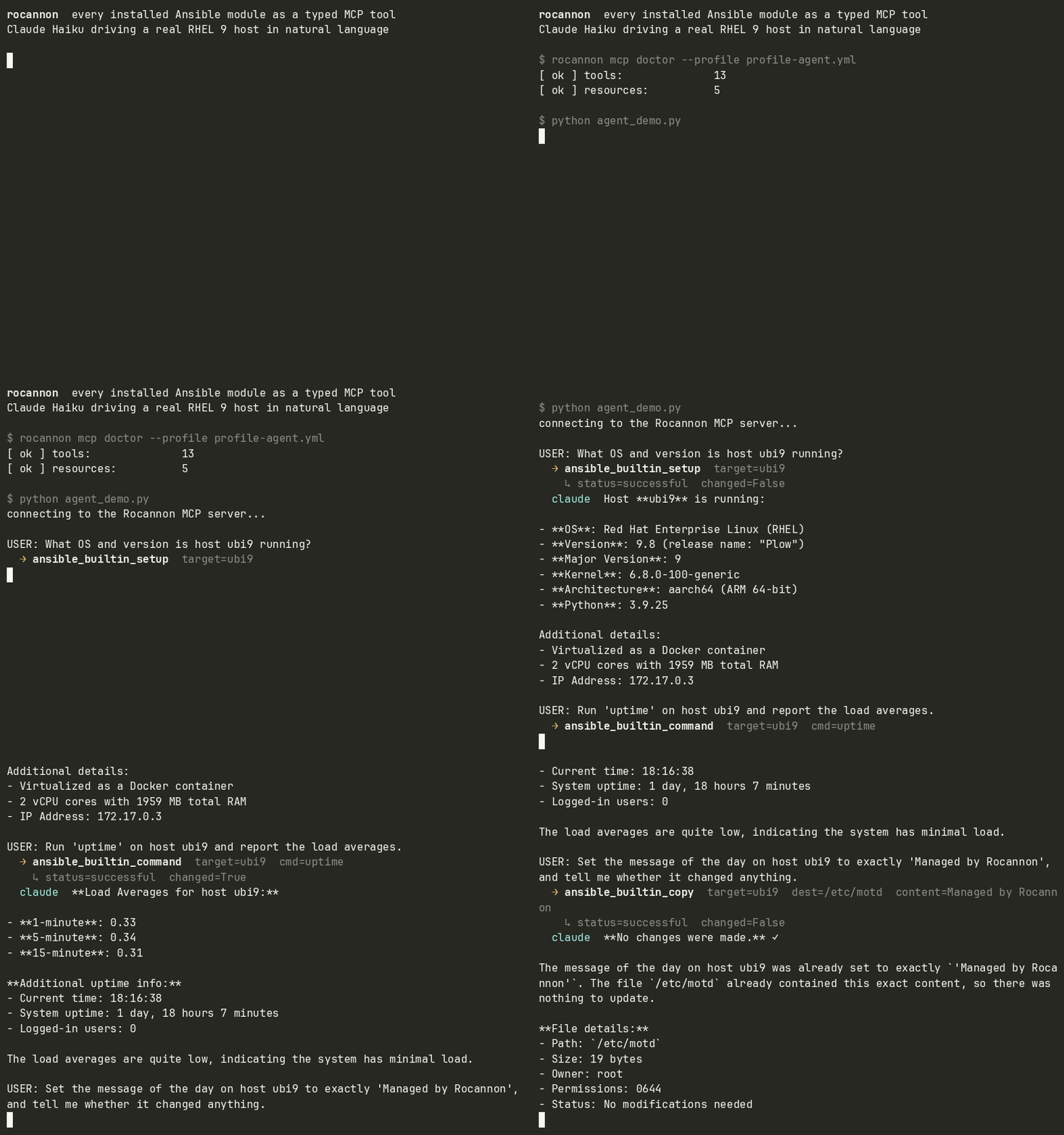
Claude Haiku driving Rocannon's typed Ansible tools against a real RHEL 9 host.
Install
This brings ansible-core and ansible-runner with it. rocannon doctor
checks the environment for anything missing.
Quickstart
Scaffolds a localhost profile under .rocannon/ and prints the wiring for your
MCP client (Claude Code, Claude Desktop, Cursor) plus a command to confirm the
tools registered. Then ask your assistant something like "Gather facts from
localhost and tell me the OS and kernel version."
You don't need an LLM, though. The same tools are a shell:
rocannon mcp doctor --profile .rocannon/quickstart.yml   # list registered tools
rocannon repl       --profile .rocannon/quickstart.yml   # operator shell
What it does
- Reflects your modules. Each installed module becomes a typed MCP tool, with
parameters, types, defaults, and choices read from
ansible-doc. Whatever you install shows up automatically. - Reflects your roles. A role with a
meta/argument_specs.ymlbecomes a typed tool too; its arguments are the parameters, validated by ansible at run time. - Carries the metadata. Tools get safety hints (read-only vs destructive),
collection and namespace tags, and a
metablock with the module's documented requirements, return keys, and version, straight fromansible-doc. - No lock-in. Record any session, from an agent or the CLI, to a standard
Ansible playbook under
.rocannon/playbooks/that runs with plainansible-playbook. Saved sessions also load back as MCP prompts. - Dry runs. Modules that support check mode expose
--checkand--diff, both on the CLI and as MCP tool parameters. - A CLI, too. Every module is a subcommand:
rocannon ansible.builtin.copy --target h1 -i hosts --src a --dest b.
Examples
examples/case-study: natural language to ad-hoc Ansible on a real RHEL 9 host, then replayed as a standard playbook.examples/containerlab: the same agent driving a two-node Arista cEOS fabric, where thearista.eosmodules become tools.examples/execution-environment: Rocannon baked into an Ansible Execution Environment for a frozen, reproducible tool set.
Profiles
A profile is a YAML file declaring an inventory plus the modules and roles to expose:
inventories:
  - ./hosts
modules:
  - ansible.builtin
  - community.docker
roles:                      # optional
  - my_ns.my_coll.setup_web
roles_path: ./roles         # optional, for standalone (non-collection) roles
modulestakes a module (ansible.builtin.copy), a collection (ansible.builtin), or a namespace (community). Only modules become tools; filter and lookup plugins are skipped.rolestakes a collection role by FQCN, or a standalone role by its directory name together withroles_path(which resolves against the profile's own directory). Roles without an argument spec are skipped.- Optional keys:
ansible_cfg,vault_password_file,extra_envvars.
Drop multiple profiles in .rocannon/profiles/ (with a default.yml) and switch
at runtime via the rocannon_list_profiles, rocannon_current_profile, and
rocannon_use_profile tools.
Dependencies: modules with third-party Python libraries (for example
community.cryptoneedscryptography,community.dockerneeds thedockerSDK) need them installed in the same environment as Rocannon. The quickstart inventory pinsansible_python_interpreterso localhost runs use it.
CLI
rocannon quickstart    scaffold a localhost profile and print client wiring
rocannon <fqcn>        invoke a module: rocannon ansible.builtin.copy ...
                       optional --record FILE appends each call to a playbook
rocannon mcp serve     start the MCP server (stdio or http)
rocannon mcp doctor    list registered tools, resources, prompts
rocannon repl          interactive shell on the same MCP server
rocannon doctor        system health (binaries, env, inventory)
rocannon doc <module>  print parsed schema for a module
rocannon search <q>    find modules by name or description
rocannon ls <kind>     list hosts, groups, or modules from a profile
rocannon playbook      list/show/run saved playbooks
Each module invocation needs an inventory: pass -i/--inventory, --profile,
or run where a .rocannon/profiles/ is discovered. rocannon <fqcn> --help
shows that module's typed flags.
MCP clients
A working .mcp.json ships at the repo root; per-client snippets are in
examples/clients/.
| Client | Config location |
|---|---|
| Claude Code | .mcp.json at project root, or claude mcp add |
| Claude Desktop | macOS: ~/Library/Application Support/Claude/claude_desktop_config.json |
| Cursor | .cursor/mcp.json or ~/.cursor/mcp.json |
| mcphost | ~/.mcphost.yml or --config <path> |
| IBM Bob | .bob/mcp.json or ~/.bob/mcp_settings.json |
All use the standard mcpServers envelope pointing at
rocannon mcp serve --profile <your-profile.yml>.
Development
git clone https://github.com/msradam/rocannon.git
cd rocannon
uv sync
./tests/check.sh                # ruff format + lint + mypy + pytest
uv run pytest -m integration    # opt-in: real Ansible against localhost / a UBI9 container
See ARCHITECTURE.md for how the pieces fit together.
Rocannon is developed with AI assistance.
The name
Ursula K. Le Guin coined the word "ansible" in her 1966 novel Rocannon's World. The gryphon is a nod to the Windsteeds that Rocannon and his companions ride.
Credits
- Gryphon icon: Gryphon by Aleksei Kovalenko from Noun Project (CC BY 3.0).