惯性聚合 高效追踪和阅读你感兴趣的博客、新闻、科技资讯
阅读原文 在惯性聚合中打开

推荐订阅源

Martin Fowler
Martin Fowler
Y
Y Combinator Blog
M
MIT News - Artificial intelligence
The Cloudflare Blog
WordPress大学
WordPress大学
H
Hackread – Cybersecurity News, Data Breaches, AI and More
博客园 - 司徒正美
小众软件
小众软件
Blog — PlanetScale
Blog — PlanetScale
雷峰网
雷峰网
奇客Solidot–传递最新科技情报
奇客Solidot–传递最新科技情报
J
Java Code Geeks
云风的 BLOG
云风的 BLOG
C
Check Point Blog
D
DataBreaches.Net
T
The Blog of Author Tim Ferriss
V
V2EX
F
Fortinet All Blogs
B
Blog
大猫的无限游戏
大猫的无限游戏
N
Netflix TechBlog - Medium
B
Blog RSS Feed
A
About on SuperTechFans
Cyber Security Advisories - MS-ISAC

Hacker News: Show HN

PurrrrrFocus: Pomodoro Timer App - App Store Workflow Engine — Multi-Step Orchestration for Bun RapidPhoto: Pro Photo Editor App - App Store GitHub - DheerG/swarms: Achieve extraordinary results with claude code across a variety of tasks SPICE simulation → oscilloscope → verification with Claude Code — Lucas Gerads Show HN: VCoding – A 5 MB native Windows IDE with no dynamic dependencies Show HN: LLMs don't hallucinate because they're bad at math, it's the format GitHub - Agent-FM/agentfm-core: AgentFM is a peer-to-peer network that turns everyday computers into a decentralized AI supercomputer. AgentFM lets you run massive AI workloads directly across a global mesh of idle CPUs and GPUs. Show HN: Tracking Top US Science Olympiad Alumni over Last 25 Years GitHub - Potarix/agent-hub: One place to talk to all your agents Show HN: Runtime security for AI agents(injection,tool abuse, data exfiltration) GitHub - dubeyKartikay/lazyspotify: Terminal Spotify client for macOS and Linux GitHub - the-banana-tool/king-louie: Easy to use GUI Personal AI Assistant. Win/Linux/Mac. Show HN I made my vacation rental bookable by AI agents–no Airbnb, 0% commission GitHub - basteez/jsf-autoreload: maven plugin to enable hot reload on jsf projects uvm32/hosts/host-gdbstub at main · ringtailsoftware/uvm32 GitHub - labsai/EDDI: Config-driven engine that turns JSON into production-grade AI agents. Multi-agent orchestration, 12+ LLM providers, MCP/A2A protocols, RAG, persistent memory, and enterprise compliance (EU AI Act, GDPR, HIPAA). Built on Quarkus. GitHub - glitchnsec/fortyone-oss: AI Executive Assistant Platform Quickstart | Alien GitHub - muxshed/shed: One stream in, or many. Every destination, simultaneously. No cloud middleman, no per-channel fees, no limits. GitHub - ocrbase-hq/ocrbase: 📄 PDF/IMG ->.MD/JSON Document OCR API for PaddleOCR and GLMOCR. Self-hostable. GitHub - impactjo/home-memory: MCP server that lets your AI assistant remember everything about your home. GitHub - Sets88/dbcls: DbCls is a powerful terminal database client that supports various databases GitHub - neptun2000/heor-agent-mcp GitHub - SeanFDZ/macmind: Single-layer transformer in HyperTalk for the classic Macintosh RollQuation: Math Puzzles - Apps on Google Play GitHub - dropbox/witchcraft Show HN: Agent-cache – Multi-tier LLM/tool/session caching for Valkey and Redis GitHub - opentalon/opentalon: OpenTalon is an open-source platform built from the ground up in Go as a robust alternative to OpenClaw LinkedIn™ 职位抓取工具 - Chrome 应用商店
GitHub - XTraceAI/memhub-llm-wiki-guide: Guide: ChatGPT /...
TristanX · 2026-05-02 · via Hacker News: Show HN

Turn your ChatGPT, Claude, and Gemini history into an Andrey Karpathy's LLM-Wiki mindmap — structured Markdown you can browse in Obsidian-style tools and explore as a graph in MemHub.

MemHub is your context control panel for AI agents. This guide walks through exporting chat history, importing it into MemHub, exploring the Mindmap, and downloading a Markdown ZIP (“Mindmap Markdowns”) for your second brain — without writing code or using Claude Code.

MemHub extracts AI memory and context from your chats, stores it in an encrypted vector database, and organizes it in a file layout that tools like Obsidian work well with.


Watch
Video walkthrough

Open on YouTube →

XTrace MemHub on Product Hunt


Quick links

Link Description
MemHub Web app
MemHub Chrome extension Capture context from the browser (including Gemini in-product)

1. Install the Chrome Extension

These steps match the in-product Instructions panel when ChatGPT is selected in MemHub.

  1. Go to MemHub Chrome extension
  2. Add XTrace Memory to your browser.

2. Export from ChatGPT (OpenAI) / Claude (Anthropic) / Gemini (Google)

  1. Open ChatGPT/Claude/Gemini in your browser.
  2. Click the XTrace Memory extension in the Extensions.
  3. Sign in
  4. You would see a Memory button at your top right, click it
  5. Click export the last N chats you have. Recommend you to put a smaller number if you not sure how much

3. Go to MemHub and Wait

It could take a few minutes for AI to search through your data and extracts memories. Go to MemHub to see your memories getting created in realtime


4. Export Markdown (LLM-Wiki ZIP)

  1. On Memories, click Export (download icon).

  2. The modal title is Export Markdown — subtitle ZIP for Mindmap Markdowns.

  3. Adjust optional filters:

    • Scope: Beliefs (facts), Artifacts, Episodes
    • Date range (leave empty for all time)
    • Platform: memhub, chatgpt, gemini, claude, other
    • Belief type / Artifact type
    • Content density: Full (YAML + body) vs Compact
    • Link style: Standard vs Relationship (wikilinks for supersession, linked facts, etc.)
    • We suggest keep everything as default
    image
  4. Click Confirm export and save the ZIP.

  5. Unzip into your Obsidian vault or any Markdown wiki.


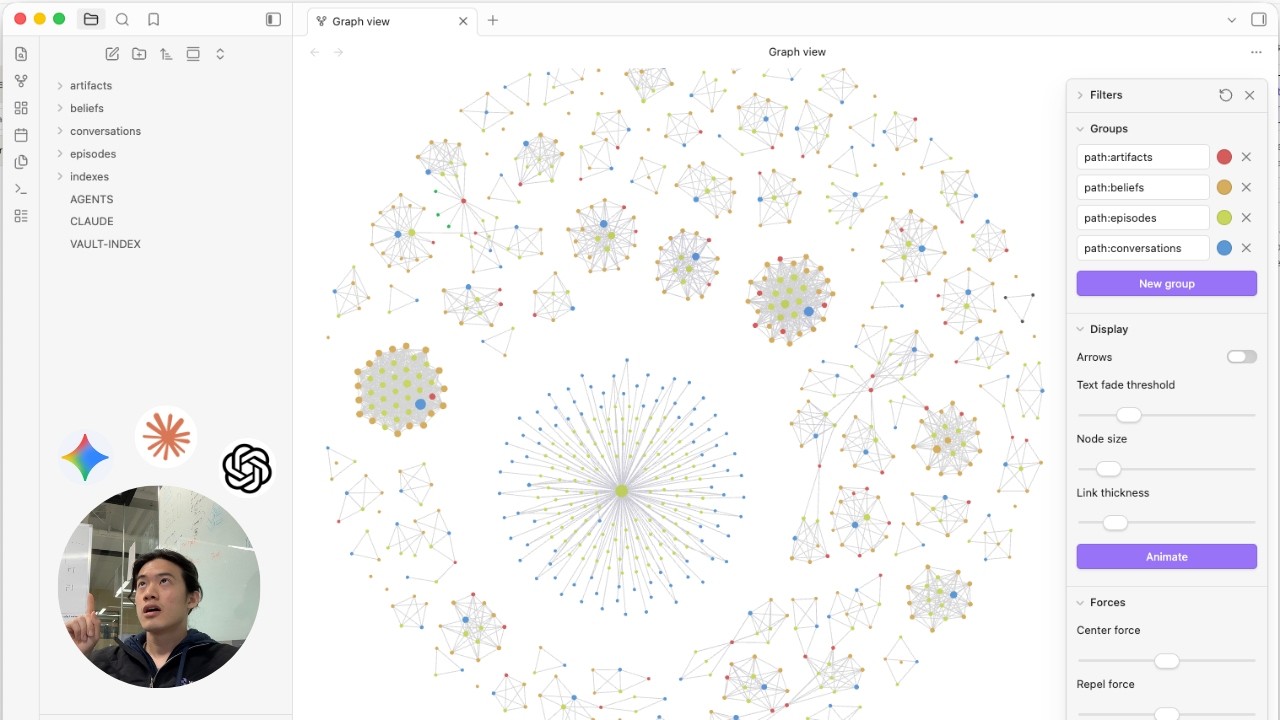
5. View on Obsidian

  1. Make sure your downloaded file is unzipped
  2. Open your Obsidian app
  3. On the top of the window, File -> Open Vault -> select the unzipped folder -> Open
image image 4. On the left sidebar, click Open graph view image

License

Documentation in this repository is licensed under CC BY 4.0.

XTrace, MemHub, and related trademarks belong to their owners. This repo is an unofficial community/education guide unless explicitly published by XTrace.