


PhishGuard
A Chrome extension that detects dangerous and phishing pages using a locally-run LLM — no data leaves your machine.
Supports Ollama and LM Studio (or any OpenAI-compatible local server).
Demo
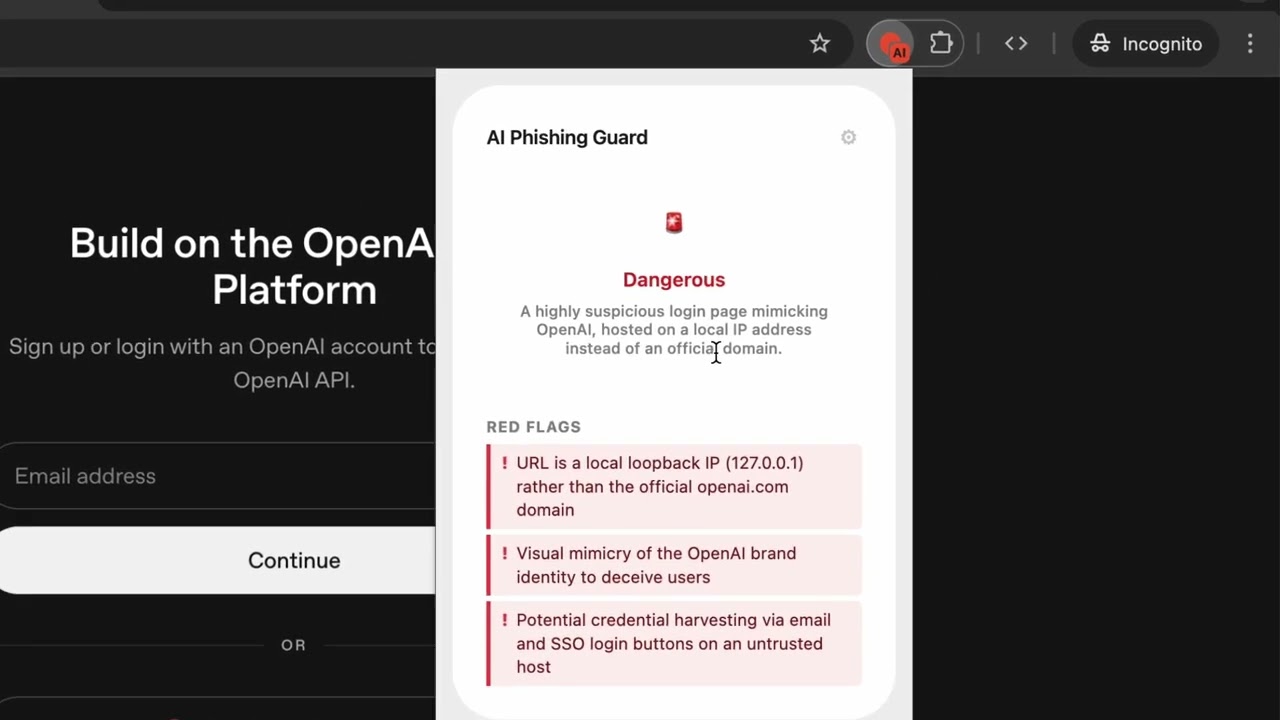
Watch a demo on Youtube here: https://www.youtube.com/watch?v=eA5MTv1Dlts
How it works
- Click the extension icon → Scan Page
- The extension captures: URL + visible text + form inputs + page metadata + a screenshot
- Everything is sent to your local LLM
- The model returns a risk assessment — Safe, Suspicious, or Dangerous — with a list of red flags
Passive monitoring (optional): auto-analyzes every page you visit and injects a warning banner directly into the page if something looks dodgy.
Setup & Installation
Step 1 — Install a local LLM
PhishGuard requires a vision-capable model running locally. Pick one of the two options below.
Option A — Ollama (recommended, free & open source)
1. Install Ollama
| Platform | Instructions |
|---|---|
| macOS | brew install ollama or download from ollama.com |
| Linux | curl -fsSL https://ollama.com/install.sh | sh |
| Windows | Download the installer from ollama.com |
2. Pull the model
PhishGuard uses google/gemma-4-26b-a4b — a multimodal model that can analyse both text and screenshots.
ollama pull google/gemma-4-26b-a4b
The model is ~17 GB. A smaller alternative is
gemma3:4b(~3 GB) if you're on limited hardware, though accuracy will be lower.
3. Start the server
ollama serve
Ollama runs at http://localhost:11434 by default. You can verify it's working:
curl http://localhost:11434/api/tags
On macOS, Ollama also runs automatically as a menu bar app after installation — no need to run
ollama servemanually.
Option B — LM Studio
- Download LM Studio and install it
- Search for and download
google/gemma-4-26b-a4b(or any vision-capable model) - Go to Local Server → click Start Server (default:
http://localhost:1234)
Step 2 — Load the extension in Chrome
- Open
chrome://extensions - Enable Developer mode (toggle in the top-right corner)
- Click Load unpacked
- Select this project directory
The PhishGuard icon will appear in your Chrome toolbar.
Step 3 — Configure the extension
Click the ⚙ icon in the popup and set:
| Setting | Ollama | LM Studio |
|---|---|---|
| Provider | Ollama | LM Studio / OpenAI |
| Local LLM URL | http://localhost:11434 |
http://localhost:1234 |
| Model | google/gemma-4-26b-a4b |
google/gemma-4-26b-a4b |
| API Key | (leave blank) | Your LM Studio key (if auth is enabled) |
Click Save, then try scanning a page.
Troubleshooting
"LLM error 404" or no response
- Make sure
ollama serveis running (or LM Studio's local server is started) - Check the URL in Settings matches where your server is running
- Confirm the model name is spelled exactly right:
ollama list
Slow analysis
- First run after pulling the model is slowest (model loads into memory)
- A GPU speeds things up significantly; CPU-only is supported but slower
- Try a smaller model like
gemma3:4bif speed is a concern
Extension not loading
- Make sure Developer mode is enabled in
chrome://extensions - Check the service worker console for errors: click "Service worker" link on the extension card
Architecture
popup.html / popup.js          ← User interface
       │
       │  chrome.runtime.sendMessage
       ▼
background.js (service worker) ← Orchestrator
  ├── chrome.tabs.captureVisibleTab()    → screenshot (base64 PNG)
  ├── chrome.scripting.executeScript()  → page text, inputs, links, iframes
  └── fetch(llmUrl)                     → LLM analysis
       │
       ▼
content.js                     ← Injects warning banner into the page
                                  Detects cross-origin form submissions
What the LLM analyzes
| Signal | Examples |
|---|---|
| URL patterns | typosquatting, suspicious TLDs, IP addresses, excessive subdomains |
| Visual mimicry | fake Google/Apple/bank login pages |
| Credential harvesting | unexpected password/email forms |
| Fear tactics | "your account will be suspended in 24h" |
| Technical signals | hidden iframes, cross-origin form actions |
| Content quality | poor grammar/spelling common in phishing |
Risk levels
| Level | Meaning |
|---|---|
| ✅ Safe | No significant threats detected |
| Some concerning signals — proceed with caution | |
| 🚨 Dangerous | High confidence this is malicious |
License
MIT — see LICENSE