




惯性聚合 高效追踪和阅读你感兴趣的博客、新闻、科技资讯
阅读原文 在惯性聚合中打开

推荐订阅源

宝玉的分享
宝玉的分享
Help Net Security
Help Net Security
D
Darknet – Hacking Tools, Hacker News & Cyber Security
Threat Intelligence Blog | Flashpoint
T
Tor Project blog
Spread Privacy
Spread Privacy
K
Kaspersky official blog
Simon Willison's Weblog
T
Tenable Blog
C
CERT Recently Published Vulnerability Notes
L
LINUX DO - 热门话题
Latest news
Latest news
The Last Watchdog
The Last Watchdog
S
Security Affairs
S
Security Archives - TechRepublic
cs.AI updates on arXiv.org
Hacker News: Ask HN
Hacker News: Ask HN
E
Exploit-DB.com RSS Feed
TaoSecurity Blog
TaoSecurity Blog
T
Threat Research - Cisco Blogs
S
Secure Thoughts
G
GRAHAM CLULEY
V
V2EX - 技术
GbyAI
GbyAI
cs.CV updates on arXiv.org
月光博客
月光博客
D
DataBreaches.Net
SecWiki News
SecWiki News
Microsoft Azure Blog
钛媒体:引领未来商业与生活新知
钛媒体:引领未来商业与生活新知
Cloudbric
Cloudbric
博客园 - 聂微东
H
Heimdal Security Blog
S
Security @ Cisco Blogs
Schneier on Security
K
KPMG report finds enterprise disconnect between AI and its ROI | CIO
Last Week in AI
Last Week in AI
U
Unit 42
L
LangChain Blog
P
Proofpoint News Feed
V
V2EX
B
Blog
Hugging Face - Blog
Hugging Face - Blog
Stack Overflow Blog
Stack Overflow Blog
MongoDB | Blog
MongoDB | Blog
The Register - Security
罗磊的独立博客
M
MIT News - Artificial intelligence
NISL@THU
NISL@THU
T
The Exploit Database - CXSecurity.com

Hacker News: Show HN

PurrrrrFocus: Pomodoro Timer App - App Store Workflow Engine — Multi-Step Orchestration for Bun RapidPhoto: Pro Photo Editor App - App Store GitHub - DheerG/swarms: Achieve extraordinary results with claude code across a variety of tasks SPICE simulation → oscilloscope → verification with Claude Code — Lucas Gerads Show HN: VCoding – A 5 MB native Windows IDE with no dynamic dependencies Show HN: LLMs don't hallucinate because they're bad at math, it's the format GitHub - Agent-FM/agentfm-core: AgentFM is a peer-to-peer network that turns everyday computers into a decentralized AI supercomputer. AgentFM lets you run massive AI workloads directly across a global mesh of idle CPUs and GPUs. Show HN: Tracking Top US Science Olympiad Alumni over Last 25 Years GitHub - Potarix/agent-hub: One place to talk to all your agents Show HN: Runtime security for AI agents(injection,tool abuse, data exfiltration) GitHub - dubeyKartikay/lazyspotify: Terminal Spotify client for macOS and Linux GitHub - the-banana-tool/king-louie: Easy to use GUI Personal AI Assistant. Win/Linux/Mac. Show HN I made my vacation rental bookable by AI agents–no Airbnb, 0% commission GitHub - basteez/jsf-autoreload: maven plugin to enable hot reload on jsf projects uvm32/hosts/host-gdbstub at main · ringtailsoftware/uvm32 GitHub - labsai/EDDI: Config-driven engine that turns JSON into production-grade AI agents. Multi-agent orchestration, 12+ LLM providers, MCP/A2A protocols, RAG, persistent memory, and enterprise compliance (EU AI Act, GDPR, HIPAA). Built on Quarkus. GitHub - glitchnsec/fortyone-oss: AI Executive Assistant Platform Quickstart | Alien GitHub - muxshed/shed: One stream in, or many. Every destination, simultaneously. No cloud middleman, no per-channel fees, no limits. GitHub - ocrbase-hq/ocrbase: 📄 PDF/IMG ->.MD/JSON Document OCR API for PaddleOCR and GLMOCR. Self-hostable. GitHub - impactjo/home-memory: MCP server that lets your AI assistant remember everything about your home. GitHub - Sets88/dbcls: DbCls is a powerful terminal database client that supports various databases GitHub - neptun2000/heor-agent-mcp GitHub - SeanFDZ/macmind: Single-layer transformer in HyperTalk for the classic Macintosh RollQuation: Math Puzzles - Apps on Google Play GitHub - dropbox/witchcraft Show HN: Agent-cache – Multi-tier LLM/tool/session caching for Valkey and Redis GitHub - opentalon/opentalon: OpenTalon is an open-source platform built from the ground up in Go as a robust alternative to OpenClaw LinkedIn™ 职位抓取工具 - Chrome 应用商店 GitHub - EdoardoBambini/Agent-Armor-Iaga: AI agents are getting tool access — shell, file system, databases, APIs, secrets. But **nobody is governing what they actually do with it**. Frameworks like LangChain, CrewAI, AutoGen, and Claude Code give agents the power to execute. Agent Armor gives you the power to control, audit, and approve every single action before it happens. HN Vibes — Week 15, Apr 7–13 2026 GitHub - chojs23/ec: Easy terminal-native 3-way git mergetool vim-like workflow GitHub - SethPyle376/hiraeth: Local AWS emulator focused on fast integration testing, with SQS support, SQLite-backed state, and a debug-friendly web UI. GitHub - JakOb-dotcom/cloud-sandbox-security-analysis: Technical analysis and Proof of Concept (PoC) regarding environment variable exfiltration in containerized cloud sandboxes via side-channel data leaks. Springboards - Flint Alpha Show HN: A simpler coding agent harness GitHub - audiodude/sudomake-friends GitHub - 256thFission/mini-mythos: OSS clone of Anthropic’s Mythos harness to locate C/C++ memory vulnerabilities Show HN: OpenParallax: OS-level privilege separation for AI agent execution Hacker News Sorted - Chrome 应用商店 Show HN: How to Install Docker on Ubuntu 24.04 LTS: Complete 2026 Guide GitHub - himanshudongre/smriti GitHub - sverrirsig/claude-control: macOS desktop dashboard for monitoring and managing multiple Claude Code sessions GitHub - ory/dockertest: Write better integration tests! Dockertest helps you boot up ephermal docker images for your Go tests with minimal work. Chiral - Chrome 应用商店 Show HN: Two Claudes collaborating through shared memory on a $100 mini-PC GitHub - pmichaillat/latex-cv: Minimalist LaTeX template for academic CVs GitHub - oguzbilgic/posse: A web UI for Anthropic Managed Agents. GitHub - sshiraz/depsly: Dependency risk analysis tool for npm packages ABI Add safari/agent-harness — Safari browser automation via safari-mcp by achiya-automation · Pull Request #212 · HKUDS/CLI-Anything GitHub - Halfblood-Prince/trustcheck: Verify PyPI package attestations and improve Python supply-chain security GitHub - oguzbilgic/kern-ai: Agents that do the work and show it. GitHub - bruits/satteri: High-performance Markdown and MDX processing for the JavaScript ecosystem GitHub - tylergibbs1/feedstock: High-performance web crawler and scraper for TypeScript, powered by Bun and Playwright GitHub - Grimm67123/grimmbot: The self-improving sandboxed and open-source AI agent. With persistent memory and scheduling. GitHub - whitevanillaskies/whitebloom: Local whiteboard that blooms. GitHub - hwdsl2/docker-whisper: Docker image for a self-hosted Whisper speech-to-text server with speaker diarization and OpenAI-compatible transcription and translation APIs. Powered by faster-whisper. Supports all Whisper models, NVIDIA GPU (CUDA) acceleration, JSON/SRT/VTT output, SSE streaming, offline mode, and multi-arch (amd64, arm64). GitHub - yisding/reviewwiggum GitHub - MarwanAlsoltany/serrors: Structured errors for Go: sentinel hierarchies, typed data, custom formatting, and slog integration. GitHub - soatok/age-php GitHub - Luthiraa/markitme GitHub - stagas/rtdiff: realtime git diff gui and AI-assisted commits GitHub - tombedor/excalicharts GitHub - wh1le/excalidraw-edit: Open and edit .excalidraw files from the terminal. Offline, auto-saves to disk. MalExt Sentry - Malicious Extension Scanner - Chrome 应用商店 GitHub - syi0808/asciianimesvg: Generate animated ASCII art SVGs from text. CLI, Rust library, WASM, and web editor. GitHub - zaina-ml/ml_forge: A visual-based graph node editor for training computer vision models. GitHub - anakin87/llm-rl-environments-lil-course: 🌱 A little course on Reinforcement Learning Environments for evaluating and training Language Models GitHub - takaakit/superpowers-uml: Superpowers-UML modifies Superpowers to ensure a software development workflow in which AI agents design through UML modeling. AdriByte Studio - Sviluppo Web e Soluzioni Digitali GitHub - chouligi/angel-copilot: Your personalized Angel Investment Advisor Show HN: MoodSense AI (ML and FastAPI and Gradio, Deployed on Hugging Face) Moodsense Ai - a Hugging Face Space by aman179102 GitHub - agenteractai/lodmem: Level Of Detail Context Management for Agents GitHub - ostefani/subnetlens: A fast, concurrent network scanner with a TUI and plain-text CLI, built in Go. It discovers live hosts on your network, scans their open ports, resolves hostnames, and fingerprints operating systems—delivered. Cyber Pulse: Agentic Intel - Apps on Google Play Whisper API: Self-Hostable Speech to Text Transcription The Agent-Web Protocol Stack: A Research Thesis GitHub - msmarkgu/RelayFreeLLM: A restful API designed to route user prompts to various AI model providers. Show HN: Provepy – A Python decorator that proves your code using Lean and LLMs Show HN: Pardonned.com – A searchable database of US Pardons GitHub - patrickdappollonio/dux: Dux is a terminal UI that lets you run multiple AI coding agents side by side, each in its own git worktree, with full companion terminals, macros, commit generation, and a command palette that knows more tricks than you do. kMC Crystal Simulator Show HN: HyperFlow – A self-improving agent framework built on LangGraph GitHub - stef41/vibescore: 🎵 Grade your vibe-coded project. One command, instant letter grade across security, quality, dependencies, and testing. GitHub - stef41/lmscan: 🔍 Detect AI-generated text and fingerprint which LLM wrote it. Open-source GPTZero alternative. Zero dependencies, works offline. imgur.com GitHub - visionscaper/collabmem: Enabling long-term collaboration with Agentic AI - building up episodic and world model memory over time with in-context awareness 在 Steam 上购买 FriedrichAI: Offline AI 立省 10% GitHub - atripati/ark: AI Runtime Kernel — a context operating system for AI agents. Eliminates tool bloat, loads only what’s needed, and gives LLMs their reasoning space back. GitHub - nowork-studio/toprank: Open-source Claude Code skills for SEO, SEM, Google Ads GitHub - tacomanator/sash: Lightweight macOS menu bar app for reliably cycling through windows of the current application. Appents | Social Media Management for Product-First Teams GitHub - pnhoang/youtube-spam-blocker: Automatically detects and hides spam messages in YouTube Live chat. Set rate limits, keyword filters, and block repeat offenders. GitHub - decisionnode/DecisionNode: CLI + Local MCP - A shared structured memory store across Claude Code, Cursor, Windsurf, Antigravity, and every MCP client. Semantically queryable. GitHub - AvaCodeSolutions/django-email-learning: An open source Django app for creating email-based learning platforms with IMAP integration and React frontend components. The $100K Gap in Kubernetes Security Tooling Function Calling Harness: From 6.75% to 100%
Snake in Hardware | Simten
Charles Harris · 2026-06-16 · via Hacker News: Show HN

Pixels & Memory

The screen is just memory. One byte per pixel across an 8×8 grid, and setting a byte to 1 lights that pixel up. The catch: the game has to write pixels while the display reads them, at the same time. A DualPortRAM gives us exactly that, two independent windows into one block of memory. Port A is where game logic reads and writes; port B feeds the Screen, which scans the addresses to draw the grid.

Addresses run left to right, top to bottom: 0 is top-left, 7 is top-right, 63 is bottom-right. The pattern below draws a border.

Toggle write-enable, set an address and data, then Tick to write a pixel; the HexDisplay shows what reads back. Snake runs this same cycle every frame.


From Coordinates to Pixels

The snake moves on a 2D grid, but the framebuffer is a flat array of 64 bytes. We convert (X, Y) to a linear address: address = (Y « 3) + X.

Multiplying by 8 is a left shift by 3, and in hardware a constant shift costs zero gates. It’s just wiring. Each bit of Y connects three places higher, the low three bits tied to zero. The only real gate is the final Adder for X.

Change X and Y below. At (3, 2) you get address 19, row 2 column 3.


Decoding Player Input

Arrow keys produce scan codes: Up 72, Down 80, Left 75, Right 77. The circuit turns these into movement deltas deltaX and deltaY, each −1, 0, or +1.

Four Comparators check the code against each direction. Their outputs feed a Mux tree that picks the delta: Left sets deltaX to 255 (−1 in unsigned 8-bit), Right sets it to 1, otherwise 0. deltaY works the same for Up and Down.

Set the key code below to 72, 75, 77, or 80 and watch the two delta displays flip between −1, 0, and +1.


Moving a Pixel

Now make a pixel move. Two Registers hold the head position, headX and headY, both starting at 4. Each tick adds the deltas to get the next position.

The grid wraps: walk off the right edge and you reappear on the left. That comes for free by keeping only the lowest 3 bits of each coordinate, which forces it back into the 0–7 range. Column 7 + 1 wraps to 0; column 0 − 1 wraps to 7 (0 − 1 = 255, and 255 & 0b111 = 7). The part doing it is a BitSlice, and there’s no edge-case check anywhere; the wrap falls out of the arithmetic.

The wrapped coordinates become a pixel address (Y×8+X) written to the framebuffer. Flip enable on, set a direction code, and tick to walk the pixel across the screen.


Multi-Step Operations

A RAM port does one thing per cycle: read or write, at one address. But moving the snake needs four memory operations: read the tail’s address, clear that pixel, write the new head to the body buffer, draw the new head pixel. So we run four phases.

A 2-bit register counts the phase, ticking 0 → 1 → 2 → 3 and back to 0. It only holds two bits, so it wraps after 3 on its own (a BitSlice keeping the low two bits). Comparators watch the count and switch on the right RAM operation for each phase.

Toggle enable and tick to watch the counter cycle; each LED marks its phase. In the full game, the four ticks make one complete “game step.”


Eating Food

When the head lands on the food, the snake grows by one segment and the food respawns. To catch that, compare head X to food X and head Y to food Y. If both match, it’s a hit.

Two Comparators produce equality flags; an And gate combines them into a collision signal that drives a “grow” flag, 1 on a hit and 0 otherwise.

In the full game, grow suppresses the tail for one step: the head advances, the tail stays, so the snake gets one longer. Match the coordinates below (or don’t) and watch the collision LED.


The Full Snake Game

Everything from the sections above is one circuit now: framebuffer, addressing, the phase pipeline, collision detection, the lot. The full Snake circuit is about 300 lines of TypeScript, compiled and running in your browser.

The body is a circular buffer of pixel addresses in RAM 64–127. The four phases: phase 0 reads the tail address, phase 1 clears the tail pixel, phase 2 writes the new head address, phase 3 draws the new head. Eating food suppresses the tail clear, so the snake grows.

In case you want to play again…

Loading Snake game circuit...

Fair warning: it has bugs. The snake can turn back the way it came and run straight into itself, and you’ll find other rough edges if you go looking. That’s part of the charm of building a game out of gates instead of code.

Want to take it apart? Open the whole circuit in the editor to trace every wire, change it, and break it however you like.


From Browser to FPGA

The same TypeScript you’ve been poking at runs on silicon too. Export it to Verilog, synthesize it, and it runs on an actual FPGA. Here it is on a ULX3S (Lattice ECP5), drawing to a monitor over HDMI, steered with the board’s buttons.
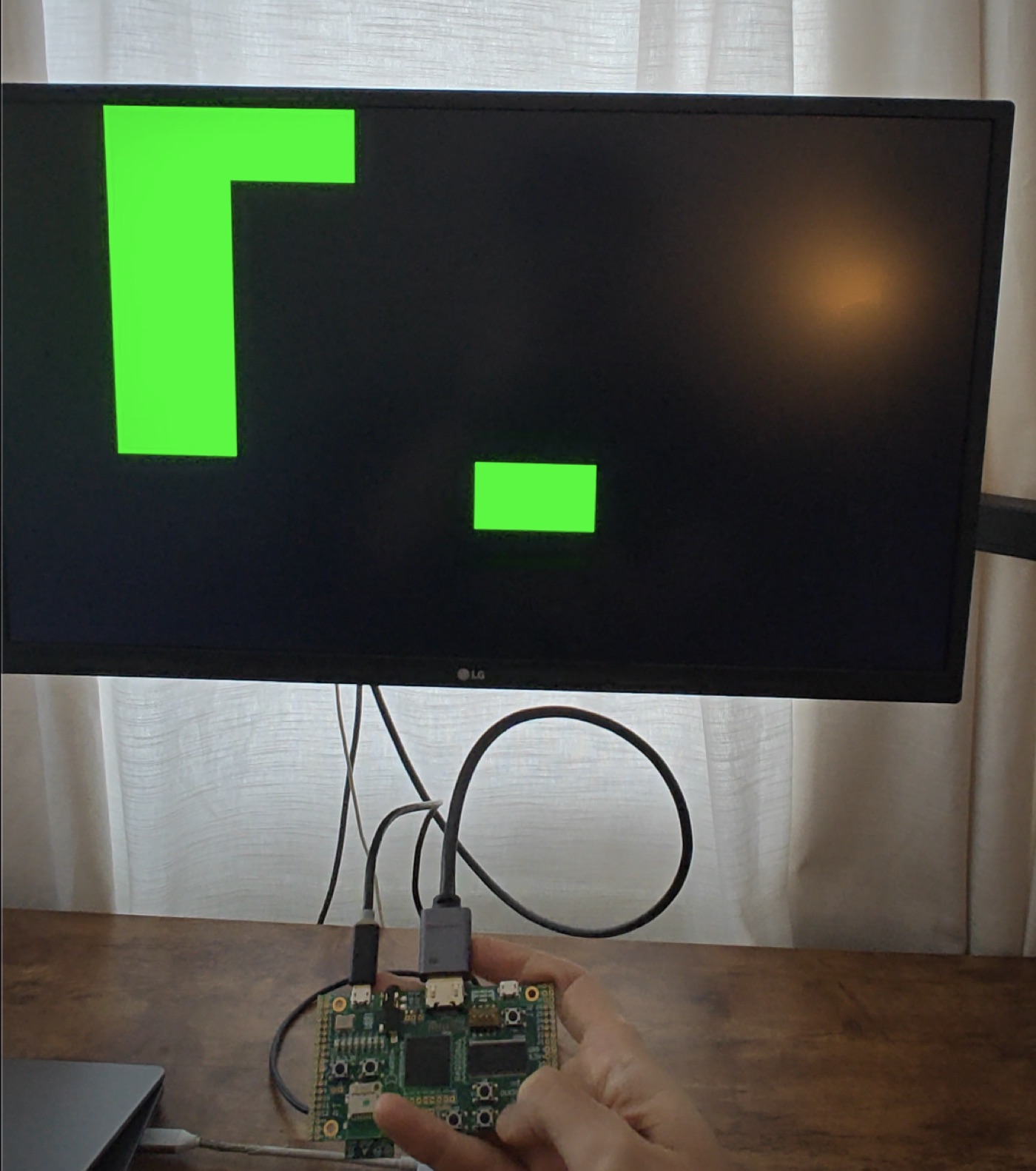
The Snake circuit running on a ULX3S FPGA, drawn on a monitor over HDMI
The same circuit from the demo above, synthesized onto a ULX3S (ECP5) and running over HDMI.

This isn’t a Verilog rewrite of Snake. The game logic and framebuffer are byte-for-byte the circuit you just played, and a CI check fails the build if the browser version and the bitstream ever drift apart.

The video is generated logic too, no display chip in the path. A TMDS encoder turns each pixel into the 10-bit DVI signaling the monitor expects. That, plus the pixel clock and button inputs, is plain Verilog wrapped around the generated core, the same plumbing any ULX3S video project uses. The game is the generated part; this is just the wiring to get it on a screen.

The flow is open the whole way: Verilog → Yosys (synth_ecp5) → nextpnr → ecppack → bitstream. About 100 nodes of logic, and nextpnr closes timing with plenty of headroom over the 25 MHz the design actually runs at.

Run it on your own board

Got an FPGA? The Snake core is plain Verilog, so it synthesizes for any board. The repo has a complete ULX3S (ECP5) build to copy from, plus a README on running it there and porting it elsewhere: you swap the wrapper, the constraints, and the toolchain target, while the game logic stays the same.