惯性聚合 高效追踪和阅读你感兴趣的博客、新闻、科技资讯
阅读原文 在惯性聚合中打开

推荐订阅源

MongoDB | Blog
MongoDB | Blog
J
Java Code Geeks
OSCHINA 社区最新新闻
OSCHINA 社区最新新闻
D
DataBreaches.Net
腾讯CDC
GbyAI
GbyAI
I
InfoQ
博客园 - Franky
G
Google Developers Blog
Last Week in AI
Last Week in AI
奇客Solidot–传递最新科技情报
奇客Solidot–传递最新科技情报
V
Visual Studio Blog
Vercel News
Vercel News
博客园_首页
MyScale Blog
MyScale Blog
Martin Fowler
Martin Fowler
N
Netflix TechBlog - Medium
V
V2EX
T
The Blog of Author Tim Ferriss
M
MIT News - Artificial intelligence
雷峰网
雷峰网
H
Hackread – Cybersecurity News, Data Breaches, AI and More
大猫的无限游戏
大猫的无限游戏
The GitHub Blog
The GitHub Blog

Hacker News: Show HN

PurrrrrFocus: Pomodoro Timer App - App Store Workflow Engine — Multi-Step Orchestration for Bun RapidPhoto: Pro Photo Editor App - App Store GitHub - DheerG/swarms: Achieve extraordinary results with claude code across a variety of tasks SPICE simulation → oscilloscope → verification with Claude Code — Lucas Gerads Show HN: VCoding – A 5 MB native Windows IDE with no dynamic dependencies Show HN: LLMs don't hallucinate because they're bad at math, it's the format GitHub - Agent-FM/agentfm-core: AgentFM is a peer-to-peer network that turns everyday computers into a decentralized AI supercomputer. AgentFM lets you run massive AI workloads directly across a global mesh of idle CPUs and GPUs. Show HN: Tracking Top US Science Olympiad Alumni over Last 25 Years GitHub - Potarix/agent-hub: One place to talk to all your agents Show HN: Runtime security for AI agents(injection,tool abuse, data exfiltration) GitHub - dubeyKartikay/lazyspotify: Terminal Spotify client for macOS and Linux GitHub - the-banana-tool/king-louie: Easy to use GUI Personal AI Assistant. Win/Linux/Mac. Show HN I made my vacation rental bookable by AI agents–no Airbnb, 0% commission GitHub - basteez/jsf-autoreload: maven plugin to enable hot reload on jsf projects uvm32/hosts/host-gdbstub at main · ringtailsoftware/uvm32 GitHub - labsai/EDDI: Config-driven engine that turns JSON into production-grade AI agents. Multi-agent orchestration, 12+ LLM providers, MCP/A2A protocols, RAG, persistent memory, and enterprise compliance (EU AI Act, GDPR, HIPAA). Built on Quarkus. GitHub - glitchnsec/fortyone-oss: AI Executive Assistant Platform Quickstart | Alien GitHub - muxshed/shed: One stream in, or many. Every destination, simultaneously. No cloud middleman, no per-channel fees, no limits. GitHub - ocrbase-hq/ocrbase: 📄 PDF/IMG ->.MD/JSON Document OCR API for PaddleOCR and GLMOCR. Self-hostable. GitHub - impactjo/home-memory: MCP server that lets your AI assistant remember everything about your home. GitHub - Sets88/dbcls: DbCls is a powerful terminal database client that supports various databases GitHub - neptun2000/heor-agent-mcp GitHub - SeanFDZ/macmind: Single-layer transformer in HyperTalk for the classic Macintosh RollQuation: Math Puzzles - Apps on Google Play GitHub - dropbox/witchcraft Show HN: Agent-cache – Multi-tier LLM/tool/session caching for Valkey and Redis GitHub - opentalon/opentalon: OpenTalon is an open-source platform built from the ground up in Go as a robust alternative to OpenClaw LinkedIn™ 职位抓取工具 - Chrome 应用商店
Markdown QuickLook
jzone3 · 2026-06-13 · via Hacker News: Show HN
Markdown QuickLook icon

Render Markdown in macOS Quick Look. Free & open source.

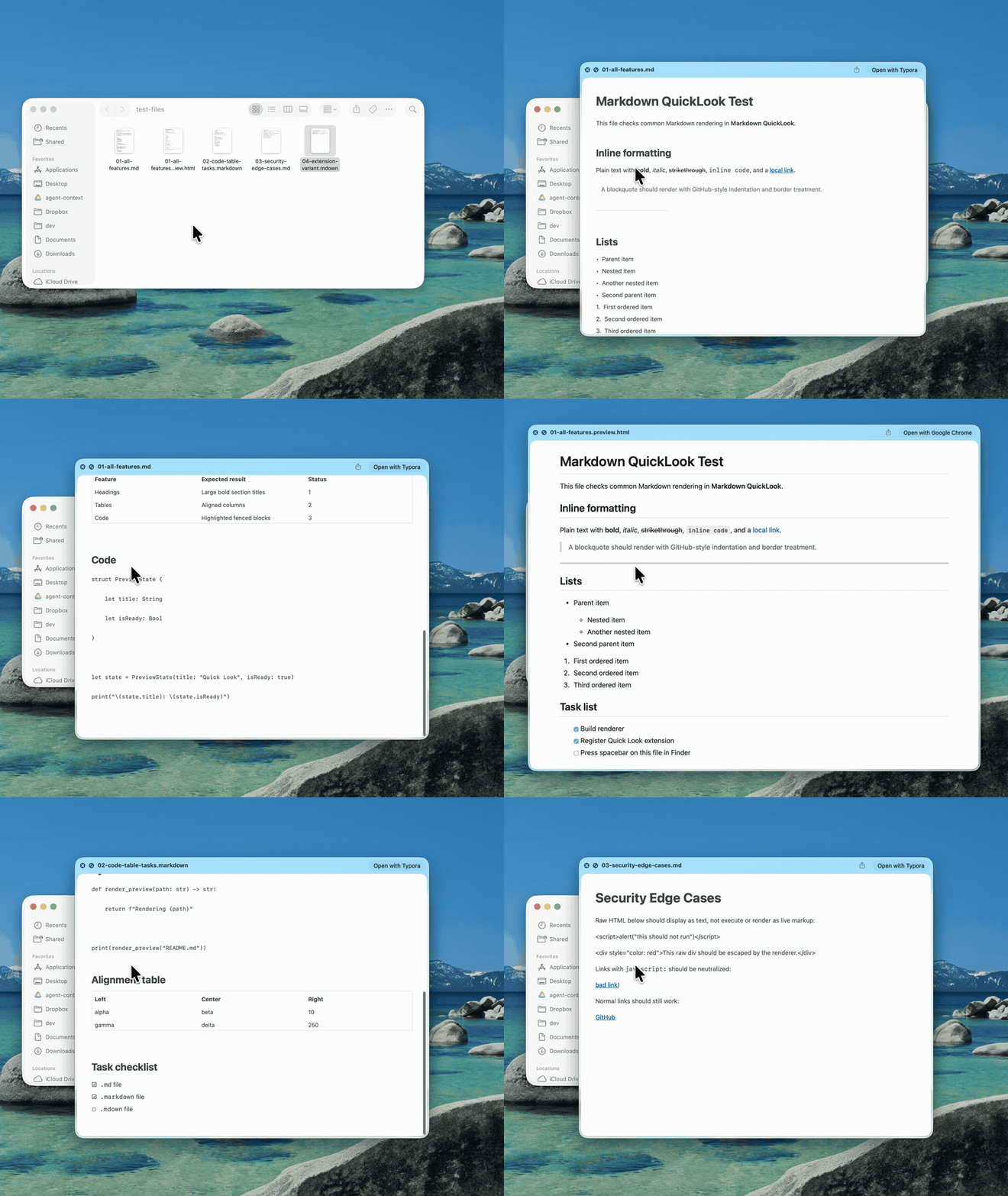
A tiny macOS Quick Look extension. Select a .md file in Finder, press space, and read it rendered the way it was meant to look — headings, code, tables and task lists included. No app window, just a menu-bar helper that stays out of the way.

Download MarkdownQuickLook.dmg ↓

macOS 12+ · MIT · source on GitHub

Pressing spacebar on Markdown files in Finder shows rendered Quick Look previews with headings, code blocks, tables and task lists
Spacebar on a .md file in Finder → rendered preview.

What it does

  • Rich rendering. Headings, lists, task lists, blockquotes, links, bold, italic, strikethrough and inline code.
  • Syntax-highlighted code. Fenced code blocks highlighted with a clean GitHub-style theme, light and dark.
  • Real tables. GitHub-flavored Markdown tables render as native AppKit tables — not raw pipes.
  • Sandboxed & offline. Runs in a sandboxed Quick Look extension with no network access. A menu-bar helper, no Dock icon.

Install

  1. Download & open the disk image. Drag Markdown QuickLook into your Applications folder.
  2. Launch it once. Open it from Applications. It lives in the menu bar and registers the Quick Look extension.
  3. Press space. Select any .md file in Finder and hit space. If an old preview is cached, use the menu-bar item → Reset Quick Look Cache.