








Glassboard lets you scribble over anything on your Mac. Hold a shortcut to draw, release and your ink fades away — perfect for demos, screen shares, and teaching.
Free · Signed & notarized · macOS Tahoe 26 or later
Why Glassboard
An annotation layer that's only ever one key press away — and out of your way otherwise.
✋
Hold a global shortcut and drag to draw over anything on screen — slides, demos, code, the desktop.
✨
Temporary by design. Your strokes disappear, once you let go.
🎨
Pink, lime, yellow, turquoise, and orange — Make your message stand out.
🖍️
Freehand pen, arrow, rectangle, and ellipse, with adjustable thickness.
🧑🎨
Highlight the points you want to get across.
👌
No app support needed. Just draw over anything you want.
Draw over anything
Glassboard draws on a transparent overlay across apps on every display, without stealing focus from the app underneath. Keep presenting, keep clicking — just hold the shortcut to mark things up.

Control with gestures...
Hold right-click to fan out a radial menu right where you're drawing — tools on the left, colors on the right, with a live brush preview in the middle. Hover and release to pick; scroll while it's open to size the brush. No trip to a toolbar.
... or with keybinds.
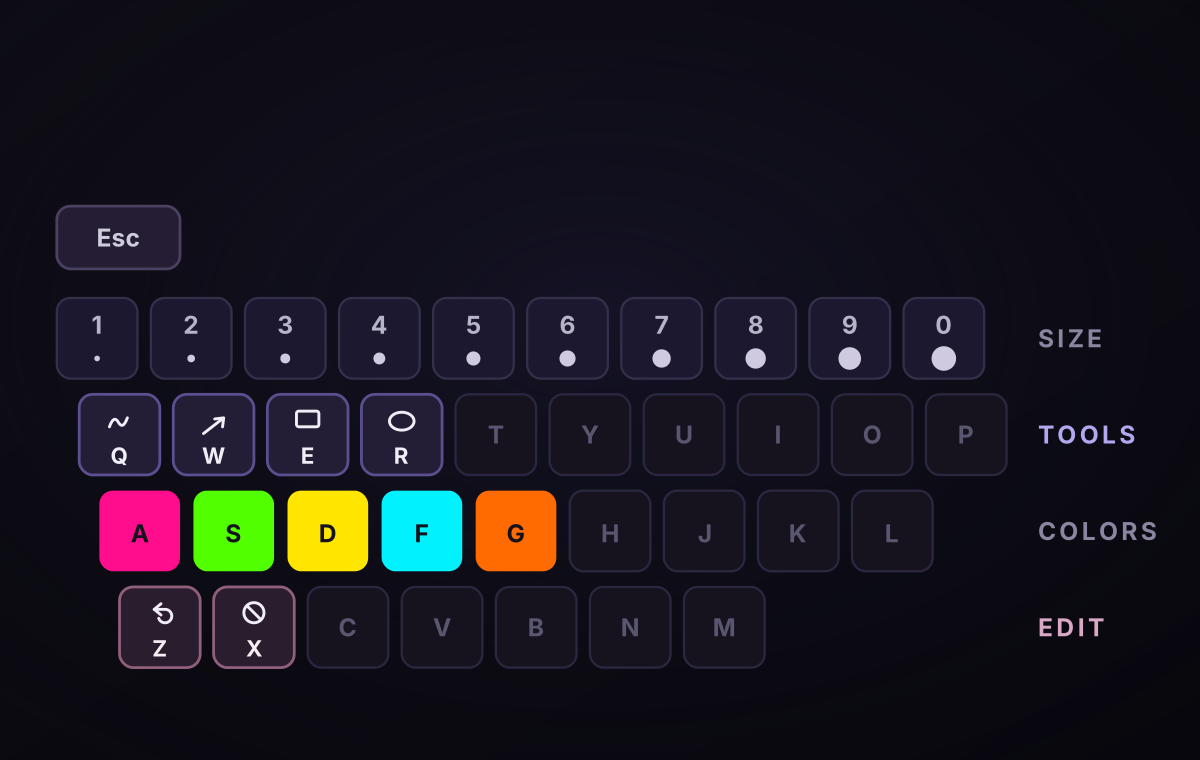
If you don't want any UI to disturb your presentation, the keyboard does it all without a menu. Q W E R pick the tool, the A S D F G home row picks the color, and 1 through 0 set the thickness from hair-thin to bold. Z undoes your last stroke and X wipes the canvas clean.
How it works
1
Strokes appear instantly on a transparent layer. The app underneath keeps focus, so you can keep clicking and presenting.
2
Drag to draw freehande or using shapes. Hold right-click for the radial menu, or use the keyboard to switch tool and color without breaking stride.
3
The ink fades on its own. No undo, no eraser, no "let me clear that" — the screen is clean for your next point.
Requirements
macOS Tahoe 26+Tahoe-compatible Apple Silicon or Intel Mac.
AccessibilityGrant permission once so Glassboard can watch for the global drawing shortcut.
此内容由惯性聚合(RSS阅读器)自动聚合整理,仅供阅读参考。 原文来自 — 版权归原作者所有。