



惯性聚合 高效追踪和阅读你感兴趣的博客、新闻、科技资讯
阅读原文 在惯性聚合中打开

推荐订阅源

I
InfoQ
博客园_首页
美团技术团队
M
MIT News - Artificial intelligence
人人都是产品经理
人人都是产品经理
Blog — PlanetScale
Blog — PlanetScale
H
Help Net Security
J
Java Code Geeks
T
Tailwind CSS Blog
Jina AI
Jina AI
量子位
freeCodeCamp Programming Tutorials: Python, JavaScript, Git & More
G
Google Developers Blog
爱范儿
爱范儿
Cyber Security Advisories - MS-ISAC
宝玉的分享
宝玉的分享
小众软件
小众软件
MongoDB | Blog
MongoDB | Blog
博客园 - 三生石上(FineUI控件)
L
LangChain Blog
酷 壳 – CoolShell
酷 壳 – CoolShell
V
Visual Studio Blog
博客园 - Franky
钛媒体:引领未来商业与生活新知
钛媒体:引领未来商业与生活新知

Hacker News: Show HN

PurrrrrFocus: Pomodoro Timer App - App Store Workflow Engine — Multi-Step Orchestration for Bun RapidPhoto: Pro Photo Editor App - App Store GitHub - DheerG/swarms: Achieve extraordinary results with claude code across a variety of tasks SPICE simulation → oscilloscope → verification with Claude Code — Lucas Gerads Show HN: VCoding – A 5 MB native Windows IDE with no dynamic dependencies Show HN: LLMs don't hallucinate because they're bad at math, it's the format GitHub - Agent-FM/agentfm-core: AgentFM is a peer-to-peer network that turns everyday computers into a decentralized AI supercomputer. AgentFM lets you run massive AI workloads directly across a global mesh of idle CPUs and GPUs. Show HN: Tracking Top US Science Olympiad Alumni over Last 25 Years GitHub - Potarix/agent-hub: One place to talk to all your agents Show HN: Runtime security for AI agents(injection,tool abuse, data exfiltration) GitHub - dubeyKartikay/lazyspotify: Terminal Spotify client for macOS and Linux GitHub - the-banana-tool/king-louie: Easy to use GUI Personal AI Assistant. Win/Linux/Mac. Show HN I made my vacation rental bookable by AI agents–no Airbnb, 0% commission GitHub - basteez/jsf-autoreload: maven plugin to enable hot reload on jsf projects uvm32/hosts/host-gdbstub at main · ringtailsoftware/uvm32 GitHub - labsai/EDDI: Config-driven engine that turns JSON into production-grade AI agents. Multi-agent orchestration, 12+ LLM providers, MCP/A2A protocols, RAG, persistent memory, and enterprise compliance (EU AI Act, GDPR, HIPAA). Built on Quarkus. GitHub - glitchnsec/fortyone-oss: AI Executive Assistant Platform Quickstart | Alien GitHub - muxshed/shed: One stream in, or many. Every destination, simultaneously. No cloud middleman, no per-channel fees, no limits. GitHub - ocrbase-hq/ocrbase: 📄 PDF/IMG ->.MD/JSON Document OCR API for PaddleOCR and GLMOCR. Self-hostable. GitHub - impactjo/home-memory: MCP server that lets your AI assistant remember everything about your home. GitHub - Sets88/dbcls: DbCls is a powerful terminal database client that supports various databases GitHub - neptun2000/heor-agent-mcp GitHub - SeanFDZ/macmind: Single-layer transformer in HyperTalk for the classic Macintosh RollQuation: Math Puzzles - Apps on Google Play GitHub - dropbox/witchcraft Show HN: Agent-cache – Multi-tier LLM/tool/session caching for Valkey and Redis GitHub - opentalon/opentalon: OpenTalon is an open-source platform built from the ground up in Go as a robust alternative to OpenClaw LinkedIn™ 职位抓取工具 - Chrome 应用商店
ACAV: Overview
leomicv · 2026-05-22 · via Hacker News: Show HN

ACAV (Aurora Clang AST Viewer) is an interactive Abstract Syntax Tree (AST) visualization tool for C, C++, and Objective-C, built with Clang and Qt. Given a JSON compilation database such as compile_commands.json, ACAV lets you open a real project, inspect the AST for a translation unit, and move directly between source code and AST nodes.
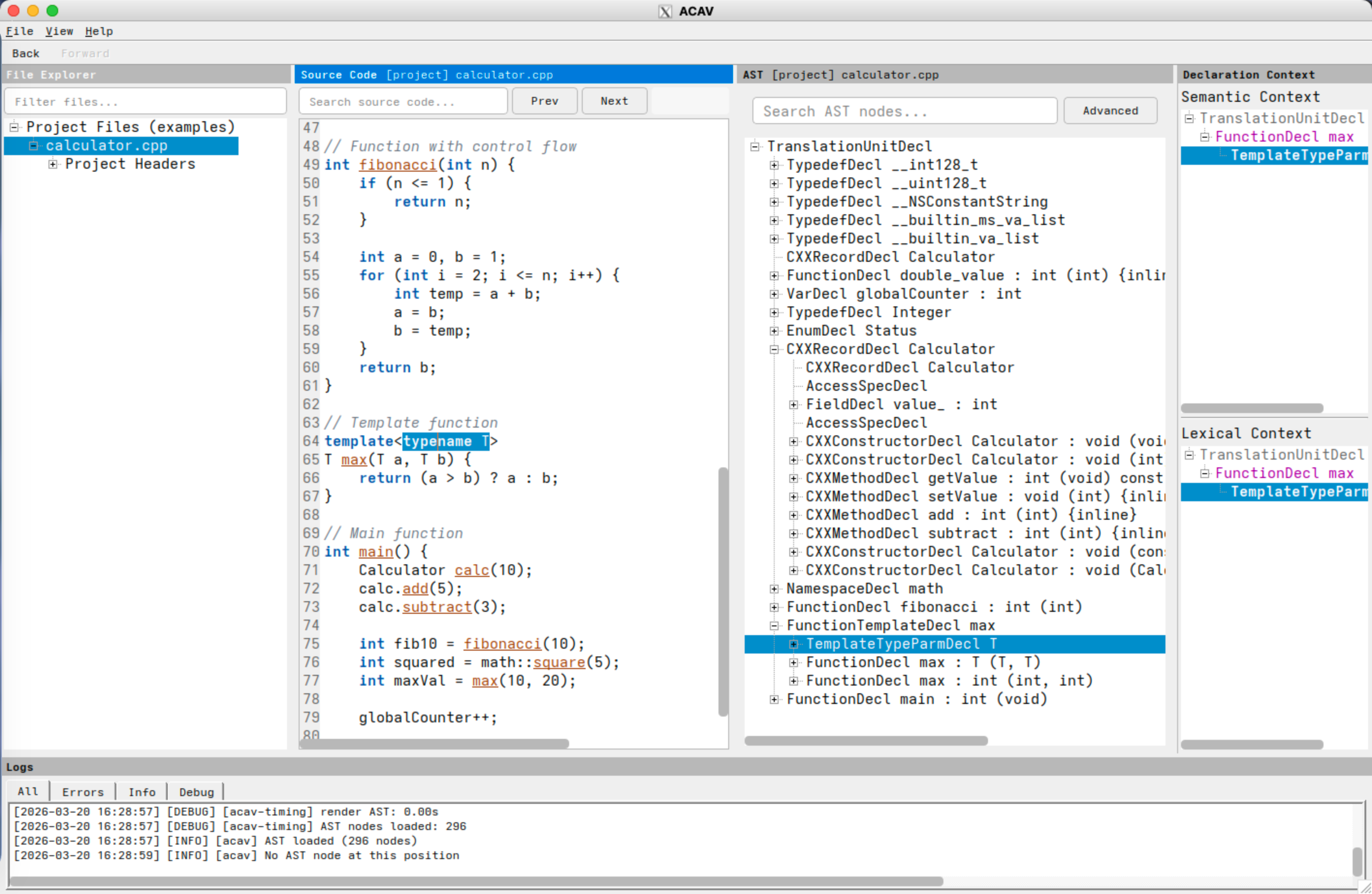
Screenshot of the ACAV interface showing the file explorer, source code view, AST tree view, declaration-context panels, and log panel.

Screenshot: ACAV displaying the file explorer, source-code panel, AST tree view, declaration-context panels, and log panel.

Project Links

At a Glance

With a valid compilation database, ACAV lets you:

  • inspect the AST for a translation unit in a navigable tree,
  • move in both directions between source locations and AST nodes,
  • view declaration context while exploring program structure,
  • search both source text and AST nodes, and
  • reuse dependency and AST-cache artifacts across sessions.

ACAV follows a three-program architecture:

  • acav is the interactive GUI application.
  • query-dependencies extracts dependency information from a compilation database.
  • make-ast builds and caches serialized AST files for individual source files.

Purpose and Scope

ACAV addresses the gap between Clang's powerful front-end infrastructure and the practical difficulty of exploring Clang ASTs interactively. It is designed for real codebases rather than toy examples: it reads a JSON compilation database, applies the recorded build settings for each source file, and keeps the interface responsive through background processing and AST caching.

ACAV is useful for students learning compiler internals, researchers studying program structure, and developers building or debugging Clang-based tools. Its current scope is intentionally limited to read-only AST exploration. ACAV does not modify source code, perform refactoring, or act as a general-purpose editor, and it displays the AST of one translation unit at a time.

Quick Start

The typical workflow is:

  1. Generate or locate a compilation database for the target project.
  2. Build or install ACAV by following Installation.
  3. Launch ACAV:

    acav -c /path/to/compile_commands.json

  4. Browse files in the file explorer, then double-click a file or press F5 to generate or load its AST.
  5. Use the source view, AST view, and declaration context view to navigate the program structure.

Documentation Organization

  • License points to the authoritative license file.
  • Installation covers prerequisites, native builds, and the containerized workflow.
  • Docker/Podman Demo Image provides detailed OCI demo image instructions.
  • User Manual describes the GUI, common workflows, the command-line programs, keyboard shortcuts, and configuration.
  • References lists related technologies and resources.
  • Classes provides the generated class reference.
  • Files provides the generated file reference.
  • Changelog provides public release notes for ACAV.
  • Notice provides project attribution, authorship, and licensing context.

How to Use This Manual

If you are new to ACAV, start with this overview, then Installation, and then User Manual. If you want to inspect the API surface, use Classes and Files. If you want to review public release notes, see the Changelog.