













📬 Subscribe for release updates — new versions, no spam
Your clusters are talking. This assistant helps you listen.
An AI-powered Kubernetes troubleshooting assistant that lets teams investigate, diagnose, and resolve cluster issues through natural language — via a chat-based web UI or directly inside your IDE (Cursor / Claude Desktop / VS Code via MCP).
Combines live kubectl access with pluggable LLM providers (Gemini, Ollama/local, more coming) for root-cause analysis that turns cryptic Kubernetes failures into clear answers and actionable fix commands.
See it in action
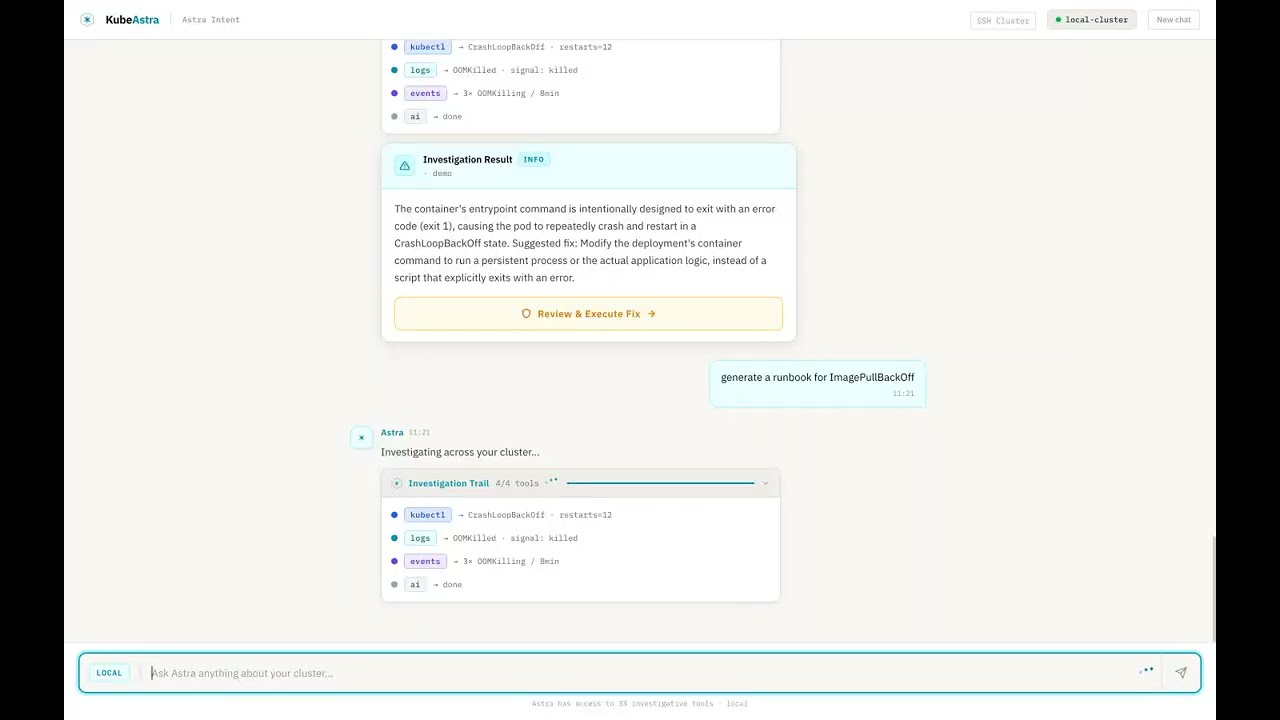
▶ Watch the 90-second demo — Kubeastra walking through 7 real Kubernetes failures (CrashLoopBackOff, OOMKilled, ImagePullBackOff, stuck PVC, unschedulable pod, namespace-wide health, runbook generation).
Want to reproduce it locally?
make demospins up a kind cluster pre-seeded with six broken workloads. Seedemo/README.md.
Why this exists
Every DevOps engineer has been here: a pod is crashlooping at 2 AM, and you're mentally chaining together kubectl get, kubectl describe, kubectl logs, cross-referencing events, checking resource limits, and Googling error messages — all while half asleep.
This tool handles that investigation loop for you:
- Ask in plain English — "Why is payment-service crashing in production?"
- Get root-cause analysis — not just logs, but AI-synthesized explanations of what's wrong and why
- Receive fix commands — ready to run, with safety confirmations for write operations
- Generate runbooks — so your team doesn't debug the same issue twice
- Stay on your own infra — run entirely locally with Ollama, no data leaves your cluster
Key Features
🔍 34 Built-in Kubernetes Tools
Live cluster tools (28) — pod/deployment/service inspection, event streams, multi-namespace discovery, rollout status, kubeconfig context switching, log retrieval with previous-container support, resource-graph topology, deployment-level investigation, namespace-wide health analysis, and safe write operations (delete, scale, restart, patch — all gated behind confirm=true).
AI analysis tools (6) — error analysis with RAG-backed similarity search, curated fix playbooks for 11 error categories, AI-generated runbooks, cluster health reports, post-incident summarization.
💬 Two Ways to Use It
| Web UI | IDE / MCP Integration |
|---|---|
| Chat-based Next.js interface for team-wide troubleshooting | Direct integration into Cursor, Claude Desktop, or any MCP client |
| Shareable sessions with persistent chat history (SQLite) | Debug without leaving your editor |
| SSH panel to attach to any remote kubeadm cluster | 34 tools available via stdio or HTTP MCP transport |
🔌 Pluggable LLM Providers
Pick your LLM — Google Gemini (default, free tier available) or Ollama (fully local — your cluster data never leaves your network). OpenAI and Anthropic Claude adapters coming next.
🛡️ Safety First
- Read-only by default — all
kubectlcommands are validated before execution - Explicit confirmation required for write operations (
delete,scale,restart,patch) - Full audit logging of every command executed
- RBAC-aware — respects your existing Kubernetes permissions
- Input validation — namespace/name/label-selector safety checks prevent injection
🚀 Deploy Anywhere
- Local dev — docker-compose one-liner
- Kind demo cluster —
make demospins up a broken cluster so you can see the tool work in 60 seconds - Production Helm chart — deploy into the same clusters it monitors
- SSH multi-cluster — query any remote kubeadm cluster without copying kubeconfigs
Quick Start
Option 1: Try the demo (60 seconds, no cluster needed)
Prerequisites: Docker Desktop, kind, kubectl
git clone https://github.com/kubeastra/KubeAstra.git
cd KubeAstra
make demo
Spins up a local kind cluster with pre-broken workloads (CrashLoop, OOM, ImagePull, stuck PVC) and launches the web UI.
Open http://localhost:3000 and ask "what's broken in the demo namespace?".
The demo generates its own kubeconfig automatically — it does not touch your host's current kubectl context. See
demo/README.mdfor full prerequisites and troubleshooting.
Option 2: Run locally against your own cluster
Prerequisites: a running Kubernetes cluster with kubectl access, and a Google Gemini API key (free tier) or Ollama running locally.
# 1. Configure the backend
cp ui/backend/.env.example ui/backend/.env
#    → set GEMINI_API_KEY (or LLM_PROVIDER=ollama) in .env

# 2. Start via docker-compose (kubeconfig mounted read-only)
cd ui
docker compose up --build

# 3. Open http://localhost:3000
Option 3: Use via MCP (Cursor / Claude Desktop)
cd mcp
./setup.sh        # creates venv, installs deps, writes MCP config entry
Edit mcp/.env:
GEMINI_API_KEY=your-key-here          # or LLM_PROVIDER=ollama
ALLOWED_NAMESPACES=prod,staging,default
Restart your IDE — all 34 tools appear as MCP tools.
Option 4: Deploy to Kubernetes via Helm
helm upgrade --install kubeastra helm/kubeastra \
  --namespace kubeastra --create-namespace \
  --set backend.image.repository=ghcr.io/your-org/kubeastra-backend \
  --set frontend.image.repository=ghcr.io/your-org/kubeastra-frontend \
  --set secrets.geminiApiKey="YOUR_KEY" \
  --set secrets.kubeconfig="$(cat ~/.kube/config | base64 | tr -d '\n')"
How It Works
- You ask a question — "Why are pods in checkout-service not starting?"
- Intent classification — LLM (Gemini or local Ollama) picks the right tool + extracts params. Falls back to a 30+ pattern regex router if no LLM key is set.
- Auto-discovery — if you don't specify a namespace,
find_workloadsearches across all namespaces. - Live investigation — executes read-only
kubectlcommands against your cluster (or over SSH if you've connected a remote node). - AI synthesis — instead of dumping raw JSON, returns a clear 2–3 sentence diagnosis with root cause and next steps.
- Persistence — every message, tool call, and result saved to SQLite so you can pick up where you left off.
Example Interaction
You: Why is my-app crashing in the dev namespace?
Assistant: my-app-7d4f9b-xkj2p is in CrashLoopBackOff. The container is failing
with exit code 1 during startup — the application logs show a connection
refused error to redis-master:6379. The Redis pod in this namespace is in
Pending state due to an unbound PVC.

Suggested fix:
  kubectl get pvc -n dev                   # Check PVC status
  kubectl describe pvc redis-data -n dev   # Check binding issue

Would you like me to generate a runbook for Redis PVC recovery?
Configuration
All settings are read from environment variables (or .env):
| Variable | Default | Description |
|---|---|---|
LLM_PROVIDER |
gemini |
gemini or ollama |
GEMINI_API_KEY |
— | Required when LLM_PROVIDER=gemini. Get one free |
GEMINI_MODEL |
gemini-2.5-flash |
Gemini model to use |
OLLAMA_BASE_URL |
http://localhost:11434 |
Ollama server URL |
OLLAMA_MODEL |
llama3.1 |
Ollama model name (must be pulled first) |
ALLOWED_NAMESPACES |
* |
Comma-separated list, or * for all |
KUBECTL_TIMEOUT_SECONDS |
15 |
Per-command timeout |
MAX_LOG_TAIL_LINES |
200 |
Max log lines per request |
ENABLE_RECOVERY_OPERATIONS |
false |
Enables delete_pod, rollout_restart, scale_deployment, apply_patch |
WEAVIATE_URL |
http://localhost:8080 |
Optional RAG vector DB |
Repository Layout
kubeastra/
├── ui/
│   ├── frontend/          # Next.js chat UI
│   ├── backend/           # FastAPI app + SQLite persistence
│   └── docker-compose.yml
├── mcp/
│   ├── mcp_server/        # MCP server (stdio + HTTP transports)
│   ├── k8s/               # kubectl wrappers, SSH runner, validators
│   ├── ai_tools/          # Error analysis, runbooks, error summary
│   ├── services/          # LLM providers, Weaviate, embeddings
│   └── config/settings.py
├── helm/kubeastra/        # Helm chart
├── demo/                  # Kind + broken workloads for `make demo`
└── docs/                  # Public documentation
Roadmap
- Gemini + Ollama (local) LLM support
- Demo mode with kind cluster
- Visual resource graph (Ingress → Service → Deployment → Pod)
- Approval flow for write operations
- Deployment-level investigation (
investigate_workload) - Namespace-wide health analysis (
analyze_namespace) - Agentic investigation loop (multi-step ReAct)
- OpenAI + Anthropic Claude adapters
- Prometheus / Loki / Tempo observability integrations
- CLI tool (
kubeastra investigate <pod>) - Slack bot integration (alert-driven investigation)
- "What changed?" view — recent deployments, ConfigMap/Secret mutations
- Shareable session URLs
- VS Code extension (beyond MCP)
- Post-mortem generator
- CNCF Sandbox submission
Contributing
Contributions are welcome — especially the items at the top of the roadmap. See CONTRIBUTING.md for local setup, project layout, and how to add a new tool, and CODE_OF_CONDUCT.md for community guidelines.
Looking for a starter task? Check the good first issue label.
License
Apache 2.0 — see LICENSE for details.