


惯性聚合 高效追踪和阅读你感兴趣的博客、新闻、科技资讯
阅读原文 在惯性聚合中打开

推荐订阅源

L
LangChain Blog
阮一峰的网络日志
阮一峰的网络日志
WordPress大学
WordPress大学
博客园 - 司徒正美
罗磊的独立博客
D
Docker
Last Week in AI
Last Week in AI
爱范儿
爱范儿
M
MIT News - Artificial intelligence
V
V2EX
Google DeepMind News
小众软件
小众软件
Apple Machine Learning Research
Microsoft Security Blog
T
Tailwind CSS Blog
MyScale Blog
MyScale Blog
V
Visual Studio Blog
博客园 - 叶小钗
B
Blog RSS Feed
A
About on SuperTechFans
F
Fortinet All Blogs
T
The Blog of Author Tim Ferriss
Martin Fowler
Martin Fowler
P
Proofpoint News Feed

Hacker News: Show HN

PurrrrrFocus: Pomodoro Timer App - App Store Workflow Engine — Multi-Step Orchestration for Bun RapidPhoto: Pro Photo Editor App - App Store GitHub - DheerG/swarms: Achieve extraordinary results with claude code across a variety of tasks SPICE simulation → oscilloscope → verification with Claude Code — Lucas Gerads Show HN: VCoding – A 5 MB native Windows IDE with no dynamic dependencies Show HN: LLMs don't hallucinate because they're bad at math, it's the format GitHub - Agent-FM/agentfm-core: AgentFM is a peer-to-peer network that turns everyday computers into a decentralized AI supercomputer. AgentFM lets you run massive AI workloads directly across a global mesh of idle CPUs and GPUs. Show HN: Tracking Top US Science Olympiad Alumni over Last 25 Years GitHub - Potarix/agent-hub: One place to talk to all your agents Show HN: Runtime security for AI agents(injection,tool abuse, data exfiltration) GitHub - dubeyKartikay/lazyspotify: Terminal Spotify client for macOS and Linux GitHub - the-banana-tool/king-louie: Easy to use GUI Personal AI Assistant. Win/Linux/Mac. Show HN I made my vacation rental bookable by AI agents–no Airbnb, 0% commission GitHub - basteez/jsf-autoreload: maven plugin to enable hot reload on jsf projects uvm32/hosts/host-gdbstub at main · ringtailsoftware/uvm32 GitHub - labsai/EDDI: Config-driven engine that turns JSON into production-grade AI agents. Multi-agent orchestration, 12+ LLM providers, MCP/A2A protocols, RAG, persistent memory, and enterprise compliance (EU AI Act, GDPR, HIPAA). Built on Quarkus. GitHub - glitchnsec/fortyone-oss: AI Executive Assistant Platform Quickstart | Alien GitHub - muxshed/shed: One stream in, or many. Every destination, simultaneously. No cloud middleman, no per-channel fees, no limits. GitHub - ocrbase-hq/ocrbase: 📄 PDF/IMG ->.MD/JSON Document OCR API for PaddleOCR and GLMOCR. Self-hostable. GitHub - impactjo/home-memory: MCP server that lets your AI assistant remember everything about your home. GitHub - Sets88/dbcls: DbCls is a powerful terminal database client that supports various databases GitHub - neptun2000/heor-agent-mcp GitHub - SeanFDZ/macmind: Single-layer transformer in HyperTalk for the classic Macintosh RollQuation: Math Puzzles - Apps on Google Play GitHub - dropbox/witchcraft Show HN: Agent-cache – Multi-tier LLM/tool/session caching for Valkey and Redis GitHub - opentalon/opentalon: OpenTalon is an open-source platform built from the ground up in Go as a robust alternative to OpenClaw LinkedIn™ 职位抓取工具 - Chrome 应用商店
Oicana is in public beta
niklasei · 2026-05-13 · via Hacker News: Show HN

Source available on GitHub

Generating PDFs from application code is usually a pick-your-poison choice. HTML-to-PDF tools have fragile pagination and weak typography, PDF libraries put verbose layout code into your application, and SaaS PDF builders often come with proprietary template formats and vendor lock-in.

Oicana takes a different route. Templates are plain Typst projects. Your application passes typed inputs (JSON, images), and Oicana compiles a PDF.

  • Multi-platform — the same template works across all integrations: browser, Node.js, C#, Java, Rust, Python, and PHP.
  • Powerful layouting — templates use the full power of Typst, including its package ecosystem.
  • Performant — PDFs can generate in single-digit milliseconds with warmed-up templates in native integrations.
  • AI and version control ready — templates are text files. They live next to your code, and AI can help write them.
  • Minimal vendor lock-in — templates are plain Typst projects. The Typst compiler is open source.

Here’s a minimal Oicana template — a single Typst file with a manifest defining one JSON input:

#import "@preview/oicana:0.1.1": setup

#let read-project-file(path) = read(path, encoding: none)

#let (input, oicana-image, oicana-config) = setup(read-project-file)

#set document(date: datetime.today())

= Hello from Oicana, #input.info.name

[package]

name = "example"

version = "0.1.0"

entrypoint = "main.typ"

[tool.oicana]

manifest_version = 1

[[tool.oicana.inputs]]

type = "json"

key = "info"

Typst is a modern markup-based typesetting system. In main.typ, the = marks a heading and # switches to code mode. The first line imports the Typst Oicana package and the next two lines set it up. In the last line is the actual visual content of our document. #input.info.name interpolates the name field of the info input into the document.

In typst.toml, we define metadata for the template like a name, entrypoint, and inputs. The example defines a single input of type json (see the Oicana documentation on inputs). If the input value is { "name": "Alice" }, the content of our document will be a header reading “Hello from Oicana, Alice”.

There are good options for working on Typst documents like the official webapp and several IDE plugins. this is what it can look like to work on an Oicana template in VS Code using the Tinymist Typst extension with syntax highlighting and live preview:
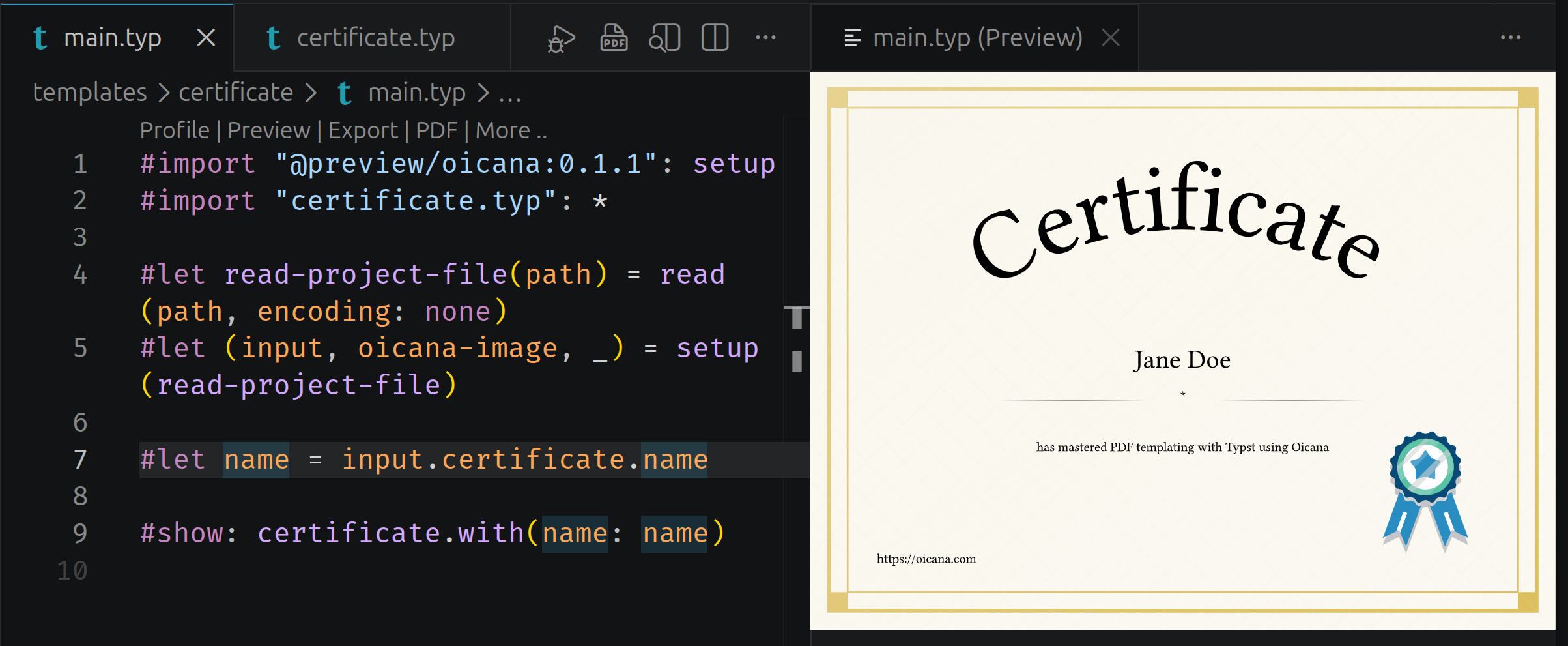
An Oicana template for certificates open in VS Code with the Tinymist Typst extension. The left pane shows the main.typ source with syntax highlighting; the right pane shows the live preview of the document.

You can find an open source collection of example Oicana templates on GitHub, including the certificate template shown above.

If you install the Oicana CLI and run oicana pack in the template directory, it produces the file example-0.1.0.zip that any Oicana integration can compile. Passing { "name": "Alice" } for the info input from your application looks like this in the different integrations (omitting some general boilerplate):

import { Template } from '@oicana/browser';

const templateFile = await fetch('/example-0.1.0.zip');

const template = new Template(new Uint8Array(await templateFile.arrayBuffer()));

const jsonInputs = new Map<string, string>();

jsonInputs.set('info', JSON.stringify({ name: 'Alice' }));

const pdf = template.compile(jsonInputs, new Map());

One template, seven tech stacks — including the browser. The getting started guide walks through this end-to-end for your stack of choice.

Non-commercial use is free: Personal projects, hobby use, research, education, and use by charitable organizations, educational institutions, public research organizations, and government institutions are covered by the PolyForm Noncommercial License.

Commercial licenses are available on the homepage. Licenses are per project, priced by company size, and every subscription includes the CLI and all integrations. All prices include VAT.

  • Startup — €19/month, for companies up to €2M yearly revenue
  • Scaleup — €49/month, for companies up to €25M yearly revenue
  • Enterprise — €99/month, for companies above €25M yearly revenue

Annual billing saves 15%. Every subscription comes with a 30-day money-back guarantee — if Oicana doesn’t fit, email support@oicana.com for a refund.

Oicana was already used in production during the alpha and improved based on the learnings. The same idea goes for the beta. If something feels off, please let us know — that’s the feedback that shapes the road from beta to 1.0.

Give Oicana a try and get started with the setup guide.