








A pnpm-inspired CLI for managing Agent skills with content-addressable storage.
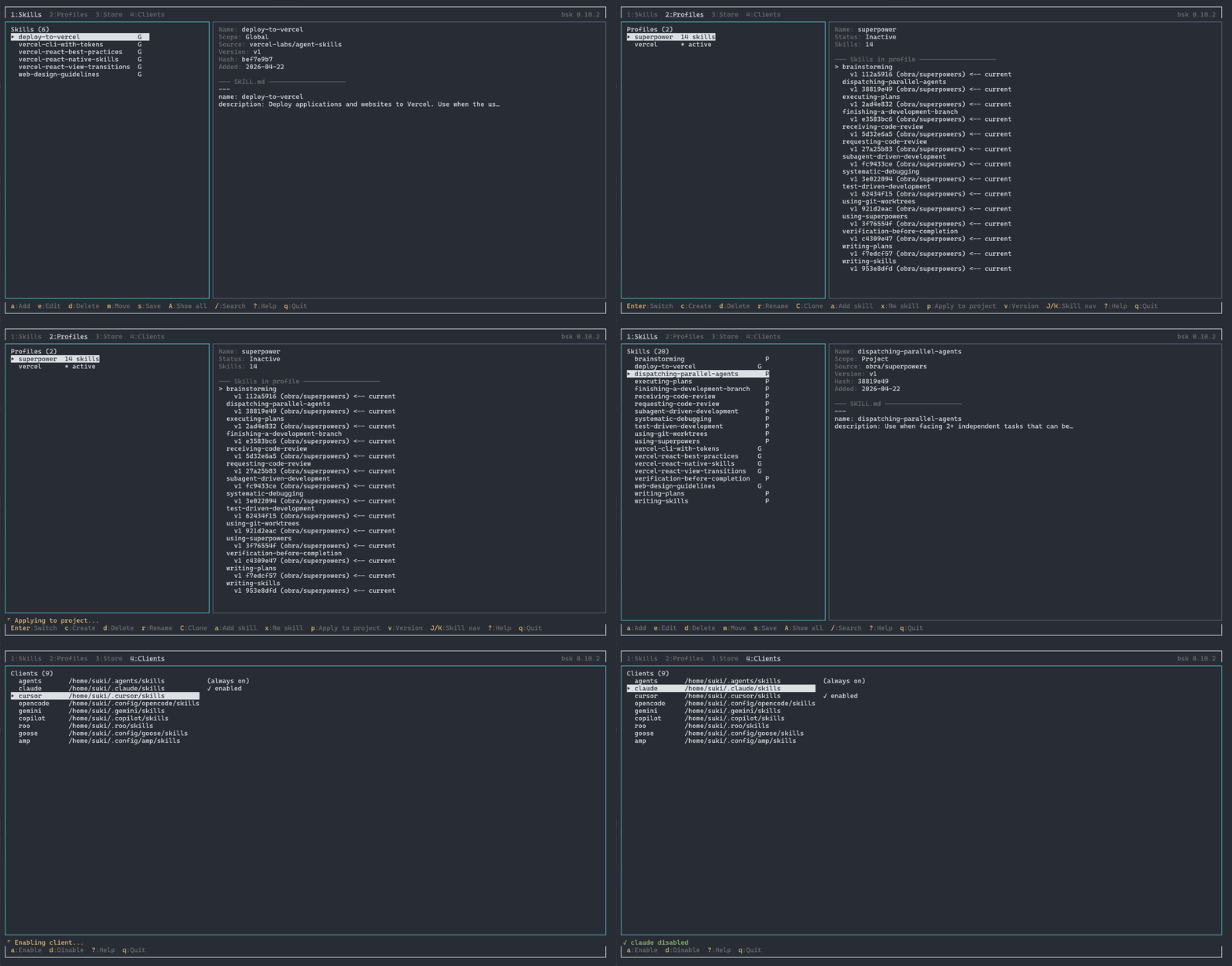
Features
- Content-addressable storage — Skills are SHA-256 hashed and deduplicated in a global store
- Profile management — Create named skill collections, switch between them instantly
- Version tracking — Every save creates a new version; reference any version by number
- Global & project scopes — Install skills user-wide or per-project, move them freely between scopes
- Multiple sources — Add skills from GitHub repos, git URLs, or local paths
- Multi-client support — Sync skills to Claude, Cursor, OpenCode, Gemini, Copilot, Roo, Goose, and Amp simultaneously
Installation
npm / pnpm / bun
npm install -g better-skills
pnpm add -g better-skills
bun add -g better-skills
Requires Node.js >= 18 (or Bun).
Binary
curl -fsSL https://raw.githubusercontent.com/ocherry341/better-skills/main/packages/install/install.sh | bashInstalls a platform-specific binary to ~/.local/bin/. Supports Linux (x64/arm64) and macOS (x64/arm64).
You can also download binaries directly from the GitHub Releases page.
Already Have Skills?
Still managing your skills manually? Just one command to unlock the full power of bsk:
bsk save
Versioning, deduplication, profile switching — all yours, instantly.
Quick Start
# Launch interactive TUI
bsk

# Add a skill from GitHub
bsk add owner/repo

# Add a skill from a subdirectory
bsk add owner/repo/path/to/skill

# Add from a local path
bsk add ./my-skill

# List active skills
bsk ls

# List all managed skills (including inactive)
bsk ls -a
Commands
Skill Management
bsk add <source>          # Add a skill (github, git, local path)
bsk install <source>      # Alias for add (also: bsk i)
bsk rm <name>             # Remove a skill
bsk ls [-a]               # List skills (-a for all managed)
bsk save [name]           # Save new/changed skills to management
bsk mv <skill> <scope>    # Move skill between global/project scope
Options for add / install:
-g, --global        # Install to global skills directory
-n, --name <name>   # Override the skill name
-f, --force         # Overwrite unmanaged skills
-y, --yes           # Skip confirmation prompts
--hardlink           # Use hard links instead of file copy
Source Formats
bsk add owner/repo                              # GitHub repo root
bsk add owner/repo/subdir                       # GitHub subdirectory
bsk add https://github.com/owner/repo           # Full GitHub URL
bsk add https://github.com/owner/repo/tree/main/subdir  # Branch + path
bsk add https://gitlab.com/owner/repo           # Any HTTPS git URL
bsk add git@github.com:owner/repo.git           # Git SSH
bsk add ./local/path                            # Local directory (also ../ and /abs)
Profiles
Profiles are named snapshots of skill collections with version references.
bsk profile create <name>     # Create a profile from current skills
bsk profile ls                # List all profiles
bsk profile show [name]       # Show profile details
bsk profile use <name>        # Switch to a profile
bsk profile add <skill>       # Add a skill to active profile
bsk profile rm <skill>        # Remove a skill from active profile
bsk profile clone <from> <to> # Clone a profile
bsk profile rename <old> <new>
bsk profile delete <name>
Version specifiers for profile operations:
bsk profile add my-skill@latest     # Latest version
bsk profile add my-skill@previous   # Previous version
bsk profile add my-skill@v2         # Specific version
bsk profile add my-skill@~1         # Relative (latest minus 1)
bsk profile add my-skill@abc123     # Hash prefix match
Multi-Client
Enable additional clients to automatically sync skills to their directories.
bsk client ls                          # List enabled clients
bsk client add claude cursor gemini    # Enable clients
bsk client rm cursor                   # Disable a client
Supported clients: claude, cursor, opencode, gemini, copilot, roo, goose, amp
Store
bsk store verify    # Check integrity of all store entries
bsk store ls        # List all store entries with skill/version info
bsk store prune     # Delete all orphan entries from the store
bsk store adopt     # Re-register orphan store entries into registry
Sync
~/.better-skills/ is a self-contained data directory. Sync it with any tool you prefer.
bsk sync restore          # Rebuild live skills from store and profile
bsk sync export           # Export ~/.better-skills/ as tar.gz
bsk sync import <file>    # Import tar.gz and restore
bsk cd                    # Open a shell in ~/.better-skills/
Quick start with git:
cd ~/.better-skills
git init && git add -A && git commit -m "init"
git remote add origin <your-repo> && git push

# On another machine:
git clone <your-repo> ~/.better-skills
bsk sync restore
Simple backup/transfer (no git needed):
bsk sync export                          # Machine A
bsk sync import better-skills-backup.tar.gz  # Machine B
rsync:
rsync -az ~/.better-skills/ remote:~/.better-skills/
ssh remote bsk sync restore
Syncthing / other:
Sync ~/.better-skills/ as a shared folder, then run bsk sync restore on each machine.
How It Works
Skill Format
Skills are directories containing a SKILL.md file with YAML frontmatter:
---
name: my-skill
description: What this skill does
---

# My Skill

Instructions for the AI agent...
Storage Architecture
~/.better-skills/
├── store/{hash}/        # Content-addressable store (immutable)
├── registry.json        # Tracks all skill versions and hashes
├── profiles/            # Named skill collections
├── active-profile       # Currently active profile name
└── config.json          # Enabled clients

~/.agents/skills/        # Global skills (copied from store)
./.agents/skills/        # Project skills
- Add — Skill is fetched, hashed, and stored in
~/.better-skills/store/{hash}/ - Link — Files are copied from the store to skill directories (use
--hardlinkfor hard links) - Sync — Copies are replicated to all enabled client directories (e.g.,
~/.claude/skills/,~/.cursor/skills/) - Version — Each save creates a new registry entry; old versions remain in store
Deduplication
Identical skills across projects share a single store entry. The SHA-256 hash is computed deterministically from file paths and contents, so the same skill always produces the same hash.
Roadmap
- TUI — Interactive terminal UI for managing skills
- Built-in
use better-skillsskill — A bundled skill that teaches agents how to usebsk - Skills security audit — Security review and sandboxing for skill content
Development
This is a Bun workspace monorepo.
bun install              # Install dependencies
bun run dev              # Run CLI from source
bun run build            # Build (tsdown → dist/cli.mjs)
bun run test             # Run tests
bun run typecheck        # TypeScript strict check
bun run build:binary     # Compile cross-platform binaries
License
MIT