









Read your Telegram unread. Without reading it.

A local CLI that turns Telegram chats, YouTube videos, web pages, and files into reports with citations — using whichever LLM you keep an API key for.
You have 47 unread Telegram groups. You will never read them. You will now.
curl -LsSf https://astral.sh/uv/install.sh | sh
uv tool install unread && unread init
unread @somegroup --last-days 7
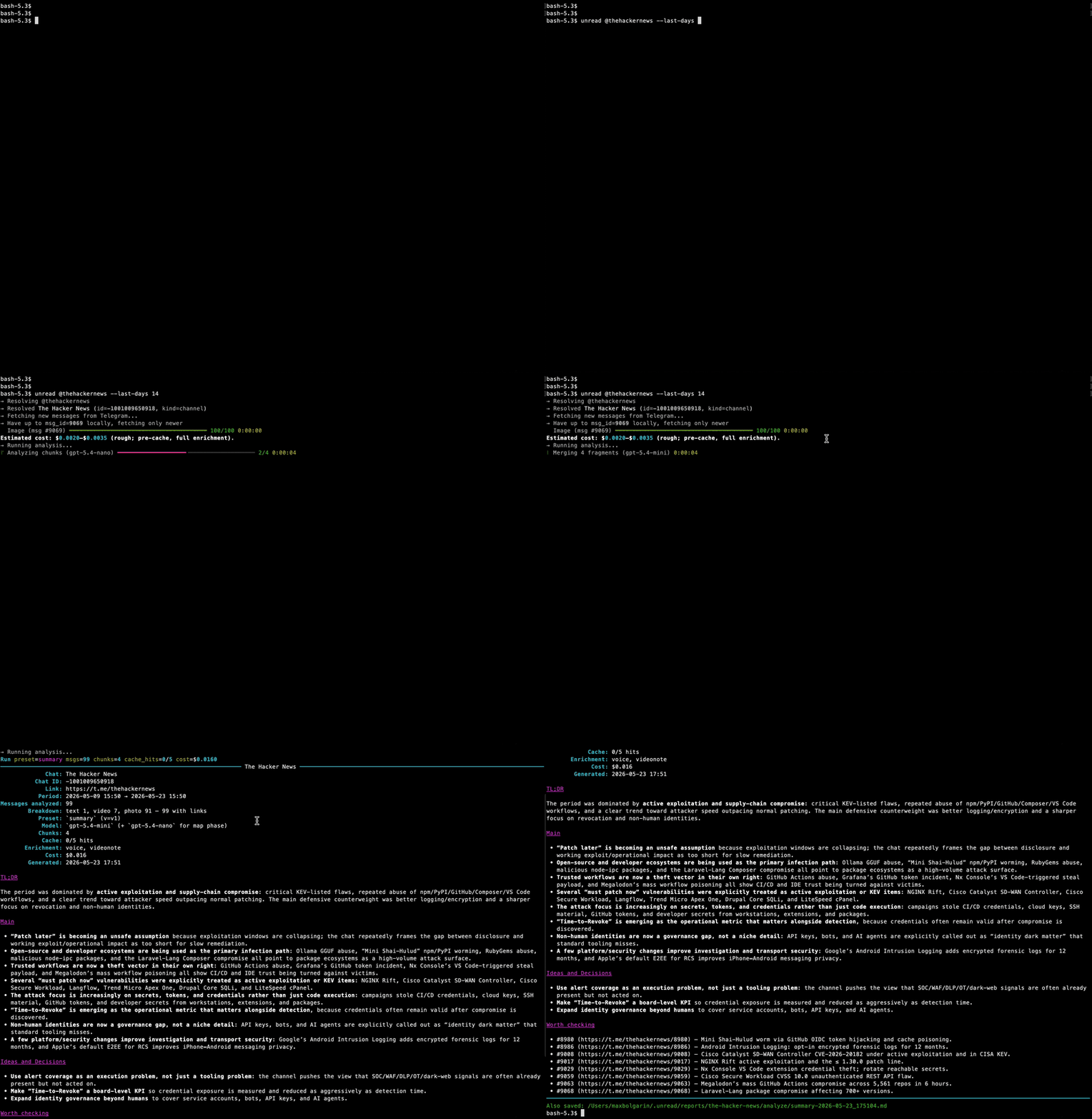
It pulls the chat, runs it through whichever LLM you keep an API key for, and hands you a report with clickable citations back to every claim. Same shape for YouTube videos, web pages, voice messages, recorded meetings, podcasts, PDFs, and stdin. Or run it as a self-hosted Telegram bot and forward anything weird at it — see Self-hosted Telegram bot below.
See a real report from @thehackernews — 99 messages over two weeks, four chunks, $0.016, every bullet linked back to its source.
What it does
Three verbs. The same <ref> shape works on all of them.
unread <ref>— analyze. Map-reduce the source into a Markdown report. Every claim links back to its message / paragraph / timestamp.unread ask <ref> "Q"— ask. One-shot Q&A with citations. Multi-turn follow-ups are one keystroke away.unread dump <ref>— dump. Save the original — chat history, transcript, article — verbatim. No LLM call.
<ref> is any of:
unread @somegroup --last-days 7              # Telegram chat / channel / forum
unread "https://youtu.be/jmzoJCn8evU"        # YouTube video (captions or Whisper)
unread "https://paulgraham.com/greatwork"    # Web page / article
unread ./meeting.mp3                         # Local file (PDF, DOCX, audio, video, image)
cat notes.txt | unread                       # Stdin
Telegram in any language
This is the bit you actually want.
Use unread tg to analyze any yours chats with interactive picker.
Source language and report language are independent. The chat can be in Russian, the report in English. Or English source → Spanish report. Or anything → anything — the LLM does the heavy lifting and the source hint is optional.
# Russian-language group, English summary
unread @forklog --last-days 7 --report-language en

# English channel, Russian summary
unread @thehackernews --last-days 14 --report-language ru
Out of the box, hand-tuned preset structures ship for en and ru
under presets/<lang>/*.md — section names, the forum
addendum, the report skeleton. For any other report language the LLM
writes the structure on the fly using the English preset as a template.
It works. It's not as polished as the native trees.
What you get back, for a Russian chat with --report-language en:
## Decisions
- Migrate to indexed fund structures starting Q1 2026. [#1586](https://t.me/c/3865481227/584/1586)
- Drop the legacy K8s 1.27 cluster by end of month — Bob owns the rollout. [#1604](...)

## Open questions
- Who pays the OpenAI bill across the joint team? [#1612](...)
Every citation is a t.me link. Click → Telegram opens that message.
unread handles forums (topics), channel comments, voice notes
(transcribed), photos (described), forwarded media (deduped — Whisper
runs once across N chats), and your folder structure (--folder Work
batches everything in that Telegram folder). The full source-shape
matrix is in docs/sources.md.
YouTube — the bonus that pays for itself
unread <youtube-url> does the obvious thing: tries captions first,
falls back to Whisper if the video has none. Every citation in the
report becomes a t=SECONDS deep link, so clicking jumps you to that
moment of the video.
Analyze 30 mins of podcast:
unread https://www.youtube.com/watch?v=Pmd6knanPKw Analyze a random old russian lecture with german report:
unread https://www.youtube.com/watch?v=SBEtiXnLtpw --report-language deAsk a question about the video:
from what timecode should i start watching if i want to know about RAG?
unread ask https://youtube.com/watch\?v\=k1njvbBmfsw "from what timecode should i start watching if i want to know about RAG?"
Save the transcript only:
unread dump https://www.youtube.com/watch?v=BDqvzFY72mg --mode=transcriptCached after the first run. Re-asking a question about the same video costs only the answer call — no yt-dlp, no Whisper, no re-spend.
Plain web pages (unread <url>), PDFs, DOCX, Markdown, audio, video,
and images all use the same <ref> syntax. See
docs/sources.md for the full list of supported
extensions and the cache rules.
Voice, video, and any file — talk-to-text in one command
That 12-minute voice message someone sent you. The 45-minute meeting recording you'll never play back. The hour-long lecture you wanted to skim. Drop any of them in and get a Markdown summary:
unread ./meeting.mp3                 # audio → Whisper → summary
unread ./standup.mp4                 # video → ffmpeg → Whisper → summary
unread ./voice-note.ogg              # forwarded voice message saved to disk
unread ./report.pdf                  # PDF
unread ./screenshot.png              # image (vision)
Inside a Telegram chat the same step runs invisibly: voice notes and
video circles are transcribed, photos are described, the analysis
treats them as text. Forward a voice across five chats — Whisper runs
once, cached by Telegram's stable document_id.
Whisper is roughly $0.006 per minute of audio. A 30-minute podcast costs under twenty cents. Re-running on the same file is free when it hits the cache.
The full kind matrix and cache rules are in
docs/sources.md#media-enrichment.
Bring your own model
Drop in a key for any of these. Switch at any time with
unread settings — caches and analyses persist across switches.
| Provider | What you get |
|---|---|
| OpenAI | Chat models + Whisper (audio) + embeddings + vision. The full toolkit. |
| Anthropic (Claude) | Chat models only. Pair with an OpenAI key if you also want voice / image enrichment. |
| Google (Gemini) | Chat models only. Same pairing note. |
| OpenRouter | One key, dozens of chat models — handy for trying Llama / DeepSeek / Mistral without separate signups. |
| Local (Ollama / LM Studio / vLLM) | OpenAI-compatible HTTP. Zero cost, zero data leakage, your own model. |
Whisper / vision / embeddings are OpenAI-only. If you pick Anthropic or
Google as your chat provider and also want media enrichment, add an
OpenAI key alongside — unread init will offer it.
Quickstart (90 seconds)
# 1. Install. uv handles the Python venv and binary.
curl -LsSf https://astral.sh/uv/install.sh | sh         # macOS / Linux
uv tool install unread

# 2. Interactive setup. Picks install folder, AI provider, Telegram (optional).
unread init

# 3. Run something.
unread "https://paulgraham.com/greatwork.html"          # any web page
unread ./meeting.mp3                                    # any local file
unread @somegroup --last-days 7                         # last week of a chat
unread doctor                                           # confirm everything works
unread help                                           # show help
No virtualenv to activate, no pip conflicts, no global Python
pollution. Upgrade later with uv tool upgrade unread.
Skip the Telegram step if you only want YouTube / web / file analysis — those work with only an AI key.
Full install matrix (Windows / ffmpeg / dev install / editable) is in
docs/install.md.
Self-hosted Telegram bot
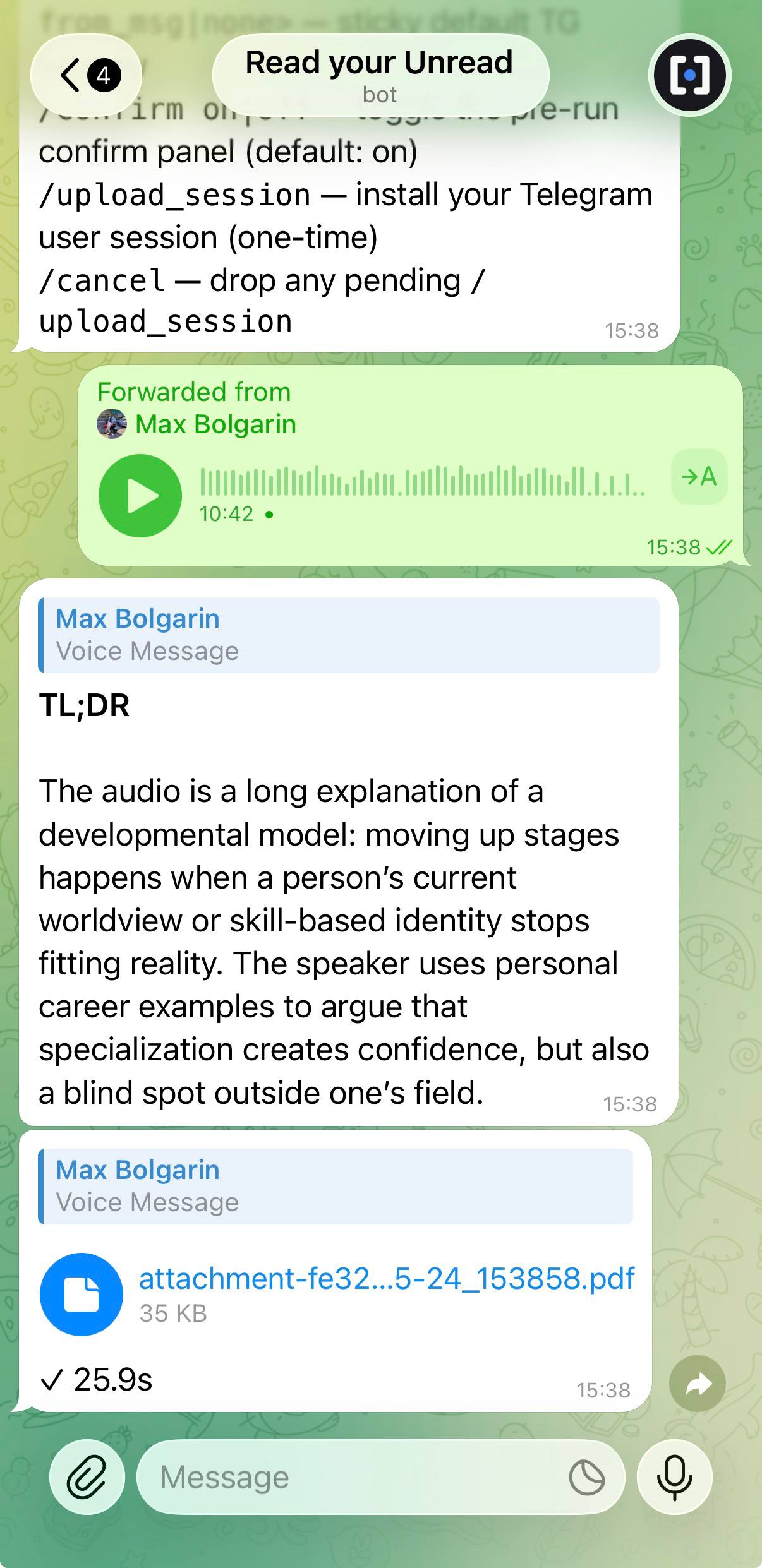
Run the same pipeline as a Telegram bot. Forward it a voice message
you don't feel like listening to, a PDF you don't feel like reading, a
YouTube link, a t.me/... post from a channel you're not sure you
want to subscribe to, or that suspicious link a friend just sent —
you get a Markdown summary back as a document, with cost and timing
in the caption.
Single-user by design: the bot only answers ONE Telegram ID. The
allowlist is auto-derived from the user session you give it (mounted
or sent via /upload_session); UNREAD_BOT_OWNER_ID is only a
bootstrap fallback for the case where no session is installed yet.
Everyone else is silently dropped.
Three install paths — pick by environment:
1. Local laptop / dev (unread bot run foreground):
uv tool install unread
export UNREAD_BOT_TOKEN=123:abc...   # from @BotFather
unread bot run
2. Fresh Linux VM — one line, blank disk to running systemd service:
UNREAD_EXECUTABLE="install-unread-bot.sh" && curl -fsSL https://raw.githubusercontent.com/maxbolgarin/unread/main/scripts/install-bot.sh > $UNREAD_EXECUTABLE && chmod +x $UNREAD_EXECUTABLE && ./$UNREAD_EXECUTABLE && rm ./$UNREAD_EXECUTABLE
Installs uv + ffmpeg + libpango, runs unread init, asks for the
@BotFather token, drops a systemd --user unit that auto-restarts
on crash and survives SSH disconnect.
3. Docker — pull the generic unread image from GHCR (same image
can also run one-off CLI commands; command: ["unread","bot","run"]
in the compose file specifies the bot mode):
cp .env.bot.example .env.bot && $EDITOR .env.bot
docker compose -f docker-compose.bot.yml --env-file .env.bot up -d
Reports default to PDF; set UNREAD_BOT_REPORT_FORMAT=md in .env.bot
to skip PDF rendering (.md upload instead). The first time you
message the bot with a t.me/... link it'll ask for /upload_session
— send your laptop's ~/.unread/storage/session.sqlite as a Telegram
document and it's ready.
Full feature reference (slash commands, the confirm panel, what each
input kind does) is in docs/bot.md. End-to-end VM
deployment guide covering all three paths is in
docs/bot-vm-deploy.md.
Why this exists
I have ~50 Telegram groups I genuinely want to follow and not enough hours to read them. The same is true for the videos I bookmark and the articles I save to "read later." LLMs are now cheap enough that analyzing a week of group chat costs less than a coffee. My time is not. So I built the CLI I wanted to use — local-first, citation-backed, provider-agnostic — and now I open Telegram a lot less.
The boring but real bits
- Local-first. SQLite under
~/.unread/. Your messages, embeddings, analyses, and secrets stay on your disk. The only network calls are to Telegram, your chosen AI provider, and any URLs you point at. - Security. Your API keys, Telegram session, and other secrets can be encrypted at rest. You can use your OS keychain (default) or passphrase to unlock the CLI.
- Citations on every claim. Reports link back to the source message / paragraph / timestamp.
--cite-context Nexpands citations into<details>blocks with surrounding context, so the report is auditable without re-opening Telegram. - Two-layer cache. Local analysis cache (re-running an unchanged chat is free) + the AI provider's prompt cache (server-side discount on repeated prefixes).
unread cache statsshows the hit rate. - Cost guardrails.
--max-cost 0.50aborts or confirms before you spend more than that.--dry-runestimates without calling the model.unread statsshows lifetime spend by chat / preset / day. - PII redaction.
--redactscrubs phones, emails, IBANs, and Luhn-valid card numbers from what gets sent to the LLM. Originals stay in the local DB. - Map-reduce, automatic. Big histories get chunked, summarized in parallel, then merged. Each chunk is cached independently — adding one message to the tail re-costs only the last chunk.
- Forums, channels with comments, folders. Telegram's awkward shapes are first-class.
--all-per-topic,--with-comments,--folder Work.
Encryption modes (keystore, passphrase-derived pass), session
hygiene, and the threat model are documented in
docs/security.md.
FAQ
Does this ship my Telegram history to OpenAI?
Only the messages in the window you asked about, only after PII
redaction if you set --redact, and only to the provider whose key you
configured. Nothing else leaves the machine. The local cache is in
your install dir; you can wipe it any time with unread cache ai purge.
What if I don't use Telegram?
Skip unread init's Telegram step. unread <url> and unread <file>
work with only an AI key. Most of the codebase is source-agnostic.
What languages does it actually support? Source content: anything Whisper auto-detects (audio) or your LLM can read (text) — pretty much everything human languages cover. Reports: anything your LLM can write. EN and RU get hand-tuned preset structures; other report languages use the English preset as a template that the LLM translates on the fly.
Will it cost me money?
Yes — your AI provider charges. unread itself is free. Per-call USD
is logged; --max-cost N caps a single run. Re-running an unchanged
chat is free (local cache hit). With cheap models (gpt-5.4-mini-class,
Gemini Flash, Claude Haiku) the bill is small enough that most users
stop reading the cost reports after a week.
Is it actually fast?
Fast enough that I stopped reading group chats. No benchmark table —
speed depends on chat size, model choice, and your network. Try it
with unread @somegroup --last-days 1 --dry-run to see the estimate
before any LLM call.
Can I run it on a server / in cron?
Yes. Non-TTY mode skips interactive prompts. unread watch --interval 1h ...
loops in the foreground (run under tmux / systemd / nohup). API keys
can come from env vars or ~/.unread/.env. The passphrase backend
reads UNREAD_PASSPHRASE for headless unlock.
Can I plug in my own preset / prompt?
--preset custom --prompt-file my-prompt.md. Same frontmatter format
as the bundled ones in presets/. Bump prompt_version
in the frontmatter when you edit, otherwise the cache won't notice.
Deep docs
The full reference manual lives under docs/:
| Topic | File |
|---|---|
| Install on macOS / Linux / Windows + first-run setup + where files live | docs/install.md |
| Sources: Telegram refs, YouTube, web pages, local files, forums, media enrichment, presets | docs/sources.md |
Every CLI command, every flag, the wizard, watch, subscriptions |
docs/reference.md |
Languages, cost & caching, config.toml, maintenance, troubleshooting, architecture |
docs/configuration.md |
| Threat model, encryption backends, PII redaction, session hygiene | docs/security.md |
Useful inline help: unread --help, unread <subcommand> --help,
unread help, unread doctor.
Contributing
PRs welcome. Read CLAUDE.md first — it's the contributor
map (DB invariants, cache keys, preset version bumps, the three
language axes). CONTRIBUTING.md covers the bench
(lint / format / tests). SECURITY.md for vulnerability
reports.
uv sync --extra dev
uv run pytest -q
uv run ruff check . && uv run ruff format --check .
Issues and feature requests: https://github.com/maxbolgarin/unread/issues.
Credits
Standing on the shoulders of: Telethon for the Telegram side, OpenAI Whisper / Anthropic / Google Gemini / OpenRouter / Ollama for the LLM side, yt-dlp for YouTube, trafilatura for article extraction, tiktoken for token counting, Typer / Rich / structlog for the CLI shell, and uv for keeping all of the above out of your system Python.
License
Apache 2.0 — see LICENSE.