








A kanban-style task management dashboard with an integrated MCP server.
Human users manage tasks via a drag-and-drop web UI, while AI agents connect via the MCP server to discover, accept, update, and create tasks programmatically.


✨ Features
| Feature | Description | |
|---|---|---|
| 👤 | User Accounts | Email/password registration and login with sealed cookie sessions |
| 📋 | Multiple Boards | Create and manage multiple project boards with custom descriptions |
| 💾 | Import/Export | Import and export boards as JSON |
| 👥 | Board Collaboration | Invite users by email, manage member roles (Owner/Member) |
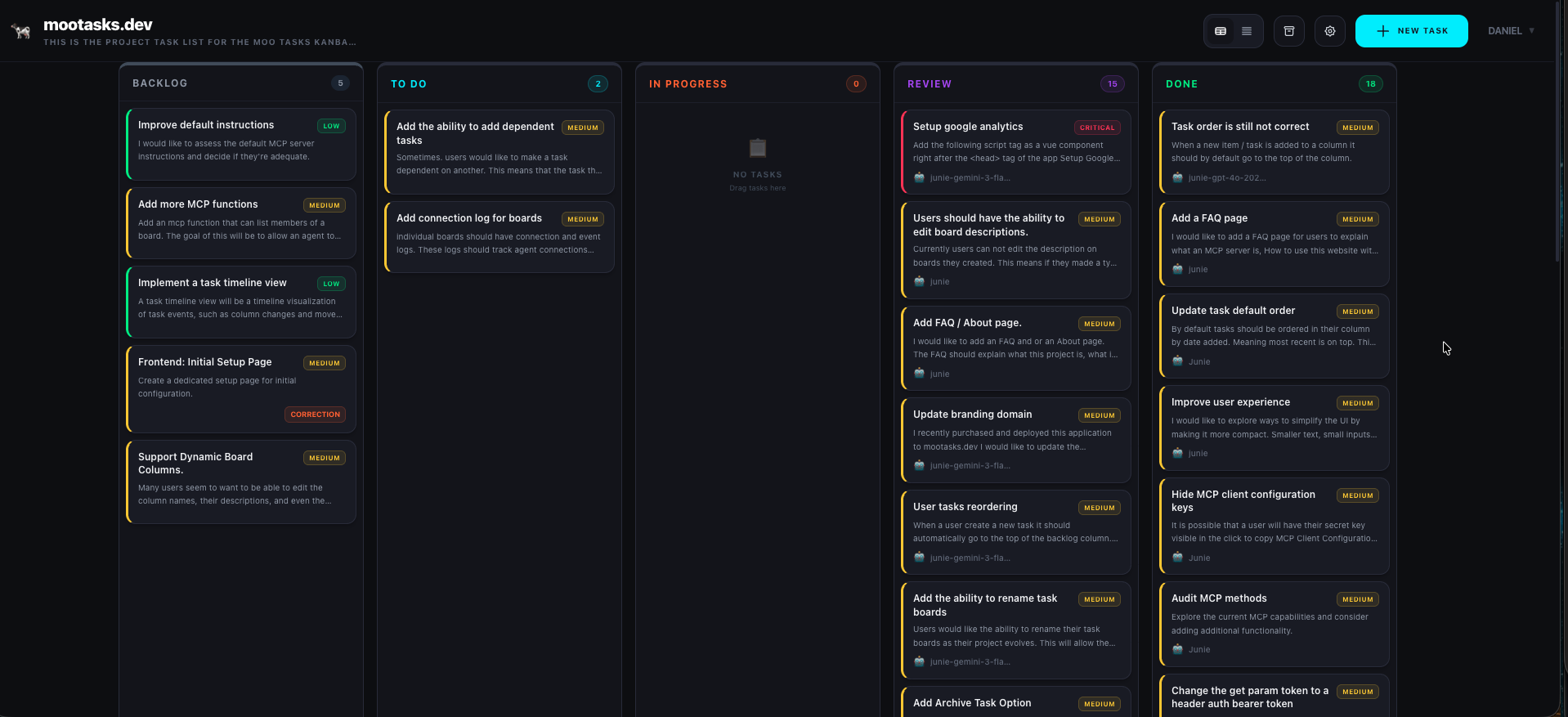
| 🔄 | 5-Column Kanban | Workflow stages: Backlog → To Do → In Progress → Review → Done |
| 🔀 | Dual View Modes | Toggle between visual Kanban Board and condensed Task List |
| 🖱️ | Drag & Drop | Intuitive task movement between columns using vuedraggable |
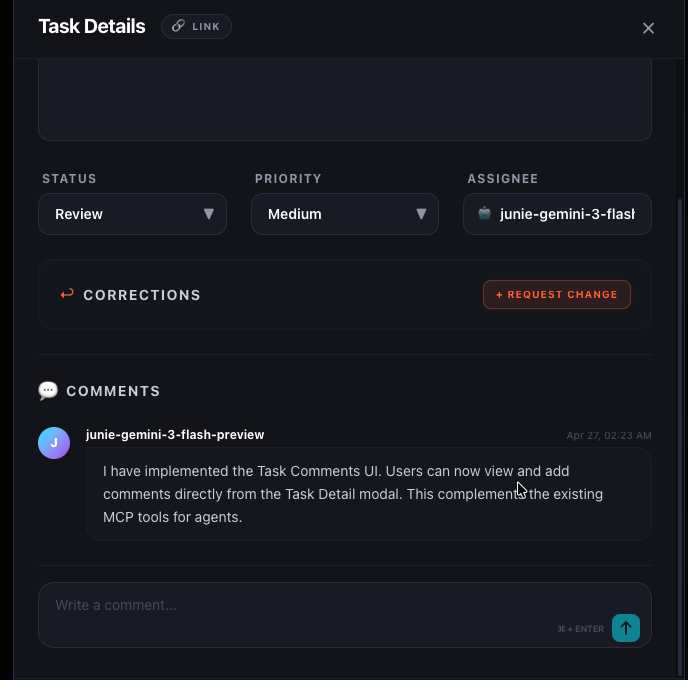
| 🔧 | Correction Tasks | Request specific fixes with linked child tasks for task refinement |
| 🤖 | MCP Server | Per-board MCP endpoints with bearer token auth & Public/Private toggles |
| 📝 | Configurable Instructions | Global and per-board MCP instructions with "Reset to Default" support |
| 🔗 | Task Deep-Linking | Copy unique task URLs for direct navigation and easy sharing |
| ⚡ | Real-time Polling | Automatic board sync to keep human and AI agent actions in sync |
| 🗄️ | MySQL Persistence | Reliable data storage with Drizzle ORM |
Screenshots
💾 Board Management
- Import Board: Available on the Dashboard page.
- Export Board: Available in the Board Settings panel.
🚀 Quick Start
The fastest way to get started with Moo Tasks is using Docker.
🐳 Running with Docker (Recommended)
If you have Docker installed, you can start the entire stack (including the database, Adminer, and Mailpit) with one command:
docker-compose up -d
The application will be available at http://localhost:3000.
🛠️ Manual Development Setup
If you prefer to run locally without Docker:
- Prerequisites: Ensure you have Node.js (v22+) and npm installed.
- Install dependencies:
npm install - Environment Variables: Create a
.envfile from.env.exampleand setNUXT_SESSION_PASSWORD(at least 32 characters long). - Start development server:
npm run dev
📖 Usage Guide
Get up and running in just a few minutes:
- Launch: Once the server is running, navigate to
http://localhost:3000(or the live site at mootasks.dev). - Account: Register your account at
/registeror login. - Create Board: Head to the Dashboard to create your first project board.
- Manage Tasks: Add, move, and update tasks on your new board using the drag-and-drop Kanban view or the list view.
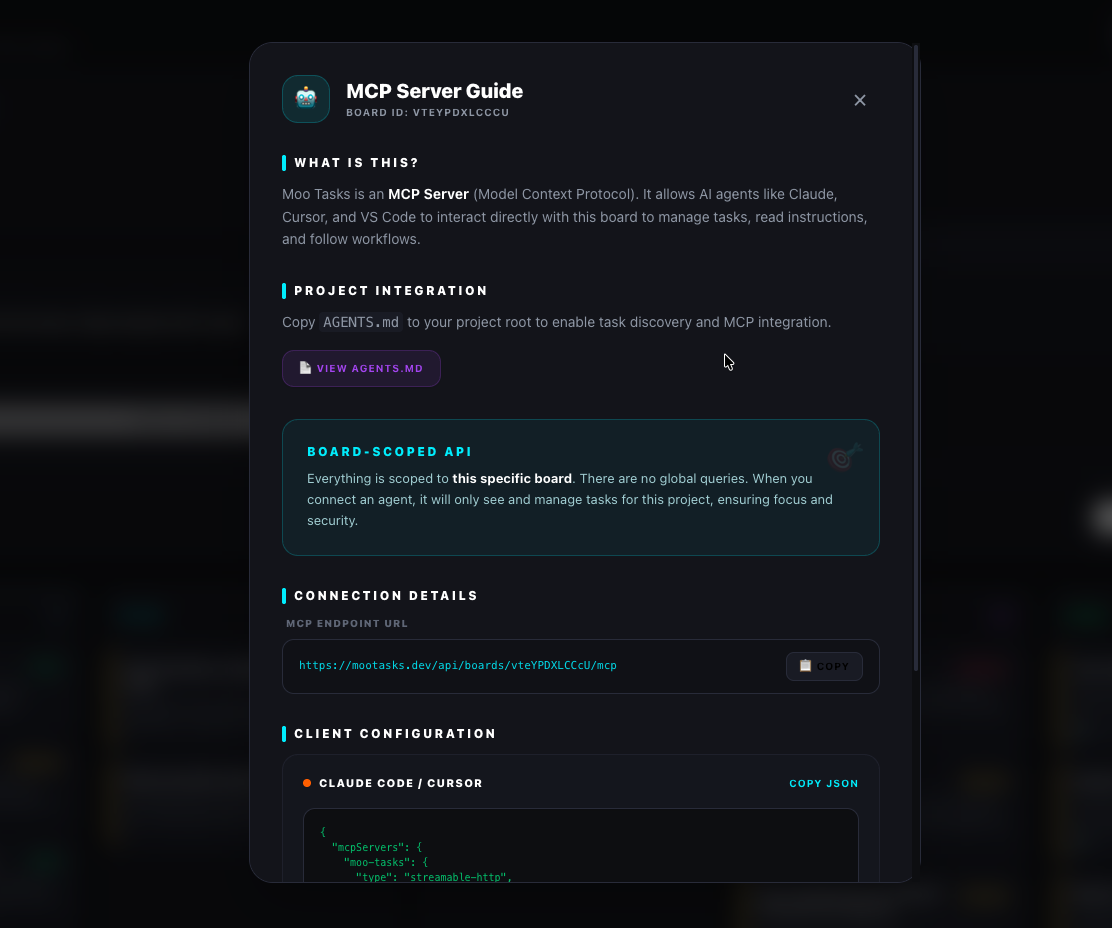
- Connect AI: Go to Board Settings to view your MCP configuration and connect your favorite AI agent (e.g., Claude Code, Cursor, VS Code).
- Seed Data: Need test data? Run
npx tsx server/db/seed.tsto populate the database with sample tasks.
⚙️ Environment Variables
Copy .env.example to .env and adjust as needed:
| Variable | Default | Description |
|---|---|---|
HOST |
0.0.0.0 |
Server bind address |
PORT |
3000 |
Server port |
DB_USER |
mootasks |
MySQL user |
DB_PASSWORD |
mootasks |
MySQL password |
DB_NAME |
mootasks |
MySQL database name |
DB_PORT |
3307 |
MySQL local port mapping |
DATABASE_URL |
(required if not using Docker) | MySQL connection string |
NUXT_SESSION_PASSWORD |
(required) | 32+ char secret for sealed cookie sessions |
🤖 MCP Server
Moo Tasks is primarily an MCP server and Agent API. While it provides a web interface for humans, its core purpose is to enable AI agents to manage tasks programmatically.
🎯 Board-Scoped Architecture
Everything in Moo Tasks is scoped to a board. There are no global queries for tasks. This ensures that agents only work within the context they are assigned to, improving focus and security.
- Each board has its own unique MCP endpoint.
- AI agents connect to a specific board to work on its tasks.
- Resources, prompts, and tools are all scoped to the active board.
📋 Working with Tasks via MCP
The board acts as the primary task list for this application. To programmatically work on tasks:
- Get the MCP Token: In the Board Settings, generate an MCP token if the board is private.
- Configure Your Agent: Add the MCP server configuration for your specific board.
- Use Tools: Use the available tools (
list-tasks,accept-task,update-task-status, etc.) to interact with the tasks.
🔐 Security & Privacy
| Mode | Description |
|---|---|
| 🔒 Private (Default) | Requires a Bearer Token via the token query parameter |
| 🌐 Public | Allows access without a token (for local development) |
Tokens can be generated, rotated, or revoked at any time from Board Settings.
🛠️ Tools
| Tool | Description |
|---|---|
list-tasks |
List tasks with optional status/priority filters |
get-task |
Get full details of a task by ID |
create-task |
Create a new task |
update-task-status |
Update a task's status |
accept-task |
Assign yourself to a task and move it to in_progress |
📚 Resources
| URI | Description |
|---|---|
moo-tasks://<boardId>/board-state |
Full board snapshot grouped by status |
moo-tasks://<boardId>/agent-instructions |
Workflow instructions for agents |
💬 Prompts
| Prompt | Description |
|---|---|
task-workflow |
Guided workflow for discovering and completing tasks |
🔄 Task Hierarchy & Corrections
Moo Tasks supports a refined workflow for task completion:
- Review Status — Move tasks to "Review" when ready for human verification
- Request Corrections — From "Review" or "Done", create linked "Correction Tasks"
- Linked Navigation — Correction tasks link to their parent for easy navigation
Configurable Instructions
| Level | Description |
|---|---|
| 🌍 Global | Edit at /settings/instructions, applies to all boards by default |
| 📋 Per-Board | Override in board settings, falls back to global when reset |
Both support reset to default to restore the original built-in instructions.
🔌 MCP Client Configuration
Claude Code
{
  "mcpServers": {
    "moo-tasks": {
      "type": "streamable-http",
      "url": "http://localhost:3000/api/boards/<boardId>/mcp",
      "headers": {
        "Authorization": "Bearer <your-bearer-token>"
      }
    }
  }
}
Cursor
Add to .cursor/mcp.json:
{
  "mcpServers": {
    "moo-tasks": {
      "type": "streamable-http",
      "url": "http://localhost:3000/api/boards/<boardId>/mcp",
      "headers": {
        "Authorization": "Bearer <your-bearer-token>"
      }
    }
  }
}
VS Code / JetBrains / generic MCP client
Add to your client's MCP config (e.g. .vscode/mcp.json or JetBrains MCP settings):
{
  "mcpServers": {
    "moo-tasks": {
      "type": "streamable-http",
      "url": "http://localhost:3000/api/boards/<boardId>/mcp",
      "headers": {
        "Authorization": "Bearer <your-bearer-token>"
      }
    }
  }
}
💡 The board page has a 📋 Copy JSON button that emits this exact snippet pre-filled with your board ID and token.
🔐 Security & Scoping
- Each MCP endpoint is scoped to a single board (
/api/boards/<boardId>/mcp). The server only ever sees tasks, comments, and instructions belonging to that one board. - Tokens are sent via the standard
Authorization: Bearer <token>HTTP header per the MCP authorization spec. Query-string tokens are no longer accepted. - Generate or revoke a board's token from the board settings drawer at any time. Revoking immediately invalidates all existing agent connections.
- Boards may also be marked
mcpPublicin settings for read-friendly demos; in that mode no token is required, but it is not recommended for real work.
📡 API Routes
Authentication
| Method | Route | Purpose |
|---|---|---|
| POST | /api/auth/register |
Register with email/password |
| POST | /api/auth/login |
Login with email/password |
Boards
| Method | Route | Purpose |
|---|---|---|
| GET | /api/boards |
List boards for current user |
| POST | /api/boards |
Create a new board |
| GET | /api/boards/:id |
Get board details |
| PATCH | /api/boards/:id |
Update board (owner only) |
| DELETE | /api/boards/:id |
Delete board (owner only) |
Board Members
| Method | Route | Purpose |
|---|---|---|
| GET | /api/boards/:id/members |
List board members |
| POST | /api/boards/:id/members |
Invite user by email |
| DELETE | /api/boards/:id/members/:userId |
Remove member |
Tasks
| Method | Route | Purpose |
|---|---|---|
| GET | /api/boards/:id/tasks |
List tasks for a board |
| POST | /api/boards/:id/tasks |
Create a task in a board |
| GET | /api/tasks/:id |
Get a single task |
| PATCH | /api/tasks/:id |
Update task fields |
| DELETE | /api/tasks/:id |
Delete a task |
Instructions
| Method | Route | Purpose |
|---|---|---|
| GET | /api/instructions |
Get global instructions |
| PUT | /api/instructions/:id |
Update global instruction |
| POST | /api/instructions/:id/reset |
Reset to default |
| GET | /api/boards/:id/instructions |
Get board instructions |
| PUT | /api/boards/:id/instructions/:instructionId |
Update board instruction |
| POST | /api/boards/:id/instructions/:instructionId/reset |
Reset board instruction |
🐳 Docker
Build & Run
# Build
docker build -t moo-tasks .

# Run
docker run -p 3000:3000 \
  -e NUXT_SESSION_PASSWORD="your-secret" \
  -e DATABASE_URL="mysql://user:pass@host:3306/db" \
  moo-tasks
☁️ Deploy to DigitalOcean App Platform
Prerequisites
- A DigitalOcean account
- Your repo pushed to GitHub
- A DigitalOcean API token
Option 1: One-Click via App Spec
- Fork/push this repo to GitHub
- Go to DigitalOcean App Platform → Create App
- Connect your GitHub repo and select the
mainbranch - DigitalOcean will auto-detect the
Dockerfile— confirm the settings - Under Environment Variables, add these secrets:
NUXT_SESSION_PASSWORD— 32+ character secret for session encryptionDATABASE_URL— Your MySQL connection string
- Deploy!
Note: MySQL is recommended for production as it allows you to increase
instance_countto handle more traffic.
Option 2: Deploy with doctl
# Install doctl and authenticate
doctl auth init

# Create the app from the spec (update repo in .do/app.yaml first)
doctl apps create --spec .do/app.yaml

# Set secrets
doctl apps update <app-id> --spec .do/app.yaml
Option 3: CI/CD with GitHub Actions
The included workflow at .github/workflows/deploy.yml automatically:
- On pull requests — builds and validates the project
- On push to main — builds, then deploys to DigitalOcean App Platform
Setup:
- Create the app on DigitalOcean first (Option 1 or 2)
- Generate a DigitalOcean API token
- Add it as a GitHub repository secret:
- Go to Settings → Secrets and variables → Actions
- Add
DIGITALOCEAN_ACCESS_TOKENwith your DO API token
- Push to
main— the workflow will deploy automatically
App Spec Reference
The .do/app.yaml file defines the full app configuration:
name: moo-tasks

services:
  - name: web
    dockerfile_path: Dockerfile
    github:
      branch: main
      deploy_on_push: true
    http_port: 3000
    instance_count: 1
    instance_size_slug: apps-s-1vcpu-1gb
    envs:
      - key: NUXT_SESSION_PASSWORD
        type: SECRET
      - key: DATABASE_URL
        type: SECRET
Troubleshooting
- "Only board owners can invite users" or missing boards after creation: Ensure
DATABASE_URLis correctly configured and the MySQL server is accessible from the app. - Scalability: Unlike SQLite, you can increase
instance_countto handle more traffic, as all instances share the same MySQL database. - Session Reset: If the database is reset but your browser still has a session cookie, the app will automatically log you out. Simply register again to start fresh.
🧱 Tech Stack
| Technology | Purpose |
|---|---|
| Nuxt 4 (Nitro + Vue 3) | Framework |
| Tailwind CSS v4 | Styling |
| MySQL + Drizzle ORM | Database |
| nuxt-auth-utils | Auth (sealed cookie sessions, scrypt hashing) |
| @nuxtjs/mcp-toolkit | MCP server integration |
| vuedraggable | Drag & drop |
| nanoid | ID generation |
Built with 🐄 by dizlexic