







ErrataBench
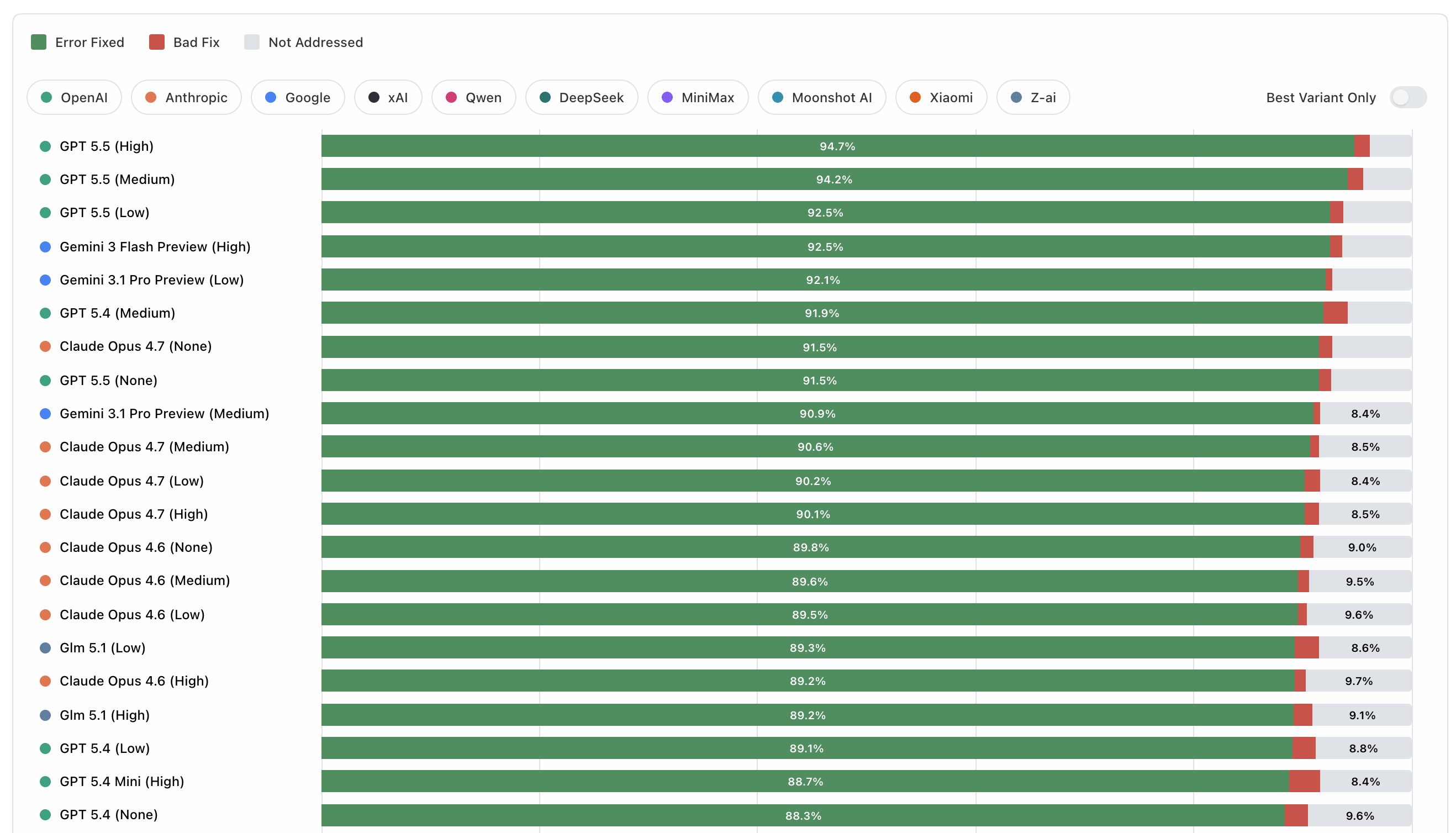
ErrataBench measures how well LLMs can proofread text.
The benchmark uses a simple agent loop that lets models find errors in various text samples, and fix them using tools. Each sample includes issues drawn from categories such as spelling, grammar, word choice, and typos. Error density is steady at about 5 issues per 1,000 words.
A public viewer for the latest run is hosted at https://revise.io/errata-bench.
The official result set included in this repo covers 51 model variants across 1600+ run samples. Instructions can be found below for running the benchmark yourself with an OpenRouter API key, or OpenAI-compatible API.
Running the benchmark
The easiest way to run the benchmark is with an OpenRouter key. Configure your key in a .env file.
Then, you can run the benchmark with default settings:
npm install
npm run bench
Running the full benchmark with 3 samples per model per text costs about $550. You can perform a smaller or larger run using the command line flags:
Flags
The runner has several parameters you can provide, which all have defaults:
--group-id: default official-v1. String ID for the result group to which your results will be added. Use your own result group ID to start from scratch.
--samples: default 3. Number of times we run the benchmark for each model on each text.
--models: comma-separated list of models. By default we use the list in models/starter-models.json.
--chunk-size: default 2000. Word limit used when splitting up text from the dataset into chunks. Models work on text one chunk at a time. Reducing chunk size can yield better results, but at higher cost.
--max-turns-per-chunk: default 3. Number of passes the model gets on a chunk before we move to the next chunk. Models can advance early by calling the proofreading_complete tool. Like chunk size, increasing this can yield better results at a higher cost.
--concurrency: default 30. How many agent loops to run at a time.
With the default parameters, a model is proofreading ~2000 words at a time, containing ~10 errors.
Providing your own model endpoint
ErrataBench can run against any endpoint that exposes an OpenAI-compatible POST /chat/completions API with tool calling.
This is useful if you want to benchmark:
- an unreleased internal model
- a self-hosted model behind an OpenAI-compatible gateway
- a provider other than OpenRouter
Configure the benchmark transport in .env:
cp .env.example .env
Set these values:
ERRATA_BENCH_API_PROVIDER=openai-compatibleERRATA_BENCH_API_BASE_URL=https://your-endpoint.example/v1ERRATA_BENCH_API_KEY=...
Optional but recommended:
ERRATA_BENCH_API_ENDPOINT_LABEL=my-labThis label is stored in run and results artifacts so results from different backends do not get mixed together.ERRATA_BENCH_API_REASONING_MODE=omitUse this if your endpoint rejects the OpenRouter-stylereasoningobject. Leave it aspassthroughif your endpoint accepts reasoning parameters.ERRATA_BENCH_DEFAULT_JUDGE_MODEL=my-org/my-judge-model:noneSet this if you want alternative-fix judging on your custom endpoint. Otherwise pass--no-judge.ERRATA_BENCH_PRICING_FILE=/abs/path/to/pricing.jsonFor non-OpenRouter endpoints, cost metrics aren/aunless you provide a pricing file.
Minimal example:
ERRATA_BENCH_API_PROVIDER=openai-compatible
ERRATA_BENCH_API_BASE_URL=https://your-endpoint.example/v1
ERRATA_BENCH_API_KEY=your-api-key
ERRATA_BENCH_API_ENDPOINT_LABEL=my-lab
ERRATA_BENCH_API_REASONING_MODE=omit
ERRATA_BENCH_DEFAULT_JUDGE_MODEL=my-org/my-judge-model:none
Then run the benchmark normally, but point --models and --judge-model at the model ids your endpoint expects:
npm run bench -- \
  --group-id my-endpoint-run \
  --dataset datasets/v1/generated \
  --runs 3 \
  --models my-org/my-model:none \
  --judge-model my-org/my-judge-model:none
Notes:
- The harness appends
/chat/completionsautomatically if your base URL does not already end with it. - Your endpoint must support tool calling. ErrataBench relies on
find_and_replace,replace_paragraph, andproofreading_complete. - If you compare OpenRouter runs with custom-endpoint runs, keep
ERRATA_BENCH_API_ENDPOINT_LABELdistinct so the artifacts stay separable. - OpenRouter pricing lookup only works when
ERRATA_BENCH_API_PROVIDER=openrouter. For every other backend, useERRATA_BENCH_PRICING_FILEif you want cost charts. - If your endpoint has a stricter completion-token cap than ErrataBench's default, override it with
--max-completion-tokens-per-turn. - The built-in default judge model is OpenRouter-specific. On a custom endpoint, either set
ERRATA_BENCH_DEFAULT_JUDGE_MODEL, pass--judge-model, or use--no-judge.
Viewing results
Results from the latest official run are hosted at https://revise.io/errata-bench.
The repo also contains a CLI for viewing results which you can use for the official result set, or your own.
npm run view:rankings my-result-group
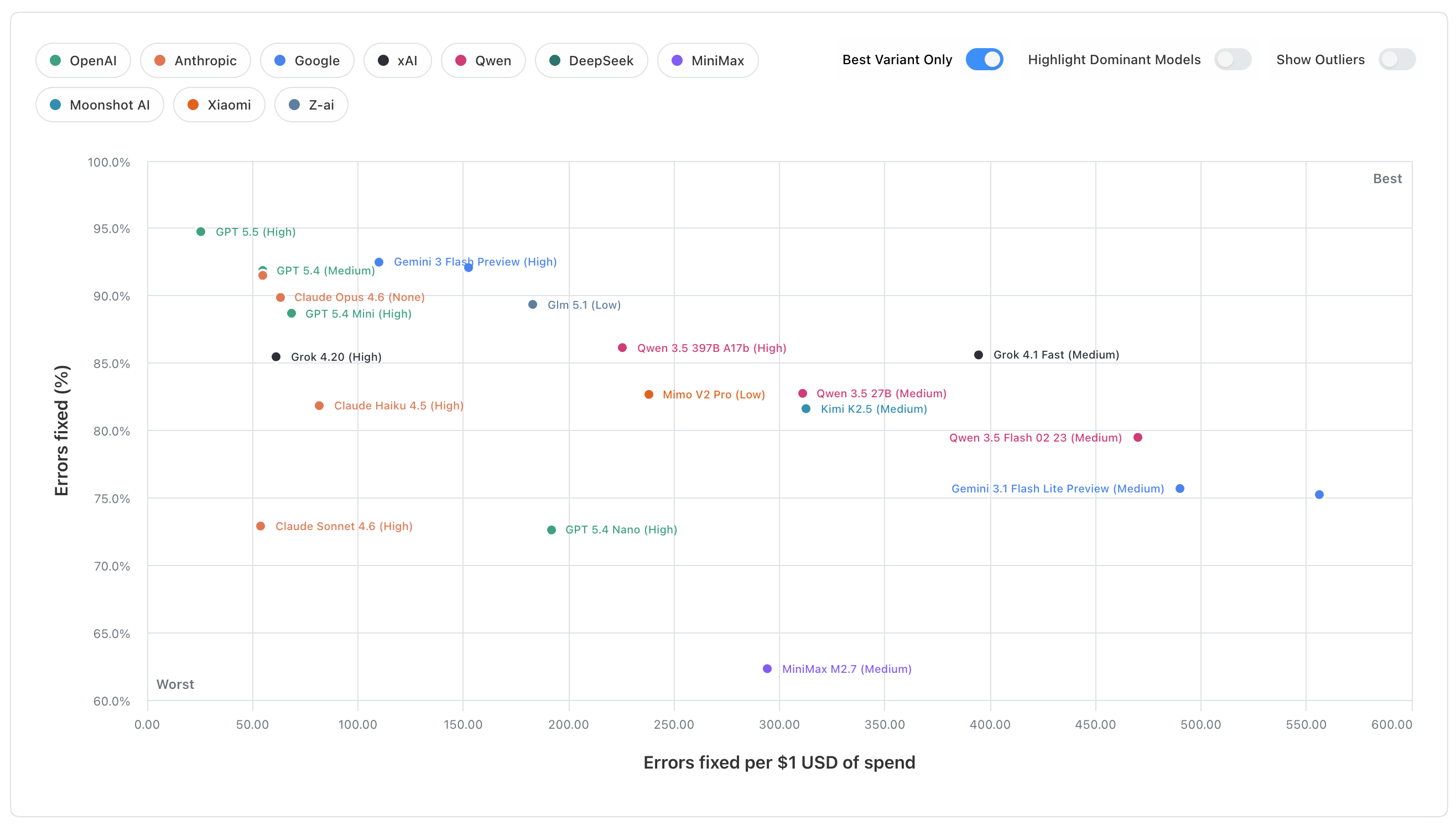
npm run view:scatterplot my-result-group
Implementation
Each source text is split into word-limited chunks. The model edits one chunk at a time using three tools:
find_and_replace(paragraphId, find, replace)for small local fixesreplace_paragraph(paragraphId, newParagraphHtml)for broader paragraph rewritesproofreading_complete(note)to end the current chunk early when it looks done
The model sees HTML paragraphs like:
<p id="A1b2C3">...</p>
<p id="D4e5F6">...</p>
Each dataset case contains a known list of benchmark issues with an expected bad span and canonical fix. Scoring happens issue by issue:
- if the final text contains the expected fix and no longer contains the bad text, the issue is counted as fixed
- if the bad text is gone but the model used a different replacement, the fallback judge decides whether that alternative repair is still valid
- if the model changed the bad text but the repair is still not valid, it counts as a
bad fix - if the bad text remains, it counts as
not addressed
The headline quality score is the share of benchmark issues that end up fixed after that process. Results views then aggregate those per-run scores across datasets, along with cost, speed, tool-use efficiency, and run-to-run range.
Source Credits
The v1 dataset for this benchmark is composed of excerpts from the following sources:
the-call-of-the-wild-chapter-3.txt- Original: "The Call of the Wild" - Jack London
- Source: https://www.gutenberg.org/files/215/215-h/215-h.htm
aerodynamics-of-flight.txt- Original: "Pilot's Handbook of Aeronautical Knowledge" - FAA
- Source: https://www.faa.gov/regulations_policies/handbooks_manuals/aviation/phak
owid-what-is-economic-growth.txt- Original: "What is economic growth? And why is it so important?" - Max Roser
- Source: https://ourworldindata.org/what-is-economic-growth
owid-better-learning.txt- Original: "Millions of children learn only very little. How can the world provide a better education to the next generation?" - Max Roser
- Source: https://ourworldindata.org/better-learning
owid-global-decline-fertility-rate.txt- Original: "The global decline of the fertility rate" - Max Roser
- Source: https://ourworldindata.org/global-decline-fertility-rate
uk-hospital-surgery.txt- Original: "Facilities for surgical procedures: Volume 1" - NHS Estates
- Source: https://www.england.nhs.uk/wp-content/uploads/2021/05/HBN_26.pdf
law-of-nations.txt- Original: "Law of Nations" - James Mill
- Source: https://oll.libertyfund.org/titles/mill-law-of-nations
extent-of-knowledge.txt- Original: "An Essay Concerning Humane Understanding" - John Locke
- Source: https://en.wikisource.org/wiki/An_Essay_Concerning_Human_Understanding_(Troutman_%26_Hayes_1853)/Book_4/Chapter_III
reznor-heater.txt- Original: "INSTRUCTIONS EGHB Model" - Reznor LLC
- Source: https://assets.reznorhvac.com/download/B61EF32C-8533-482F-83C8-F140B18CCB10
sherlock-red-headed-league.txt- Original: "The Adventures of Sherlock Holmes" - Arthur Conan Doyle
- Source: https://gutenberg.org/ebooks/1661
jury-instructions.txt- Original: "Manual of Model Civil Jury Instructions" - Ninth Circuit Jury Instructions Committee
- Source: https://www.ce9.uscourts.gov/jury-instructions/sites/default/files/WPD/Civil_Instructions_9_2025.pdf
Adding datasets
To generate a new benchmark case from a clean source text:
npm run generate:corrupted -- \
  --source datasets/v1/sources/my-source.txt \
  --issues-per-1000-words 5 \
  --max-words-per-chunk 500 \
  --model google/gemini-3.1-pro-preview:medium \
  --review-model anthropic/claude-opus-4.6:low
This writes a corrupted text file and a matching dataset JSON into datasets/v1/generated/. If you want the corruptor to favor underrepresented issue categories, add --dataset-to-balance datasets/v1/generated.