惯性聚合 高效追踪和阅读你感兴趣的博客、新闻、科技资讯
阅读原文 在惯性聚合中打开

推荐订阅源

Jina AI
Jina AI
N
Netflix TechBlog - Medium
P
Proofpoint News Feed
OSCHINA 社区最新新闻
OSCHINA 社区最新新闻
D
DataBreaches.Net
人人都是产品经理
人人都是产品经理
aimingoo的专栏
aimingoo的专栏
Stack Overflow Blog
Stack Overflow Blog
Blog — PlanetScale
Blog — PlanetScale
月光博客
月光博客
阮一峰的网络日志
阮一峰的网络日志
I
InfoQ
F
Fortinet All Blogs
J
Java Code Geeks
Last Week in AI
Last Week in AI
美团技术团队
大猫的无限游戏
大猫的无限游戏
有赞技术团队
有赞技术团队
让小产品的独立变现更简单 - ezindie.com
博客园_首页
量子位
奇客Solidot–传递最新科技情报
奇客Solidot–传递最新科技情报
Apple Machine Learning Research
小众软件
小众软件

Hacker News: Show HN

PurrrrrFocus: Pomodoro Timer App - App Store Workflow Engine — Multi-Step Orchestration for Bun RapidPhoto: Pro Photo Editor App - App Store GitHub - DheerG/swarms: Achieve extraordinary results with claude code across a variety of tasks SPICE simulation → oscilloscope → verification with Claude Code — Lucas Gerads Show HN: VCoding – A 5 MB native Windows IDE with no dynamic dependencies Show HN: LLMs don't hallucinate because they're bad at math, it's the format GitHub - Agent-FM/agentfm-core: AgentFM is a peer-to-peer network that turns everyday computers into a decentralized AI supercomputer. AgentFM lets you run massive AI workloads directly across a global mesh of idle CPUs and GPUs. Show HN: Tracking Top US Science Olympiad Alumni over Last 25 Years GitHub - Potarix/agent-hub: One place to talk to all your agents Show HN: Runtime security for AI agents(injection,tool abuse, data exfiltration) GitHub - dubeyKartikay/lazyspotify: Terminal Spotify client for macOS and Linux GitHub - the-banana-tool/king-louie: Easy to use GUI Personal AI Assistant. Win/Linux/Mac. Show HN I made my vacation rental bookable by AI agents–no Airbnb, 0% commission GitHub - basteez/jsf-autoreload: maven plugin to enable hot reload on jsf projects uvm32/hosts/host-gdbstub at main · ringtailsoftware/uvm32 GitHub - labsai/EDDI: Config-driven engine that turns JSON into production-grade AI agents. Multi-agent orchestration, 12+ LLM providers, MCP/A2A protocols, RAG, persistent memory, and enterprise compliance (EU AI Act, GDPR, HIPAA). Built on Quarkus. GitHub - glitchnsec/fortyone-oss: AI Executive Assistant Platform Quickstart | Alien GitHub - muxshed/shed: One stream in, or many. Every destination, simultaneously. No cloud middleman, no per-channel fees, no limits. GitHub - ocrbase-hq/ocrbase: 📄 PDF/IMG ->.MD/JSON Document OCR API for PaddleOCR and GLMOCR. Self-hostable. GitHub - impactjo/home-memory: MCP server that lets your AI assistant remember everything about your home. GitHub - Sets88/dbcls: DbCls is a powerful terminal database client that supports various databases GitHub - neptun2000/heor-agent-mcp GitHub - SeanFDZ/macmind: Single-layer transformer in HyperTalk for the classic Macintosh RollQuation: Math Puzzles - Apps on Google Play GitHub - dropbox/witchcraft Show HN: Agent-cache – Multi-tier LLM/tool/session caching for Valkey and Redis GitHub - opentalon/opentalon: OpenTalon is an open-source platform built from the ground up in Go as a robust alternative to OpenClaw LinkedIn™ 职位抓取工具 - Chrome 应用商店
Buffer zoom
aarcamp · 2026-04-23 · via Hacker News: Show HN

Buffer zoom provides tmux users with OS-native scrollback, clipboard selection, and search.

It works by capturing the active tmux pane’s scrollback — wrapped lines joined, ANSI colors intact — then suspends the renderer, clears the primary screen, and paints the capture as a single full-terminal view. Press any key to dismiss and return to the main application. Unlike tmux copy-mode, which scrolls one pane while the rest of the layout remains visible, buffer zoom is a whole-terminal state transition.
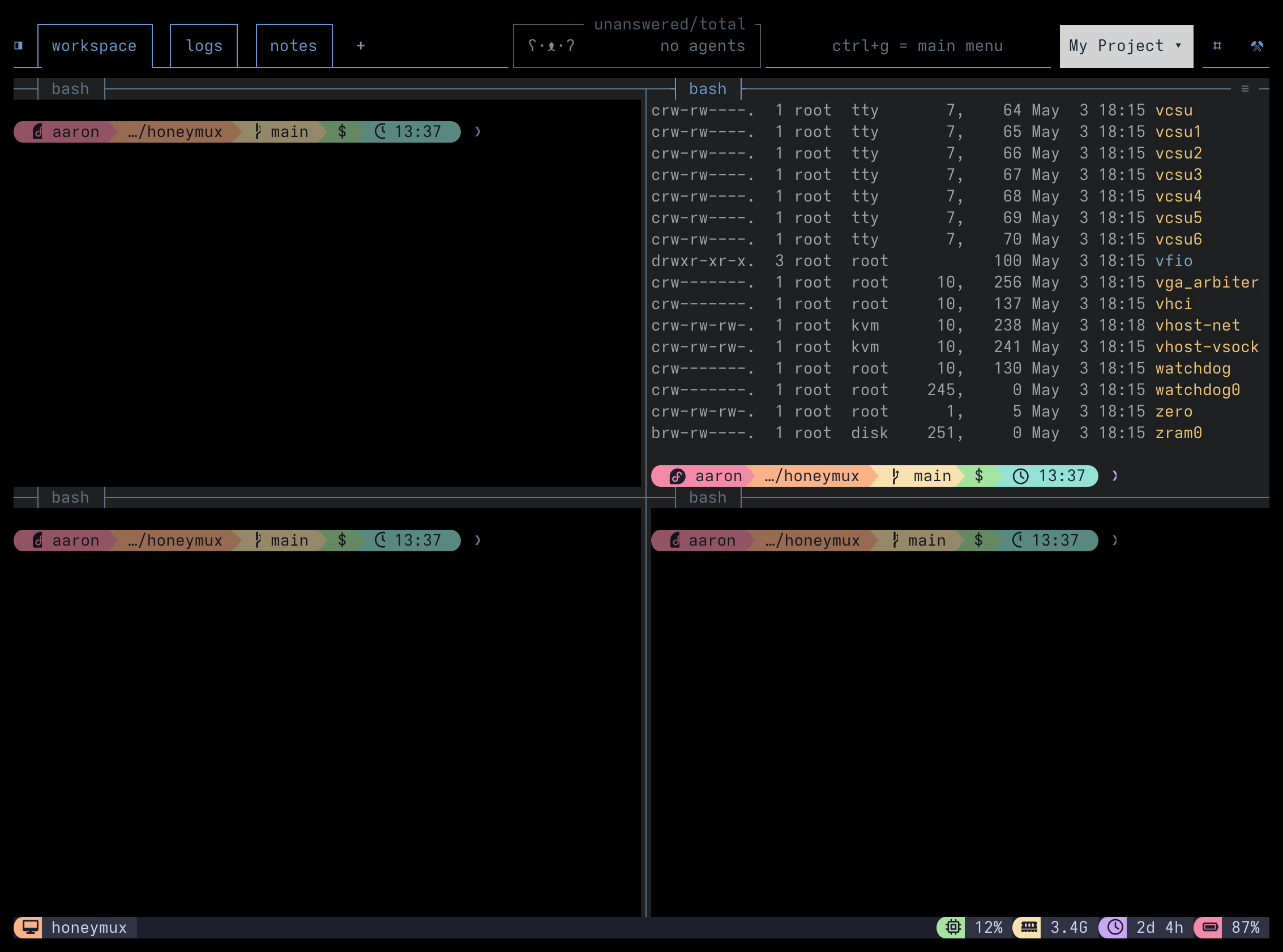
Four tmux panes in a 2x2 grid; the upper-right pane shows a truncated ls -l /dev listing

Before — the upper-right pane shows a truncated ls -l /dev listing.

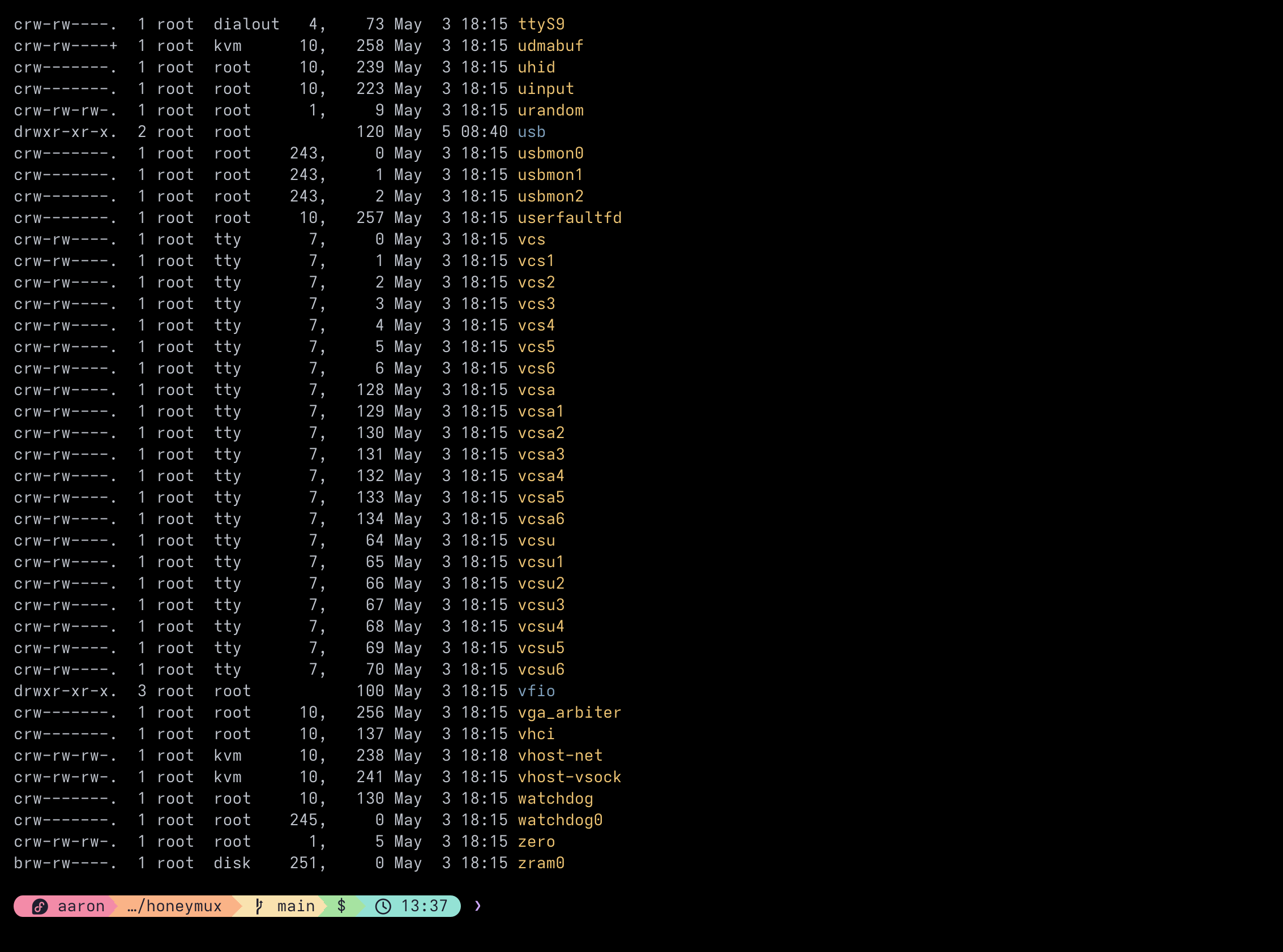
The same pane's scrollback painted full-screen via buffer zoom, revealing more of the ls -l /dev output

After — buffer zoom hides the UI and paints the full pane scrollback for OS-native interaction.

With buffer zoom active, users can:

  • Benefit from smooth, local-driven scroll gestures, even for remotely-connected tmux panes
  • Select and copy text with the same click-and-drag motion used for any other type of app
  • Search entire pane history with the usual key shortcuts (e.g. Cmd+F on macOS)

Additionally, if a pane is not already set to full screen width and contains wide columnar output (think e.g. kubectl get pods -o wide), buffer zoom is very handy for viewing that content in wide form without having to resize the pane. If you use this feature often, you can even configure a key mapping so buffer zoom activates with a single key press (e.g. with an unused function row key, if your OS and terminal emulator support it).

Open the Main Menu with Ctrl+G and press B, trigger the bufferZoom key binding, or click the button in the toolbar. The pane in focus at trigger time is the one whose scrollback is captured; wrapped lines are re-joined (tmux capture-pane -J) before display.

Press any key to dismise the buffer zoom view. While active, the outer terminal’s title reads [[ BUFFER ZOOM ACTIVE ]] · Press any key to dismiss to hint at this, and the cursor glows by cycling its color through grayscale shades via OSC 12 on terminals that honor the sequence. On dismissal the previous pane title and cursor color are restored.

For a softer switching effect, bufferZoomFade (default true) enables a quick fade-out of the alt screen and fade-in of the primary-screen capture. Terminals without truecolor support, and users who turn the key off, get an instant transition instead.

bufferZoomMaxLines (default 50000) caps how many scrollback lines are pulled from tmux. Set it to 0 for unlimited. The cap exists because very large captures can block the event loop while tmux serializes scrollback; keeping it bounded keeps the transition responsive on long-lived panes.

Screen captures powered by Honeyshots

Copyright © 2026 Aaron Campbell · Apache 2.0