
Open Cliptop
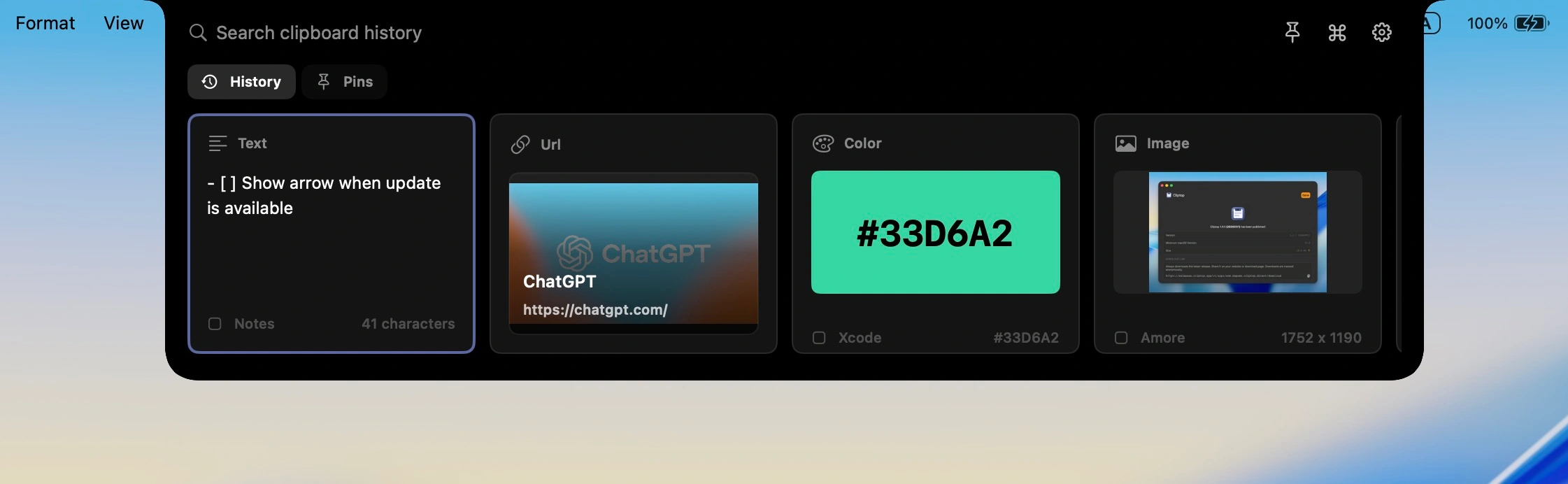
Hover near the notch or press ⇧⌘V to open history with search focused.




Workflow
Cliptop keeps clipboard work in the same flow as the app you were already using.
Hover near the notch or press ⇧⌘V to open history with search focused.
Search recent text, links, code, images, files, and colors without switching away from your work.
Press ⌘K for actions like paste, paste plain text, clean URL, copy Markdown, or inspect.
Daily use cases
Cliptop groups the formats you copy every day and keeps the right action close to each one.
Cliptop keeps recent writing close, with plain-text paste and quick edits when formatting gets in the way.
Notes, Slack, email
Search links by title or domain, then clean, preview, or copy them as Markdown.
Safari, Chrome
Find copied code, trim whitespace, paste plain text, or copy it as a code block.
Xcode, editors
Images, files, and colors
Screenshots, files, and color values keep previews and actions that match the selected item.
CleanShot, Finder, Figma
Contextual actions
Text gets cleanup actions, links get URL tools, code gets formatting options, and colors get copy formats.
Safari · copied 2 minutes ago
Private by design
Fast search, local previews, and optional paste-back permissions without routing your clipboard history through the cloud.
Clipboard history is stored on your Mac instead of synced to a Cliptop cloud.
Link previews are generated after capture and cached locally for quick search.
Enable Accessibility for one-step paste-back, or keep using manual paste.
Built around Mac patterns: notch access, menu bar placement, Shift + Cmd + V, and external displays.
Pricing
Start with the Mac app. Try every Pro feature, then choose yearly or lifetime access when you are ready.
Try every Cliptop Pro feature from the Mac app.
Yearly
Full Cliptop Pro access for one year.
Pay once and keep Cliptop Pro.
$29.99 $19.99
one-time purchase
3-day full-feature trial No payment required for trial 30-day money-back guarantee
Already bought Cliptop? Recover your license key.
FAQ
The short version: Cliptop is local-first, works with or without a notch, and starts with a no-payment trial.
Cliptop is a clipboard history app for Mac that opens near the notch or from Shift + Cmd + V, lets you search recent copies, and helps you paste or clean up items without switching context.
No. Clipboard history is stored locally on your Mac. Link previews are generated after capture and cached locally so Cliptop stays fast without sending every copied item through a server.
Cliptop works on any Mac screen. On external displays or non-notch Macs, open it from the middle of the menu bar or use the shortcut: Shift + Cmd + V.
Direct Paste uses Accessibility permission so Cliptop can paste the selected item back into the app you were using. If you do not enable it, Cliptop still restores the item to the clipboard so manual paste keeps working.
Cliptop keeps useful formats from daily Mac work, including text, links, code snippets, screenshots, images, files, and colors.
Yes. Cliptop includes a 3-day free trial with full Pro feature access and no payment required, so you can test the workflow before choosing yearly or lifetime Pro.
Yes. Cliptop includes a 30-day money-back guarantee. If it is not a fit for your workflow, email support@cliptop.app within 30 days and we'll refund you, no questions asked.
Use the recover license page with the email address you purchased with, and Cliptop will resend your license key by email.
Cliptop for Mac
Download the app, try every Pro feature, and decide after it has been in your workflow.
此内容由惯性聚合(RSS阅读器)自动聚合整理,仅供阅读参考。 原文来自 — 版权归原作者所有。