惯性聚合 高效追踪和阅读你感兴趣的博客、新闻、科技资讯
阅读原文 在惯性聚合中打开

推荐订阅源

S
Secure Thoughts
罗磊的独立博客
T
The Blog of Author Tim Ferriss
人人都是产品经理
人人都是产品经理
博客园 - 叶小钗
Last Week in AI
Last Week in AI
美团技术团队
Google Online Security Blog
Application and Cybersecurity Blog
D
Docker
G
Google Developers Blog
大猫的无限游戏
大猫的无限游戏
酷 壳 – CoolShell
酷 壳 – CoolShell
小众软件
小众软件
月光博客
月光博客
L
LINUX DO - 最新话题
cs.AI updates on arXiv.org
CTFtime.org: upcoming CTF events
W
WeLiveSecurity
H
Heimdal Security Blog
Vercel News
Vercel News
SecWiki News
SecWiki News
Forbes - Security
Forbes - Security
Blog — PlanetScale
Blog — PlanetScale
Google DeepMind News
Exploit-DB.com RSS Feed
www.infosecurity-magazine.com
TaoSecurity Blog
TaoSecurity Blog
T
Troy Hunt's Blog
A
About on SuperTechFans
C
Check Point Blog
S
Security Affairs
Hacker News - Newest:
Hacker News - Newest: "LLM"
AI
AI
WordPress大学
WordPress大学
K
KPMG report finds enterprise disconnect between AI and its ROI | CIO
Help Net Security
Help Net Security
博客园_首页
The Last Watchdog
The Last Watchdog
S
SegmentFault 最新的问题
Hugging Face - Blog
Hugging Face - Blog
Security Archives - TechRepublic
Engineering at Meta
Engineering at Meta
cs.CV updates on arXiv.org
I
Intezer
K
Kaspersky official blog
M
MIT News - Artificial intelligence
J
Java Code Geeks
G
GRAHAM CLULEY
P
Palo Alto Networks Blog

崔八由

内网设备被挖矿了 对华宸未来债券基金更名的总结 凸(艹皿艹 ) 推特被封了 第一次装机过程与记录 记录一下今年治牙的过程 预测未来 最终还是投向了obsidian pve lxc容器使用vnpy的问题 扔垃圾的感受 解决macos sierra重新安装时报错-准备安装时发生错误 记录一下使用vercel搭建umami中需要注意的地方 还是不能太依赖自建服务 Android应用在上架Google Play时封闭式测试的一些建议 JVM中的Shallow Size 和 Retained Size解释 老了 go学习笔记之指针 pve主机使用smart_ctl监控磁盘信息 tailscale的设置与安装 go中获取某个包下定义的所有变量
acme.sh自动生成泛域名证书的几个坑
崔八由 · 2024-05-20 · via 崔八由

发表于|更新于|编程other

|浏览量:|评论数:

先说一下我的环境与配置:

  • 域名:在namesilo上购买的
  • 证书使用方式:nginx
  • nginx部署方式:docker

说一下在使用过程中可能会遇到的一些坑, 方便后来人正确处理。

安装脚本过程

安装acme.sh前要将系统用户切换到和nginx服务使用的用户, 否则之后的relaod命令将没有权限执行。

比如我使用root用户安装的docker启动nginx, 就切换到root,并在此用户下安装acme.sh

生成证书过程

此处使用的是dns的api方式来验证,有几个点需要注意。

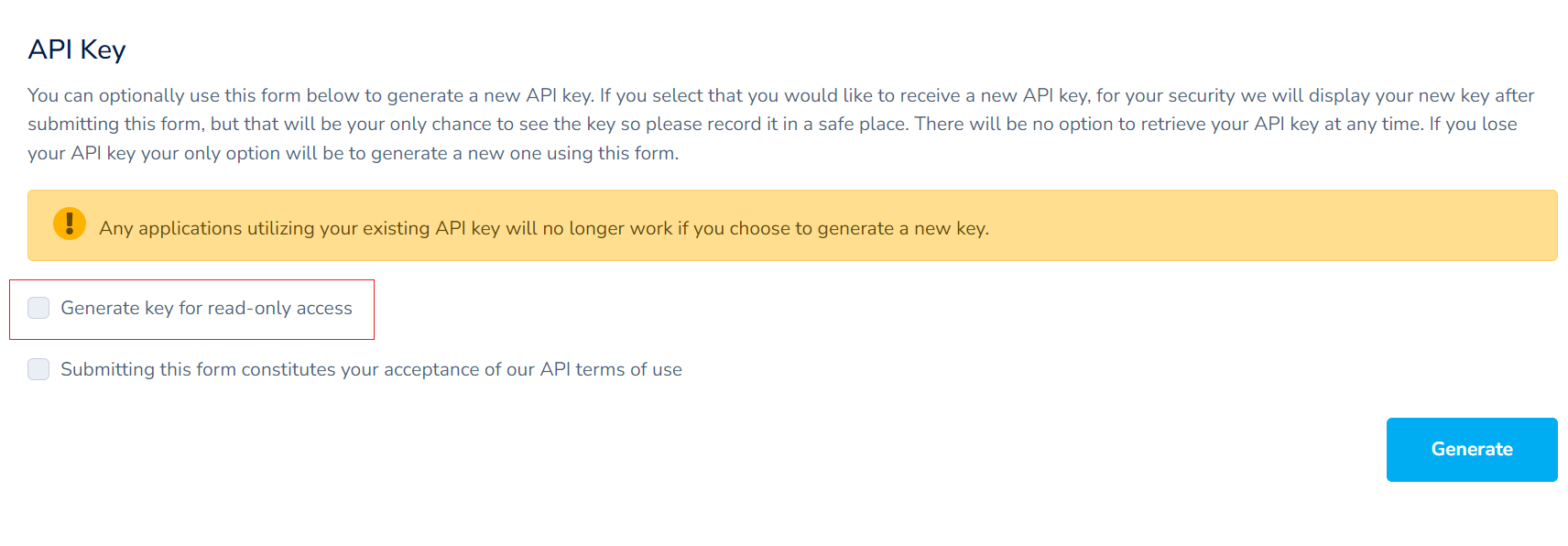
  1. 生成api key的时候,Generate key for read-only access 一定不要勾选

  2. 如果第一次没有注意勾选,并且使用脚本生成证书(不管是否生成失败),在新生成key之后, 需要先将.acme.sh account.conf Namesilo_Key 删除掉