


基于 centos7.9,docker-ce-20.10.18,kubelet-1.22.3-0
基本概念
存在意义
Pod 为亲密性应用而存在。
亲密性应用场景:
Infrastructure Container
pod 中总会多一个 pause 容器,这个容器就是实现将 pod 中的所有容器的网络命名空间进行统一,a 容器在 localhost 或者 127.0.0.1 的某个端口提供了服务,b 容器访问 localhost 或者 127.0.0.1 加端口也可以访问到
pause 容器主要为每个业务容器提供以下功能:
Init container:
应用场景:
示例
apiVersion: v1
kind: Pod
metadata:
  name: pod-init
spec:
  containers:
  - name: nginx
    image: nginx
    ports:
    - containerPort: 80
    volumeMounts:
    - name: workdir
      mountPath: /usr/share/nginx/html
  initContainers:
  - name: install
    image: busybox
    command: ["wget", "-O", "/work-dir/index.html", "http://www.baidu.com/index.html"]
    volumeMounts:
    - name: workdir
      mountPath: "/work-dir"
  volumes:
  - name: workdir
    emptyDir: {}
静态 Pod 特点:
在 kubelet 配置文件启用静态 Pod:
vi /var/lib/kubelet/config.yaml
...
staticPodPath: /etc/kubernetes/manifests
...
将部署的 pod yaml 放到该目录会由 kubelet 自动创建
Pod 的 spec 中包含一个 restartPolicy 字段,其可能取值包括 Always、OnFailure 和 Never。默认值是 Always。
restartPolicy 适用于 Pod 中的所有容器。
kubernetes 包含以下三种探针
需要注意的是, 如果容器未配置以上三种探针, 则视为三种探针皆为成功, liveness 和 readiness 探针的 initialDelaySeconds 配置代表 startup 探针成功后等待多少秒再去初始化 liveness 和 readiness 探针.
支持以下四种检查方法:
GET 请求。如果响应的状态码大于等于 200 且小于 400,则诊断被认为是成功的。linveness 实际触发重启需要的时间 = 失败次数 * 间隔时间 + 等待容器优雅退出的宽限期 (默认 30s,docker 默认是 10s)
failureThreshold * periodSeconds + terminationGracePeriodSeconds
livenessProbe 示例
apiVersion: v1
kind: Pod
metadata:
  name: pod-livenessprobe
  namespace: default
spec:
  restartPolicy: OnFailure
  terminationGracePeriodSeconds: 10
  containers:
  - name: liveness
    image: busybox
    imagePullPolicy: IfNotPresent
    command: ["/bin/sh", "-c", "touch /tmp/healthy; sleep 10; rm -rf /tmp/healthy; sleep 600"]
    livenessProbe:
      exec:
        command: ["test", "-e", "/tmp/healthy"]
      initialDelaySeconds: 5
      periodSeconds: 5
      failureThreshold: 2
运行结果可以看到在两分钟的时间里重启了 4 次,每次 30s
[root@k8s-node1 opt]# kubectl get pods
NAME           READY   STATUS    RESTARTS     AGE
liveness-pod   1/1     Running   4 (2s ago)   2m2s
示例:
apiVersion: v1
kind: Pod
metadata:
  name: pod-probes
  namespace: default
spec:
  terminationGracePeriodSeconds: 10
  containers:
  - name: liveness-with-startup
    image: busybox
    imagePullPolicy: IfNotPresent
    command: ["/bin/sh", "-c", "sleep 5; touch /tmp/healthy; sleep 30; rm -rf /tmp/healthy; sleep 600"]
    startupProbe:
      exec:
        command: ["test", "-e", "/tmp/healthy"]
      periodSeconds: 5
      failureThreshold: 10
    livenessProbe:
      exec:
        command: ["test", "-e", "/tmp/healthy"]
      initialDelaySeconds: 15
      periodSeconds: 5
      failureThreshold: 3
重启过程:
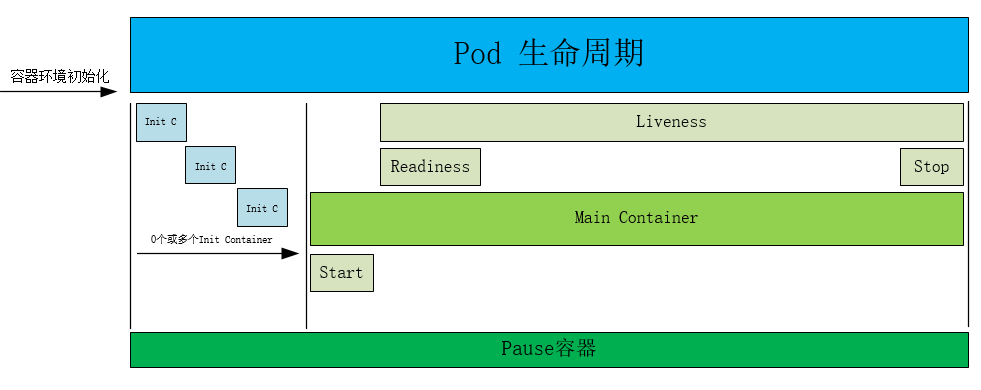
如下示例
apiVersion: v1
kind: Pod
metadata:
  name: lifecycle-demo-pod
  namespace: default
  labels:
    test: lifecycle
spec:
  containers:
  - name: lifecycle-demo
    image: nginx:1.22.1
    imagePullPolicy: IfNotPresent
    lifecycle:
      postStart:
        exec:
          command: ["/bin/sh", "-c", "echo 'Hello from the postStart handler' >> /var/log/nginx/message"]
      preStop:
        exec:
          command: ["/bin/sh", "-c", "echo 'Hello from the preStop handler'   >> /var/log/nginx/message"]
    volumeMounts:
    - name: message-log
      mountPath: /var/log/nginx/
      readOnly: false        # 读写挂载方式,默认为读写模式false
  initContainers:
  - name: init-myservice
    image: busybox:1.28
    command: ["/bin/sh", "-c", "echo 'Hello initContainers'   >> /var/log/nginx/message"]
    volumeMounts:
    - name: message-log
      mountPath: /var/log/nginx/
      readOnly: false           # 读写挂载方式,默认为读写模式false
  volumes:
  - name: message-log
    hostPath:
      path: /data/volumes/nginx/log/
      type: DirectoryOrCreate     # 表示如果宿主机没有此目录则会自动创建
效果如下
[root@k8s-node1 ~]# kubectl delete pod lifecycle-demo-pod
[root@k8s-node2 log]# cat message
Hello initContainers
Hello from the postStart handler
Hello from the preStop handler
以上
此内容由惯性聚合(RSS阅读器)自动聚合整理,仅供阅读参考。 原文来自 — 版权归原作者所有。