


0 前言
一个高性能的 Bash 磁盘分析脚本,用于快速定位磁盘空间占用问题.
1 功能特性
-
子目录占用排行
- 显示占用超过 10% 的子目录
- 对占用超过 50% 的目录自动递归分析
- 树形结构展示,一目了然
-
大文件查找
- 查找超过指定大小的文件(默认 1024MB)
- 显示 Top 5 大文件
- 显示文件大小,修改日期,所有者
-
性能优化
- 使用关联数组缓存目录大小
- 一次扫描,多次查询
- 无临时文件,减少 I/O 开销
2 使用方法
2.1 脚本内容
#!/bin/bash
# ==============================================================================
# 磁盘分析脚本 (性能优化版)
# 功能: 1. 子目录占用排行(>10%,自动递归>50%)  2. 大文件 Top 5
# 用法: ./disk_analyze.sh [目录] [大文件阈值MB]
# 优化: 使用关联数组索引缓存,减少 du 调用,消除临时文件
# ==============================================================================

set -o pipefail

# --- 参数 ---
TARGET_DIR="${1:-$(pwd)}"
LARGE_FILE_LIMIT_MB="${2:-1024}"
TOP_N=5
SHOW_THRESHOLD=10
RECURSE_THRESHOLD=50

if ! [[ "$LARGE_FILE_LIMIT_MB" =~ ^[0-9]+$ ]]; then
    echo "错误: 大文件阈值MB 必须是整数, 当前: $LARGE_FILE_LIMIT_MB"
    exit 1
fi

# 转为绝对路径
if [ -d "$TARGET_DIR" ]; then
    TARGET_DIR=$(cd "$TARGET_DIR" && pwd)
else
    echo "错误: 目录 $TARGET_DIR 不存在!"
    exit 1
fi

# --- 颜色 ---
RED='\033[0;31m'
GREEN='\033[0;32m'
YELLOW='\033[1;33m'
CYAN='\033[0;36m'
BLUE='\033[0;34m'
BOLD='\033[1m'
NC='\033[0m'

# --- 目录索引(核心优化:一次扫描,多次查询)---
declare -A DIR_SIZE=()
declare -A DIR_CHILDREN=()

# 进度显示函数
show_progress() {
    local count="$1"
    local current_path="$2"
    local spinner=('⠋' '⠙' '⠹' '⠸' '⠼' '⠴' '⠦' '⠧' '⠇' '⠏')
    local idx=$((count / 10 % 10))
    # 截断过长的路径
    local display_path="$current_path"
    if [ ${#display_path} -gt 50 ]; then
        display_path="...${display_path: -47}"
    fi
    printf "\r    ${CYAN}${spinner[$idx]}${NC} 扫描中: ${YELLOW}%d${NC} 个目录  %-50s" "$count" "$display_path" >&2
}

build_dir_index() {
    local root="$1"

    DIR_SIZE=()
    DIR_CHILDREN=()

    local dir_count=0
    local last_update=0

    # du 默认只输出目录. 使用 -0 避免路径含空格/换行时被 read 拆分.
    while IFS=$'\t' read -r -d '' size path; do
        [ -z "$size" ] && continue
        DIR_SIZE["$path"]="$size"

        dir_count=$((dir_count + 1))

        # 每 100 个目录或每秒更新一次进度
        if (( dir_count - last_update >= 100 )); then
            show_progress "$dir_count" "$path"
            last_update=$dir_count
        fi

        if [ "$path" != "$root" ]; then
            local parent="${path%/*}"
            [ -z "$parent" ] && parent="/"
            DIR_CHILDREN["$parent"]+="$path"$'\n'
        fi
    done < <(du -b -0 -x "$root" 2>/dev/null)

    # 清除进度行,显示完成信息
    if (( dir_count > 0 )); then
        printf "\r    ${GREEN}✓${NC} 扫描完成: ${YELLOW}%d${NC} 个目录%-50s\n" "$dir_count" "" >&2
    fi
}

# --- 工具函数(优化:使用 Bash 原生算术替代 awk)---
human_size() {
    local bytes="${1:-0}"
    [ -z "$bytes" ] || [ "$bytes" = "0" ] && echo "0B" && return

    local div unit
    if (( bytes >= 1073741824 )); then
        div=1073741824
        unit="G"
    elif (( bytes >= 1048576 )); then
        div=1048576
        unit="M"
    elif (( bytes >= 1024 )); then
        div=1024
        unit="K"
    else
        echo "${bytes}B"
        return
    fi

    local tenths=$(( (bytes * 10 + div / 2) / div ))
    printf "%d.%d%s" $((tenths / 10)) $((tenths % 10)) "$unit"
}

# 显示目录下 Top N 文件/子目录(优化:使用 awk 插入排序替代 sort | head)
show_top_items() {
    local dir="$1"
    local prefix="$2"
    local dir_size="$3"

    printf "${prefix}${BLUE}┌─ 热点目录: %s${NC}\n" "$dir"
    printf "${prefix}${BLUE}│${NC}\n"

    while IFS='|' read -r size type name; do
        [ -z "$size" ] && continue

        local pct=0
        if (( dir_size > 0 )); then
            pct=$(( (size * 100 + dir_size / 2) / dir_size ))
        fi

        if [ "$type" = "D" ]; then
            printf "${prefix}${BLUE}│${NC}  %-30s ${CYAN}%8s  %3s%%${NC}  [目录]\n" "$name" "$(human_size "$size")" "$pct"
        else
            printf "${prefix}${BLUE}│${NC}  %-30s ${YELLOW}%8s  %3s%%${NC}  [文件]\n" "$name" "$(human_size "$size")" "$pct"
        fi
    done < <(
        {
            children="${DIR_CHILDREN["$dir"]}"
            if [ -n "$children" ]; then
                while IFS= read -r child; do
                    [ -z "$child" ] && continue
                    size="${DIR_SIZE["$child"]}"
                    [ -z "$size" ] && continue
                    printf '%s|D|%s\n' "$size" "${child##*/}"
                done <<< "$children"
            fi

            find -L "$dir" -mindepth 1 -maxdepth 1 -xdev -type f -printf '%s|F|%f\n' 2>/dev/null
        } | awk -v n="$TOP_N" -F '|' '
            BEGIN { count=0 }
            {
                size=$1+0
                line=$0
                pos=count+1
                for (i=1; i<=count; i++) {
                    if (size > sizes[i]) { pos=i; break }
                }
                if (pos > n) next
                if (count < n) count++
                for (j=count; j>pos; j--) {
                    sizes[j]=sizes[j-1]
                    lines[j]=lines[j-1]
                }
                sizes[pos]=size
                lines[pos]=line
            }
            END { for (i=1; i<=count; i++) print lines[i] }
        '
    )

    printf "${prefix}${BLUE}└────────────────────────────────────────────${NC}\n"
}

# ==============================================================================
# [1] 子目录占用分析 (递归) - 优化:使用缓存索引
# ==============================================================================
analyze_directory() {
    local dir="$1"
    local prefix="$2"
    local parent_size="$3"

    # 获取当前目录总大小(从缓存)
    local total_size="${parent_size:-${DIR_SIZE["$dir"]}}"

    [ -z "$total_size" ] || [ "$total_size" -eq 0 ] && return

    # 收集符合条件的子目录(从缓存)
    local children="${DIR_CHILDREN["$dir"]}"
    [ -z "$children" ] && return

    local items=()
    while IFS= read -r path; do
        [ -z "$path" ] && continue
        local size="${DIR_SIZE["$path"]}"
        [ -z "$size" ] && continue
        local pct=$(( (size * 100 + total_size / 2) / total_size ))
        [ "$pct" -lt "$SHOW_THRESHOLD" ] && continue
        items+=("$size|$pct|$path")
    done <<< "$children"

    # 如果没有符合条件的子目录,直接返回
    [ ${#items[@]} -eq 0 ] && return

    local sorted=()
    mapfile -t sorted < <(printf '%s\n' "${items[@]}" | grep -v '^$' | LC_ALL=C sort -t'|' -k1,1nr)

    local count=${#sorted[@]}
    local i=0

    for item in "${sorted[@]}"; do
        # 跳过空项
        [ -z "$item" ] && continue

        i=$((i + 1))
        local size="${item%%|*}"
        local rest="${item#*|}"
        local pct="${rest%%|*}"
        local path="${rest#*|}"

        # 防止空值导致的整数比较错误
        [ -z "$size" ] && continue
        [ -z "$pct" ] && pct=0
        [ -z "$path" ] && continue

        # 判断是否是最后一个
        local is_last=0
        [ "$i" -eq "$count" ] && is_last=1

        # 选择树形符号
        local branch
        local child_prefix
        if [ $is_last -eq 1 ]; then
            branch="└── "
            child_prefix="${prefix}    "
        else
            branch="├── "
            child_prefix="${prefix}│   "
        fi

        # 根据占比选择颜色
        local color="$CYAN"
        [[ "$pct" =~ ^[0-9]+$ ]] && [ "$pct" -ge 60 ] && color="$RED"
        [[ "$pct" =~ ^[0-9]+$ ]] && [ "$pct" -ge 40 ] && [ "$pct" -lt 60 ] && color="$YELLOW"

        # 显示目录名
        local name="${path##*/}"
        printf "${prefix}${branch}%-20s ${color}%8s  %3s%%${NC}\n" "$name" "$(human_size "$size")" "$pct"

        # 占用超过阈值则递归
        if [[ "$pct" =~ ^[0-9]+$ ]] && [ "$pct" -ge "$RECURSE_THRESHOLD" ]; then
            local sub_size="$size"

            # 检查子目录是否还有超过阈值的项(从缓存)
            local has_more=0
            local sub_children="${DIR_CHILDREN["$path"]}"
            if [ -n "$sub_children" ] && (( sub_size > 0 )); then
                while IFS= read -r sub_item_path; do
                    [ -z "$sub_item_path" ] && continue
                    local sub_item_size="${DIR_SIZE["$sub_item_path"]}"
                    [ -z "$sub_item_size" ] && continue
                    local sub_pct=$(( (sub_item_size * 100 + sub_size / 2) / sub_size ))
                    if [ "$sub_pct" -ge "$RECURSE_THRESHOLD" ]; then
                        has_more=1
                        break
                    fi
                done <<< "$sub_children"
            fi

            if [ "$has_more" -eq 1 ]; then
                # 继续递归
                analyze_directory "$path" "$child_prefix" "$sub_size"
            else
                # 已到最深层,显示 Top N
                printf "${child_prefix}\n"
                show_top_items "$path" "$child_prefix" "$sub_size"
            fi
        fi
    done
}

analyze_directories() {
    printf "${YELLOW}[1] 子目录占用分析 (>%d%%, 递归>%d%%)${NC}\n" "$SHOW_THRESHOLD" "$RECURSE_THRESHOLD"
    printf "────────────────────────────────────────────────────────\n"

    local start_time=$(date +%s)

    # 核心优化:一次构建索引
    build_dir_index "$TARGET_DIR"
    local total_size="${DIR_SIZE["$TARGET_DIR"]}"

    printf "    ${BOLD}%-20s %8s${NC}\n" "$TARGET_DIR" "$(human_size "$total_size")"

    analyze_directory "$TARGET_DIR" "    " "$total_size"

    printf "\n    耗时: $(($(date +%s) - start_time))秒\n\n"
}

# ==============================================================================
# [2] 大文件查找(优化:使用 awk 插入排序替代 sort | head)
# ==============================================================================
find_large_files() {
    printf "${YELLOW}[2] 大文件 Top ${TOP_N} (>${LARGE_FILE_LIMIT_MB}MB)${NC}\n"
    printf "────────────────────────────────────────────────────────\n"
    printf "    ${BOLD}%-50s  %-10s  %-10s  %-8s${NC}\n" "PATH" "SIZE" "DATE" "OWNER"
    printf "    %-50s  %-10s  %-10s  %-8s\n" "--------------------------------------------------" "----------" "----------" "--------"

    local start_time=$(date +%s)
    local count=0

    while IFS=$'\t' read -r size mtime owner path; do
        [ -z "$size" ] && continue
        count=$((count + 1))
        printf "    %-50s  ${RED}%-10s${NC}  %-10s  %-8s\n" \
            "$path" "$(human_size "$size")" "$mtime" "$owner"
    done < <(
        find "$TARGET_DIR" -xdev -type f -size +"${LARGE_FILE_LIMIT_MB}"M \
            -printf '%s\t%TY-%Tm-%Td\t%u\t%p\n' 2>/dev/null | \
        awk -v n="$TOP_N" -F '\t' '
            BEGIN { count=0 }
            {
                size=$1+0
                line=$0
                pos=count+1
                for (i=1; i<=count; i++) {
                    if (size > sizes[i]) { pos=i; break }
                }
                if (pos > n) next
                if (count < n) count++
                for (j=count; j>pos; j--) {
                    sizes[j]=sizes[j-1]
                    lines[j]=lines[j-1]
                }
                sizes[pos]=size
                lines[pos]=line
            }
            END { for (i=1; i<=count; i++) print lines[i] }
        '
    )

    [ $count -eq 0 ] && printf "    ${GREEN}无超过 ${LARGE_FILE_LIMIT_MB}MB 的文件${NC}\n"

    printf "\n    耗时: $(($(date +%s) - start_time))秒\n\n"
}

# ==============================================================================
# 主程序
# ==============================================================================
main() {
    printf "\n"
    printf "${BOLD}═══════════════════════════════════════════════════════════${NC}\n"
    printf "${BOLD}  磁盘分析: ${CYAN}%s${NC}  [%s]${NC}\n" "$TARGET_DIR" "$(date '+%Y-%m-%d %H:%M:%S')"
    printf "${BOLD}═══════════════════════════════════════════════════════════${NC}\n\n"

    analyze_directories
    find_large_files

    printf "${GREEN}完成${NC}\n\n"
}

main
2.2 使用方法
./disk_analyze.sh [目录] [大文件阈值MB]
2.3 参数说明
| 参数 | 默认值 | 描述 |
|---|---|---|
| 目录 | 当前目录 | 要分析的目标目录 |
| 大文件阈值 MB | 1024 | 大文件筛选阈值(单位:MB) |
2.4 使用示例
# 分析当前目录
./disk_analyze.sh

# 分析 /var 目录
./disk_analyze.sh /var

# 分析 /home 目录,查找超过 500MB 的文件
./disk_analyze.sh /home 500
3 效果展示
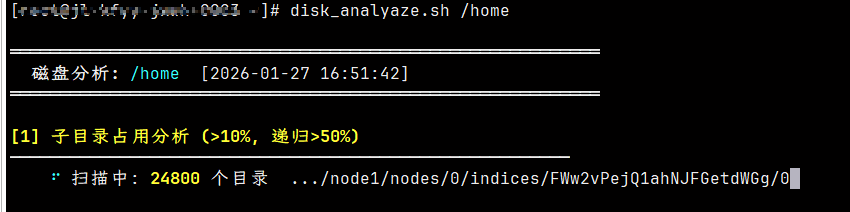
3.1 扫描进度
分析大目录时显示实时进度:
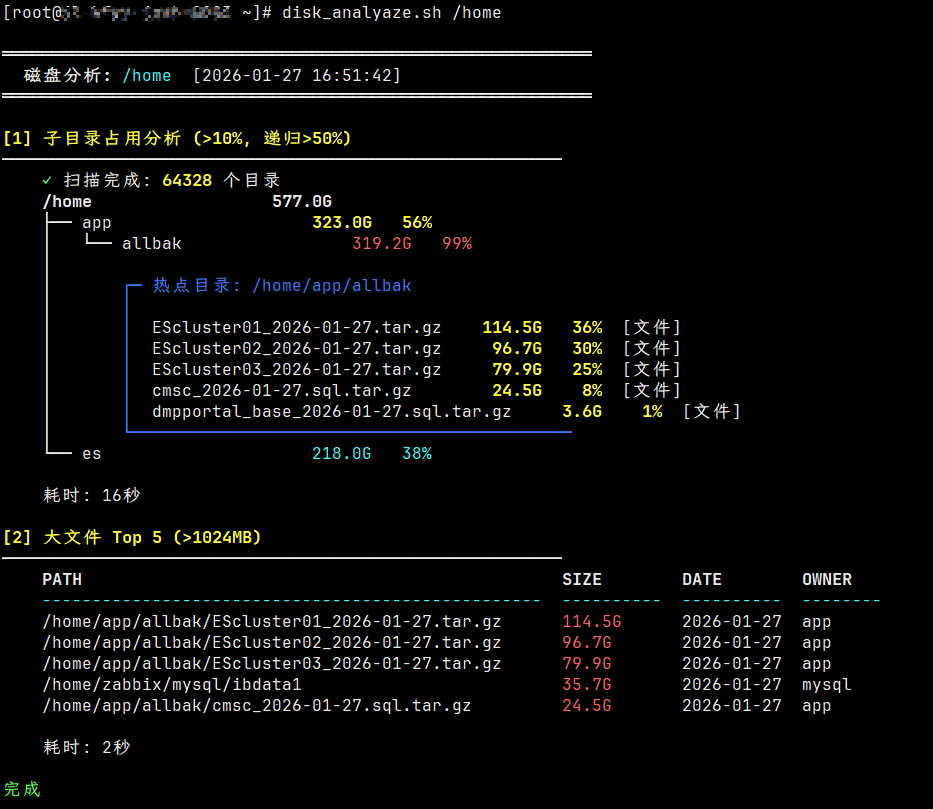
3.2 完整输出
4 颜色说明
- 🔴 红色:占用 ≥60%,需重点关注
- 🟡 黄色:占用 40%-60%,建议检查
- 🔵 青色:占用 10%-40%,正常范围
5 环境要求
- Bash 4.0+(需要关联数组支持)
- GNU coreutils(du, find)
- awk
6 注意事项
- 脚本使用
-x参数,不会跨越文件系统边界 - 符号链接会被跟随(-L)
- 需要对目标目录有读取权限
以上.

微信

支付宝