惯性聚合 高效追踪和阅读你感兴趣的博客、新闻、科技资讯
阅读原文 在惯性聚合中打开

推荐订阅源

爱范儿
爱范儿
Security Latest
Security Latest
NISL@THU
NISL@THU
OSCHINA 社区最新新闻
OSCHINA 社区最新新闻
C
Cybersecurity and Infrastructure Security Agency CISA
Cloudbric
Cloudbric
T
Threat Research - Cisco Blogs
大猫的无限游戏
大猫的无限游戏
C
CXSECURITY Database RSS Feed - CXSecurity.com
阮一峰的网络日志
阮一峰的网络日志
freeCodeCamp Programming Tutorials: Python, JavaScript, Git & More
雷峰网
雷峰网
C
Cisco Blogs
V
Vulnerabilities – Threatpost
S
Security Archives - TechRepublic
V
Visual Studio Blog
让小产品的独立变现更简单 - ezindie.com
cs.AI updates on arXiv.org
J
Java Code Geeks
D
Darknet – Hacking Tools, Hacker News & Cyber Security
Know Your Adversary
Know Your Adversary
博客园 - 叶小钗
腾讯CDC
钛媒体:引领未来商业与生活新知
钛媒体:引领未来商业与生活新知
P
Privacy International News Feed
P
Palo Alto Networks Blog
博客园_首页
V
V2EX
WordPress大学
WordPress大学
Schneier on Security
月光博客
月光博客
博客园 - 司徒正美
Google DeepMind News
TaoSecurity Blog
TaoSecurity Blog
博客园 - 聂微东
酷 壳 – CoolShell
酷 壳 – CoolShell
人人都是产品经理
人人都是产品经理
奇客Solidot–传递最新科技情报
奇客Solidot–传递最新科技情报
博客园 - 【当耐特】
The Cloudflare Blog
罗磊的独立博客
美团技术团队
N
News | PayPal Newsroom
K
KPMG report finds enterprise disconnect between AI and its ROI | CIO
Last Week in AI
Last Week in AI
K
Kaspersky official blog
Google Online Security Blog
S
SegmentFault 最新的问题
Application and Cybersecurity Blog
T
Tailwind CSS Blog

又见苍岚

COLMAP PatchMatch Stereo 算法详解 事件驱动的状态机框架:从理论到工程实践 Git 在国内网络环境下无法 Push 的排查与修复 —— 配置 Clash 代理 分段五次多项式插值原理详解 路径插值方法深度对比研究 Claude Code 使用指南 OpenClaw 记忆管理与技能创建指南 CBS(Conflict-Based Search)算法详解 A* 算法及其变种详解 OpenClaw 配置多 Agents Windows Powershell 无法加载文件,因为在此系统上禁止运行脚本问题的解决方案 MaxClaw 安装流程 大模型 AI 名词介绍 AList 网盘聚合工具简介 Protobuf 简介与测试 Claude Code 简介以及 GLM 4.7 模型接入 Github 歌词下载工具 163MusicLyrics Python __getattr__ 懒加载 Python TypedDict 机器人仿真平台 Gazebo 安装记录 机器人仿真平台 Gazebo 简介 多机器人路径规划问题(Multi-Agent Path Finding, MAPF)简介 Python exifread 读取修改过的 jpeg 信息错误问题修复 3D 坐标系变换的理解 3D 旋转矩阵基本概念 MongoDB Compass 介绍 Python 环境管理工具 uv Flutter 开发指南 Snipaste 安装下载与黑屏问题解决方案 全局路径规划算法记录 2025 Python 版本性能测试 Flutter Hello World Flutter 安装环境配置 Ubuntu VMware 硬盘扩容后 SMBus Host controller not enabled 报错问题解决 Python NetworkX 教程 Docker GPU 报错 - Failed to initialize NVML Unknown Error 解决方案 Python matplotlib 图表绘制 cuda-toolkit 安装替代 Cuda 与 Cudnn Jinja2 Python 利用 docxtpl 和 Jinja2 生成基于模板的 Word 文档 Docker 实现 CPU 核心隔离 LoFTR 基于 Transformer 的特征提取匹配算法 OmniGlue 特征匹配 SuperGlue 使用图神经网络学习特征匹配 Ubuntu 下将 xlsx 文件按照 sheet 转换为 图片 Python 使用 SQLAlchemy Python FastAPI 教程 openwrt 软路由配置安装 Nav2 地图文件(PGM/YAML)规范标准 3D OBJ 模型转换为 glb 瓦片格式 Python 源码 Redis 数据库介绍 Ubuntu 22.04 内核自动升级导致 MongoDB 7.0.12 错误记录 ubuntu 20.04 安装 ROS Noetic ubuntu 18.04 安装 ROS Melodic VMware Workstation Pro 个人免费版下载、安装、使用指南 Hybrid A-star 路径规划 Reeds-Shepp 曲线 Dubins 曲线 Linux kvm 虚拟机网络不通的问题解决方法 Ubuntu 自动内存清理 BiliBili 缓存视频转 mp4 Python 求解线性规划 3D Gaussian Splatting 官方源码实践记录 ImageMagick 教程 Ubuntu 22.04 安装 Colmap 对数几率 odds Ubuntu nmcli 网络管理工具使用指南 SuperPoint 自监督深度学习特征点提取 SyncTV Music Tag Web 在线音乐信息整理工具 ncm 格式转 mp3 MusicBrainz 音乐元数据百科数据库 Ubuntu 网络流量监控工具 私人云音乐平台 Navidrome 入门 手眼标定 四元数(Quaternions) OHTTPS 实现免费自动 https 证书申请、更新、部署 ubuntu 22.04 安装 CloudCompare 单机 KVM 虚拟机冷迁移 Ubuntu 22.04 使用 mdadm 实现软 raid 小鱼 一键安装 ROS-humble Fluid -46- 基于 Simpletex API 构建公式识别页面 公式识别 API 简介 -- Simpletex 使用 Python web 部署库 waitress 3D Gaussian Splatting for Real-Time Radiance Field Rendering Ubuntu Swap 简介与空间扩展 Ubuntu 24.04 安装 forticlient Clash Verge 使用 MongoDB 7.0.17 集群 Docker 构建源码 Error code - 2013. Lost connection to MySQL server during query 问题解决 Python 日志记录库 loguru 使用指北 Python 实现 Web 日志查看服务 MySQL LOAD DATA LOCAL INFILE 极速数据加载 Image size exceeds limit of 89478485 pixels 解决方案 Docker 使用 NVIDIA GPU 驱动错误解决 阿里云 docker 镜像仓库 Ubuntu中没有wired connected的解决方案 MinIO 简介 subconverter 代理订阅格式转换 修复 node –openssl-legacy-provider is not allowed in NODE_OPTIONS 错误
Joplin 私有服务器部署
Yiwei Zhang · 2023-12-12 · via 又见苍岚

自己的 markdown 笔记一定要握在自己手里,本文记录私有笔记服务器工具 joplin 的部署过程。

简介

Joplin是一款开源的笔记本应用,它的以下优点让我最终选择了它,

  • 多平台支持
    桌面端支持Windows,Mac;移动端支持安卓、IOS,所以不论是电脑还是手机都能够使用这款笔记来记录。

  • 多设备同步
    Joplin可以在各个设备上通过WebDAV、Dropbox、OneDrive、Joplin Server等方式进行存储同步笔记,可以实现自主选择数据存储方式。

  • Markdown语法支持
    支持Markdown使我在Joplin和Note staiton之间最终选择了Joplin,Markdown作为一种轻量级的标记语言,易写易读高效,能在写作排版上大大提高效率。

  • 待办事项和笔记统一管理
    Joplin除了支持创建笔记之外,还可以创建待办事项,所以可以把自己的待办清单和笔记整理在一起,并且它还支持待办事项和笔记的转换,可以先设置待办,作为未完成笔记的一个提醒,在完成写作之后再转为笔记。

  • 端对端加密(E2EE)
    Joplin支持端对端加密(E2EE)来保证笔记数据的安全,确保除了用户自己之外没有人可以访问它们,所以也可以在原有的笔记存储基础上放心的在公有云上额外再备份自己的笔记。

Server 部署流程

官方文档有介绍 server 配置流程,但是不清不楚

总体来说还是 Docker 部署最舒服,咱们记录流程

准备工作

  • 安装好 Docker
  • 安装好 Docker-compose

生成 docker 容器

  • 创建 docker-compose.yml 文件
1
2
3
4
5
6
7
8
9
10
11
12
13
14
15
16
17
18
19
20
21
22
23
24
25
26
27
28
29
30
31
32
33
34
35
36
37
38
39
40
41
42
43
44
45
46
47
48
49
50
51
52
53
54

# This is a sample docker-compose file that can be used to run Joplin Server
# along with a PostgreSQL server.
#
# Update the following fields in the stanza below:
#
# POSTGRES_USER
# POSTGRES_PASSWORD
# APP_BASE_URL
#
# APP_BASE_URL: This is the base public URL where the service will be running.
# - If Joplin Server needs to be accessible over the internet, configure APP_BASE_URL as follows: https://example.com/joplin.
# - If Joplin Server does not need to be accessible over the internet, set the the APP_BASE_URL to your server's hostname.
# For Example: http://[hostname]:22300. The base URL can include the port.
# APP_PORT: The local port on which the Docker container will listen.
# - This would typically be mapped to port to 443 (TLS) with a reverse proxy.
# - If Joplin Server does not need to be accessible over the internet, the port can be mapped to 22300.

version: '3'

services:
db:
image: postgres:16
volumes:
- ./data/postgres:/var/lib/postgresql/data
ports:
- "5432:5432"
restart: unless-stopped
environment:
- POSTGRES_PASSWORD=balabala
- POSTGRES_USER=balabala
- POSTGRES_DB=balabala
app:
image: joplin/server:latest
volumes:
- /etc/localtime:/etc/localtime:ro
# This directory has to be created manually, owned by user 1001 with chmod 700
- /home/vvd/programs/joplin/files:/mnt/files
ports:
- "22300:22300"
restart: unless-stopped
depends_on:
- db
environment:
- APP_PORT=22300
- APP_BASE_URL=http://domain:port
- DB_CLIENT=pg
- POSTGRES_PASSWORD=balabala
- POSTGRES_DATABASE=balabala
- POSTGRES_USER=balabala
- POSTGRES_PORT=5432
- POSTGRES_HOST=db
- STORAGE_DRIVER=Type=Filesystem; Path=/mnt/files

  • 其中 APP_BASE_URL 为 joplin 可接受的访问链接,该url 需要填入 协议、域名和端口,初始为了方便建议 http 协议测试,之后升级 https

  • 建议将内部存放核心文件映射出来,方便管理

    1
    2
    3
    4
    volumes:
    - /etc/localtime:/etc/localtime:ro
    # This directory has to be created manually, owned by user 1001 with chmod 700
    - /home/vvd/programs/joplin/files:/mnt/files
  • 配置初始用户邮箱

1
2
3
4
5
6
7
8
MAILER_ENABLED=1
MAILER_HOST=smtp.gmail.com 10
MAILER_PORT=587
MAILER_SECURITY=starttls
MAILER_AUTH_USER=my_email_address
MAILER_AUTH_PASSWORD=my_password
MAILER_NOREPLY_NAME=JoplinServer
MAILER_NOREPLY_EMAIL=my_email_address
  • 修改文件件权限

需要将/mnt/files 映射的本地 /home/vvd/programs/joplin/files 文件夹所有者修改为 1001

https://discourse.joplinapp.org/t/self-hosted-server-setup-storage-in-filesytem/25939

1
sudo chown 1001 /home/vvd/programs/joplin/files
  • 构建 container
1
docker-compose up
  • 正常运行服务
1
2
3
4
5
6
7
8
9
10
11
12
13
14
15
16
17
18
19
20
21
22
23
24
25
26
27
28
29
30
31
32
33
34
35
36
37
38
39
40
41
42
43
44
45
46
47
48
49
50
51
52
53
54
55
56
57
58
59
60
61
62
63
64
65
66
67
68
69
70
71
72
73
74
75
76
77
78
79
80
81
82
83
84
85
86
87
88
89
90
91
92
93
94
95
96
97
98
99
100
101
102
103
104
105
106
107
108
109
110
111
112
113
114
115
116
117
118
119
120
121
122
123
124
125
126
127
128
129
130
131
132
Starting joplin_db_1 ... done
Recreating joplin_app_1 ... done
Attaching to joplin_db_1, joplin_app_1
db_1 |
db_1 | PostgreSQL Database directory appears to contain a database; Skipping initialization
db_1 |
db_1 | 2023-12-13 14:11:26.652 UTC [1] LOG: starting PostgreSQL 16.1 (Debian 16.1-1.pgdg120+1) on x86_64-pc-linux-gnu, compiled by gcc (Debian 12.2.0-14) 12.2.0, 64-bit
db_1 | 2023-12-13 14:11:26.653 UTC [1] LOG: listening on IPv4 address "0.0.0.0", port 5432
db_1 | 2023-12-13 14:11:26.653 UTC [1] LOG: listening on IPv6 address "::", port 5432
db_1 | 2023-12-13 14:11:27.166 UTC [1] LOG: listening on Unix socket "/var/run/postgresql/.s.PGSQL.5432"
db_1 | 2023-12-13 14:11:27.259 UTC [28] LOG: database system was shut down at 2023-12-13 14:10:45 UTC
db_1 | 2023-12-13 14:11:27.557 UTC [1] LOG: database system is ready to accept connections
app_1 | yarn run v1.22.19
app_1 | $ pm2 kill && pm2 start --no-daemon --exp-backoff-restart-delay=1000 dist/app.js
app_1 |
app_1 | -------------
app_1 |
app_1 | __/\\\\\\\\\\\\\____/\\\\____________/\\\\____/\\\\\\\\\_____
app_1 | _\/\\\/////////\\\_\/\\\\\\________/\\\\\\__/\\\///////\\\___
app_1 | _\/\\\_______\/\\\_\/\\\//\\\____/\\\//\\\_\///______\//\\\__
app_1 | _\/\\\\\\\\\\\\\/__\/\\\\///\\\/\\\/_\/\\\___________/\\\/___
app_1 | _\/\\\/////////____\/\\\__\///\\\/___\/\\\________/\\\//_____
app_1 | _\/\\\_____________\/\\\____\///_____\/\\\_____/\\\//________
app_1 | _\/\\\_____________\/\\\_____________\/\\\___/\\\/___________
app_1 | _\/\\\_____________\/\\\_____________\/\\\__/\\\\\\\\\\\\\\\_
app_1 | _\///______________\///______________\///__\///////////////__
app_1 |
app_1 |
app_1 | Runtime Edition
app_1 |
app_1 | PM2 is a Production Process Manager for Node.js applications
app_1 | with a built-in Load Balancer.
app_1 |
app_1 | Start and Daemonize any application:
app_1 | $ pm2 start app.js
app_1 |
app_1 | Load Balance 4 instances of api.js:
app_1 | $ pm2 start api.js -i 4
app_1 |
app_1 | Monitor in production:
app_1 | $ pm2 monitor
app_1 |
app_1 | Make pm2 auto-boot at server restart:
app_1 | $ pm2 startup
app_1 |
app_1 | To go further checkout:
app_1 | http://pm2.io/
app_1 |
app_1 |
app_1 | -------------
app_1 |
app_1 | [PM2] Spawning PM2 daemon with pm2_home=/home/joplin/.pm2
app_1 | [PM2] PM2 Successfully daemonized
app_1 | [PM2][WARN] No process found
app_1 | [PM2] [v] All Applications Stopped
app_1 | [PM2] [v] PM2 Daemon Stopped
app_1 | pm2 launched in no-daemon mode (you can add DEBUG="*" env variable to get more messages)
app_1 | 2023-12-13T14:11:33: PM2 log: Launching in no daemon mode
app_1 | 2023-12-13T14:11:33: PM2 log: [PM2] Starting /home/joplin/packages/server/dist/app.js in fork_mode (1 instance)
app_1 | 2023-12-13T14:11:33: PM2 log: App [app:0] starting in -fork mode-
app_1 | 2023-12-13T14:11:33: PM2 log: App [app:0] online
app_1 | 2023-12-13T14:11:33: PM2 log: [PM2] Done.
app_1 | 2023-12-13T14:11:33: PM2 log: ┌────┬────────┬─────────────┬─────────┬─────────┬──────────┬────────┬──────┬───────────┬──────────┬──────────┬──────────┬──────────┐
app_1 | │ id │ name │ namespace │ version │ mode │ pid │ uptime │ ↺ │ status │ cpu │ mem │ user │ watching │
app_1 | ├────┼────────┼─────────────┼─────────┼─────────┼──────────┼────────┼──────┼───────────┼──────────┼──────────┼──────────┼──────────┤
app_1 | │ 0 │ app │ default │ 2.13.3 │ fork │ 62 │ 0s │ 0 │ online │ 0% │ 40.3mb │ joplin │ disabled │
app_1 | └────┴────────┴─────────────┴─────────┴─────────┴──────────┴────────┴──────┴───────────┴──────────┴──────────┴──────────┴──────────┘
app_1 | 2023-12-13T14:11:33: PM2 log: [--no-daemon] Continue to stream logs
app_1 | 2023-12-13T14:11:33: PM2 log: [--no-daemon] Exit on target PM2 exit pid=51
app_1 | 14:11:43 0|app | 2023-12-13 14:11:43: App: Starting server v2.13.3 (prod) on port 22300 and PID 62...
app_1 | 14:11:43 0|app | 2023-12-13 14:11:43: App: Checking for time drift using NTP server: pool.ntp.org:123
app_1 | 14:11:43 0|app | 2023-12-13 14:11:43: App: NTP time offset: -24ms
app_1 | 14:11:43 0|app | 2023-12-13 14:11:43: App: Running in Docker: true
app_1 | 14:11:43 0|app | 2023-12-13 14:11:43: App: Public base URL: http://uipv4.zywvvd.com:22300
app_1 | 14:11:43 0|app | 2023-12-13 14:11:43: App: API base URL: http://uipv4.zywvvd.com:22300
app_1 | 14:11:43 0|app | 2023-12-13 14:11:43: App: User content base URL: http://uipv4.zywvvd.com:22300
app_1 | 14:11:43 0|app | 2023-12-13 14:11:43: App: Log dir: /home/joplin/packages/server/logs
app_1 | 14:11:43 0|app | 2023-12-13 14:11:43: App: DB Config: {
app_1 | 14:11:43 0|app | client: 'pg',
app_1 | 14:11:43 0|app | name: 'joplin',
app_1 | 14:11:43 0|app | slowQueryLogEnabled: false,
app_1 | 14:11:43 0|app | slowQueryLogMinDuration: 1000,
app_1 | 14:11:43 0|app | autoMigration: true,
app_1 | 14:11:43 0|app | user: 'joplin',
app_1 | 14:11:43 0|app | password: '********',
app_1 | 14:11:43 0|app | port: 5432,
app_1 | 14:11:43 0|app | host: 'db'
app_1 | 14:11:43 0|app | }
app_1 | 14:11:43 0|app | 2023-12-13 14:11:43: App: Mailer Config: {
app_1 | 14:11:43 0|app | enabled: false,
app_1 | 14:11:43 0|app | host: '',
app_1 | 14:11:43 0|app | port: 465,
app_1 | 14:11:43 0|app | security: 'tls',
app_1 | 14:11:43 0|app | authUser: '',
app_1 | 14:11:43 0|app | authPassword: '********',
app_1 | 14:11:43 0|app | noReplyName: '',
app_1 | 14:11:43 0|app | noReplyEmail: ''
app_1 | 14:11:43 0|app | }
app_1 | 14:11:43 0|app | 2023-12-13 14:11:43: App: Content driver: { type: 2, path: '/mnt/files' }
app_1 | 14:11:43 0|app | 2023-12-13 14:11:43: App: Content driver (fallback): null
app_1 | 14:11:43 0|app | 2023-12-13 14:11:43: App: Trying to connect to database...
app_1 | 14:11:43 0|app | 2023-12-13 14:11:43: App: Connection check: {
app_1 | 14:11:43 0|app | latestMigration: { name: '20230804154410_can_receive_folder.js', done: true },
app_1 | 14:11:43 0|app | isCreated: true,
app_1 | 14:11:43 0|app | error: null
app_1 | 14:11:43 0|app | }
app_1 | 14:11:43 0|app | 2023-12-13 14:11:43: App: Auto-migrating database...
app_1 | 14:11:44 0|app | 2023-12-13 14:11:44: App: Latest migration: { name: '20230804154410_can_receive_folder.js', done: true }
app_1 | 14:11:44 0|app | 2023-12-13 14:11:44: EmailService: Service will be disabled because mailer config is not set or is explicitly disabled
app_1 | 14:11:49 0|app | 2023-12-13 14:11:49: App: Performing main storage check...
app_1 | 14:11:49 0|app | 2023-12-13 14:11:49: App: Item was written, read back and deleted without any error.
app_1 | 14:11:49 0|app | 2023-12-13 14:11:49: App: Starting services...
app_1 | 14:11:49 0|app | 2023-12-13 14:11:49: TaskService: Scheduling #1 (Delete expired tokens): 0 */6 * * *
app_1 | 14:11:49 0|app | 2023-12-13 14:11:49: TaskService: Scheduling #2 (Update total sizes): 0 * * * *
app_1 | 14:11:49 0|app | 2023-12-13 14:11:49: TaskService: Scheduling #3 (Process oversized accounts): 30 */2 * * *
app_1 | 14:11:49 0|app | 2023-12-13 14:11:49: TaskService: Scheduling #6 (Delete expired sessions): 0 */6 * * *
app_1 | 14:11:49 0|app | 2023-12-13 14:11:49: TaskService: Scheduling #7 (Compress old changes): 0 0 */2 * *
app_1 | 14:11:49 0|app | 2023-12-13 14:11:49: TaskService: Scheduling #8 (Process user deletions): 10 * * * *
app_1 | 14:11:49 0|app | 2023-12-13 14:11:49: TaskService: Scheduling #10 (Process orphaned items): 15 * * * *
app_1 | 14:11:49 0|app | 2023-12-13 14:11:49: TaskService: Scheduling #11 (Process shared items): PT10S
app_1 | 14:11:49 0|app | 2023-12-13 14:11:49: TaskService: Scheduling #12 (Process emails): * * * * *
app_1 | 14:11:49 0|app | 2023-12-13 14:11:49: App: Call this for testing: `curl http://uipv4.zywvvd.com:22300/api/ping`
app_1 | 14:11:59 0|app | 2023-12-13 14:11:59: TaskService: Running #11 (Process shared items) (scheduled)...
app_1 | 14:11:59 0|app | 2023-12-13 14:11:59: TaskService: Completed #11 (Process shared items) in 105ms
app_1 | 14:12:00 0|app | 2023-12-13 14:12:00: TaskService: Running #12 (Process emails) (scheduled)...
app_1 | 14:12:00 0|app | 2023-12-13 14:12:00: TaskService: Completed #12 (Process emails) in 50ms
app_1 | 14:12:09 0|app | 2023-12-13 14:12:09: TaskService: Running #11 (Process shared items) (scheduled)...
app_1 | 14:12:09 0|app | 2023-12-13 14:12:09: TaskService: Completed #11 (Process shared items) in 75ms
app_1 | 14:12:19 0|app | 2023-12-13 14:12:19: TaskService: Running #11 (Process shared items) (scheduled)...
app_1 | 14:12:19 0|app | 2023-12-13 14:12:19: TaskService: Completed #11 (Process shared items) in 84ms
app_1 | 14:12:29 0|app | 2023-12-13 14:12:29: TaskService: Running #11 (Process shared items) (scheduled)...

测试 joplin

访问 http://domain:port/api/ping 也就是你的 joplin 访问链接加上 /api/ping 作为测试

如果一切正常会返回:

1
{"status":"ok","message":"Joplin Server is running"}

同时服务器后端输出日志

1
app_1  | 14:15:28 0|app  | 2023-12-13 14:15:28: App: GET /api/ping (200) (10ms)

说明一切正常

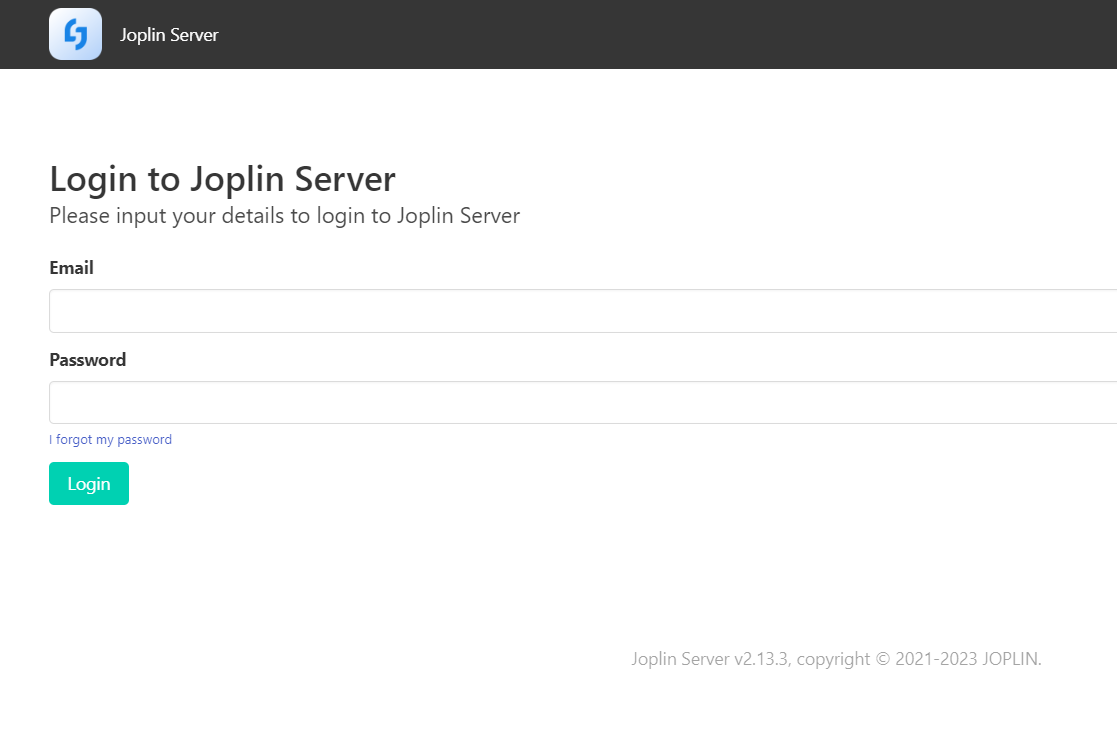
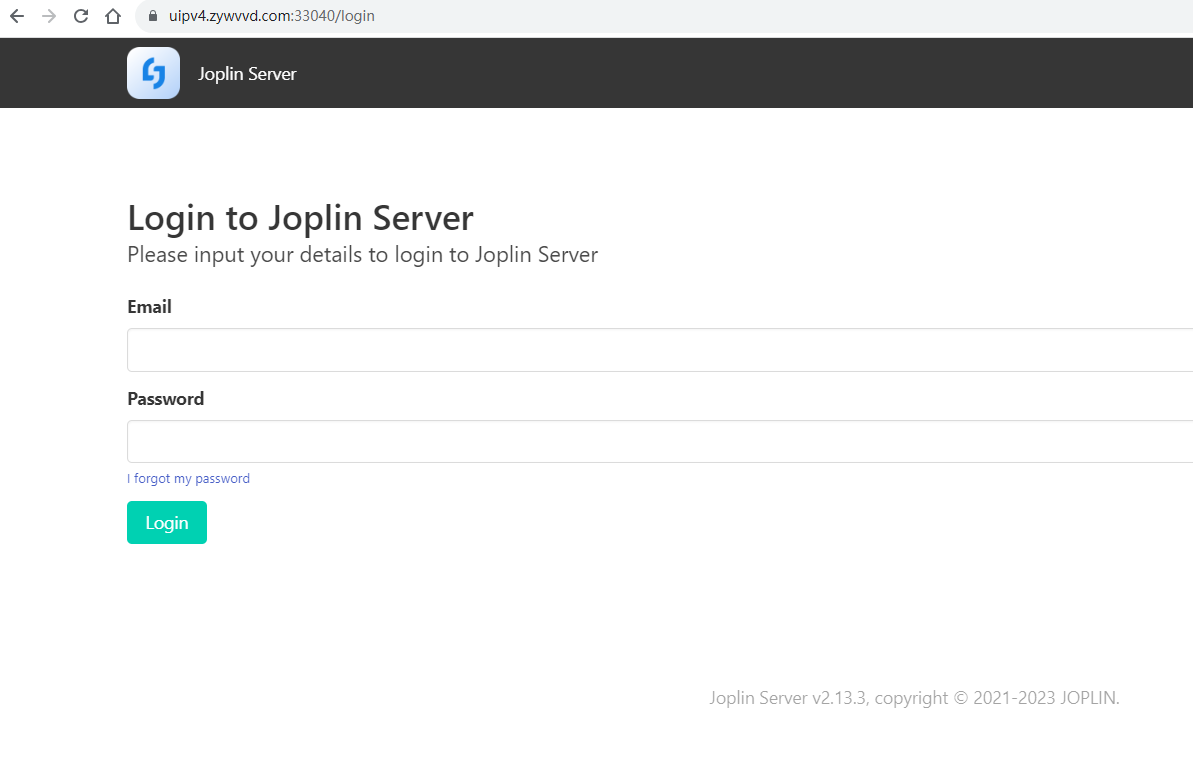
此时访问 http://domain:port/login 可以看到初始登录界面

说明服务器配置目前一切顺利。

https 协议

Docker container 端口设置为默认的 22300

该容器会自动将 22300 映射到本机的 22300 端口

配置 Nginx 反向代理,配置 ssl 证书

1
2
3
4
5
6
7
8
9
10
11
12
13
14
15
16
17
18

server {
listen 11040 ssl;
listen [::]:11040 ssl;
# server_name localhost;

ssl_certificate /ssl/uipv4.zywvvd.com.crt;
ssl_certificate_key /ssl/uipv4.zywvvd.com.key;

location / {
proxy_set_header X-FORWARDED-FOR $remote_addr;
proxy_set_header X-FORWARDED-PROTO $scheme;
proxy_set_header Host $http_host;
proxy_pass http://192.168.5.5:22300;
}
}

将本地的 http 协议转发到 https 协议的 11040 端口上

再通过路由器的端口转发将本机的 11040 端口映射到广域网端口

将路由器公网IP映射到自己的域名上,就可以公网 https 访问自己的 joplin 啦

注意,设置 joplin 登录链接时要设置 nginx 映射之后的链接,否则被认为非法访问

登录配置

  • 初始密码
1
2
账号: admin@localhost
密码: admin
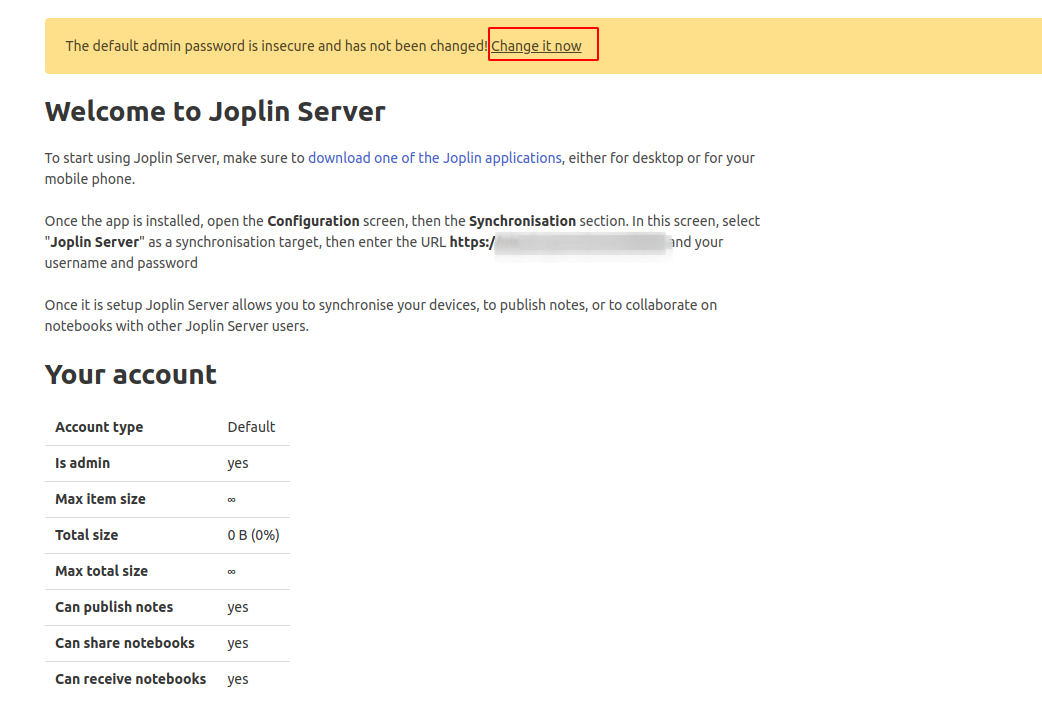
  • 修改初始账号密码

  • 建议这里仅修改 admin 的密码,别改邮箱
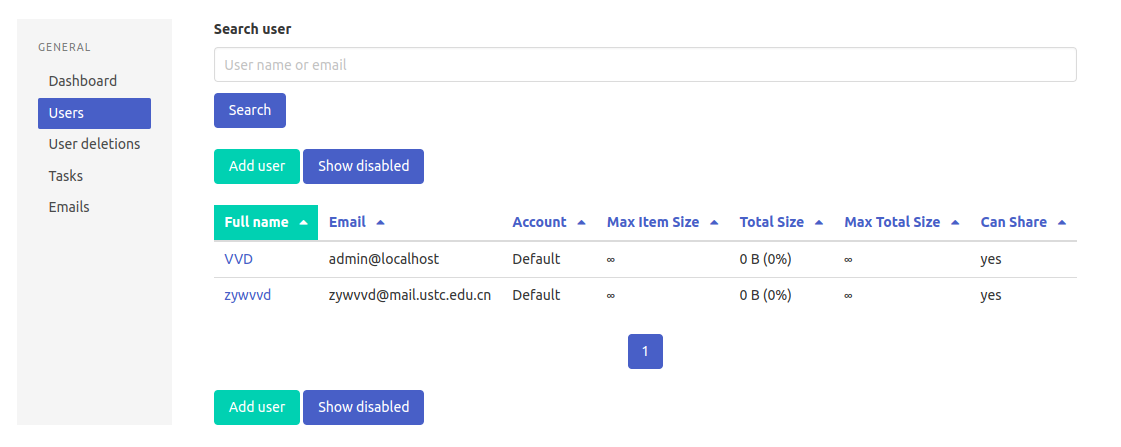
  • 然后再 Admin 用户设置界面添加用户加入自己的邮箱

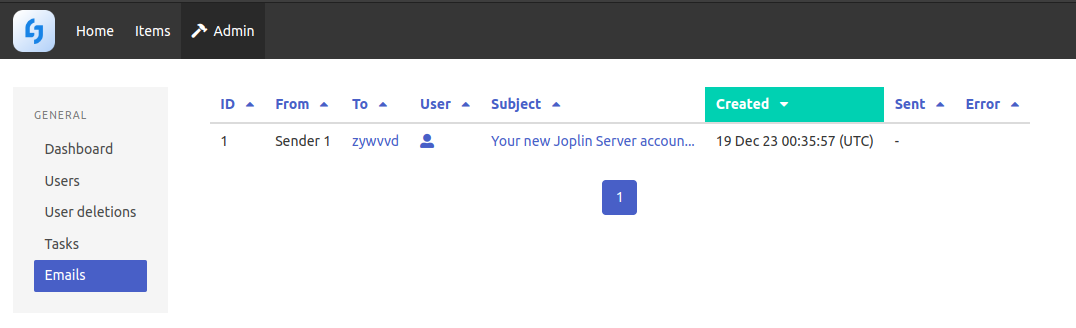
  • 添加用户登录后我们自己的 Server 会说向该邮箱发送了 Email,但是事实上我们收不到(Docker 没有配置邮件服务器)
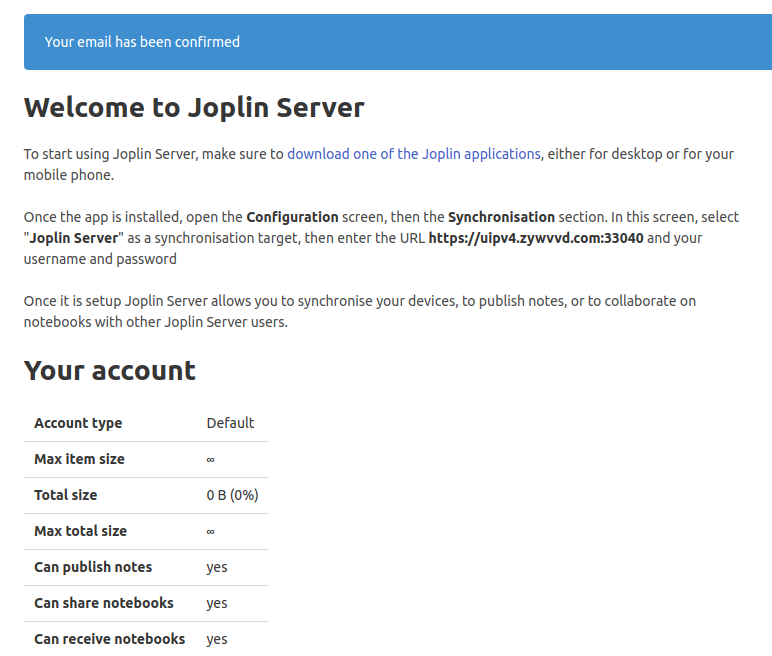
  • 此时登录 Admin 账号,进入 Admin -> Emails 可以看到该邮件,进去访问验证链接就可以了

  • 之后可以用自己的邮箱登录了

连接服务器

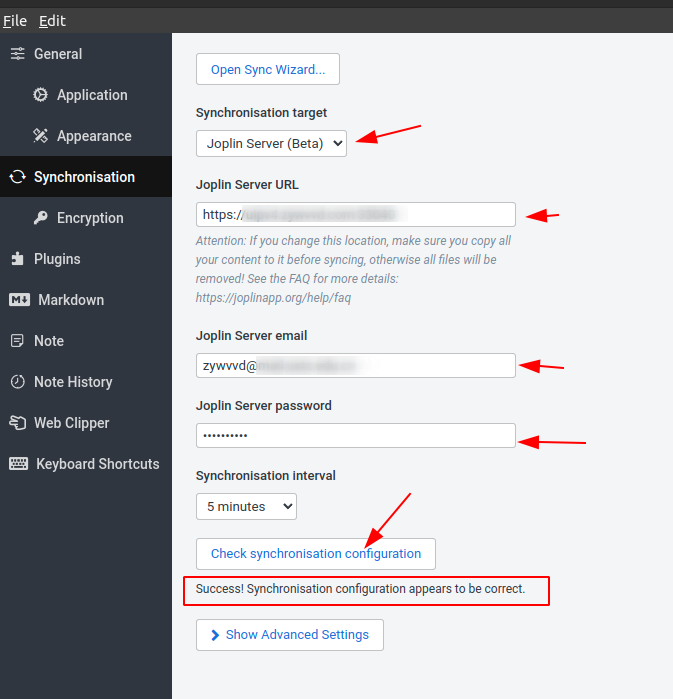
下载 Joplin App 选择非官方的登录选项,在配置中选择 Joplin Server(Beta),填入 URL 邮箱和密码,可以在确认前测试是否成功

参考资料

文章链接:
https://www.zywvvd.com/notes/tools/joplin-develop/joplin-develop/