惯性聚合 高效追踪和阅读你感兴趣的博客、新闻、科技资讯
阅读原文 在惯性聚合中打开

推荐订阅源

cs.AI updates on arXiv.org
PCI Perspectives
PCI Perspectives
钛媒体:引领未来商业与生活新知
钛媒体:引领未来商业与生活新知
Google Online Security Blog
K
KPMG report finds enterprise disconnect between AI and its ROI | CIO
The GitHub Blog
The GitHub Blog
S
Secure Thoughts
cs.CV updates on arXiv.org
WordPress大学
WordPress大学
SecWiki News
SecWiki News
B
Blog
小众软件
小众软件
Hacker News - Newest:
Hacker News - Newest: "LLM"
Webroot Blog
Webroot Blog
CTFtime.org: upcoming CTF events
L
LINUX DO - 热门话题
Recent Commits to openclaw:main
酷 壳 – CoolShell
酷 壳 – CoolShell
IT之家
IT之家
The Cloudflare Blog
Google DeepMind News
Know Your Adversary
Know Your Adversary
Y
Y Combinator Blog
F
Fortinet All Blogs
W
WeLiveSecurity
博客园 - Franky
MongoDB | Blog
MongoDB | Blog
Last Week in AI
Last Week in AI
The Last Watchdog
The Last Watchdog
S
Schneier on Security
爱范儿
爱范儿
V
V2EX - 技术
L
LINUX DO - 最新话题
月光博客
月光博客
博客园 - 【当耐特】
Latest news
Latest news
阮一峰的网络日志
阮一峰的网络日志
博客园 - 司徒正美
U
Unit 42
Schneier on Security
E
Exploit-DB.com RSS Feed
J
Java Code Geeks
Cyberwarzone
Cyberwarzone
T
The Blog of Author Tim Ferriss
TaoSecurity Blog
TaoSecurity Blog
博客园 - 叶小钗
T
Troy Hunt's Blog
大猫的无限游戏
大猫的无限游戏
AI
AI
Security Latest
Security Latest

又见苍岚

COLMAP PatchMatch Stereo 算法详解 事件驱动的状态机框架:从理论到工程实践 Git 在国内网络环境下无法 Push 的排查与修复 —— 配置 Clash 代理 分段五次多项式插值原理详解 路径插值方法深度对比研究 Claude Code 使用指南 OpenClaw 记忆管理与技能创建指南 CBS(Conflict-Based Search)算法详解 A* 算法及其变种详解 OpenClaw 配置多 Agents Windows Powershell 无法加载文件,因为在此系统上禁止运行脚本问题的解决方案 MaxClaw 安装流程 大模型 AI 名词介绍 AList 网盘聚合工具简介 Protobuf 简介与测试 Claude Code 简介以及 GLM 4.7 模型接入 Github 歌词下载工具 163MusicLyrics Python __getattr__ 懒加载 Python TypedDict 机器人仿真平台 Gazebo 安装记录 机器人仿真平台 Gazebo 简介 多机器人路径规划问题(Multi-Agent Path Finding, MAPF)简介 Python exifread 读取修改过的 jpeg 信息错误问题修复 3D 坐标系变换的理解 3D 旋转矩阵基本概念 MongoDB Compass 介绍 Python 环境管理工具 uv Flutter 开发指南 Snipaste 安装下载与黑屏问题解决方案 全局路径规划算法记录 2025 Python 版本性能测试 Flutter Hello World Flutter 安装环境配置 Ubuntu VMware 硬盘扩容后 SMBus Host controller not enabled 报错问题解决 Python NetworkX 教程 Docker GPU 报错 - Failed to initialize NVML Unknown Error 解决方案 Python matplotlib 图表绘制 cuda-toolkit 安装替代 Cuda 与 Cudnn Jinja2 Python 利用 docxtpl 和 Jinja2 生成基于模板的 Word 文档 Docker 实现 CPU 核心隔离 LoFTR 基于 Transformer 的特征提取匹配算法 OmniGlue 特征匹配 SuperGlue 使用图神经网络学习特征匹配 Ubuntu 下将 xlsx 文件按照 sheet 转换为 图片 Python 使用 SQLAlchemy Python FastAPI 教程 openwrt 软路由配置安装 Nav2 地图文件(PGM/YAML)规范标准 3D OBJ 模型转换为 glb 瓦片格式 Python 源码 Redis 数据库介绍 Ubuntu 22.04 内核自动升级导致 MongoDB 7.0.12 错误记录 ubuntu 20.04 安装 ROS Noetic ubuntu 18.04 安装 ROS Melodic VMware Workstation Pro 个人免费版下载、安装、使用指南 Hybrid A-star 路径规划 Reeds-Shepp 曲线 Dubins 曲线 Linux kvm 虚拟机网络不通的问题解决方法 Ubuntu 自动内存清理 BiliBili 缓存视频转 mp4 Python 求解线性规划 3D Gaussian Splatting 官方源码实践记录 ImageMagick 教程 Ubuntu 22.04 安装 Colmap 对数几率 odds Ubuntu nmcli 网络管理工具使用指南 SuperPoint 自监督深度学习特征点提取 SyncTV Music Tag Web 在线音乐信息整理工具 ncm 格式转 mp3 MusicBrainz 音乐元数据百科数据库 Ubuntu 网络流量监控工具 私人云音乐平台 Navidrome 入门 手眼标定 四元数(Quaternions) OHTTPS 实现免费自动 https 证书申请、更新、部署 ubuntu 22.04 安装 CloudCompare 单机 KVM 虚拟机冷迁移 Ubuntu 22.04 使用 mdadm 实现软 raid 小鱼 一键安装 ROS-humble Fluid -46- 基于 Simpletex API 构建公式识别页面 公式识别 API 简介 -- Simpletex 使用 Python web 部署库 waitress 3D Gaussian Splatting for Real-Time Radiance Field Rendering Ubuntu Swap 简介与空间扩展 Ubuntu 24.04 安装 forticlient Clash Verge 使用 MongoDB 7.0.17 集群 Docker 构建源码 Error code - 2013. Lost connection to MySQL server during query 问题解决 Python 日志记录库 loguru 使用指北 Python 实现 Web 日志查看服务 MySQL LOAD DATA LOCAL INFILE 极速数据加载 Image size exceeds limit of 89478485 pixels 解决方案 Docker 使用 NVIDIA GPU 驱动错误解决 阿里云 docker 镜像仓库 Ubuntu中没有wired connected的解决方案 MinIO 简介 subconverter 代理订阅格式转换 修复 node –openssl-legacy-provider is not allowed in NODE_OPTIONS 错误
C++ DLL 工程创建与使用
Yiwei Zhang · 2022-12-06 · via 又见苍岚

本文最后更新于:2024年5月11日 下午

DLL,是 Dynamic Link Library的缩写,中文名 动态链接库。DLL是一个包含可由多个程序,同时使用的代码和数据的库。 本文简介DLL 概念,记录 DLL 工程创建与使用方法。

简介

  • 动态链接库( Dynamic-link library,缩写为 DLL) 是微软公司在windows 系统中实现共享函数库概念的一种实现方式。所谓动态链接,就是把常用的公共函数封装到 DLL 文件中,当程序需要用到这些函数时,系统才会动态地将 DLL 加载到内存中使用。

  • 调用方式主要分为两种:

    1. 静态加载: 启动时加载DLL:需要使用.h头文件和.lib文件

    2. 动态加载: 运行时加载DLL:使用LoadBibrary() GetProcessAddress()

  • 动态链接库的扩展名: .dll, .ocx 或者 .drv(驱动程序)。

动态链接库的优势

  • 由于 DLL 可以在需要时加载,因此可以节约内存空间,提升运行效率;
  • 更新 DLL 不需要重新编译链接整个程序,仅更换 DLL、lib 、头文件等文件即可。

调用方式

定义外部接口

  • 不是所有 dll 中的函数都可以在装载后调用,需要向外开放的内容在声明时需要加前缀 __declspec(dllexport)
  • 我看到的现象是如果需要动态加载的函数,还额外需要定义在 extern "C" 函数体中

静态加载

  • 静态加载 dll 是在程序启动时加载,需要使用.h头文件和.lib文件
  • 在应用程序中引入 dll 的头文件声名接口,引入库 lib 文件,在程序目录中包含 dll 文件,即可将 dll 中向外开放的接口当作正常接口使用

动态加载

  • 可以在程序运行过程中随时动态加载 dll 中为动态加载开放的函数
  • 完整使用流程如下:
  1. 声明函数指针 typedef DWORD(*MYDEMOW)();
  2. 定义函数指针变量 MYDEMOW demo =
  3. 动态加载DLL到内存 hmo = LoadLibrary(_T("DLL2.dll"));
  4. 函数指针变量接收DLL中加载函数的地址 MYDEMOW demo= (MYDEMOW)GetProcAddress(hmo, "DEMOW")
  5. 调用函数指针 demo();
  6. 释放动态链接库 FreeLibrary(hmo);

动态链接库搜索顺序

  • 对于Windows,加载动态链接库时:

    • 如果内存中已经有同module名的DLL,除非是DLL redirection或manifest,否则直接就用内存中这个DLL而不再搜索。
    • 如果DLL名字属于当前Windows版本的Known DLL,则必须用Known DLL。清单见 HKEY_LOCAL_MACHINE\SYSTEM\CurrentControlSet\Control\Session Manager\KnownDLLs.
    • 如果DLL有依赖DLL,操作系统按缺省标准规则根据module名字搜索依赖DLL。即使第一个DLL指定了全路径。
  • Windows Desktop应用程序的DLL标准搜索序:

  1. 应用程序所在目录;
  2. 系统目录。GetSystemDirectory函数返回该目录。
  3. 16比特系统目录;
  4. Windows目录。使用GetWindowsDirectory函数返回该目录。
  5. 当前(工作)目录;
  6. 环境变量PATH中列出的目录。
  • 如果SafeDllSearchMode被禁止,则当前目录成为第二个被搜索的目录。

创建 DLL

  • 以 Visual Studio 2017 环境为例:
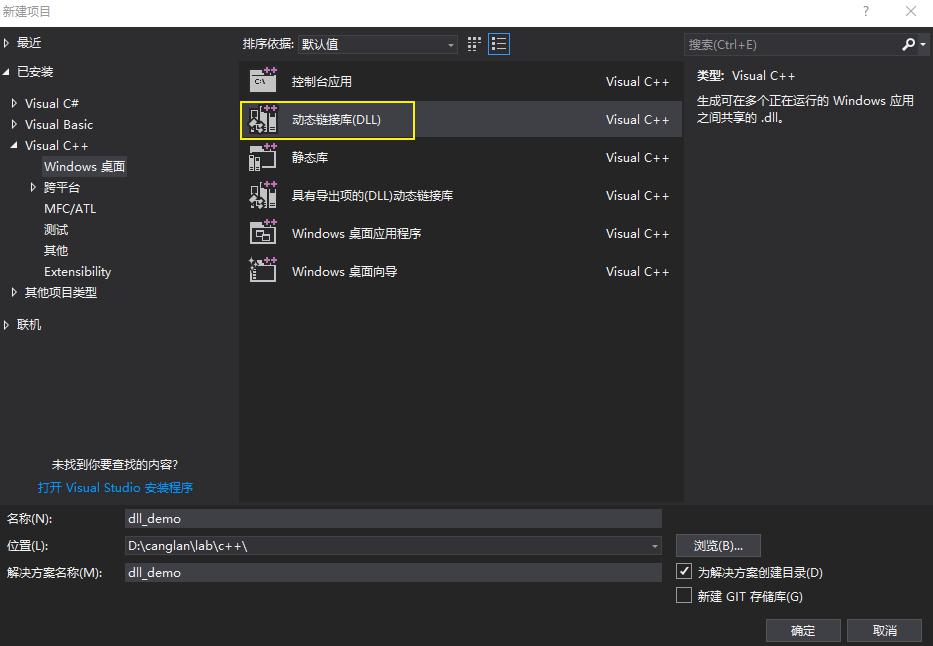
  • 文件 -> 新建 -> 项目 -> Visual C++ -> Windows 桌面 -> 动态链接库
  • 我给项目起名 dll_demo

  • 新建头文件 dll.h​,在其中声明外界调用的类和接口,我在这里设置了几种示例,用于静态、动态调用测试:
1
2
3
4
5
6
7
8
9
10
11
12
13
14
15
16
17
18
19
20
21
22
23
24
25
26
27
28
29
30
31
32
33
34
35
36
37
38
39
40
41
42
43
44
45
46
47
48
49
50
51
52
53
54
55
56
57
58
59
60
61
62
63
64
65
66
67
68
#pragma once
#ifdef CREATEDELL_API_DU
#else
#define CREATEDELL_API_DU _declspec(dllimport) //当编译时,头文件不参加编译,所以.cpp文件中先定义,后头文件被包含进来,因此外部使用时,为dllexport,而在内部编译时,则为dllimport
#endif

// 静态加载测试类
class CREATEDELL_API_DU animal //需要被外界调用的类(父类)
{
public:
virtual int outDate() = 0; //纯虚函数
void getWide(int x);
void getHigh(int y);

protected:
int wide;
int high;
};

class CREATEDELL_API_DU cat :public animal //需要被调用的类(子类cat)
{
public:
int outDate();
};

class CREATEDELL_API_DU dog :public animal //需要被调用的类(子类dog)
{
public:
int outDate();
};

// 静态/动态 加载测试函数
int square1(int x);

extern "C"
{
__declspec(dllexport) int square2(int x);
}

__declspec(dllexport) int square3(int x);

//动态加载测试类
class Math
{
public:
virtual double add(double a, double b) = 0;
virtual double substract(double a, double b) = 0;
virtual double multiply(double a, double b) = 0;
virtual double divide(double a, double b) = 0;
virtual ~Math() {};
};

extern "C"
{
__declspec(dllexport) Math* FactoryCreate();
__declspec(dllexport) void FactoryDestroy(Math* pmath);
}

class MathImplementation : public Math
{
public:
double add(double a, double b);
double substract(double a, double b);
double multiply(double a, double b);
double divide(double a, double b);
};

  • 新建 dll.cpp 源文件,在其中完成对外类、接口的实现

  • 在源文件开头需要引入 pch.h

    加入 #include "pch.h", 否则会报错

    1
    错误	C1010	在查找预编译头时遇到意外的文件结尾。是否忘记了向源中添加“#include "pch.h"”?	dll_demo	
1
2
3
4
5
6
7
8
9
10
11
12
13
14
15
16
17
18
19
20
21
22
23
24
25
26
27
28
29
30
31
32
33
34
35
36
37
38
39
40
41
42
43
44
45
46
47
48
49
50
51
52
53
54
55
56
57
58
59
60
61
62
63
64
65
66
67
68
69
70
71
72
73
74
75
#include "pch.h"
#define CREATEDELL_API_DU _declspec(dllexport)

#include <iostream>
#include "dll.h"

using namespace std;
//父类中函数实现

//静态加载类实现
void animal::getWide(int x) {
wide = x;
}
void CREATEDELL_API_DU animal::getHigh(int y) {
high = y;
}//子类cat中数据输出实现
int CREATEDELL_API_DU cat::outDate() {
return (wide + high); wide += wide; high += high;
}//子类dog数据输出实现
int CREATEDELL_API_DU dog::outDate() {
return (wide - high);
}//函数的实现

//测试函数实现
int square1(int x)
{
return x * x;
}

int square2(int x)
{
return x * x;
}

int square3(int x)
{
return x * x;
}

//动态加载测试类实现
Math* FactoryCreate()
{

return new(std::nothrow) MathImplementation; //注意返回的是实现类的指针
}

void FactoryDestroy(Math* pmath)
{
delete pmath;
}

double MathImplementation::add(double a, double b)
{
return a + b;
}

double MathImplementation::substract(double a, double b)
{
return a - b;
}

double MathImplementation::multiply(double a, double b)
{
return a * b;
}

double MathImplementation::divide(double a, double b)
{
return a / b;
}

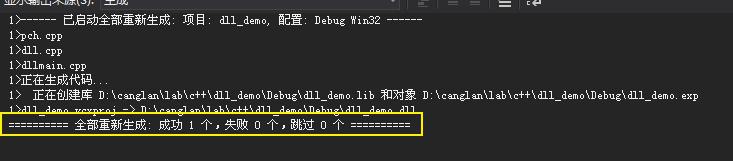
  • 我选择了 Debug x86 平台,生成解决方案

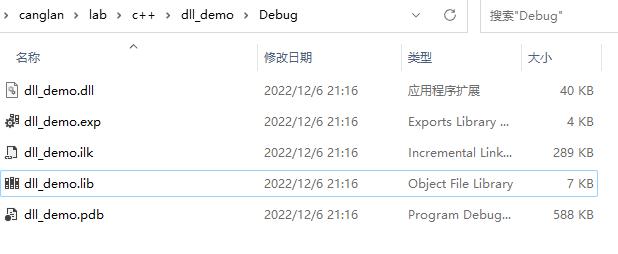
  • 在项目文件夹可以看到生成的 dll , lib 等文件

  • 至此我们完成了 dll 的创建

加载使用 DLL

  • 在已经生成好 dlllib.h 后,我们就可以着手使用了
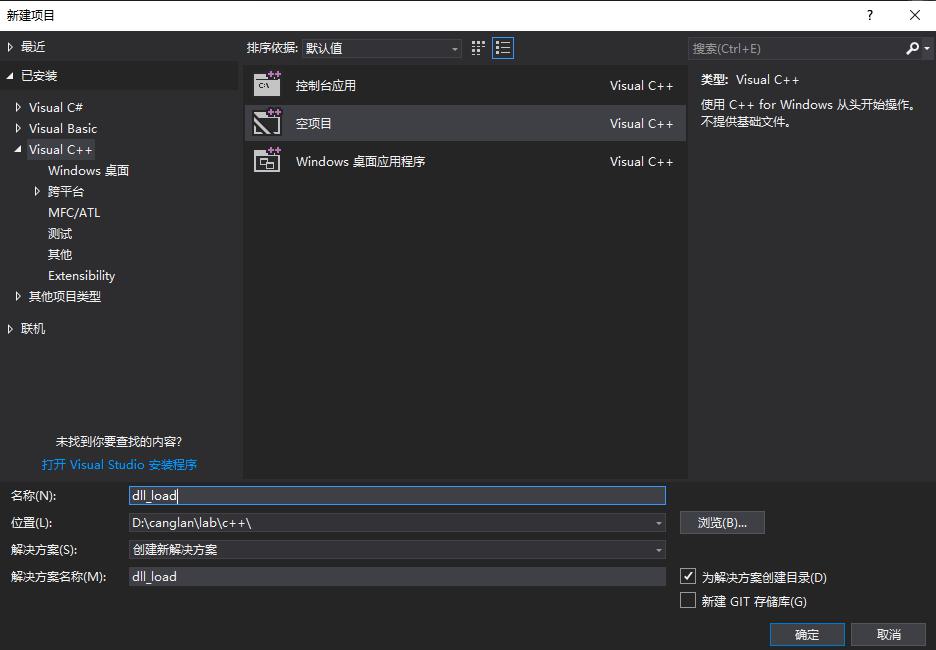
  • 创建 Visual C++ 空项目,取名 dll_load

  • 我们采用运用 dlllib, .h 文件的方式调用 dll
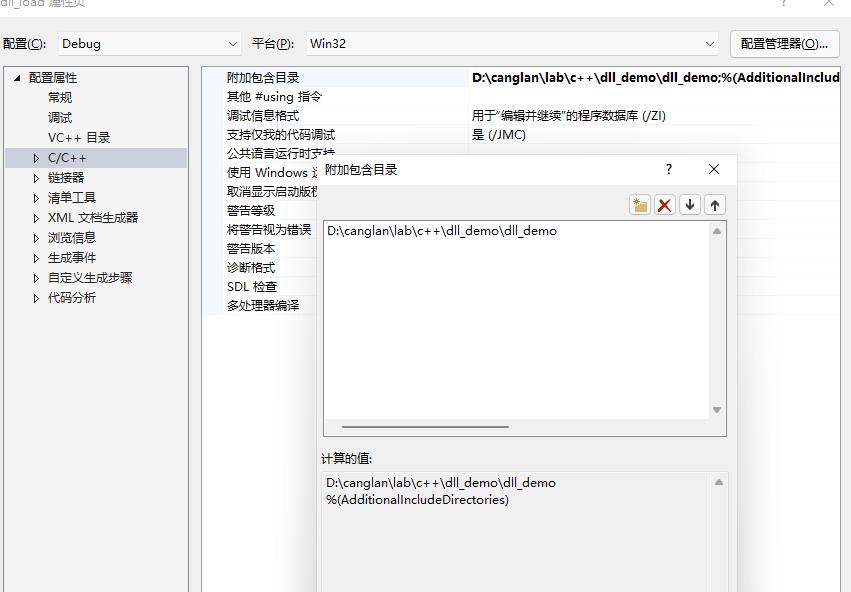
  • 需要配置包含目录包含 dll.h

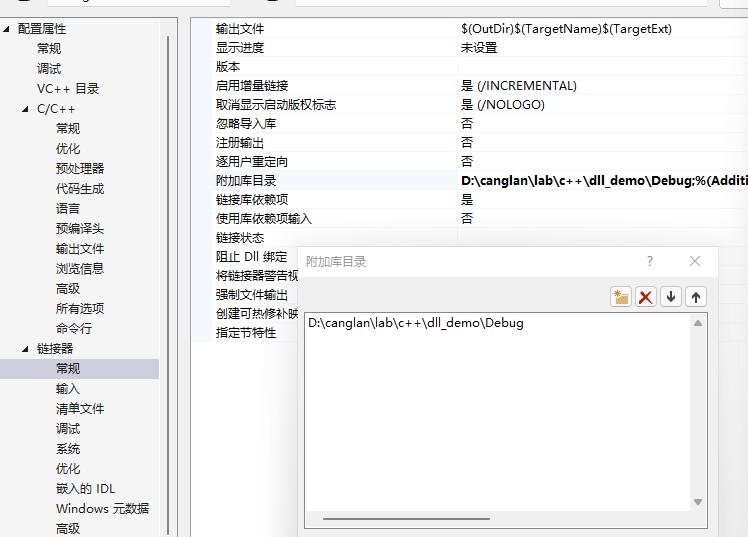
  • 加入 lib 文件所在路径,作为库目录

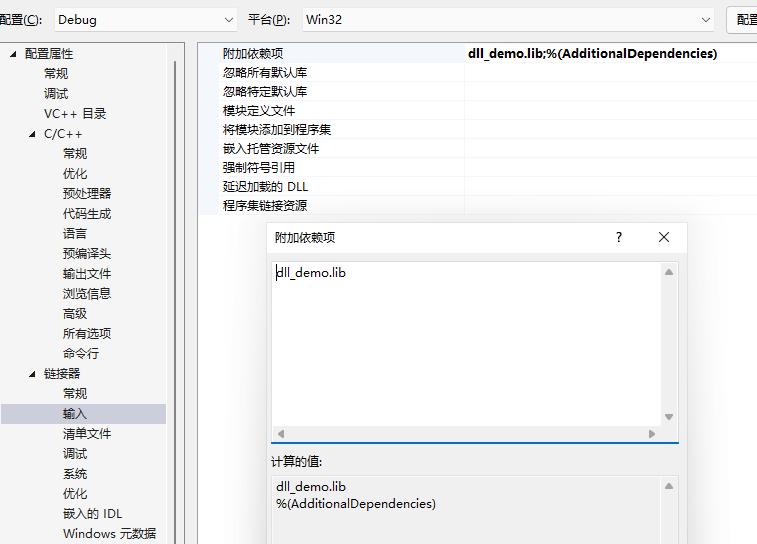
  • 添加 lib 文件作为依赖项

  • dll 文件拷贝到项目源文件夹用于静态加载

  • 创建源文件,起名 load.cpp

  • 加入调用 dll 代码,其中包含了静态、动态加载 dll 函数、类的简单示例,一些需要注意的点我写在注释里了

1
2
3
4
5
6
7
8
9
10
11
12
13
14
15
16
17
18
19
20
21
22
23
24
25
26
27
28
29
30
31
32
33
34
35
36
37
38
39
40
41
42
43
44
45
46
47
48
49
50
51
52
53
54
55
56
57
58
59
60
61
62
63
64
65
66
67
68
69
70
71
72
73
74
75
76
77
78
79
80
81
82
83
84
85
86
87
88
89
90
91
92
93
94
95
96
97
#include<iostream>
#include <Windows.h>
#include <string>
#include "dll.h"

typedef int(*test_func1)(int);
typedef int(*FUN_SUB)(int, int);

typedef Math* (*PFNFACTORYCREATE)();
typedef void(*PFNFACTORYDESTROY)(Math*);

using std::wstring;
using std::to_wstring;
using namespace std;

bool main()
{

// 静态调用函数测试
cout << endl << "静态调用函数测试" << endl;
// cout << square1(7) << endl; // 由于在 dll 创建时未声名 __declspec(dllexport),因此会报错“无法解析的外部符号”
cout << square2(7) << endl;
cout << square3(7) << endl;

// 静态调用类测试
cout << endl << "静态调用类测试" << endl;
dog dog; //实例化dog对象、赋值、并输出。
dog.getHigh(5);
dog.getWide(6);
cout << dog.outDate() << endl;

cat cat; //实例化cat对象、赋值、并输出
cat.getHigh(16);
cat.getWide(4);
cout << cat.outDate() << endl;

Math * sta_obj = FactoryCreate();
cout << sta_obj->add(1.0, 2.0) << endl;
cout << sta_obj->substract(1.0, 2.0) << endl;
cout << sta_obj->multiply(1.0, 2.0) << endl;
cout << sta_obj->divide(1.0, 2.0) << endl;

FactoryDestroy(sta_obj);

// 动态加载DLL
cout << endl << "动态加载DLL" << endl;
HMODULE hModule = LoadLibrary("dll_demo.dll");

if (hModule == nullptr)
{
std::cout << "加载DLL失败!\n";
return 0;
}

// 动态加载 dll 函数
cout << endl << "动态加载 dll 函数" << endl;
test_func1 dllFuntest1 = test_func1(GetProcAddress(hModule, "square1")); // 由于未进行 __declspec(dllexport) 声名,加载失败
test_func1 dllFuntest2 = test_func1(GetProcAddress(hModule, "square2"));
test_func1 dllFuntest3 = test_func1(GetProcAddress(hModule, "square3")); // 由于未写入 extern "C",动态加载失败,但可以静态加载
if (dllFuntest1 == nullptr)
{
std::cout << "dllFuntest1 加载函数失败!\n";
}
if (dllFuntest2 == nullptr)
{
std::cout << "dllFuntest2 加载函数失败!\n";
}
if (dllFuntest3 == nullptr)
{
std::cout << "dllFuntest3 加载函数失败!\n";
}

std::cout << dllFuntest2(7) << std::endl;

// 动态加载 dll 类
cout << endl << "动态加载、使用 dll 类" << endl;
PFNFACTORYCREATE FactoryCreate = PFNFACTORYCREATE(GetProcAddress(hModule, "FactoryCreate"));
PFNFACTORYDESTROY FactoryDestroy = PFNFACTORYDESTROY(GetProcAddress(hModule, "FactoryDestroy"));

if (FactoryCreate == nullptr)
{
std::cout << "加载类定义失败!\n";
return 0;
}

Math *pmath = FactoryCreate();
cout << pmath->add(1.0, 2.0) << endl;
cout << pmath->substract(1.0, 2.0) << endl;
cout << pmath->multiply(1.0, 2.0) << endl;
cout << pmath->divide(1.0, 2.0) << endl;

FreeLibrary(hModule);

system("pause");
return 0;
}

  • 运行代码,看到调用 dll 得到的输出
1
2
3
4
5
6
7
8
9
10
11
12
13
14
15
16
17
18
19
20
21
22
23
24
25
26
静态调用函数测试
49
49

静态调用类测试
1
20
3
-1
2
0.5

动态加载DLL

动态加载 dll 函数
dllFuntest1 加载函数失败!
dllFuntest3 加载函数失败!
49

动态加载、使用 dll 类
3
-1
2
0.5
请按任意键继续. . .

错误记录

1
Error C2375 'onnx_inference::initModel': redefinition; different linkage
  • 在头文件中未给类定义添加CREATEDELL_API_DU修饰时,cpp中类成员函数会出现以上错误。

参考资料

文章链接:
https://www.zywvvd.com/notes/coding/cpp/dll-proj/dll-proj/


“觉得不错的话,给点打赏吧 ୧(๑•̀⌄•́๑)૭”

微信二维码

微信支付

支付宝二维码

支付宝支付