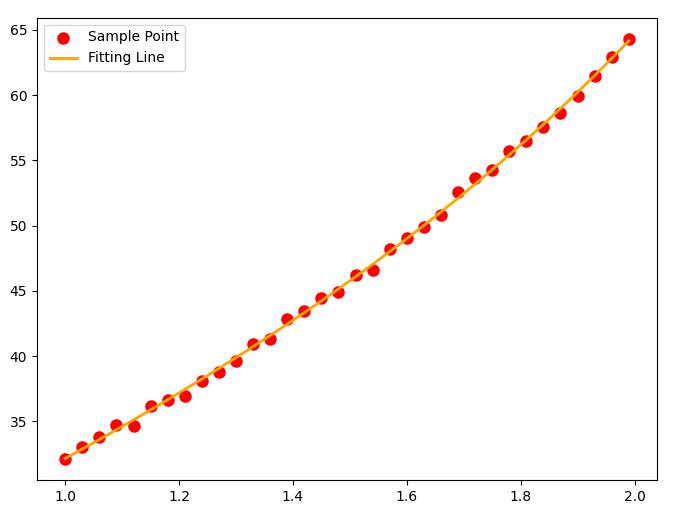
最小二乘法则是一种统计学习优化技术,它的目标是最小化误差平方之和来作为目标,从而找到最优模型。
简介
最小二乘法则是一种统计学习优化技术,它的目标是最小化误差平方之和来作为目标 $J(θ)$,从而找到最优模型的方法,该误差目标定义为:
$$
J(\theta)=\min \sum_{i=1}^{m}\left(f\left(x_{i}\right)-y_{i}\right)^{2}
$$
Scipy 对优化最小二乘 Loss 的方法做了一些封装,主要有 scipy.linalg.lstsq 和 scipy.optimize.leastsq 两种,此外还有 scipy.optimize.curve_fit 也可以用于拟合最小二乘参数。
scipy.linalg.lstsq
SciPy 的 linalg 下的 lstsq 着重解决传统、标准的最小二乘拟合问题,该方法限制了模型 $f(x_i)$的形式必须为 $ f\left(x_{i}\right)=a_{0}+a_{1} x^{1}+a_{2} x^{2}+\cdots+a^{n} x^{n} $ ,对于此类型的模型,给定模型和足够多的观测值 $ y_{i} $ 即可进行求解。
1 scipy.linalg.lstsq(A, y)
使用示例
例一
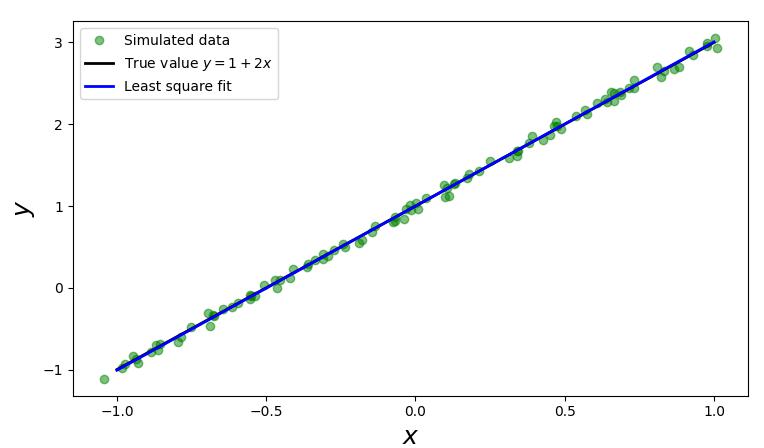
假设真实的模型是 $y=2x+1$,我们有一组数据 $(x_i,y_i)$ 共 100 个,看能否基于这 100 个数据找出 $x_i$
序构造出100个 $(x_i,y_i)$ 数据。
1
2
xi = x + np.random.normal(0 , 0.05 , 100 )1 + 2 * xi + np.random.normal(0 , 0.05 , 100 )
给出模型 $ f(x)=a+b x $ 的矩阵A。由于有100个观测 $ \left(x_{i}, y_{i}\right) $ 的数据,那么就有:
$$
\begin{aligned} a+b x_{0} & =y_{0} \\ a+b x_{1} & =y_{1} \\ a+b x_{2} & =y_{2} \\ \cdots & \\ a+b x_{99} & =y_{99}\end{aligned}
$$
将以上式子写成如下矩阵的形式:
$$
\left|\begin{array}{cc}1 & x_{0} \\ 1 & x_{1} \\ \vdots & \vdots \\ 1 & x_{99}\end{array}\right| \times\left|\begin{array}{l}a \\ b\end{array}\right|=\left|\begin{array}{c}y_{0} \\ y_{1} \\ \vdots \\ y_{99}\end{array}\right|
$$
1 A = np.vstack([xi**0 , xi**1 ])
调用 scipy.linalg.lstsq 传入 $ A^{T} $ 和观测值里的 $ y_{i} $ 即程序里的yi变量即可求得 $ f(x)=a+b x $ 里的 $a$ 和 $b$。$a$ 和 $b$ 记录在 $Istsq$ 函数的第一个返回值里。
1 sol, r, rank, s = la.lstsq(A.T, yi)
scipy.linalg.Istsq 的第一个返回值 sol 共有两个值, sol[0] 即是估计出来的 $ f(x)=a+b x $ 里的 $a$, $ \operatorname{sol}[1] $ 代表 $ f(x)=a+b x $ 里的 $b$。因此 $ f(x) $ 为:
1 y_fit = sol[0 ] + sol[1 ] * x
示例代码
1
2
3
4
5
6
7
8
9
10
11
12
13
14
15
16
17
18
19
20
21
22
23
import numpyimport scipy.linalg as laimport numpy as npimport matplotlib.pyplot as plt100 1 , 1 , m)1 + 2 * x0 , 0.05 , 100 )1 + 2 * xi + np.random.normal(0 , 0.05 , 100 )print (xi,"#xi" )print (yi,"#yi" )0 , xi**1 ])0 ] + sol[1 ] * x print (sol,r ,rank,s )12 , 4 ))'go' , alpha=0.5 , label='Simulated data' )'k' , lw=2 , label='True value $y = 1 + 2x$' )'b' , lw=2 , label='Least square fit' )r"$x$" , fontsize=18 )r"$y$" , fontsize=18 )2 )
例二
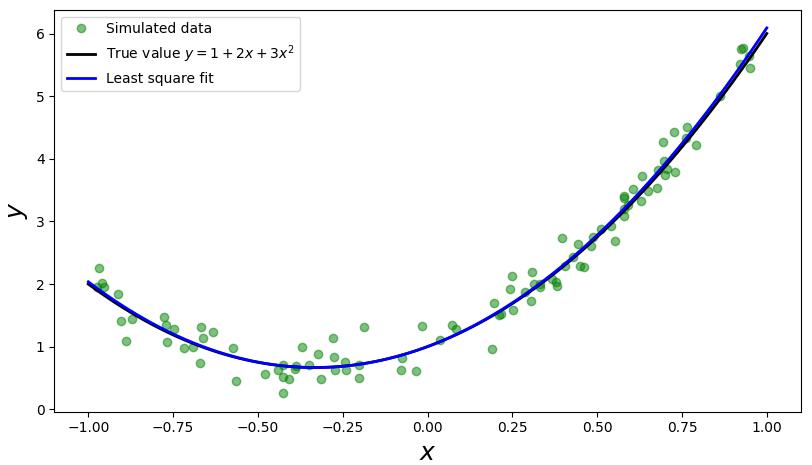
考虑模型为 $f\left(x_{i}\right)=a+b x+c x^{2} $ 的情况:
示例代码
1
2
3
4
5
6
7
8
9
10
11
12
13
14
15
16
17
18
19
20
21
22
23
import numpyimport scipy.linalg as laimport numpy as npimport matplotlib.pyplot as plt1 , 1 , 100 )1 , 2 , 3 2 100 1 - 2 * np.random.rand(m)print ("xi.shape" , xi.shape,xi**1 ,xi)2 + np.random.randn(m) * 0.2 0 , xi**1 , xi**2 ])print (A.shape, A.T.shape)0 ] + sol[1 ] * x + sol[2 ] * x**2 12 , 4 ))'go' , alpha=0.5 , label='Simulated data' )'k' , lw=2 , label='True value $y = 1 + 2x + 3x^2$' )'b' , lw=2 , label='Least square fit' )r"$x$" , fontsize=18 )r"$y$" , fontsize=18 )2 )
scipy.optimize.leastsq
scipy.optimize.leastsq 方法相比于 scipy.linalg.lstsq 更加灵活,开放了 $f(x_i)$ 的模型形式。
leastsq() 函数传入误差计算函数和初始值,该初始值将作为误差计算函数的第一个参数传入。计算的结果是一个包含两个元素的元组,第一个元素是一个数组,表示拟合后的参数;第二个元素如果等于1、2、3、4中的其中一个整数,则拟合成功,否则将会返回 mesg。
调用示例
例一
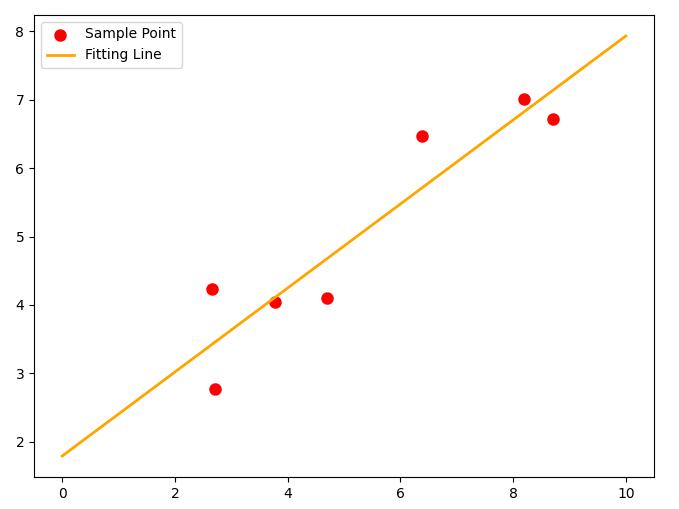
首先仍以线性拟合为例,拟合 $ f(x)=a x+b $ 函数。
1
2
3
4
5
6
7
8
9
10
11
12
13
14
15
16
17
18
import numpy as npfrom scipy.optimize import leastsqdef err (p, x, y ):return p[0 ] * x + p[1 ] - y100 , 20 ]8.19 ,2.72 ,6.39 ,8.71 ,4.7 ,2.66 ,3.78 ])7.01 ,2.78 ,6.47 ,6.71 ,4.1 ,4.23 ,4.05 ])print ret import matplotlib.pyplot as plt0 ]8 ,6 ))"red" ,label="Sample Point" ,linewidth=3 )0 ,10 ,1000 )"orange" ,label="Fitting Line" ,linewidth=2 )
例二
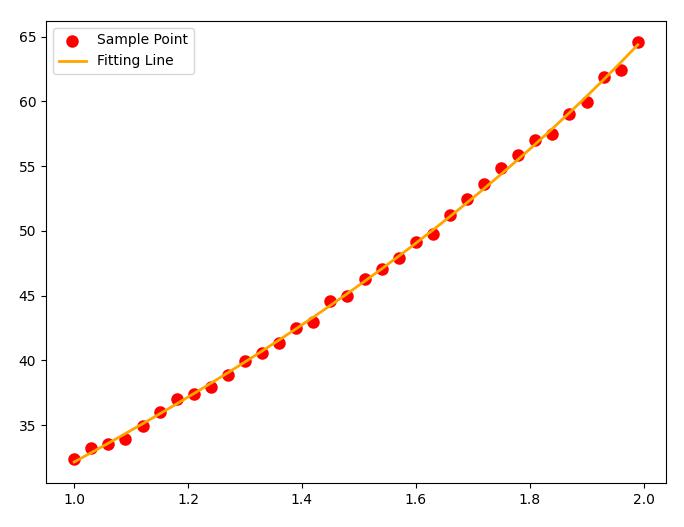
这里我们展现一下 leastsq 的灵活之处,由于 leastsq 放开了对 $f(x_i)$ 形式的严格限制,我们可以设置一些更加复杂的最小二乘的情况。
例如我现在就要拟合这么个函数:leastsq 射程范围内:
1
2
3
4
5
6
7
8
9
10
11
12
13
14
15
16
17
18
19
20
21
22
23
24
25
26
27
28
import numpy as npfrom scipy.optimize import leastsqdef f (p, x ):return p[0 ] * (np.e ** x) + p[1 ] * (x ** - 0.5 ) + p[2 ] * np.sin(x)
def err (p, x, y ):return f(p, x) - y
p0 = [1 , 1 , 1 ]1 , 2 , 0.03 )
gt_p = [7 , 3 , 12 ]
Yi = f(gt_p, Xi) + (np.random.rand(len (Xi)) - 0.5 )
ret = leastsq(err, p0, args = (Xi, Yi))print (ret )import matplotlib.pyplot as plt
plt.figure(figsize=(8 ,6 ))"red" ,label="Sample Point" ,linewidth=3 )
y = f(ret[0 ], Xi)
plt.plot(Xi,y,color="orange" ,label="Fitting Line" ,linewidth=2 )
核心函数:
1 ret = leastsq(err, p0, args = (Xi, Yi) )
其中: err 为用于计算残差的 Callback 函数,p0 为初始解, args 为输入的数据。
输出结果:
1 array ([ 7 .02880266 , 3 .16343491 , 11 .73254754 ]), 1 )
优化方法不是万能的,如果矩阵过于奇异,也是不利于准确求解模型参数的。
scipy.optimize.curve_fit
scipy.optimize.curve_fit 函数用于拟合曲线,给出模型和数据就可以拟合,相比于 leastsq 来说使用起来方便的地方在于不需要输入初始值。
1 scipy.optimize.curve_fit(fun , X, Y)
其中 fun 为输入参数为 $x$ 和模型参数列表,输出 $y$ 的 Callback 函数,$X$ 和 $Y$ 为数据
调用示例
例一
为了方便对比,将上文例二的示例代码修改成 curve_fit 函数的实现
1
2
3
4
5
6
7
8
9
10
11
12
13
14
15
16
17
18
19
20
21
22
23
24
import numpy as npfrom scipy.optimize import curve_fitdef f (x, p0, p1, p2 ):return p0 * (np.e ** x) + p1 * (x ** - 0.5 ) + p2 * np.sin(x)
Xi = np.arange(1 , 2 , 0.03 )
gt_p = [7 , 3 , 12 ]
Yi = f(Xi, *gt_p) + (np.random.rand(len (Xi)) - 0.5 )
para, pcov = curve_fit(f, Xi, Yi)print (para)import matplotlib.pyplot as plt
plt.figure(figsize=(8 ,6 ))"red" ,label="Sample Point" ,linewidth=3 )
y = f(Xi, *(para.tolist()))
plt.plot(Xi,y,color="orange" ,label="Fitting Line" ,linewidth=2 )
输出结果:
1 [ 6.96284945 3.03529598 12.11638088 ]
绘制图像:
效果没有 leastsq 稳定,可能是没有初始值的缘故。
参考资料
文章链接:https://www.zywvvd.com/notes/coding/python/scipy-leastsquare/scipy-leastsquare/