本文记录为 Fluid 主题增加打赏功能的方法。
前言
家里添丁缺米了,寻思厚着脸皮加个打赏功能,万一被哪个有钱又好看的人看上了呢 ~
添加流程
修改布局
修改 找到主题布局文件 themes/fluid/layout/post.ejs
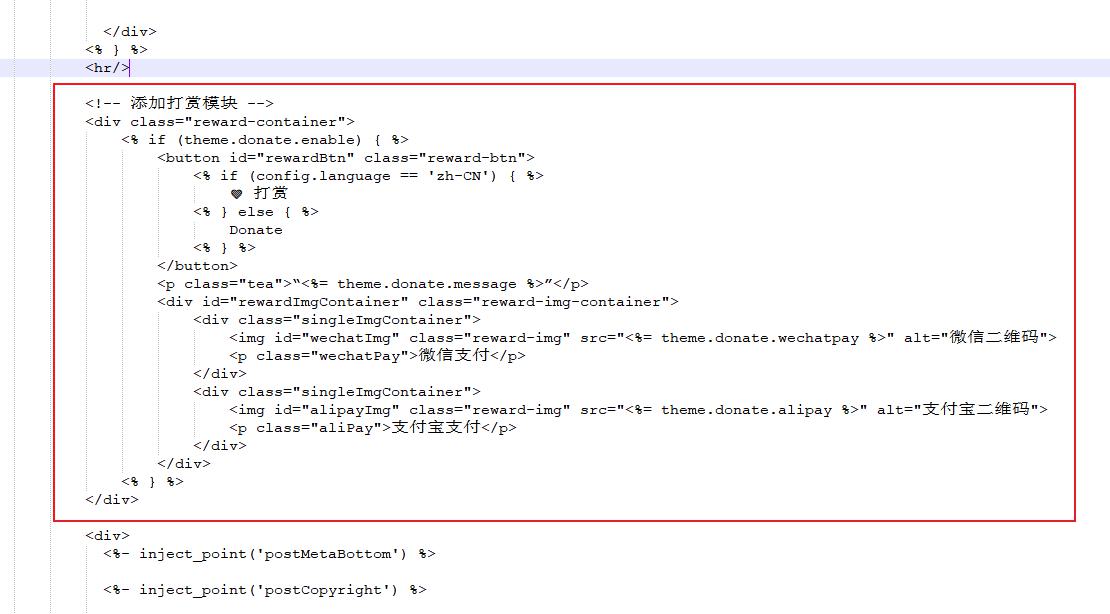
将以下代码粘贴到文章模板的 </div> 和 <hr> 之间
1
2
3
4
5
6
7
8
9
10
11
12
13
14
15
16
17
18
19
20
21
22
23
<!-- 添加打赏模块 -->
类似这样:
增加 css
在themes/fluid/source/css 创建名为:reward.css的文件,写入以下代码:
1
2
3
4
5
6
7
8
9
10
11
12
13
14
15
16
17
18
19
20
21
22
23
24
25
26
27
28
29
30
31
32
33
34
35
36
37
38
39
40
41
42
43
44
45
46
47
48
49
50
51
52
.tea {font-size : 0.8125em ;color : #999999 ;margin-top : 10px ;.reward-container {display : flex;flex-direction : column;align-items : center;margin-top : 50px ;
.reward-btn {padding : 8px 24px ;font-size : 18px ;background-color : #007bff ;color : #fff ;border : none;cursor : pointer;border-radius : 10px ;
.reward-img-container {display : none;margin-top : 20px ;/* 图片容器的透明度 */ opacity : 0 ;/* 过渡效果,使动画更平滑 */ transition : opacity 2s ease;
.reward-img {width : 200px ;margin : 10px ;border : 1px dashed #ccc ;border-radius : 4px ;padding : 10px ;
/* 单个图片的容器 */ .singleImgContainer {width : 50% ;height : 240px ;
/* 微信支付和支付宝支付的文字样式 */ .wechatPay ,.aliPay {text-align : center;font-size : 0.8125em ;color : #999999 ;
增加 js
在themes/fluid/source/js 创建名为:reward.js的文件,并引入以下代码:
1
2
3
4
5
6
7
8
9
10
11
const rewardBtn = document .getElementById ('rewardBtn' );const rewardImgContainer = document .getElementById ('rewardImgContainer' );if (rewardBtn){onclick = () => {style .display = (rewardImgContainer.style .display === 'none' || rewardImgContainer.style .display === '' ) ? 'inline-flex' : 'none' setTimeout (() => {style .opacity = (rewardImgContainer.style .opacity === '0' || rewardImgContainer.style .opacity === '' ) ? '1' : '0' 10 );
修改主题配置
在主题配置文件的 custom_js和custom_css分别引入自定义的 reward.js文件和reward.css文件。
1
2
3
4
5
6
7
8
9
10
11
12
# 指定自定义 .js 文件路径,支持列表;路径是相对 source 目录,如 /js/custom.js 对应存放目录 source/js/custom.js # Specify the path of your custom js file, support list. The path is relative to the source directory, such as `/js/custom.js` corresponding to the directory `source/js/custom.js` custom_js: - //cdn.jsdelivr.net/npm/aplayer/dist/APlayer.min.js #/APlayer#/APlayer依赖 - //cdn.jsdelivr.net/gh/metowolf/MetingJS@1.2/dist/Meting.min.js #/APlayer依赖 - /js/reward.js # 指定自定义 .css 文件路径,用法和 custom_js 相同 # The usage is the same as custom_js custom_css: - /css/custom.css - /css/reward.css - //cdn.jsdelivr.net/npm/aplayer/dist/APlayer.min.css
添加打赏配置:
1
2
3
4
5
6
7
8
9
# Donate 自己为 Fluid 主题增加的打赏功能 # `message` 是打赏提示语,可自定义 # `alipay` 是支付宝付款码, `wechatpay` 是微信付款码。 donate: enable: true message: 觉得不错的话,给点打赏吧 ୧(๑•̀⌄•́๑)૭ alipay: /image/alipay.png wechatpay: /image/wechatpay.png
整理打赏二维码
将微信、支付宝的收款码、赞赏码图像放到 image 文件夹中
效果展示
参考资料
文章链接:https://www.zywvvd.com/notes/hexo/theme/fluid/fuild-reward/fuild-reward/