


惯性聚合 高效追踪和阅读你感兴趣的博客、新闻、科技资讯
阅读原文 在惯性聚合中打开

推荐订阅源

酷 壳 – CoolShell
酷 壳 – CoolShell
GbyAI
GbyAI
SecWiki News
SecWiki News
Project Zero
Project Zero
C
Cisco Blogs
Simon Willison's Weblog
P
Privacy International News Feed
D
Darknet – Hacking Tools, Hacker News & Cyber Security
Scott Helme
Scott Helme
A
Arctic Wolf
Security Latest
Security Latest
Threat Intelligence Blog | Flashpoint
P
Privacy & Cybersecurity Law Blog
Apple Machine Learning Research
T
Tailwind CSS Blog
The Hacker News
The Hacker News
T
Tenable Blog
雷峰网
雷峰网
有赞技术团队
有赞技术团队
V
V2EX
C
CXSECURITY Database RSS Feed - CXSecurity.com
T
Threat Research - Cisco Blogs
T
Threatpost
AWS News Blog
AWS News Blog
L
LINUX DO - 热门话题
Application and Cybersecurity Blog
K
KPMG report finds enterprise disconnect between AI and its ROI | CIO
S
SegmentFault 最新的问题
月光博客
月光博客
Spread Privacy
Spread Privacy
S
Secure Thoughts
宝玉的分享
宝玉的分享
博客园 - 三生石上(FineUI控件)
Forbes - Security
Forbes - Security
T
The Exploit Database - CXSecurity.com
G
GRAHAM CLULEY
The Last Watchdog
The Last Watchdog
Y
Y Combinator Blog
I
Intezer
博客园 - 【当耐特】
B
Blog RSS Feed
Attack and Defense Labs
I
InfoQ
博客园 - 叶小钗
Cyberwarzone
Cyberwarzone
V2EX - 技术
V2EX - 技术
Cyber Security Advisories - MS-ISAC
Hugging Face - Blog
Hugging Face - Blog
H
Help Net Security
C
CERT Recently Published Vulnerability Notes

回忆中的明天

自己写一个Web 端的MiMo TTS Chat,方便实现文本转语音,API限免中 · 回忆中的明天 NVIDIA NIM 开发平台,提供超多免费大模型 · 回忆中的明天 iTranslation 简单快捷的翻译软件,支持数十种语言互译 · 回忆中的明天 国内外免费大模型平台,支持 API 调用的超多免费大模型 · 回忆中的明天 SiliconFlow 硅基流动一站式大模型云服务平台,提供超多免费大模型 · 回忆中的明天 Xiaomi MiMo 小米大模型团队开发的大语言模型,开源限免中…… · 回忆中的明天 BigModel 智谱大模型开放平台,提供超多自研免费大模型 · 回忆中的明天 OpenRouter 模型聚合平台,提供超多免费模型使用 · 回忆中的明天 iReader 英语点读学习系统,译林小学英语在线点读 · 回忆中的明天 ZenMux 企业级大模型聚合平台,提供免费试用模型 Gemini 3 Pro · 回忆中的明天 英语学习,新概念英语在线点读、全文朗读学习系统 · 回忆中的明天 iGSTT(Gemini STT) 开源免费的语音转文本(STT)的命令行工具 · 回忆中的明天 Python 项目打包,并上传到 PyPI,分享项目 · 回忆中的明天 iGTTS(Gemini TTS) 开源免费的文本转语音(TTS)的命令行工具 · 回忆中的明天 iChat(AI Chat) 智能聊天工具,支持 MiMo、DeepSeek、Gemini、Grok、OpenAI和自定义AI · 回忆中的明天 NanoPi R2S 安装 Debian 固件系统,旁路由网络代理内网转发,决解直连网络卡顿 nftables · 回忆中的明天 NanoPi R2S Armbian Linux 旁路由网络代理内网转发,决解直连网络卡顿 iptables · 回忆中的明天 sing-box rule-set · 回忆中的明天 Xcode 最全最实用的快捷键列表 · 回忆中的明天 SwiftUI 中的@State、@Bindable和@Binding · 回忆中的明天 免费的图床服务器-GitHub Pages · 回忆中的明天 A Free Native Image Uploading Tool for macOS · 回忆中的明天 免费的图床服务器-Cloudflare-R2 · 回忆中的明天 图传 (iUploader) - macOS 免费原生图床上传利器 · 回忆中的明天 本地无法加载托管到Cloudflare中的图片等资源,权限错误403 · 回忆中的明天 国内、外免费公共的DNS,支持的DoH,防止污染、篡改的问题 · 回忆中的明天 macOS 系统下载和安装 · 回忆中的明天 使用 CURL 命令调试和诊断网络问题,网站请求测速 · 回忆中的明天 WARP Beta for macOS 支持新协议 MASQUE · 回忆中的明天 2024年自用国外靠谱的 VPS 服务器推荐 · 回忆中的明天 使用 OpenCore,让你的旧 Mac 用上最新的 macOS 系统 · 回忆中的明天 给 Terminal 终端添加不一样的色彩,安装插件实现自动补全、高亮显示 · 回忆中的明天 玩转 Mac 截图,分享原生截图工具技巧,自定义截图名称和类型 · 回忆中的明天 美国 VPS 服务器,最低月费只要12元,优惠推荐 · 回忆中的明天 更新 idea 后不能打开文件夹文件,一直加载卡住假死状态 · 回忆中的明天 使用 certbot 申请 Let's Encrypt 免费证书,部署到 nginx 中,开启 https · 回忆中的明天 菲律宾 VPS 服务器,月均只要16.5元/月,优惠推荐 · 回忆中的明天 Mac launchctl 自定义服务启动 · 回忆中的明天 Mac 终端设置代理,设置一键开启和取消 · 回忆中的明天 Nginx 配置(Config)中遇到的错误(Error) · 回忆中的明天 香港 CN2 优化线路带宽低延迟 VPS 服务器推荐 · 回忆中的明天 菲律宾、马来西亚、泰国等多图 VPS 服务器便宜推荐 · 回忆中的明天 抗白之路-肺部感染发烧住院两个多月 · 回忆中的明天 12 个对新手最重要的 Linux 命令 · 回忆中的明天 第一次通过 SSH key 免密连接 GitHub 的完整过程 · 回忆中的明天 5 款适用于 Linux 的笔记应用 · 回忆中的明天 国内外免费公共 DNS 服务推荐 · 回忆中的明天 微软为 VS Code 推出 Markdown 语言服务器 · 回忆中的明天 抗白之路-每天在马桶上渡过,急性肠排…… · 回忆中的明天 抗白之路-舱内日常 · 回忆中的明天 抗白之路-移植用药 · 回忆中的明天 抗白之路-入舱 · 回忆中的明天 强!腾讯推出开源免费老照片修复工具! · 回忆中的明天 抗白之路-确诊 · 回忆中的明天 RIME 鼠须管输入法使用,免费开源还可以自定义词库 · 回忆中的明天 VIM 入门,学会必备的操作命令,模式选择、文本编辑 · 回忆中的明天 Spring Security 快速创建登录权限,安全管理资源权限 · 回忆中的明天 Spring 表单验证 Validating Form Input · 回忆中的明天 Spring 为 RESTful Web 服务启用跨域请求 · 回忆中的明天 快捷支付停车费,免去扫码操作,快捷指令快速支付 · 回忆中的明天 居家全屋无线 Wi-Fi 网络改造 · 回忆中的明天 Spring 调用 RESTful Web 服务 Hello World · 回忆中的明天 Spring 构建 RESTful Web 服务 Hello World · 回忆中的明天 使用 GitHub Actions 自动上传搜索记录到 Algolia · 回忆中的明天 Spring 文件上传,Uploading Files · 回忆中的明天 Spring 表单提交,Form Submission · 回忆中的明天 Spring 开篇,创建第一个 Web 项目 Hello World · 回忆中的明天 使用 Algolia 云引擎,实现个人博客 Hugo 本地智能搜索 · 回忆中的明天 Elasticsearch, Kibana, Logstash, Filebeat 实现日志的自动采集、搜索和分析 · 回忆中的明天 Java 递归实例操作-查询层级菜单 · 回忆中的明天 Java JSON数据实战操作 · 回忆中的明天 MacOS 或 Linux 软件包管理器 Homebrew · 回忆中的明天 Java 正则表达式实例操作 · 回忆中的明天 简述 Cookie、Token、JWT、Session · 回忆中的明天 Java 方法代理实例操作,静态代理、JDK动态代理、CGLIB动态代理 · 回忆中的明天 Java 反射实例操作 · 回忆中的明天 Vercel 上自动部署你的个人博客 Hugo · 回忆中的明天 Java 中的重写(Override)与重载(Overload) · 回忆中的明天 免费申请 JetBrains 开源开发许可证,包含 IDEA · 回忆中的明天 重疾保险理赔的亲身经历,分享下流程和套路 · 回忆中的明天 Java 开发环境的搭建,开启你的编程之旅 · 回忆中的明天 HUGO 目录详解,创建自己的网站系统 · 回忆中的明天 了解 JS 的加载顺序和方式,实现 Ready 方法 · 回忆中的明天 Elastic Stack 实现日志的自动采集、搜索和分析 · 回忆中的明天 个人站长的加速器 - 百度云加速 · 回忆中的明天 Office 批量激活的命令工具 slmgr · 回忆中的明天 Office 批量激活的命令工具 ospp · 回忆中的明天 KMS 激活 Office 批量许可证密钥 KEY · 回忆中的明天 移植物抗宿主病详解 · 回忆中的明天 慢性髓系白血病(CML)的临床分期 · 回忆中的明天 急性髓系白血病(AML)的治疗 · 回忆中的明天 骨髓增生异常综合征(MDS)的病程与预后 · 回忆中的明天 急性白血病的临床表现 · 回忆中的明天 慢性粒单核细胞白血病(CMML) · 回忆中的明天 白血病的分类:髓系肿瘤和淋系肿瘤 · 回忆中的明天 mysql 使用 source/mysqldump 命令导入/导出文件信息 · 回忆中的明天 Docker 中运行 ElasticSearch 和 Kibana · 回忆中的明天 初识 Docker · 回忆中的明天 Mac 无密码 SSH 登录服务器 · 回忆中的明天 Spring Cloud Alibaba Nacos Discovery 实战 · 回忆中的明天
免费创建属于自己的博客,Hugo+Github Pages · 回忆中的明天
2020-08-02 · via 回忆中的明天

原文:https://ichochy.com/posts/blog/20200802.html


Hugo 拥有超快的速度,强大的内容管理和强大的模版语言,使其非常适合各种静态网站。可以轻松安装在macOS,Linux,Windows等平台上,在开发过程中使用LiveReload可即时渲染更改

一、安装 Hugo

Mac 上安装 HUGO,很简单,通过 brew 可以快速安装

检查安装版本信息

二、使用 Hugo

1、创建网站

hugo new site iChochy 创建

其中 iChochy 为你的博客目录

目录结构

iChochy
├── archetypes
│   └── default.md
├── config.toml
├── content
├── data
├── layouts
├── static
└── themes

2、添加主题

a、下载主题

hyde主题为例 https://github.com/spf13/hyde
直接下载主题,放到themes目录中,或通过 git 方式添加主题

git submodule add https://github.com/spf13/hyde.git themes/hyde

b、修改配置

echo 'theme = "hyde"' >> config.toml

config.toml 文件内容

baseURL = "https://ichochy.com/"
languageCode = "en-us"
title = "My New Hugo Site"
theme = "hyde"  

目录结构

iChochy
├── archetypes
│   └── default.md
├── config.toml
├── content
├── data
├── layouts
├── static
└── themes
    └── hyde
        ├── CHANGELOG.md
        ├── LICENSE.md
        ├── README.md
        ├── archetypes
        │   └── default.md
        ├── go.mod
        ├── images
        │   ├── screenshot.png
        │   └── tn.png
        ├── layouts
        │   ├── 404.html
        │   ├── _default
        │   │   ├── baseof.html
        │   │   ├── list.html
        │   │   └── single.html
        │   ├── index.html
        │   └── partials
        │       ├── head.html
        │       ├── head_fonts.html
        │       ├── hook_head_end.html
        │       └── sidebar.html
        ├── static
        │   ├── apple-touch-icon-144-precomposed.png
        │   ├── css
        │   │   ├── hyde.css
        │   │   ├── poole.css
        │   │   ├── print.css
        │   │   └── syntax.css
        │   └── favicon.png
        └── theme.toml

3、编写内容

新建文章

hugo new posts/HelloWorld.md 新建
注:以 archetypes/default.md为模版创建

编写文章

vim content/posts/HelloWorld.md 

HelloWorld.md 文件内容

---
title: "HelloWorld"
date: 2020-08-02T21:47:48+08:00
draft: true
---

### HelloWorld  

https://ichochy.com

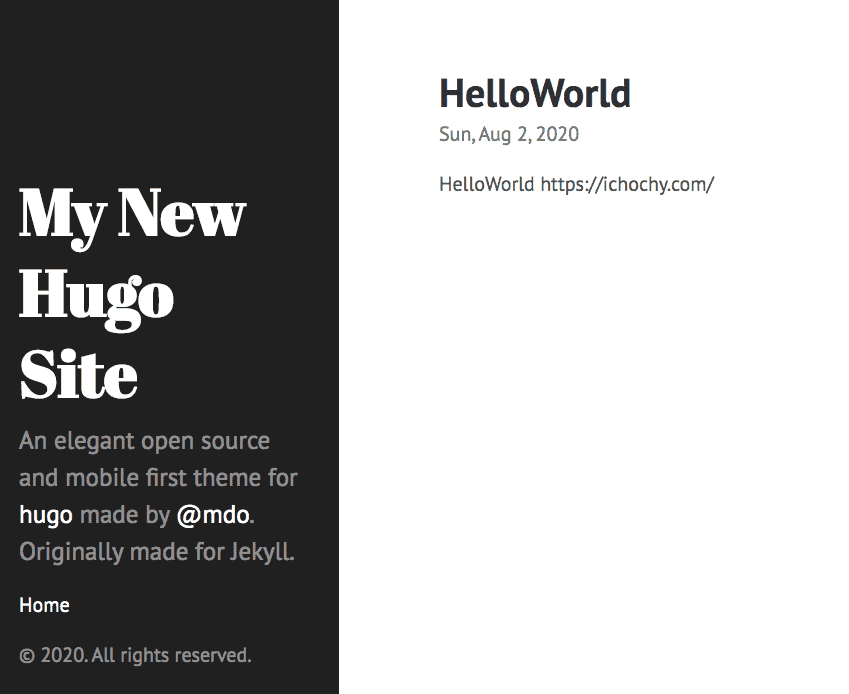
预览文章

hugo server -D 启动服务,访问 http://localhost:1313
15963791621740451

目录结构

iChochy
├── archetypes
│   └── default.md
├── config.toml
├── content
│   └── posts
│       └── HelloWorld.md
├── data
├── layouts
├── resources
│   └── _gen
│       ├── assets
│       └── images
├── static
└── themes
    └── hyde
        ├── CHANGELOG.md
        ├── LICENSE.md
        ├── README.md
        ├── archetypes
        │   └── default.md
        ├── go.mod
        ├── images
        │   ├── screenshot.png
        │   └── tn.png
        ├── layouts
        │   ├── 404.html
        │   ├── _default
        │   │   ├── baseof.html
        │   │   ├── list.html
        │   │   └── single.html
        │   ├── index.html
        │   └── partials
        │       ├── head.html
        │       ├── head_fonts.html
        │       ├── hook_head_end.html
        │       └── sidebar.html
        ├── static
        │   ├── apple-touch-icon-144-precomposed.png
        │   ├── css
        │   │   ├── hyde.css
        │   │   ├── poole.css
        │   │   ├── print.css
        │   │   └── syntax.css
        │   └── favicon.png
        └── theme.toml

部署

修改部署目录

修改 config.toml 文件
1、修改 bashURL 的部署域名
2、添加 publishDir = "docs",指定部署目录为 docs

config.toml 文件内容

baseURL = "https://ichochy.com/"
languageCode = "en-us"
title = "My New Hugo Site"
theme = "hyde"
publishDir = "docs"

生成静态文件

hugo -D 生成静态文件

目录结构

iChochy
├── archetypes
│   └── default.md
├── config.toml
├── content
│   └── posts
│       └── HelloWorld.md
├── data
├── docs
│   ├── 404.html
│   ├── apple-touch-icon-144-precomposed.png
│   ├── categories
│   │   ├── index.html
│   │   └── index.xml
│   ├── css
│   │   ├── hyde.css
│   │   ├── poole.css
│   │   ├── print.css
│   │   └── syntax.css
│   ├── favicon.png
│   ├── index.html
│   ├── index.xml
│   ├── posts
│   │   ├── helloworld
│   │   │   └── index.html
│   │   ├── index.html
│   │   └── index.xml
│   ├── sitemap.xml
│   └── tags
│       ├── index.html
│       └── index.xml
├── layouts
├── resources
│   └── _gen
│       ├── assets
│       └── images
├── static
└── themes
    └── hyde
        ├── CHANGELOG.md
        ├── LICENSE.md
        ├── README.md
        ├── archetypes
        │   └── default.md
        ├── go.mod
        ├── images
        │   ├── screenshot.png
        │   └── tn.png
        ├── layouts
        │   ├── 404.html
        │   ├── _default
        │   │   ├── baseof.html
        │   │   ├── list.html
        │   │   └── single.html
        │   ├── index.html
        │   └── partials
        │       ├── head.html
        │       ├── head_fonts.html
        │       ├── hook_head_end.html
        │       └── sidebar.html
        ├── static
        │   ├── apple-touch-icon-144-precomposed.png
        │   ├── css
        │   │   ├── hyde.css
        │   │   ├── poole.css
        │   │   ├── print.css
        │   │   └── syntax.css
        │   └── favicon.png
        └── theme.toml

部署 GitHub Pages

将整个项目推送到 GitHub,然后在项目的 Settings 中开启的 GitHub Pages,并指定分支和目录 docs 15964375806436022
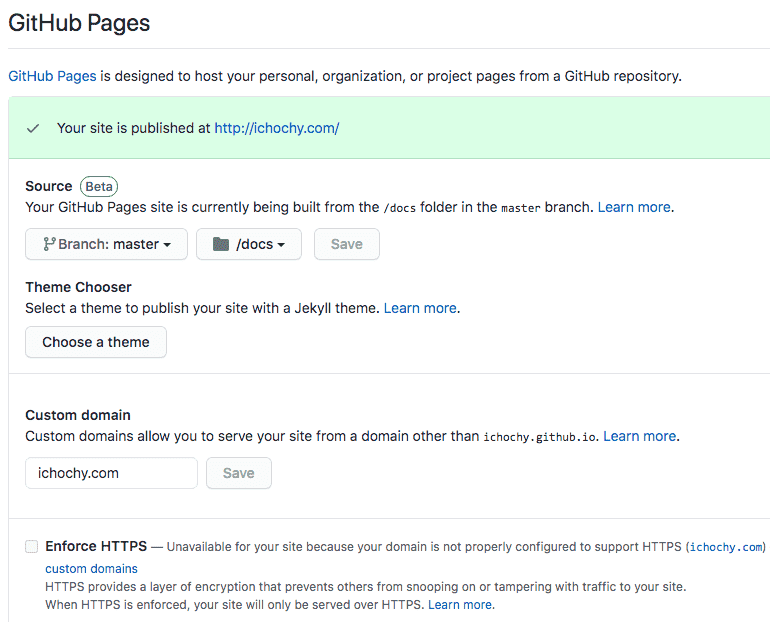
就是可以直接在线访问了,如:https://ichochy.github.io

总结

Hugo 简单、易用、快速
模版化强大,只需要关心文章的编写
默认开启 LiveReload,修改后可以实时预览,免去手去刷新操作
还有很多强大的功能,如:摘要(Summary)、文章目录(TableOfContents)、相关推荐(Related)、多语言支持(i18n)、列表分页(Pagination)、简码(Shortcodes)等。