


原文:https://ichochy.com/posts/spring/20191018.html
Nacos 作为服务注册中心,可以快速简单的将服务自动注册到 Nacos 服务端,并且能够动态无感知的刷新某个服务实例的服务列表,为分布式系统提供服务注册与发现功能
pom.xml中添加nacos支持
<dependency>
    <groupId>org.springframework.cloud</groupId>
    <artifactId>spring-cloud-starter-alibaba-nacos-discovery</artifactId>
    <version>0.9.0.RELEASE</version>
</dependency>
bootstrap.properties加入nacos参数
server.port=8080
spring.application.name=service-provider
spring.cloud.nacos.discovery.server-addr=127.0.0.1:8848
#如果不想 Nacos 注册和发现当前服务,可设置为false
spring.cloud.nacos.discovery=true
spring.cloud.nacos.discovery.server-addr:为nacos的服务器地址:端口,80端口不可省略
通过 Spring Cloud 原生注解 @EnableDiscoveryClient 开启服务注册发现功能:
package com.ichochy.nacos;

import org.springframework.boot.SpringApplication;
import org.springframework.boot.autoconfigure.SpringBootApplication;
import org.springframework.cloud.client.discovery.EnableDiscoveryClient;
import org.springframework.cloud.client.loadbalancer.LoadBalanced;
import org.springframework.cloud.openfeign.EnableFeignClients;
import org.springframework.context.annotation.Bean;
import org.springframework.web.client.RestTemplate;

@SpringBootApplication
@EnableDiscoveryClient
public class NacosApplication {

    public static void main(String[] args) {
        SpringApplication.run(NacosApplication.class, args);
    }

}
package com.ichochy.nacos.service;

import com.ichochy.nacos.service.ServiceInterface;
import org.springframework.beans.factory.annotation.Autowired;
import org.springframework.web.bind.annotation.PathVariable;
import org.springframework.web.bind.annotation.RequestMapping;
import org.springframework.web.bind.annotation.RestController;
import org.springframework.web.client.RestTemplate;

@RestController
@RequestMapping("/service")
public class EchoService {

    @RequestMapping("echo/{name}")
    public String echo(@PathVariable String name){
        System.out.println("##############");
        return "Hello Nacos Discovery "+name;
    }
}
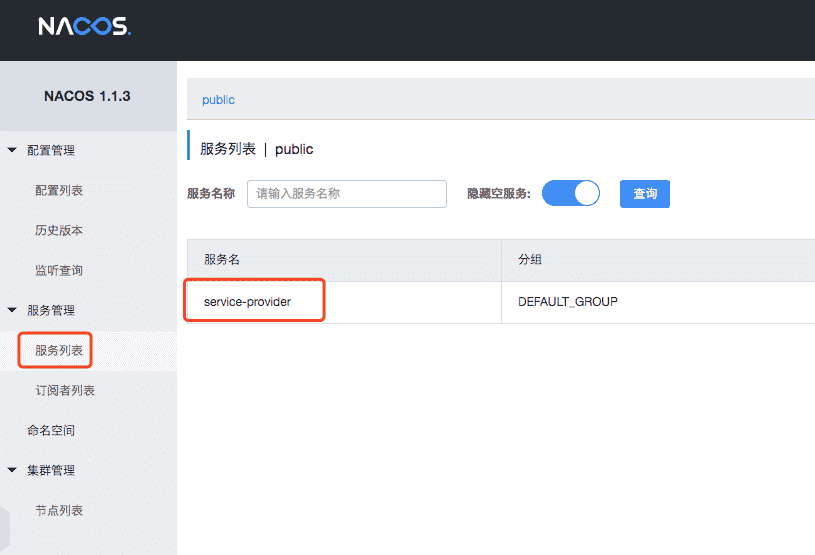
启动项目,可以在Nacos的服务列表中查看到当前服务
访问地址:http://127.0.0.1:8080/service/echo/ichochy
创建项目和服务方项目相同,server.port和spring.application.name设置为不同
构建RestTemplate,@LoadBalanced开启负载均衡
package com.ichochy.nacos;

import org.springframework.boot.SpringApplication;
import org.springframework.boot.autoconfigure.SpringBootApplication;
import org.springframework.cloud.client.discovery.EnableDiscoveryClient;
import org.springframework.cloud.client.loadbalancer.LoadBalanced;
import org.springframework.cloud.openfeign.EnableFeignClients;
import org.springframework.context.annotation.Bean;
import org.springframework.web.client.RestTemplate;

@SpringBootApplication
@EnableDiscoveryClient
public class NacosApplication {

    public static void main(String[] args) {
        SpringApplication.run(NacosApplication.class, args);
    }

    @Bean
    @LoadBalanced
    RestTemplate restTemplate(){
        return new RestTemplate();
    }

}
package com.ichochy.nacos.controller;

import com.ichochy.nacos.service.ServiceInterface;
import org.springframework.beans.factory.annotation.Autowired;
import org.springframework.web.bind.annotation.PathVariable;
import org.springframework.web.bind.annotation.RequestMapping;
import org.springframework.web.bind.annotation.RestController;
import org.springframework.web.client.RestTemplate;

@RestController
@RequestMapping("/result")
public class ResultController {
    @Autowired
    private RestTemplate restTemplate;

    @RequestMapping("restTemplate/{name}")
    public String restTemplate(@PathVariable String name){
        String url = "http://service-provider/service/echo/";
        return restTemplate.getForObject(url+name,String.class);
    }
}
注:通过RestTemplate远程调用服务,远程调用地址为服务方项目名+请求路径
spring.application.name=service-provider
启动项目,测试服务调用
访问地址:http://127.0.0.1:8080/result/restTemplate/ichochy
FeignClientpom.xml中添加FeignClient支持
<dependency>
    <groupId>org.springframework.cloud</groupId>
    <artifactId>spring-cloud-starter-openfeign</artifactId>
    <version>2.1.3.RELEASE</version>
</dependency>
通过 @EnableFeignClients 开启调用
package com.ichochy.nacos;

import org.springframework.boot.SpringApplication;
import org.springframework.boot.autoconfigure.SpringBootApplication;
import org.springframework.cloud.client.discovery.EnableDiscoveryClient;
import org.springframework.cloud.client.loadbalancer.LoadBalanced;
import org.springframework.cloud.openfeign.EnableFeignClients;
import org.springframework.context.annotation.Bean;
import org.springframework.web.client.RestTemplate;

@SpringBootApplication
@EnableDiscoveryClient
@EnableFeignClients
public class NacosApplication {

    public static void main(String[] args) {
        SpringApplication.run(NacosApplication.class, args);
    }

}
package com.ichochy.nacos.service;

import org.springframework.cloud.openfeign.FeignClient;
import org.springframework.web.bind.annotation.PathVariable;
import org.springframework.web.bind.annotation.RequestMapping;

@FeignClient(value = "service-provider")
public interface ServiceInterface {

    @RequestMapping("/service/echo/{name}")
    public String echo(@PathVariable String name);

}
package com.ichochy.nacos.controller;

import com.ichochy.nacos.service.ServiceInterface;
import org.springframework.beans.factory.annotation.Autowired;
import org.springframework.web.bind.annotation.PathVariable;
import org.springframework.web.bind.annotation.RequestMapping;
import org.springframework.web.bind.annotation.RestController;
import org.springframework.web.client.RestTemplate;

@RestController
@RequestMapping("/result")
public class ResultController {

    @Autowired
    private ServiceInterface serviceInterface;

    @RequestMapping("feignClient/{name}")
    public String feignClient(@PathVariable String name){
        return serviceInterface.echo(name);
    }

}
此内容由惯性聚合(RSS阅读器)自动聚合整理,仅供阅读参考。 原文来自 — 版权归原作者所有。