



惯性聚合 高效追踪和阅读你感兴趣的博客、新闻、科技资讯
阅读原文 在惯性聚合中打开

推荐订阅源

Cloudbric
Cloudbric
E
Exploit-DB.com RSS Feed
SecWiki News
SecWiki News
Forbes - Security
Forbes - Security
N
News | PayPal Newsroom
S
Security @ Cisco Blogs
Schneier on Security
V
V2EX - 技术
S
Secure Thoughts
W
WeLiveSecurity
Google DeepMind News
C
CERT Recently Published Vulnerability Notes
NISL@THU
NISL@THU
S
Securelist
S
Security Archives - TechRepublic
Know Your Adversary
Know Your Adversary
V
Vulnerabilities – Threatpost
Security Latest
Security Latest
Recent Commits to openclaw:main
G
GRAHAM CLULEY
H
Hacker News: Front Page
Microsoft Azure Blog
I
Intezer
Google Online Security Blog
美团技术团队
阮一峰的网络日志
阮一峰的网络日志
T
The Exploit Database - CXSecurity.com
钛媒体:引领未来商业与生活新知
钛媒体:引领未来商业与生活新知
Webroot Blog
Webroot Blog
Jina AI
Jina AI
Engineering at Meta
Engineering at Meta
P
Proofpoint News Feed
The Cloudflare Blog
I
InfoQ
L
LangChain Blog
U
Unit 42
P
Proofpoint News Feed
S
Schneier on Security
S
Security Affairs
Y
Y Combinator Blog
T
Tenable Blog
N
News and Events Feed by Topic
MyScale Blog
MyScale Blog
量子位
Google DeepMind News
Cyberwarzone
Cyberwarzone
博客园 - 聂微东
D
Darknet – Hacking Tools, Hacker News & Cyber Security
GbyAI
GbyAI
AWS News Blog
AWS News Blog

Hls on 轻风云

暂无文章

一次差点放弃的抓包
2018-09-09 · via Hls on 轻风云

本人好友(骚木)给了一个网站发现视频资源不错,准备给扒下来

准备编辑器、fd、浏览器

1.启动fd,访问视频站,看一段视频,让它发送包,先放着不动

2.查看源码执行ctrl+f输入video查找,播放器src指向.m3u8文件

img

3.下载后用编辑器打开,咦,这是什么格式,查阅google资料,原来是hls视频

img

4.看一下抓的包,原来是把第3步最后一行作为参数,继续去浏览器下载,果然如此,把.ts文件全部下载本地就能整合成视频了

img

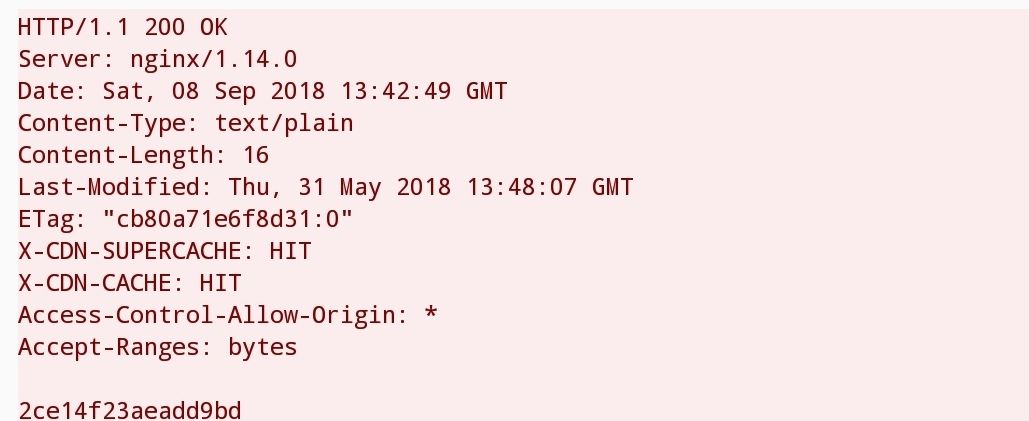
5.仔细看了一下发送的请求并返回的包,咦,这是什么,怎么有一行字符串,返回第4步看了一下差点漏了这一行:

EXT-X-KEY:METHOD=AES-128,URI=“key.key”

上帝请原谅我看不懂,大概意思是经过aes-128加密的,那一行字符串应该就是秘钥
img

抓包到此结束接下来用python获取文件并多线程下载,下载完成后用秘钥解密整合ts就成mp4啦