惯性聚合 高效追踪和阅读你感兴趣的博客、新闻、科技资讯
阅读原文 在惯性聚合中打开

推荐订阅源

Engineering at Meta
Engineering at Meta
Microsoft Azure Blog
I
InfoQ
OSCHINA 社区最新新闻
OSCHINA 社区最新新闻
人人都是产品经理
人人都是产品经理
让小产品的独立变现更简单 - ezindie.com
T
Tailwind CSS Blog
MongoDB | Blog
MongoDB | Blog
Google DeepMind News
WordPress大学
WordPress大学
量子位
美团技术团队
大猫的无限游戏
大猫的无限游戏
Cyber Security Advisories - MS-ISAC
Last Week in AI
Last Week in AI
博客园 - 司徒正美
奇客Solidot–传递最新科技情报
奇客Solidot–传递最新科技情报
小众软件
小众软件
C
Check Point Blog
博客园 - 三生石上(FineUI控件)
N
Netflix TechBlog - Medium
Recent Announcements
有赞技术团队
有赞技术团队
月光博客
月光博客

Deepin on 轻风云

deepin下开机自启脚本
deepin15.7上安装mysql(解决不提示设置密码的问题)
2018-10-02 · via Deepin on 轻风云

mysql已经安装完毕,但安装过程没有让你填写密码,链接错误,那么就来看看以下命令吧

1.首先获取root权限

1
anderyly@anderyly-PC:~*su

2.检查mysql是否已运行

1
root@anderyly-PC:~#netstat -tap | grep mysql

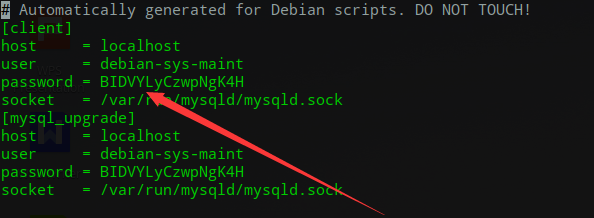
3.查询默认的用户名和密码,user是用户名,password后面的是密码

1
root@anderyly-PC:~#vim /etc/mysql/debian.cnf
截图20181105100640.png

4.利用默认账号密码登录

1
mysql -u debian-sys-maint -pBIDVYLyCzwpNgK4H

5.更改密码设置

1
update mysql.user set plugin="mysql_native_password" where user="root";

6.设置root的密码

1
update mysql.user set authentication_string=password('这里是你的密码') where user='root'and Host = 'localhost';

7.退出数据库

8.重启mysql

1
root@anderyly-PC:~#service mysql restart