




惯性聚合 高效追踪和阅读你感兴趣的博客、新闻、科技资讯
阅读原文 在惯性聚合中打开

推荐订阅源

WordPress大学
WordPress大学
T
Threatpost
阮一峰的网络日志
阮一峰的网络日志
美团技术团队
F
Fortinet All Blogs
The GitHub Blog
The GitHub Blog
月光博客
月光博客
V
Visual Studio Blog
T
Tailwind CSS Blog
Stack Overflow Blog
Stack Overflow Blog
博客园 - 聂微东
Jina AI
Jina AI
J
Java Code Geeks
Martin Fowler
Martin Fowler
大猫的无限游戏
大猫的无限游戏
Recorded Future
Recorded Future
C
Check Point Blog
腾讯CDC
N
Netflix TechBlog - Medium
aimingoo的专栏
aimingoo的专栏
罗磊的独立博客
Hacker News: Ask HN
Hacker News: Ask HN
SecWiki News
SecWiki News
博客园 - Franky
Hacker News - Newest:
Hacker News - Newest: "LLM"
N
News | PayPal Newsroom
cs.AI updates on arXiv.org
S
Security @ Cisco Blogs
W
WeLiveSecurity
The Last Watchdog
The Last Watchdog
Cloudbric
Cloudbric
F
Full Disclosure
The Cloudflare Blog
Y
Y Combinator Blog
Exploit-DB.com RSS Feed
Recent Commits to openclaw:main
Cyber Security Advisories - MS-ISAC
Google DeepMind News
MongoDB | Blog
MongoDB | Blog
S
Schneier on Security
Spread Privacy
Spread Privacy
L
LINUX DO - 热门话题
AI
AI
N
News and Events Feed by Topic
T
Tor Project blog
P
Palo Alto Networks Blog
让小产品的独立变现更简单 - ezindie.com
H
Hackread – Cybersecurity News, Data Breaches, AI and More
G
Google Developers Blog

JetBrains on 轻风云

最新idea激活2021版
IDE Eval Resetter:JetBrains 全家桶无限试用插件
2021-09-15 · via JetBrains on 轻风云

一、介绍

项目地址:https://gitee.com/pengzhile/ide-eval-resetter

项目功能:JetBrains 所有产品都有 30 天试用,这个插件的作用就是重置这个试用时间,让你无限试用,也算是另类的 JetBrains 激活方式。

支持的 JetBrains 产品,基本全系列都支持了:

IntelliJ IDEA
AppCode
CLion
DataGrip
GoLand
PhpStorm
PyCharm
Rider
RubyMine
WebStorm

二、使用方法

  1. 下载插件

下载地址: https://plugins.zhile.io/files/ide-eval-resetter-2.1.6.zip

  1. 安装插件

直接下载插件 zip 包(macOS 可能会自动解压,然后把 zip 包丢进回收站)
通常可以直接把 zip 包拖进 IDE 的窗口来进行插件的安装。如果无法拖动安装,你可以在Settings/Preferences… -> Plugins 里手动安装插件(Install Plugin From Disk…)
插件会提示安装成功

  1. 使用插件

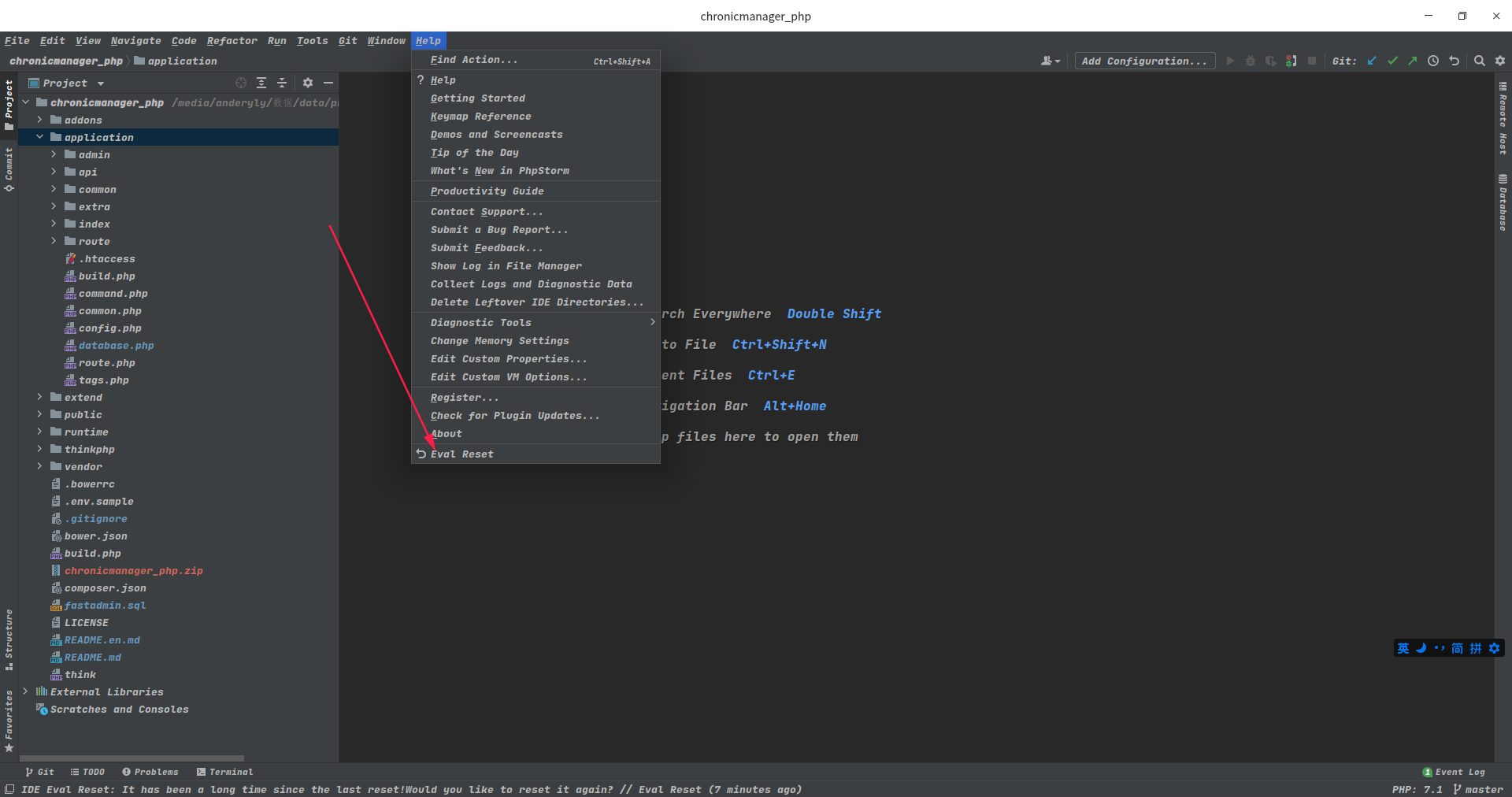
成功安装插件后,在 帮助 下会多一个 Eval Reset 按钮,如下图所示:
img

jetbrains 试用
一般来说,在 IDE 窗口切出去或切回来时(窗口失去/得到焦点)会触发事件,检测是否长时间(25 天)没有重置,给通知让你选择。(初次安装因为无法获取上次重置时间,会直接给予提示)

也可以手动唤出插件的主界面:

如果 IDE 没有打开项目,在Welcome界面点击菜单:Get Help -> Eval Reset
如果 IDE 打开了项目,点击菜单:Help -> Eval Reset
唤出的插件主界面中包含了一些显示信息,2 个按钮,1 个勾选项:

按钮:Reload 用来刷新界面上的显示信息。
按钮:Reset 点击会询问是否重置试用信息并重启 IDE。选择 Yes 则执行重置操作并重启 IDE 生效,选择 No 则什么也不做。(此为手动重置方式)
勾选项:Auto reset before per restart 如果勾选了,则自勾选后每次重启/退出 IDE 时会自动重置试用信息,你无需做额外的事情。(此为自动重置方式)