








There’s no need to guess — you’re definitely using systems of record: ERPs, financial systems, capacity planners, CRMs, HRIS, ITSM tools. For us at MEV, those systems hold the answers: who is available when, who owns which account, where a ticket is stuck, and who will be on the bench next month. The issue is the cost of access: every question turns into several screens, filters, and a context switch, which breaks the flow of a call.
We ran into this problem ourselves long before we started thinking about an AI agent. Inside MEV, we use an internal custom-built system called TeamPlanner for capacity planning and staffing visibility. TeamPlanner tracks people, projects, assignments, time off, departments, levels, locations, and related attributes. The data model can already answer most staffing questions. It has the data we need, and it does the job. But in practice, getting a simple answer still meant opening the app, setting filters, and pulling the pieces together by hand.
With AI becoming part of everyday work, those extra steps stood out as friction points. We wanted a simpler way to get answers from the system without making people dig for them every time.
This case is about the first stage of the journey: the groundwork that made it possible to build an AI agent over TeamPlanner that is read-only, respects existing authentication and authorization, and treats TeamPlanner as the single source of truth instead of creating a parallel data store.
On the data side, TeamPlanner already answers questions like:
The model and API cover people, roles, levels, departments, projects, assignments, and time off.
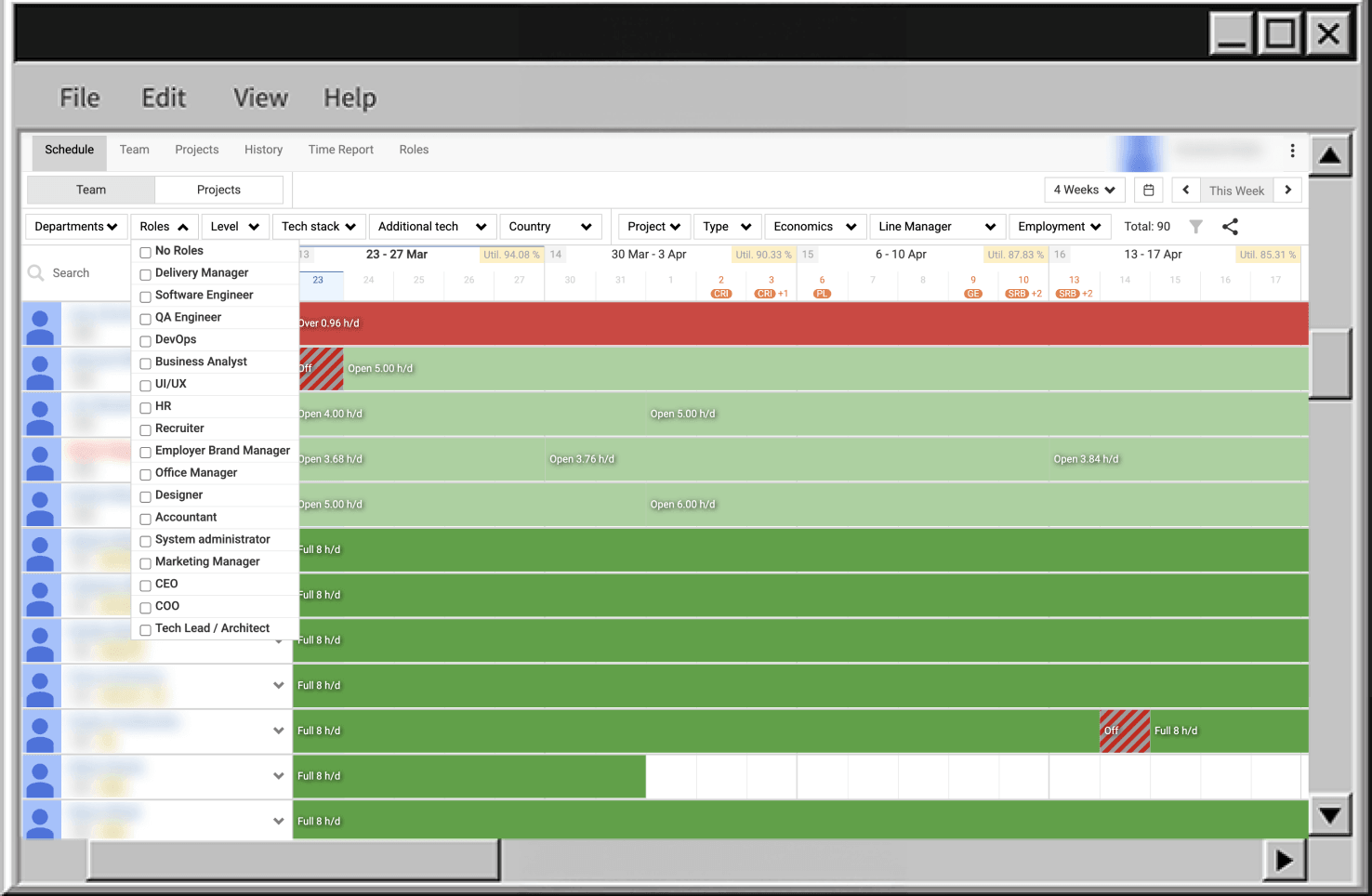
The problem is how you reach those answers. Each question usually means:
That effort is fine if you do it once in the morning. It fails in the middle of a staffing call where you have 30–60 seconds before the discussion moves on.
Business requirement: keep the same answers and the same source of truth, but expose them through a chat interface (Claude, ChatGPT, etc.) with latency that fits into a live conversation. If an “AI agent” also needs 5–10 minutes of manual steering per question, it turns into a worse UI, not an access layer.
For the first version we kept the scope deliberately small. The agent just acts as an access layer.
V1 AI agent covers a narrow class of questions:
If a user cannot see something in the UI, the agent must not be able to show it.
These guardrails apply everywhere in the design:
V1 lowers access cost to existing data without extending authority or surface area. Later sections refer back to these guardrails instead of repeating them.
At runtime the AI access layer is a small proxy that forwards a fixed set of tool calls to the existing TeamPlanner API. It does not own business logic or data; it authenticates the user, calls the right API method, and passes responses back to the model, under the V1 guardrails.
Conceptually, there are four components:
The proxy validates tool arguments, attaches the current user’s token, forwards requests to the TeamPlanner API, and returns JSON results. There is no separate data model or alternative “truth” at this layer.
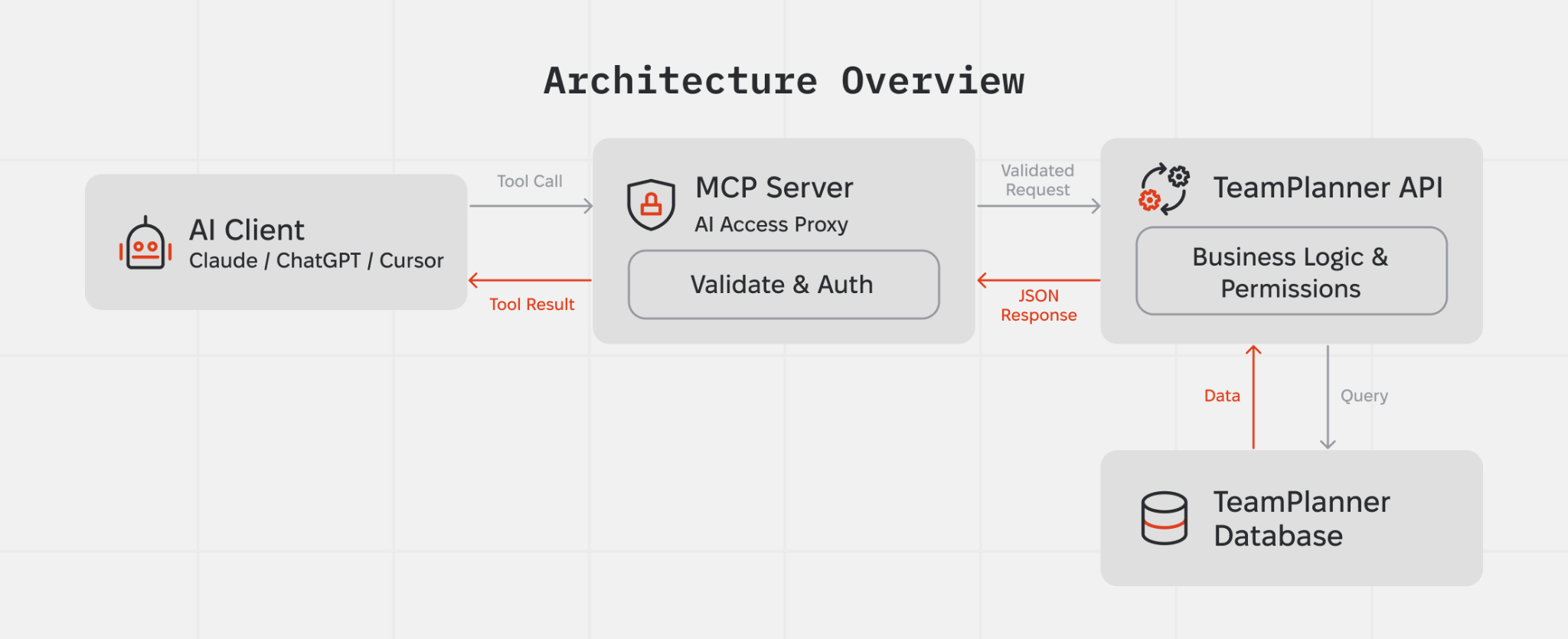
Authorization stays split across two layers:
At the edge, the MCP server runs the OAuth 2.1 with PKCE flow. Both email/password and Google sign-in still go through TeamPlanner’s /v1/auth/* endpoints. The MCP server never talks to the database directly. During authentication, it stores the issued MCP bearer token and refresh token, and uses the bearer token on subsequent /mcp requests.
When the MCP bearer token expires, the MCP server rejects requests to /mcp with 401 Unauthorized. It does not refresh the token during tool execution. Instead, the OAuth client must call POST /oauth/token with grant_type=refresh_token, using the refresh token issued during the initial authentication flow. After that, tool requests continue with the new bearer token.
Inside TeamPlanner, every tool call still arrives as a regular API request with the upstream bearer token captured during authentication. The API validates that token and applies the same per-user permission checks it already uses for the UI and other API consumers. The MCP layer has no elevated access: if a user cannot see something in TeamPlanner directly, they cannot get it through the agent either.
Inside the MCP server, the current auth context is kept in memory via AsyncLocalStorage and made available to tool handlers, so tokens do not need to be passed explicitly between components.
As a result, the AI access layer only reads data a given user is already allowed to see, and it does so through the same authorization checks that already protect TeamPlanner.
Note: Refresh rotates only the MCP bearer token stored in TokenStore. It reuses the same upstream accessToken captured at authentication time, so expiry of that upstream token, for example Google, may still affect downstream API calls.
At the tool layer, the agent knows a small, fixed set of operations. Each operation maps to one or more TeamPlanner API calls. For example, it can:
From these building blocks the agent can answer:
All of these combine the same tool set. There are no hidden operations with broader reach than the existing API.
Take the question: “Who’s on bench in March?”
The path from this question to an answer stays synchronous and linear:
There is no ETL pipeline or background jobs. Every answer comes from current TeamPlanner data through a single request/response loop, within the V1 guardrails.
Today, bench computation lives on the model side. That is acceptable for a V1 experiment, but behaviour depends on prompts and model versions. A more robust design moves bench into a deterministic API endpoint (for example, /v1/capacity/bench) and exposes it as a dedicated tool. In that setup, the agent calls a single endpoint with a date range and filters and no longer re-implements bench logic in prompts.
The first iteration exposed several structural problems.
The initial design exposed a generic “database” resource that let the model execute SQL directly against the TeamPlanner database. That turned every text field into a potential prompt-injection vector and effectively gave the agent database-level powers.
Prompt-to-SQL attacks against LLM-integrated applications have already been demonstrated in the context of frameworks like LangChain: unsanitised prompts can be steered into malicious SQL against the backing database. Security researchers are starting to treat this as a variant of classic injection risk, with the model as a code generator and the database as a critical sink.
We removed SQL access. The agent now calls only typed tools that map 1:1 to permission-checked API endpoints, in line with the V1 guardrails.
The model tried to “help” by guessing filter values, for example using "QA" where the database used "QA/QC/Tester". API calls were syntactically valid but returned empty lists, which looked like “no data” for the user.
We added reference tools (get_roles, get_levels, get_departments) and tightened the instructions: always fetch reference data first and never invent filter values. Filters now use values that actually exist in TeamPlanner.
Early on, large tool responses caused context window overflows. This happened when the agent retrieved broad datasets through heavy tools such as get_users and get_all_assignments. Once the limit was exceeded, the model lost prior context, restarted retrieval, or produced unstable answers.
At the moment, the MCP returns tool results as pretty-printed JSON (JSON.stringify(result, null, 2)), which increases payload size and makes overflows more likely.
Mitigation was added on the MCP side to control response size without changing the backend in the first iteration. This includes response transformation and selective shaping of tool outputs before they reach the model.
The approach targets two areas:
Further work will focus on backend endpoint optimization so the agent receives compact, task-specific data instead of large aggregated responses.
What we have here is a pattern that can be reused anywhere a system of record already exists and exposes an HTTP API.
Reusable building blocks:
This fits internal products where data already lives in a system of record but UI navigation costs time: ITSM systems, HR and people data, finance and invoicing, delivery tracking, access governance. Typical triggers include recurring ad-hoc questions, managers needing answers during calls instead of after them, and platform teams wanting conversational access without cloning logic into a new service.
Across these cases the V1 guardrails stay the same:
You end up with a conversational access layer over the system of record, while the system of record remains the only source of truth and the only place where real authorization decisions happen.
此内容由惯性聚合(RSS阅读器)自动聚合整理,仅供阅读参考。 原文来自 — 版权归原作者所有。