



THE AI CO-FOUNDER FOR SOLO FOUNDERSDoesn't sleep, doesn't eat, just shipped
MCP-native — agents read and write your boardProject context indexed and reachable from any agentFree forever for solo founders
app.taskachu.com / todaylive preview
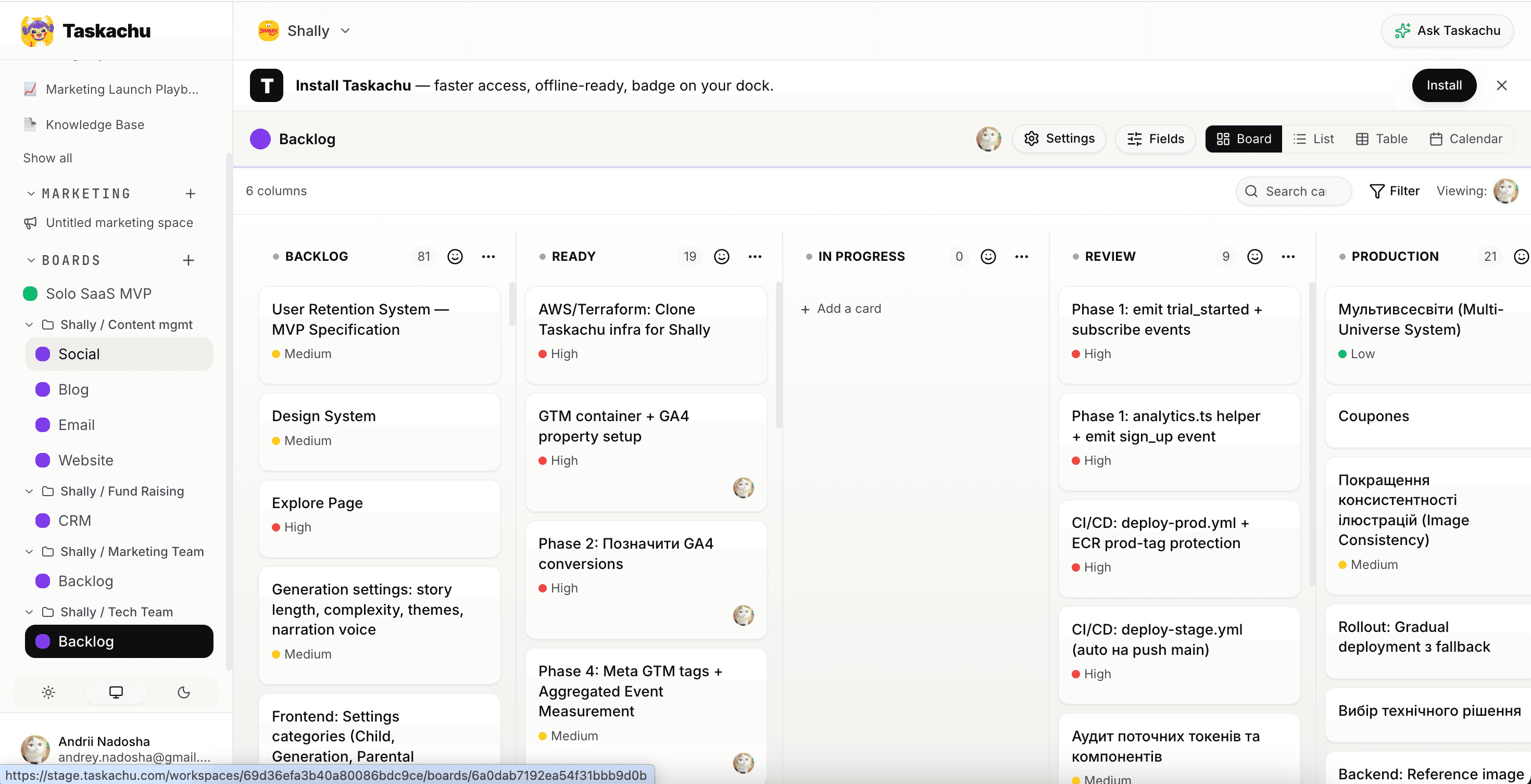
backlog3
Auth: Google sign-in flow
Taskachu is the shared workspace Claude, Cursor and Codex all read from and write to — your always-on co-founder.
→From thought to ship
01
Half-sentence in. Brief, decisions, and acceptance criteria out. Your project memory grows with every drop.
02
Tasks decompose, prioritise, and flow straight into your development workflow with full context attached.
03
Creatives, content, launch prep — drafted in your voice in parallel with the build, not after it.
01Key features
Eight primitives, one continuous loop. Each surface is built around the same idea: keep your AI in context, and keep your hands on the keyboard.
01 · IDE execution
Send tasks with full context directly into your development workflow. Brief, decisions and linked docs travel with the task — the first response is already on-spec.
MCP● connected · taskachu
@context · 12 docs · 3 decisions
→handoff · TKA-031 · Stripe checkout
↳Claude Code · session ready
MCPConnected
02 · Knowledge base
Markdown docs with hierarchy and a BlockNote editor. Decisions, briefs, runbooks, brand notes — written once, retrieved by every agent you delegate to. Stop pasting from Notion every morning.
📁architecture · 12 pages
@decisions · 2026-q2-stack
@runbooks · incident-response
@brand · voice + tone
MarkdownHierarchical
03 · Smart backlog
Ideas decompose into tasks automatically. The AI ranks impact vs. effort and surfaces what to ship today.
P1 · Top pickToday
04 · Handoff context
Every handoff to Claude carries the task, the linked docs, and the decisions that shaped it — so the first reply is already on-brief.
Auto-contextOn by default
05 · RAG · Ask Taskachu
Workspace-scoped retrieval over every doc, card and decision. Ask Taskachu in-app or reach the same RAG from Claude Code / Cursor over MCP — no copy-paste.
@docs/pricing.md · chunk_07
@decisions/2026-04-stack.md
06 · DevOps · auto
Every completed task triggers your pipeline. Failures route back to the AI with the full trace — most fix themselves before you notice.
CI greenDeploying
07 · Marketing · AI
Creative briefs, content calendars, launch campaigns — drafted in your brand voice and queued to your channels.
ContentCreative
08 · Env & secrets
API keys, environments and rotation, with a clear structure your AI can reason about without ever seeing the values.
DEV● ready
STAGE● ready
PROD● rotate · 12d
Drop in your first idea — Taskachu turns it into a backlog and hands the top card to Claude in under a minute.
02The loop
Five steps that keep going. You drop in a thought. Taskachu plans it, helps you build it, checks it works, then helps you tell the world. And then it asks what's next.
Step 01
Capture the idea
Drop in an abstract thought. Get back a structured knowledge base — problem, solution, app architecture and marketing plan. Everything you need to launch a new product.
Step 02
Plan with AI
The backlog re-ranks itself by impact. Top of the list is always today's right move.
Step 03
Hand off to Claude
Send the task, the linked docs and the decisions to your AI coding tool or IDE. One click, full context.
Step 04
Review · close
Code is built. Review and test it. If it's good, close the task. Notes flow back into the knowledge base.
Step 05
Plan what's next
The backlog updates with what you shipped. Tomorrow's right move is already on top.
Take a walk. Read your kid a bedtime story. Sleep in.
The loop keeps running.

1workspace
instead of seven tabs
MCPnative
direct to Claude Code
RAGbuilt-in
your docs, always in context
$0/ mo
free for solo operators
★Built with itself
Last Tuesday I opened my own Backlog board, asked Claude Code to pick the top priorities, and handed each card off over MCP with full context attached. Thirty minutes later, the entire 120-task backlog had moved into Complete. Auth fixes. A pricing tweak. The PWA manifest. The very landing section you're reading.
No prompt re-typing. No tab-juggling. The loop just ran.
Andrii Nadosha — building Shally with Taskachu
120
cards · Backlog → Done
~30 min
one session
1 operator
0 teammates
Open a workspace, plug Claude over MCP, ship your own backlog before lunch.
03Why Taskachu
Bring your existing work with you.
Import from Linear, Jira, Notion, Asana, Trello, GitHub Issues — or a plain CSV. Nothing left behind.
01
One workspace for backlog, docs and AI handoffs. You operate — the loop runs.
02
The backlog re-ranks itself. Today's top card is today's right move.
03
RAG + MCP let every agent read your docs, decisions and board. No paste-and-pray.
04Vs. the stack you'd otherwise glue together
Capability
Taskachu
Linear · GitHub · Buffer · ChatGPT
Backlog auto-prioritisation
Direct Claude Code handoff (MCP)
Knowledge base in handoff payload
Marketing & launch drafts
Tools to context-switch between
1
7+
Scales solo → small team
Migrate or duplicate
A1
No context switching between tools
One workspace. One brain. Everything stays where it was.
A2
Consistent execution
No manual overhead. The AI doesn't forget the convention you set last week.
A3
Faster iteration
Idea → plan → handoff in minutes. Less time wiring tools, more time deciding.
A4
Your product memory, always available
Architecture, decisions and brand voice — recalled, not re-explained.
A5
Scales with you
Solo today. Three teammates next quarter. Same workspace, same loop.
06Pricing
Solo is free forever. Upgrade to Team when you need more boards, teammates, RAG documents, and a co-founder that never sleeps. Start with a 7-day trial — no card required.
Free
For founders who want to test the loop without committing.
$0forever · no card
Recommended
Pro
Everything in Solo, plus the Pro-only modules.
$12/ month per workspace · billed annually as $144
Free forever for solo · 7 days of Pro on the house, no card
Drop in your first idea, watch it become a backlog, and hand the first task to Claude over MCP — all in one workspace.
07FAQ
Taskachu is an AI-native productivity app for solo founders. You manage projects on Kanban-style boards, and AI features (built into the app) help you decompose tasks, prioritise the backlog, run standups, and answer questions about your own workspace. Every AI feature is also reachable from Claude, Cursor, or Claude Code through the Model Context Protocol (MCP), so your AI agent can read and write the same board you do.
Solo founders, indie hackers, and small teams (up to ~10 people) who use AI as part of their daily build loop. If you find yourself re-explaining your roadmap to ChatGPT every session, Taskachu replaces that friction with persistent state your AI can read directly.
Yes. Taskachu exposes a Model Context Protocol (MCP) server at app.taskachu.com/api/mcp. Generate a workspace-scoped Personal Access Token in Settings → API Tokens, paste the snippet into your Claude Code, Claude Desktop, or Cursor config, and your AI agent can list, create, update, move, and delete cards and documents in that workspace — same surface you use in the UI.
Free tier covers one workspace with a capped monthly AI quota — plenty for an early-stage solo project. Pro is $12 per month, includes higher AI quotas, multiple workspaces, and a 7-day free trial with no credit card required.
Yes. Each workspace has an Imports section that accepts Jira XML exports, ClickUp CSV / JSON, and Confluence HTML / ZIP exports. Imports are two-step: analyse first to see what will be created, then execute when you're happy with the plan.
Task decomposition (turn a card into subtasks), card prioritisation, brainstorm sessions that synthesise into board structures, daily standup planning with conversational follow-up, weekly retrospective generation, agent-export packets for handing a card or board to an external code-gen tool, and Ask Taskachu — a workspace-scoped retrieval-augmented assistant that answers questions about your own cards and uploaded documents.
Yes. Go to Settings → Account → Delete account. We send a confirmation link to your email; clicking it permanently removes your account, every workspace you own (with cascade to all boards, cards, documents, and integrations), and cancels any active Stripe subscriptions. The process is irreversible by design.
此内容由惯性聚合(RSS阅读器)自动聚合整理,仅供阅读参考。 原文来自 — 版权归原作者所有。