
Watch your screenshot folder
Automatic mode follows the macOS screenshot location and imports macOS-marked screenshots.





Local AI screenshot naming for macOS
Private by Design: screenshot never leaves your Mac and is named locally by a bundled Gemma 4 AI Model.
Keep your screenshot app.
SnapName watches the folder.
New images get useful names locally.
Apple Silicon Mac. macOS 13 or later. CPU and GPU support.
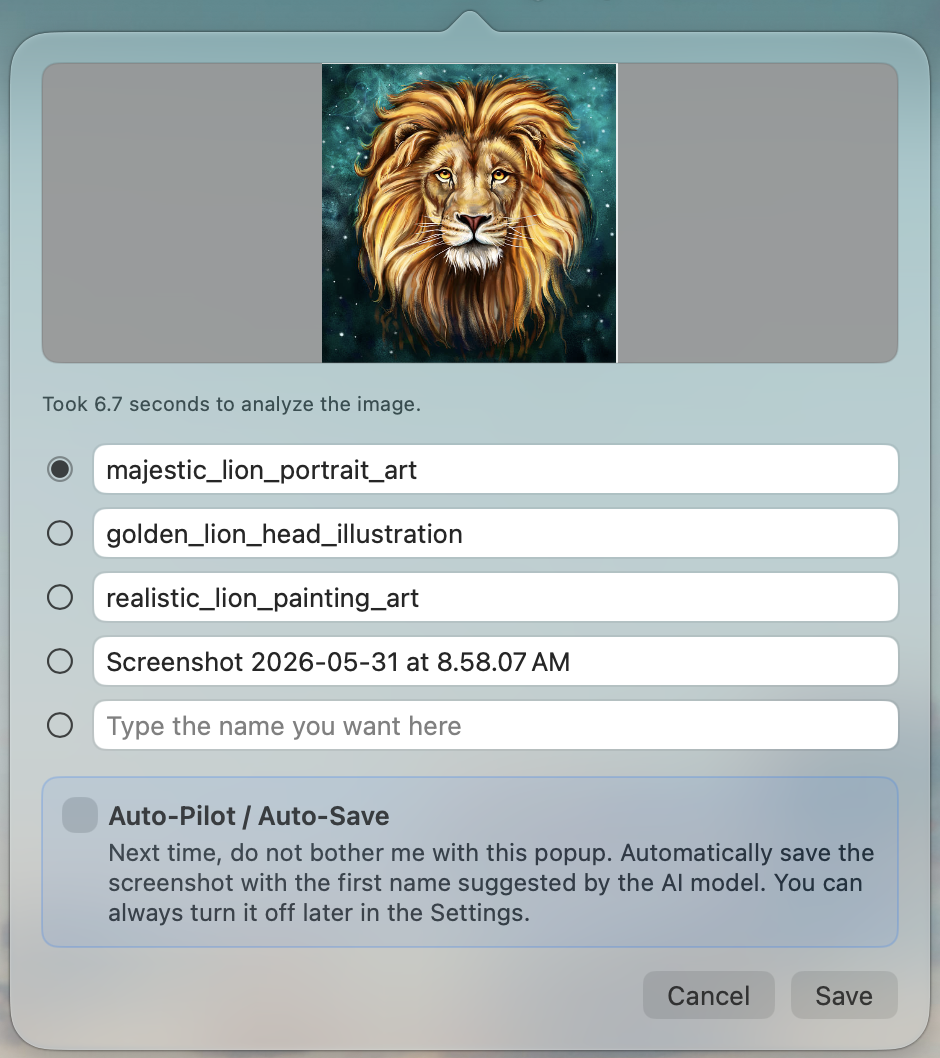
Workflow
SnapName watches your screenshot folder and lets you review and choose from three AI name suggestions. Or just choose auto-save to automatically go with the first AI suggestion without having to do anything.
Automatic mode follows the macOS screenshot location and imports macOS-marked screenshots.
Custom mode watches a folder you choose and imports every new readable image.
Approve a suggested name yourself, or turn on auto-save for watched-folder files.
Flexible imports
SnapName does not need to replace your capture workflow. It can rename screenshots created by macOS, CleanShot, Shottr, or any other tool that saves images into a folder you watch.
PNG, JPEG, HEIC, TIFF, and AVIF files are supported when macOS can decode them. SnapName's own menu and hotkey capture features are still there when you want them.
Automatic mode Follows the current macOS screenshot folder and imports macOS screenshot files.
Custom mode Watches any chosen folder and imports every new readable image.
Keep using the tool you are used to SnapName works alongside your current screenshot app. As long as new images land in a watched folder, SnapName can suggest better names for them.
Privacy by design
SnapName bundles llama.cpp and Google Gemma 4 model files inside the app, so screenshot content is analyzed locally on your Mac. Your images are never sent to an external AI model for naming, providing you with total privacy over your screenshots.
Local AI runtime llama.cpp with bundled Gemma multimodal model
Screenshot content Processed locally on your Mac
此内容由惯性聚合(RSS阅读器)自动聚合整理,仅供阅读参考。 原文来自 — 版权归原作者所有。