
A few weeks ago, GitHub announced that Copilot is moving to usage-based billing. No more flat subscriptions, from now on everyone has to pay for the tokens they use.
If you’ve been using Copilot on the free tier or an individual plan (like it was my case through a benefit to active open-source contributors), this probably stings. This subscription was the perfect way to test every new model without having to commit to specific subscriptions, and with an extremely generous monthly quota. I know of many people that bought Github Copilot subscriptions over Anthropic ones because it gave you access to Sonnet and Opus with higher quotas than those provided in Claude. So the obvious question is, why was it so cheap?
The answer is definitely not generosity. It is well-known that AI labs and big tech have been subsidising token costs for the same reason any platform subsidises onboarding: to build dependency before they extract value and crush their competition. Every cheap API call is also a training data point. Every workflow you wrap around their service is a switching cost they’re accumulating on your behalf. GitHub Copilot at $10/month was never a sustainable product, like is probably the case for more popular products like Claude Code and Codex. It was a land grab dressed up as a subscription. The cost per user of all these AI subscriptions (at least from the well-funded companies that can afford it) significantly exceeds the price of their subscriptions.
My most loyal readers know how I’ve been concerned about the economics of AI for a while. In this post I already made my argument about how I think “the AI Bubble is more a trap than a bubble”, and how by accelerating the adoption of AI for our daily workflows, companies are trying to create a dependency that they can leverage. When I realised this by the end of last year, I decided to start buying hardware that I could use to run local inference in order to start minimising my dependency from big token bills and subscriptions with decreasing token allowances.
My journey started with a Strix Halo chip, the Ryzen AI Max+ that has become my daily driver and gives me up to 128GB of unified memory. This machine allows me to comfortably run Qwen3.6-27B and Gemma 4 locally for my LLM-powered background tasks. Think email and calendar digest, meeting summaries, TTS, etc., the kind of assistant and automation work that doesn’t need a fast feedback loop or large contexts and can run continuously in the background. This allows me to prevent an increased AI bill, and to unnecessarily drain the token quota of my subscriptions, which I desperately need for more complex agentic tasks.
While this setup works fine for this kind of use case, it has shown to be quite annoying when you want to start leveling up your game and let your agents start relying exclusively on local models. The key problem is throughput. Even if the model fits in memory, as soon as you need to support an application that requires large context, tight feedback loops like agentic coding, auto-research tasks, real-time tool calls, or even running OpenClaw or Hermes agents, the tokens per seconds required to make the experience bearable (at least for me) aren’t there yet.
Fortunately, this gap is solvable, but today it may cost a few thousand dollars. So before spending a few “Ks” on hardware I wanted to be really sure and understand the setup that would give me what I need. This post is my public report of all my findings.
But before we get into the hardware, it’s worth refreshing what “inference” actually requires, because the specific hardware requirements that matter, and how they impact your user experience, may not be the ones that intuitively many people think.
There are three main resources in play at inference: memory capacity (whether the model fits at all), memory bandwidth (how fast weights and caches stream into the compute units), and raw compute (how fast those units do the maths). Most people focus on the third one, while the bottleneck is almost always the second.
Here’s why. An LLM generates text one token at a time, autoregressively. Each token requires reading a large chunk of the model’s weights from memory into the processing units. The weights themselves don’t change (you’re not training, you’re reading). Which means the question isn’t “how many FLOPS can this chip do?” but “how fast can it stream data from memory?“ That memory bandwidth is what matters, measured in GB/s.
To give you some numbers that can help you build your intuition, an RTX 3070 with 8GB of VRAM has 448 GB/s of memory bandwidth. A newer RTX 4060 Ti with the same 8GB has 288 GB/s. For inference throughput, the 3070 which is older and cheaper, can be faster at inference as long as it can fit the model. This is counterintuitive until you understand what’s actually being measured. Apple understood it early, even if by accident, with the unified memory architecture in M-series chips, where CPU, GPU, and Neural Engine share a single high-bandwidth pool with no bus crossings, turns out to be nearly optimal for exactly this kind of workload. This is what makes Apple devices with M chips so good at inference. I wrote about why a few weeks ago.
The other bottleneck you need to understand is the KV cache. When a model processes a long conversation or code context, it caches the key and value vectors from each attention layer for every token it’s seen so it doesn’t have to recompute them. This cache grows with context length. At 200k tokens, it’s roughly 2GB with FlashAttention on, something manageable. But without optimisation, long contexts can eat most of your VRAM before the model weights even load. Newer architectures like Qwen3.6 address this directly: only 10 of the model’s 40 layers use full KV cache, meaning going from 4k to 65k context adds roughly 800MB of VRAM rather than several gigabytes. Architecture decisions like this are why “how much VRAM does it need?” is a question that increasingly depends on which model you’re running, not just how many parameters it has. If you want a deeper view on how transformers and KV caches work, I also shared a brief overview with external pointers on this post.
What does this mean for agentic work specifically? Tok/s matters more than it does for a chatbot. When an agent is executing a loop (calling a tool, parsing the output, deciding the next step) latency compounds. At 5 tok/s you’re waiting seconds between loop iterations. At 40 tok/s the loop feels instant. The difference between a useful coding agent and one you give up on is often that narrow. And this is the pain that I am feeling with my current setup. These half hundred tok/s is what I want to aim for with my next setup.
I’ve spent a long time in the weeds on this, and a lot of my thinking has been shaped by 0xSero’s detailed breakdown of the current market, and all the experiments he keeps sharing publicly (if you don’t follow him already and you are interested in local inference I highly recommend you do it right now. And 0xSero If you end up reading this, I can’t thank you enough for your contributions and all the good you’ve done for the open-source AI and local inference community). Here’s how I’d summarise the options as of mid-2026, capped at roughly $10k for an end-to-end inference machine built upon 0xSero’s analysis and benchmarks, and my own research.
Before I share the actual builds, here’s a summary table with the high-level hardware numbers from the previous section. As a reminder, memory capacity tells you which models fit, memory bandwidth tells you how fast they run. The table below puts those side by side so you can read the trade-offs against the metrics that actually matter.
With that framing, here’s the detail on each.
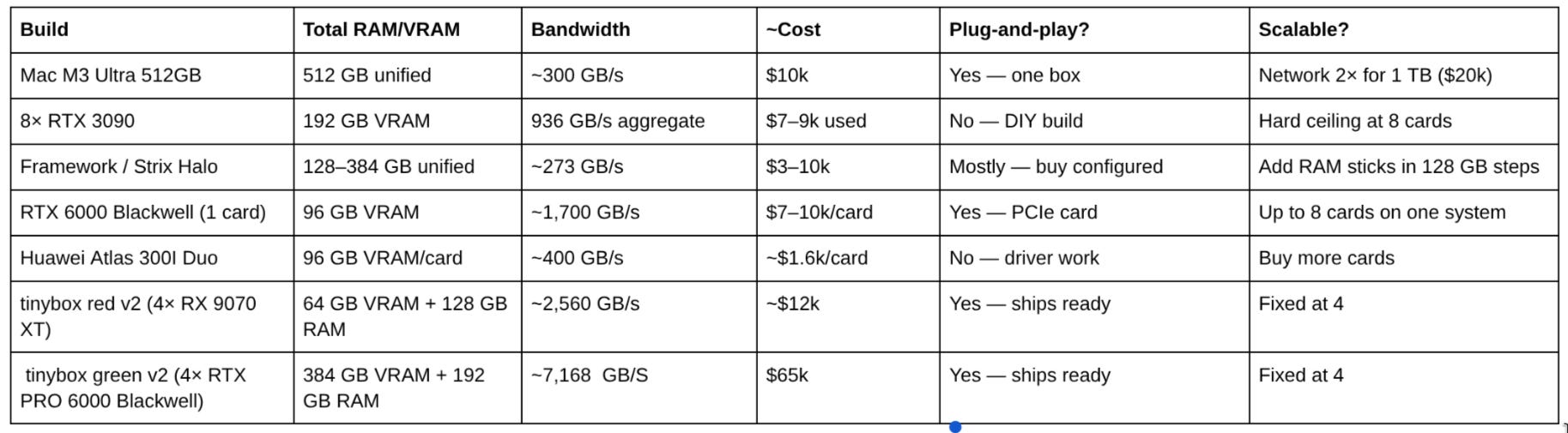
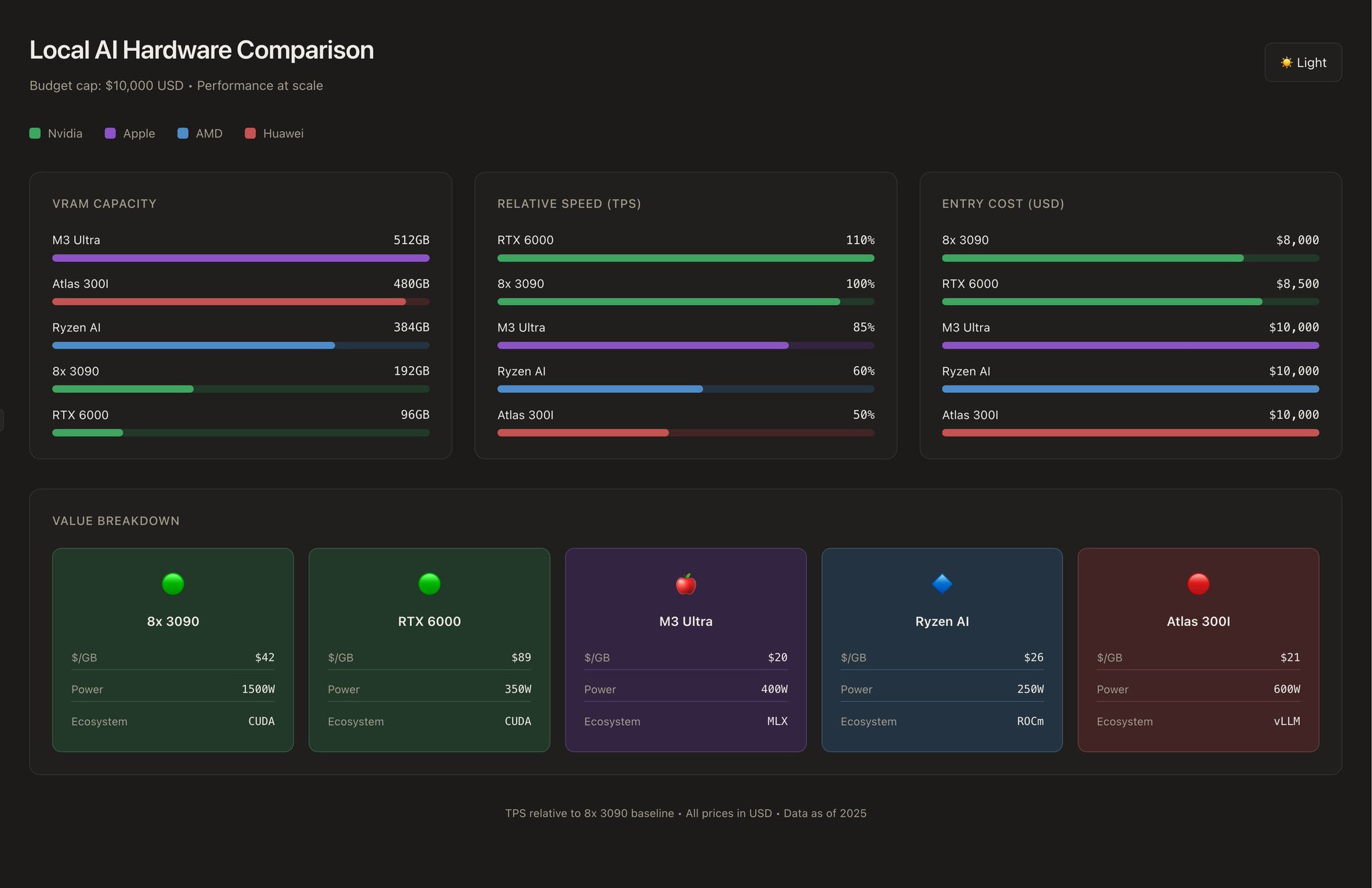
The cleanest option. Apple Silicon’s unified memory architecture (CPU, GPU, and Neural Engine sharing a single high-bandwidth memory pool) turns out to be nearly ideal for inference. No bus crossings, no transfer overhead. MLX has matured significantly in the last few months (as I described here) and is approaching the throughput of an Nvidia 3090 on comparable tasks. At 400W peak, the whole machine uses less power than a single overclocked 3090.
The biggest advantage is capacity: 512GB of usable memory means you can run Kimi-K2, Deepseek, and Minimax-M2 at full context, without extreme quantisation. Network two of them and you hit 1TB, something that would cost north of $50k with Nvidia. Scaling is quite clean in this case, each additional machine is its own self-contained unit with its own software stack connected through Thunderbolt/Ethernet.
The key limitation here is the lack of CUDA support. A lot of tooling in the inference ecosystem like vLLM, SGLang, the training and fine-tuning stack, assumes CUDA. MLX is good and getting better, but its level of maturity is still not close to CUDA’s. If you want to also fine-tune or train on your inference box, this may not be the best solution. But for inference? It’s great!
This is the power-user option, and the one that requires the most assembly work. There is no pre-built version of this; you are building a workstation from parts.The shopping list looks something like this: a server-grade motherboard with at least eight PCIe slots (something like a Gigabyte MZ32-AR0 or Supermicro equivalent, $800–1,200), a server chassis or open-air mining frame ($200–400), a 2,000W+ PSU or dual PSU setup ($400–600), 256GB of DDR5 system RAM for MoE offloading ($400), and eight RTX 3090s at roughly $800–1,000 each used. Total: $9–12k if you buy carefully, more if you don’t (which is always my case :) ). You will spend a weekend on this. Then another weekend on NVLink bridges and driver configuration.
What do you get in exchange? 192GB of VRAM at 936 GB/s of aggregate bandwidth, the fastest throughput on this list for dense models. Full CUDA support means vLLM, SGLang, and anything else the ecosystem has produced. A mature ecosystem and a box where you can also train and fine-tune.
The main downsides of this setup is that at full tilt the system draws 1,500W even with cards capped at 50% power limit. It will be quite noisy. The used 3090 market is tightening. Scaling beyond 8 cards requires an electrician and a second system. Think of this as a serious workstation close to data-centre level, not a quiet office machine.
If you like hardware and building your own machines, this is a really fun project. But if you don’t have the time this one is probably a pass for you, even if the economics per GB of VRAM add up.
This is the chip in my own Beelink machine. Framework sells a desktop configuration with 128GB starting at around $3k, expandable in 128GB increments up to 384GB really similar to the one I have. Mine includes 128GB, and you can buy it configured and it arrives ready to run, no assembly or heavy work needed. The power draw is modest, it’s quiet, and the RAM expands by swapping sticks rather than adding cards. I’ve been running non-stop for the last six months without noticing anything on my electricity bill.
The same chip, the Strix Halo, is what 0xSero describes as bringing the cost-per-GB-of-memory down “an absurd amount” relative to Nvidia. At 128GB you’re past the capability of four 3090s for half the price and a tenth of the hassle. Simon Couch has a good post showing what day-to-day local agent workflows look like on this class of machine. The memory architecture is similar in principle to what Apple is doing, unified pool, high bandwidth, no bus penalty, which is exactly why it’s competitive on inference despite the software friction.
The catch: ROCm instead of CUDA. AMD’s software stack has improved considerably, but it still requires more configuration than CUDA-based workflows, and some tools simply don’t support it. I personally faced some issues with Strix Halo’s ROCm support for the kernel version that I was running, which pushed me to run my models in Vulkan. The performance degradation is negligible, but you still have to go through some hoops compared to CUDA’s support.
Supply has also been inconsistent, Framework’s configurations sell out and wait times stretch to weeks. Scaling horizontally (multiple machines networked together) is possible but requires more work than adding a card to a PCIe slot, although you can always connect
The option for people who want to start small and scale without rebuilding. A single RTX 6000 Blackwell is a PCIe card, it slots into any workstation motherboard with a x16 slot, which means the rest of the machine (CPU, RAM, case) can be modest consumer hardware at $500–800. One card is ~$7–10k and gives you 96GB of VRAM at roughly 1,700 GB/s, faster per-card bandwidth than the entire 8× 3090 build. Two cards doubles the VRAM to 192GB at half the power draw of eight 3090s. You can reach eight cards on a household circuit, landing at 768GB of VRAM, the practical ceiling for residential power.
The per-GB cost is the highest on this list. But you’re buying a 5-year upgrade path. Add one card per year, keep everything else the same. No new chassis, no new PSU configuration, no rebuilding the stack. For people who want to grow an inference cluster incrementally, this is the most coherent architecture (albeit the entry level is quite expensive).
The wildcard. $10k buys you 480GB of VRAM, a number that’s hard to match anywhere on this list. vLLM support exists now, which has changed the viability picture considerably. At 400 GB/s bandwidth per card it’s not the fastest, which limits tok/s on dense models, but for running very large models at lower throughput requirements it’s hard to beat on cost-per-GB.
The bigger issue is the ecosystem: debugging means translating Chinese forums, GitHub issues go unanswered for months, and for US-based buyers the import situation can be complicated.
Worth knowing about. Probably not your first machine.
The tinybox from the tinygrad team is the closest thing to a plug-and-play inference machine you can buy today, pre-assembled, pre-configured,it ships on Ubuntu 24.04 with the tinygrad software stack already running.
The tinybox red v2 is the AMD option and the one that fits a realistic home inference budget. Four AMD Radeon RX 9070 XT cards, 64GB of total GPU RAM, 2,560 GB/s of aggregate bandwidth, a 32-core EPYC CPU, 128GB of system RAM, and a 2TB NVMe, all in a single 1,600W supply enclosure for $12,000. By bandwidth it punches well above the 8×3090 build described above, at a fraction of the assembly headache. The ceiling on model size is lower than the Nvidia options (64GB VRAM fits quantised 70B-class models comfortably), but for throughput on models that fit, the bandwidth numbers are serious. ROCm applies here as with all AMD hardware, but tinygrad’s stack abstracts most of it.
The tinybox green v2 has moved to a different category entirely. The current version ships four RTX PRO 6000 Blackwell cards, 384GB of total VRAM, 7,168 GB/s of aggregate bandwidth, 3,086 TFLOPS FP16, all for $65,000, made to order, and requires a concrete slab. It is no longer a home inference box. It is a small data centre. Worth knowing it exists; not relevant to this post’s scope.
The tinybox red v2 is the reference plug-and-play option for this discussion. You don’t build it, you plug it in. If the trade-off of ROCm for zero assembly time sounds right, this is currently the clearest path to a working inference machine out of the box.
This is a work in progress in my research, and something that I am seriously considering. Nvidia GPUs tend to have a higher price than AMDs for comparable hardware capabilities.
The RX 7900 XTX is the AMD equivalent of the RTX 4090: 24GB of GDDR6 VRAM, ~960 GB/s memory bandwidth, available for roughly $900–1,000. By bandwidth it actually trades blows with the 4090 (which sits at ~1,008 GB/s). The VRAM is identical. The price is meaningfully lower. An 8× RX 7900 XTX build lands at roughly $7–8k for the cards alone, comparable to the used 3090 build on cost, with newer silicon and better per-card bandwidth. The assembly requirements are the same: server motherboard, beefy PSU, a weekend of your life.
The RX 7900 XT (20GB, ~820 GB/s, ~$700 new) is worth knowing about as a budget-tier option if you want AMD silicon without paying 4090 prices. Less VRAM per card means a lower ceiling on model size, but in a multi-card build you can still reach 160GB across 8 cards.
On the workstation side, AMD’s Radeon PRO W7900 (48GB VRAM, ~864 GB/s, ~$3,500) is the closest AMD equivalent to the RTX 6000 Blackwell, a single professional-grade card with serious VRAM, designed for long-term workstation use. Two of them give you 96GB at roughly $7k, competitive with one RTX 6000 Blackwell in capacity but significantly cheaper. The bandwidth per card is lower (~864 GB/s vs ~1,700 GB/s), which shows up in tok/s on dense models.
The ROCm caveat applies uniformly across all of these. vLLM and llama.cpp both have ROCm support and it has improved substantially — most workloads that run on CUDA will run on ROCm with some configuration friction, and for inference specifically (as opposed to training) the gap is smaller than it was a year ago. The tools that still don’t support ROCm reliably are the fine-tuning and training frameworks. If your use case is pure inference, AMD is a legitimate option at every price tier. If you want to train or fine-tune on the same hardware, CUDA is still the safer choice.
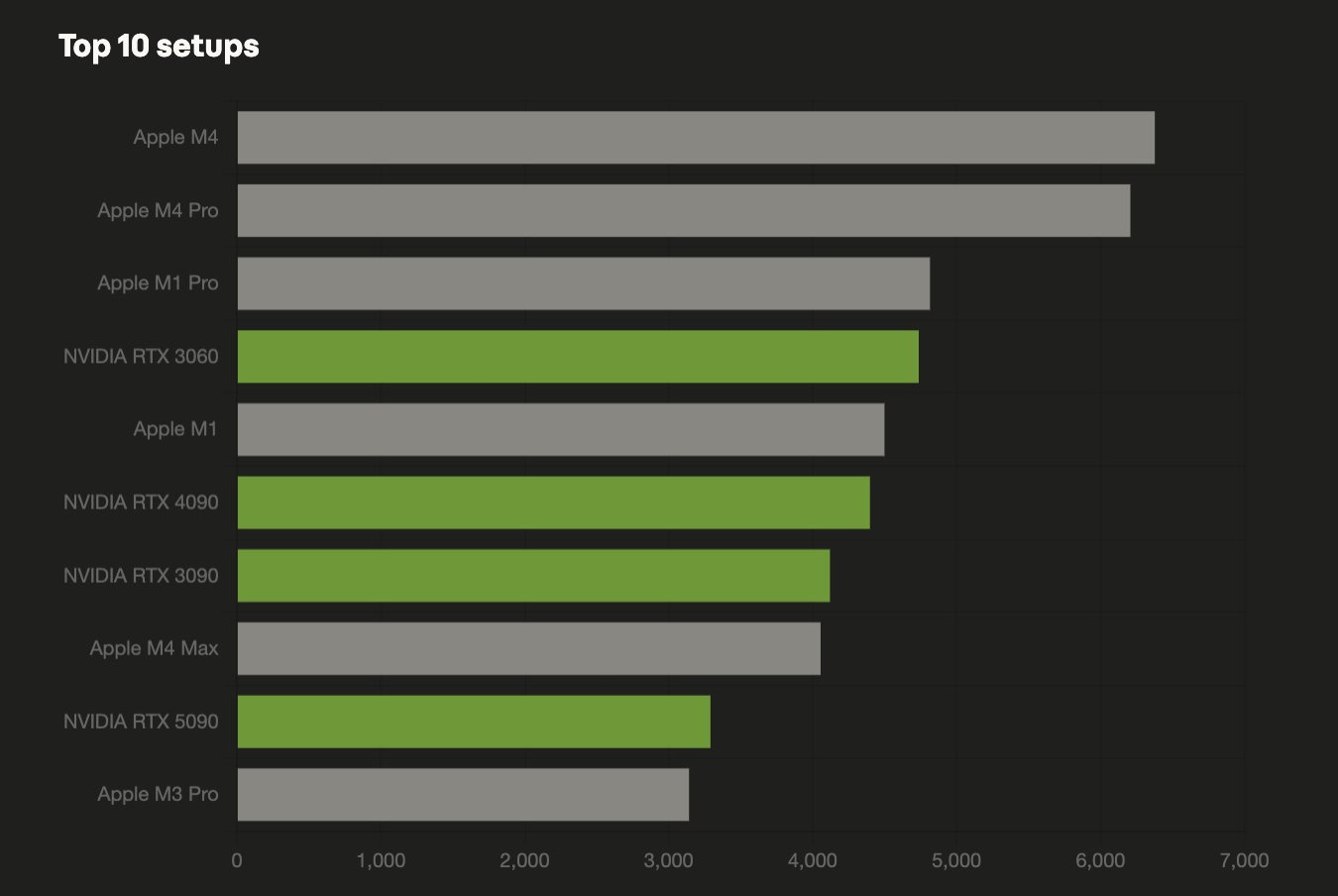
To end this analysis, if you are curious about what others are running, here’s a recent study from HuggingFace with the top100 most popular hardware setups. Here’s the top 10 setups:
Everything above operates inside the GPU paradigm. That’s where the market is today. It’s worth spending a moment on where it’s going, because the three numbers from the first section (capacity, bandwidth, compute) are exactly what purpose-built inference hardware tries to optimise, and there are early signals that something meaningfully different may be coming that can completely change the local inference landscape.
Recall the core constraint: inference is memory-bandwidth bound. A GPU spends a large fraction of its silicon on graphics-specific logic (rasterisation pipelines, render targets, display controllers) that contributes nothing to matrix multiplication. That’s headroom a purpose-built chip can reclaim.
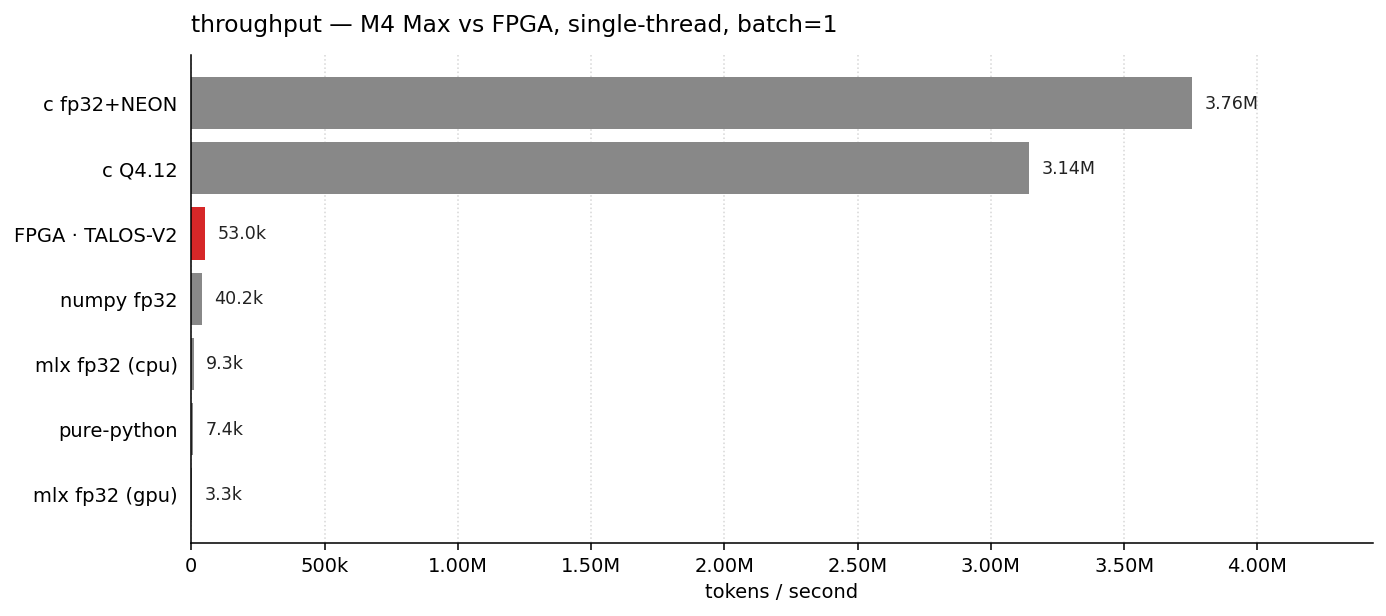
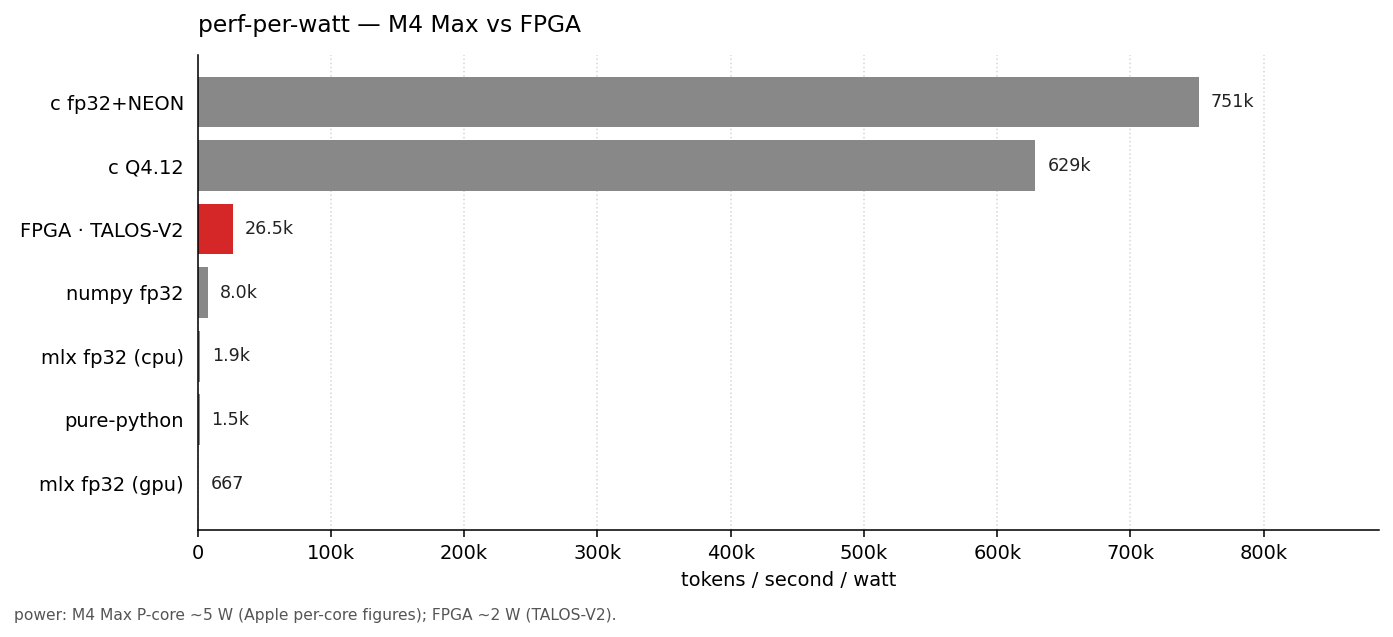
Talos V2 is a small open-hardware project that I recently came across and illustrates this directly through an FPGA-based inference board. Luthira Abeykoon built Talos specifically for transformer inference and published a head-to-head benchmark against an Apple MacBook. The numbers aren’t yet flattering for the FPGA, Apple Silicon wins on raw throughput, but the benchmark is honest about why: the FPGA’s memory bandwidth and capacity are still the limiting factor, not the compute logic. That’s the same constraint we’ve been discussing all along. What the project demonstrates is that if you wire the hardware directly to the transformer computation pattern, you eliminate the GPU overhead entirely. The floor for what’s possible on custom silicon is lower than the GPU paradigm suggests.
The more commercially developed version of this idea is Taalas (already discussed in this newsletter), which is building inference-specific accelerators designed from the ground up around the bandwidth and memory access patterns that transformers actually need rather than the patterns a graphics card was designed for. And Cerebras, whose wafer-scale chips put the entire model on a single die, eliminating inter-chip communication latency, represents the extreme end of the same logic: if memory bandwidth and model capacity are what matter, what happens when you remove the memory bottleneck entirely by fusing compute and memory into one structure?
These are not plug-and-play products today. Cerebras is data-centre hardware. Taalas is early-stage. But the direction is consistent with what happened to every other class of compute that started general-purpose and got specialised over time: GPUs themselves, Apple’s Neural Engine, Google’s TPUs. All these architectural innovations will eventually permeate into the retail (assuming that they are scalable) allowing for the manufacturing of specialised inference accelerators that allow running inference locally at a decent price (at least that’s my dream).
The practical implication for the builds above: the gap between “what you can run on $10k of consumer hardware” and “what a cloud API gives you” is closing faster than it was two years ago, and it will continue to close. MoE architectures make very large models accessible on modest VRAM. Quantisation research (see the TurboQuant work I wrote about earlier this year) keeps compressing the memory footprint of capable models. Google’s recent multi-token prediction improvements for Gemma4 (which I am planning to talk about in detail in a follow-up post) And eventually, purpose-built inference chips will arrive at the price point where they belong in a home inference box. The question of whether you need a $10k machine to run something genuinely useful has been getting a faster “no” every quarter.
I keep coming back to the following analogy when I talk about the benefits of local inference, and where the market may end up moving, to friends and colleagues. A decade ago, some homeowners started installing solar panels. Not because it was the cheapest energy in the short term, because it wasn’t, and the payback periods were long (solar cells were expensive). They did it because they wanted independence from the central grid (where prices fluctuate a lot, and it can be unreliable or inexistent depending on the location).
I feel we may be seeing this same trend for AI, as it becomes more and more of a utility. As proof of this, Nvidia and SPAN recently announced a partnership to deploy AI data centres in residential back gardens. GPU nodes integrated into home energy systems. A flavour of this is what I really need for myself.
It makes me really nervous to depend on all these AI subscriptions and token bills. I want AI independence. I already installed solar panels at home, I now want my own inference cluster. Unfortunately, I haven’t found the perfect solution where I get a plug-and-play inference system at home at a reasonable price like is currently the case for solar panels. Projects like tinygrad are getting close, but it is still a bit expensive (and probably an overkill) to what I need.
The Framework Desktop is almost there in terms of price and convenience but it is not quite there in terms of hardware requirements, and the Mac Ultra is just what I need but still expensive. A flavour of some of the configurations described above: like a small server with a RTX3090 expandable to more is close, but just still have to make your shopping list, find the right hardware, and maybe even benchmark it.
I feel increasingly convinced that there’s space in the market for someone selling the perfect well-optimised AI plug-and-play expandable inference box for 2-5K$. Something that allows you to slowly grow your inference cluster to your needs and well-benchmarked so you know what to expect in terms of tok/s and models that you can run.
I am convinced to the point that I’ve decided to start building and benchmarking these inference boxes configurations myself to try and get to this perfect device that can fill the gap in the market. Three things can happen:
I spent a few thousand dollars in experiments and I have some useful hardware at home that I can tinker with
I find the perfect setup and I manage to partner with someone to help me manufacture and ship at scale these AI inference boxes.
I managed to find a configuration that others can copy to offer similar devices.
In all three options I manage to get the inference box that I am looking for, with 2 and 3 solving the problem for others that may need to scratch a similar itch.
If you want to contribute to this endeavour help me either with input, suggestions, or sponsoring the effort. Anything is welcome. This is still a really raw idea that I am trying to shape. You know my email :)
Until next week.