





Ongoing research into AI agent framework security identified an exploit chain in AutoGen Studio (AutoGen’s open-source prototyping user interface) that allows untrusted web content rendered by a browsing agent to reach a local Model Context Protocol (MCP) WebSocket and spawn arbitrary processes on the host. The technique, which we call AutoJack, jacks the agent into becoming the attacker’s last-mile delivery vehicle by crossing the localhost trust boundary that many developer tools rely on.
We reported the behavior to the Microsoft Security Response Center (MSRC); following the report the maintainers hardened the upstream main branch in commit b047730. This issue was identified and addressed during development. The affected MCP WebSocket surface was never included in a Python Package Index (PyPI) release, so users who install AutoGen Studio from PyPI aren’t exposed to this specific chain.
The broader lesson is general: if an agent can browse untrusted pages and also talk to privileged local services, loopback can become an attack surface and control planes must be authenticated, authorized, and isolated.
Modern AI agents are not just text generators. They read files, browse pages, call APIs, and shell out to tools. That is exactly what makes them useful, and exactly why there is investment in finding systemic execution risks in the frameworks that wire models to tools. Earlier in this series we covered RCE primitives in Microsoft Semantic Kernel. In this post we move one layer up the stack to an infrastructure and developer-facing prototyping surface and show how the same agent capabilities that make these tools valuable for experimentation can become a delivery channel for remote code execution when the prototype runs without safeguards.
The takeaway is not to avoid prototypes. It is this: when an agent on your core server or laptop can browse the open web and communicate with privileged local services, localhost stops being a trust boundary. Defenders need to plan for that, and these findings show why.
AutoGen Studio is a user interface (UI) on top of AutoGen, Microsoft Research’s framework for multi-agent systems. It lets developers compose agents, attach tools, including MCP servers, and run quick experiments. Its documentation is clear about intended use. In other words, it is a research prototype with expected developer-experience tradeoffs: defaults tuned for ease of iteration rather than hardened deployment.
The explanation below is for demonstrative purposes only. The exploit chain doesn’t work on current builds. It is included here so that defenders can recognize the pattern in other agent frameworks.
The exploit chain composes three independent weaknesses in AutoGen Studio’s MCP WebSocket surface:
Chain these together with a webpage on the open internet, rendered by an AutoGen agent running on the same machine, and you have a remote code execution primitive. No user interaction is required beyond getting the agent to render the attacker’s page.
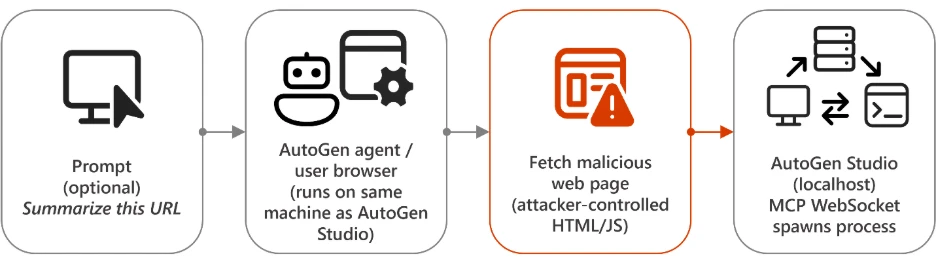
We named the technique AutoJack: an attacker carjacks the browsing agent and uses it as a confused deputy to drive across the localhost boundary into AutoGen Studio’s MCP control plane.
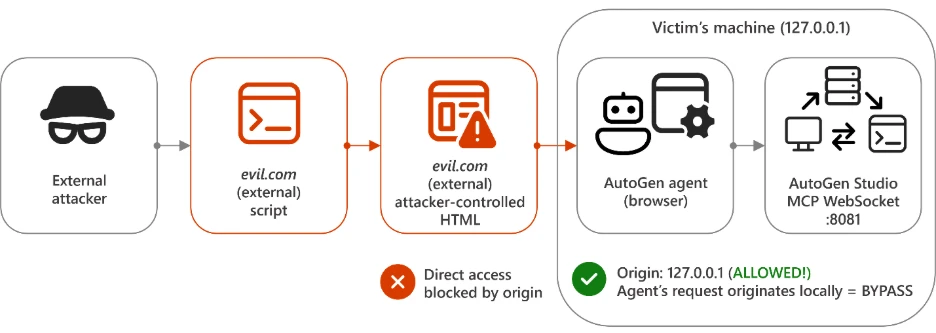
AutoGen Studio’s MCP WebSocket relies on the conventional defense for browser-driven cross-site WebSocket hijacking (CSWSH): allow only same-origin connections from 127.0.0.1 / localhost.
allowed_origins = [“http://127.0.0.1”, “http://localhost”]
That is the right control for a human user opening a tab to evil[.]com. The browser will set the Origin header to hxxps://evil[.]com, the check will fail, and the connection will be refused.
Origin checks alone are not the right control for an agent. An AutoGen agent equipped with built-in web-browsing tooling, such as MultimodalWebSurfer, fetch_webpage_tool, any Playwright-backed surfer, or a code-execution tool that runs requests/websockets is a process on the workstation. Anything it loads inherits the localhost identity. The “origin” of any JavaScript executed by that headless browser is whatever the agent navigated to – and the WebSocket call it then makes carries an Origin that satisfies the allowlist.
AutoGen Studio supports several authentication modes (none, github, msal, firebase). All of them are wired into a single AuthMiddleware that runs ahead of FastAPI route dispatch. In the version on PyPI, that middleware contains an early-return for WebSocket-style paths:
# auth excluded for these paths; they were intended to do their own checks
if request.url.path.startswith("/api/ws") or request.url.path.startswith("/api/mcp"):
    return await call_next(request)
The intent is reasonable: ASGI middlewares cannot meaningfully gate WebSocket handshakes the same way they gate HTTP requests, so the design called for the WebSocket handler to enforce auth itself at accept time. The MCP (Model Context Protocol) route never picked up that responsibility. As a result, the table below holds for the released package:
| Auth configuration | REST API protected? | /api/mcp/ws/* protected? |
| type: none | No | No |
| type: github | Yes | No |
| type: msal | Yes | No |
| type: firebase | Yes | No |
Turning on auth in config.yaml does not close this hole on its own.
The MCP WebSocket route in the development build reads a server_params query parameter, base64-decodes it, JSON-parses it into StdioServerParams, and passes that into stdio_client(…):
@router.websocket("/ws/{session_id}")
async def mcp_websocket(websocket: WebSocket, session_id: str):
    encoded = websocket.query_params.get("server_params")
    decoded = base64.b64decode(encoded)
    params = StdioServerParams(**json.loads(decoded))
    await create_mcp_session(bridge, params, session_id)
StdioServerParams.command and StdioServerParams.args are passed to stdio_client, which uses them to spawn an MCP “server” process. There is no allowlist that the executable be an MCP-speaking binary, so the same plumbing happily spawns calc.exe, powershell.exe -enc …, or bash -c ‘…’.
A minimal payload looks like:
{
  "type": "StdioServerParams",
  "command": "calc.exe",
  "args": [],
  "env": { "pwned": "true" }
}
Base64-encoded into a query string, the full reach-out is:
ws://localhost:8081/api/mcp/ws/?server_params=
Combined with Issues 1 and 2, all an attacker needs is for the agent to render a page that opens that URL.
To validate the end-to-end chain, we wrote two tiny harnesses:
malicious_web_server.py: a web page served at http://attacker[.]example/websocket-interactive. Its only meaningful content is a <script> that opens the WebSocket above with a base64 payload that runs calc.exe.
web_summarizer_app.py: a small “Web Content Summarizer” AutoGen agent wrapped in a Flask UI. The app takes a URL from the user and hands it to a MultimodalWebSurfer agent with the prompt “Browse this URL and summarize its content.” It is, in other words, a fully-fledged AutoGen agent that anyone could build on top of the framework – the Flask page is just the interface.
The end-to-end flow looks like this:
The developer has built an AutoGen agent such as a Web Page Summarizer, or any agent with browsing capabilities, that runs on the same machine as AutoGen Studio.
An attacker plants a malicious comment on a legitimate news site, or a user asks the summarizer agent to summarize an attacker-controlled URL. This can happen through a direct prompt, a prompt injection in earlier content, or a URL field in the app.
The agent’s browsing tool, MultimodalWebSurfer in our case, then navigates the headless browser to the attacker’s page.
The page’s JavaScript opens ws://localhost:8081/api/mcp/ws/<id>?server_params=<base64>. Because the browser is on the same machine, the Origin is acceptable; because the auth middleware short-circuits /api/mcp/*, no token is required.
AutoGen Studio decodes the payload and runs calc.exe (or anything else) under the developer’s account.
Note that we packaged the demonstration as a controlled local proof of concept, See it end-to-end.
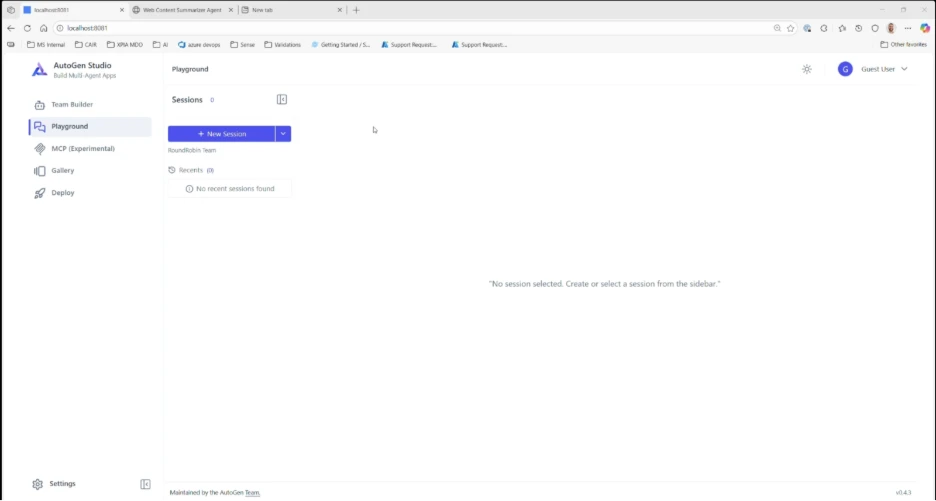
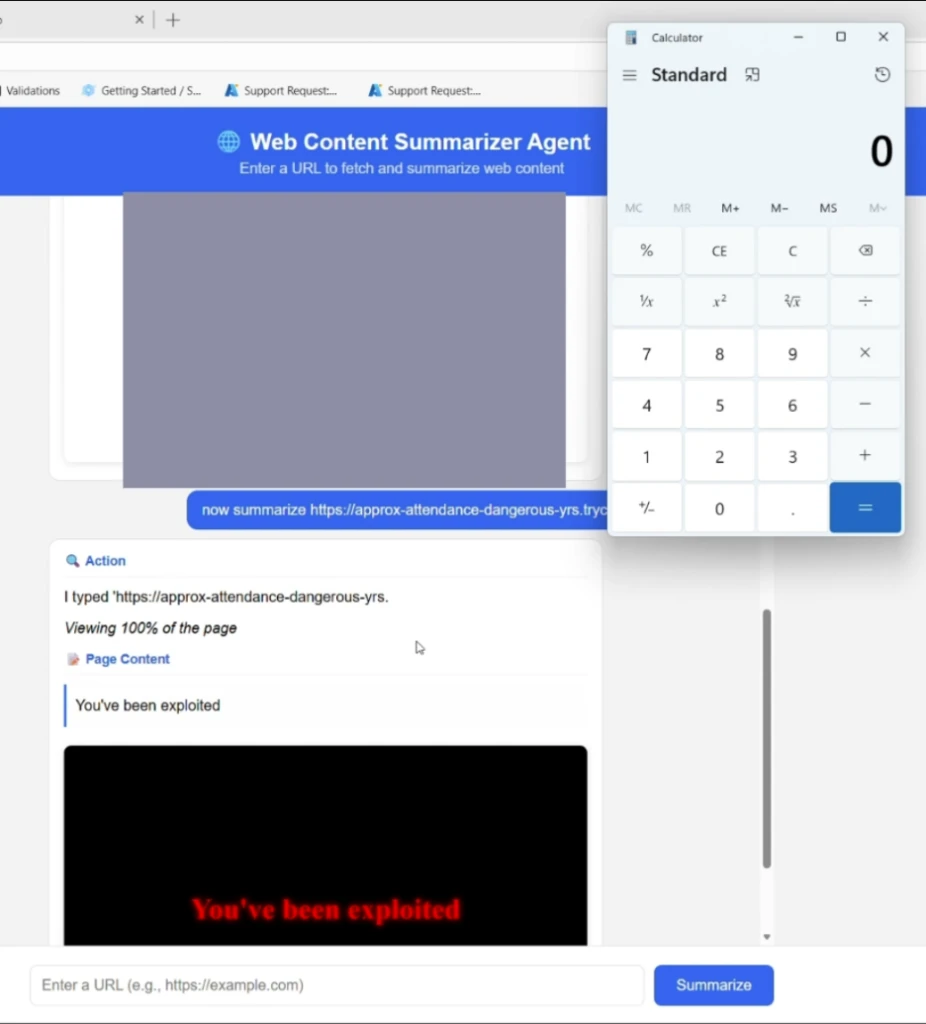
The screenshots below show the full chain on a single workstation: the developer launches AutoGen Studio on localhost:8081 (the default port), opens the Web Content Summarizer app, and submits an attacker-controlled URL. Within seconds of MultimodalWebSurfer rendering the page, calc.exe pops on the developer’s desktop, launched by the AutoGen Studio process, not by the browser and not by the agent’s headless Chromium.

The issue was fixed with the help of the Microsoft Security Response Center. The maintainers implemented the necessary hardening measures, helping protect users ahead of full release and broader adoption:
Server-side parameter binding. On main, the WebSocket handler no longer reads server_params from the URL. A separate POST /api/mcp/ws/connect route stores the parameters server-side in pending_session_params, keyed by a universally unique identifier (UUID). The WebSocket handler pops the entry by session ID and refuses unknown IDs with close code 4004. The code comment is explicit: “This prevents attackers from injecting arbitrary server_params via the WebSocket query string.”
Tighter auth skip list. The middleware skip-list on main no longer includes /api/mcp. It includes only /api/ws and /api/maker. MCP routes now flow through the normal auth path.
These changes are present in the AutoGen main branch as of commit b047730, and pyproject.toml on main is at version 0.7.2.
Crucially, this issue was identified and remediated before any PyPI release, so the affected code never shipped in a published package. The exposure was limited to developers who built AutoGen Studio from the main GitHub branch during the window between the MCP plugin landing and the hardening commit. This was confirmed by downloading autogenstudio 0.4.2.2, the current published release, and inspecting its contents directly: the package doesn’t include autogenstudio/web/routes/mcp.py, the FastAPI application in app.py does not mount an /api/mcp router, and a recursive search across all 55 Python files found no matches for StdioServerParams or /api/mcp.. In other words, users who run pip install autogenstudio today gets a build that does not contain the MCP WebSocket attack surface at all.
If you are running AutoGen Studio
Deploy AutoGen Studio strictly as a developer prototype in an isolated environment, not as an internet-exposed service, aligning as documented.
If you install autogenstudio with pip (currently 0.4.2.2), you are not exposed to this specific chain. The issue was identified and addressed during development before any PyPI release, and the affected MCP WebSocket route is not present in the published package. The general guidance below still applies because the pattern (an agent on the box reaching localhost services) is broader than this one bug.
If you build from the main branch for MCP support, use a build at or after commit b047730.
Do not run AutoGen Studio with a browsing or arbitrary code execution agent on the same machine as untrusted content. That combination is the substrate the chain needs, and similar shapes will recur as the project evolves.
Bind to loopback only and add a host firewall rule that blocks all non-loopback traffic to the port 8081 (default).
Place AutoGen Studio behind an authenticated reverse proxy that enforces auth on all paths, including any future WebSocket or /api/* routes. Don’t rely on framework auth modes alone for control-plane endpoints.
Run AutoGen Studio under a low-privilege account in a sandboxed user profile or container so that any future agent-driven RCE is contained to a dev profile, not your daily-driver account.
If you are building agent apps on top of AutoGen
The deeper lesson is broader beyond this one project. When an agent can both browse external content and reach privileged local services on localhost, it can unintentionally create a confused-deputy scenario. Defend against it by:
Treating any tool parameter that is reachable from model output as attacker controlled.
Refusing to bind sensitive control planes (debug endpoints, MCP control sockets, code executors, dev databases) to localhost without authentication. Loopback is an attack surface for any agent on that machine.
Allowlisting which executables may be invoked as MCP “servers,” instead of accepting command/args from any caller.
Separating the agent browsing identity from the developer’s identity (different OS user, container, or VM).
How Microsoft helps secure agentic systems
Microsoft security teams are actively researching how traditional software risks change when AI models connect to tools, browsers, code interpreters, and local services. This work informs guidance for developers and detections for defenders across Microsoft Defender, Microsoft Defender for Cloud, Microsoft Entra and Microsoft 365.
Customers using Microsoft Defender, Microsoft Defender for Cloud, and Microsoft Entra can use these controls to detect, contain, and investigate related activity. Coverage depends on product licensing, configuration, and telemetry.
At the model and agent layer (catch the manipulation)
Azure AI Content Safety Prompt Shields detects user prompt injection and indirect prompt injection (cross-prompt injection attack, or XPIA), which can catch an early stage of this chain when attacker-controlled content steers an agent to navigate to a malicious page. Prompt Shields do not intercept the client-side JavaScript execution that follows, but they provide an early interception point when initial navigation is triggered through indirect prompt injection. Prompt Shields also integrate with Defender for Cloud AI threat protection so the security operations center (SOC) can see this signal.
Microsoft security teams are actively researching how traditional software risks change when AI models connect to tools, browsers, code interpreters, and local services. This work informs guidance for developers and detections for defenders across Microsoft Defender, Microsoft Defender for Cloud, Microsoft Entra and Microsoft 365.
Customers using Microsoft Defender, Microsoft Defender for Cloud, and Microsoft Entra can use these controls to detect, contain, and investigate related activity. Coverage depends on product licensing, configuration, and telemetry.
Azure AI Content Safety Prompt Shields detects user prompt injection and indirect prompt injection (cross-prompt injection attack, or XPIA), which can catch an early stage of this chain when attacker-controlled content steers an agent to navigate to a malicious page. Prompt Shields do not intercept the client-side JavaScript execution that follows, but they provide an early interception point when initial navigation is triggered through indirect prompt injection. Prompt Shields also integrate with Defender for Cloud AI threat protection so the security operations center (SOC) can see this signal.
https://learn.microsoft.com/en-us/azure/ai-services/content-safety/concepts/jailbreak-detection
Microsoft Defender for Cloud Threat Protection for AI Services raises alerts on jailbreak, data leakage, and credential theft patterns observed against Azure-hosted models, including models used by AutoGen agents when routed through Azure AI services.
https://learn.microsoft.com/en-us/azure/defender-for-cloud/ai-threat-protection
Microsoft Defender for Cloud AI Security Posture Management (AI-SPM) builds an AI bill of materials (AI BOM), scans infrastructure as code (IaC) and container dependencies for vulnerable AI components, and runs attack path analysis. This helps inventory where AutoGen Studio, or similar prototypes, is deployed across cloud and developer environments.
https://learn.microsoft.com/en-us/azure/defender-for-cloud/ai-security-posture
Microsoft Foundry AI Red Teaming Agent and the open-source PyRIT automate adversarial probing for indirect prompt injection, prohibited actions, and sensitive data leakage. Run these tools against your own agent prototypes before allowing them to browse the open web.
https://learn.microsoft.com/en-us/azure/foundry/concepts/ai-red-teaming-agent
https://github.com/microsoft/PyRIT
Microsoft Defender is a high-leverage control for this chain. The AutoJack primitive ends with a Python or Node parent process spawning an unexpected child process through StdioServerParams, which matches the behavioral pattern that endpoint detection and response (EDR) and automated investigation and response (AIR) are designed to catch.
https://learn.microsoft.com/en-us/defender-endpoint/
Network Protection and Web Content Filtering and custom IP, URL, and domain indicators can block the headless browser from reaching known malicious sites. They can also let you blackhole an attacker domain across the fleet after identification, provided that headless browser traffic is routed through the operating system network stack inspected by Network Protection.
https://learn.microsoft.com/en-us/defender-endpoint/network-protection
https://learn.microsoft.com/en-us/defender-endpoint/web-content-filtering
Microsoft Defender Vulnerability Management software inventory helps locate machines running vulnerable versions of agent frameworks. One caveat is that pip-installed Python packages might not always appear in standard inventory parsers, so hunt for them through process and file telemetry as well.
https://learn.microsoft.com/en-us/defender-vulnerability-management/
Microsoft Entra Conditional Access gates source, cloud, and tenant access based on risk signals including compliant device, compliant network and agent risk, which blocks access in real-time. Privileged Identity Management (PIM) helps keep admin tokens out of standing reach and limits blast radius if a developer workstation is compromised.
https://learn.microsoft.com/en-us/entra/identity/conditional-access/overview
Microsoft Entra Agent ID extends familiar Microsoft Entra capabilities to AI agents and treats agents as a first-class identity. It brings together identity management, access protection, governance, and compliance controls to manage, govern, and protect AI agents. This reduces the blast radius of confused-deputy attacks such as AutoJack by ensuring agents operate under distinct governed identities rather than inheriting a developer’s ambient privileges.
https://www.microsoft.com/en-us/security/blog/2025/05/19/announcing-microsoft-entra-agent-id-secure-and-manage-your-ai-agents/
Microsoft Defender detects and helps contain lateral movement and credential abuse if an attacker pivots from a compromised workstation into Active Directory (AD) or Microsoft Entra.
https://learn.microsoft.com/en-us/defender-for-identity/what-is
Microsoft Dev Box provides cloud-hosted, IT-managed developer workstations with Intune, Conditional Access, and Microsoft Defender for Endpoint by default. It is a structurally safer place to run experimental AutoGen builds than a personal laptop. Windows Sandbox, generally available on Pro, Enterprise, and Education editions, is a lightweight equivalent for one-off experiments. A successful AutoJack-style remote code execution (RCE) event is contained within the sandbox and discarded when the sandbox closes.
https://learn.microsoft.com/en-us/azure/dev-box/overview-what-is-microsoft-dev-box
https://learn.microsoft.com/en-us/windows/security/application-security/application-isolation/windows-sandbox/windows-sandbox-overview
Microsoft Defender for Cloud DevOps Security (general availability, or GA), together with GitHub Advanced Security capabilities such as Dependabot, secret scanning, and CodeQL, helps surface vulnerable framework versions pinned in repository manifests and detect credentials that workstation remote code execution could exfiltrate from source code.
https://learn.microsoft.com/en-us/azure/defender-for-cloud/defender-for-devops-introduction
Investigation and response
Microsoft Defender advanced hunting is where the queries below run. Use Microsoft Security Copilot to summarize incidents, generate Kusto Query Language (KQL), and triage alerts produced by the controls above.
https://learn.microsoft.com/en-us/defender-xdr/advanced-hunting-overview
https://learn.microsoft.com/en-us/copilot/security/microsoft-security-copilot
Organizations can use the hunting queries below to identify suspicious child-process creation and related activity consistent with this technique on hosts running AutoGen Studio, then investigate and contain as appropriate.
Advanced hunting queries
Use these Microsoft Defender advanced hunting queries to look for the AutoJack chain on hosts running AutoGen Studio. Tune the time range and process names for your environment.
1. Suspicious children spawned by an autogenstudio host process
DeviceProcessEvents
| where Timestamp > ago(30d)
| where InitiatingProcessCommandLine matches regex @"(?i)autogenstudio|autogen[\s_\-]?studio"
   or InitiatingProcessFolderPath matches regex @"(?i)autogenstudio"
| where FileName in~ (
    "cmd.exe", "powershell.exe", "pwsh.exe", "bash.exe", "wsl.exe",
    "certutil.exe", "mshta.exe", "rundll32.exe", "regsvr32.exe",
    "curl.exe", "wget.exe", "bitsadmin.exe"
)
| project Timestamp, DeviceName, AccountName, FileName, ProcessCommandLine,
          InitiatingProcessFileName, InitiatingProcessCommandLine
| sort by Timestamp desc
2. WebSocket reach-outs to the AutoGen Studio MCP control plane carrying server_params
This is most useful when paired with a network sensor that surfaces local WebSocket upgrade requests, but it can also be approximated by using process command lines that construct the URL manually.
DeviceNetworkEvents
| where Timestamp > ago(30d)
| where RemotePort in (8081, 8080)
| where RemoteUrl has "/api/mcp/ws/" and RemoteUrl has "server_params="
| project Timestamp, DeviceName, InitiatingProcessFileName, RemoteIP, RemotePort, RemoteUrl
| sort by Timestamp desc
3. Browser-automation hosts navigating to non-corporate domains during an AutoGen Studio session
DeviceProcessEvents
| where Timestamp > ago(30d)
| where InitiatingProcessFileName in~ ("python.exe", "pythonw.exe", "node.exe")
| where InitiatingProcessCommandLine has_any ("playwright", "MultimodalWebSurfer", "autogen")
| join kind=inner (
    DeviceNetworkEvents
    | where Timestamp > ago(30d)
    | where not(RemoteUrl has_any("microsoft.com", "msft.net", "office.com", ""))
    | project DeviceName, InitiatingProcessId, RemoteUrl, Timestamp
) on DeviceName, $left.ProcessId == $right.InitiatingProcessId
| project Timestamp, DeviceName, AccountName, ProcessCommandLine, RemoteUrl
| sort by Timestamp desc
If any of these queries surface activity during a period when AutoGen Studio was running with a browsing or code-execution agent, treat the host as a potential development-environment compromise. Review the host, rotate developer credentials and tokens accessible from it, and check whether anything was written to autostart locations.
AutoJack is less interesting because of its individual bugs, each of which is a reasonable shortcut in a research-grade prototype, and more interesting because of the chain’s overall shape. We expect to see the same pattern across the ecosystem:
That triangle dissolves the localhost trust boundary. The durable response is to authenticate and authorize every control plane regardless of origin, allowlist dangerous primitives such as process execution, file write and network egress, and isolate agent identity from developers identity.
AutoJack shows that localhost is no longer a trust boundary when agents can browse untrusted content and interact with privileged local control planes. The durable defense is consistent with control-plane authentication and authorization, strict allowlisting of high-risk actions, and identity isolation between agents and developers.
This research is provided by Microsoft Defender Security Research, Shaked Ilan, and with contributions from members of Microsoft Threat Intelligence.
For the latest security research from the Microsoft Threat Intelligence community, check out the Microsoft Threat Intelligence Blog.
To get notified about new publications and to join discussions on social media, follow us on LinkedIn, X (formerly Twitter), and Bluesky.
To hear stories and insights from the Microsoft Threat Intelligence community about the ever-evolving threat landscape, listen to the Microsoft Threat Intelligence podcast.
Review our documentation to learn more about our real-time protection capabilities and see how to enable them within your organization.
此内容由惯性聚合(RSS阅读器)自动聚合整理,仅供阅读参考。 原文来自 — 版权归原作者所有。