


Welcome to this blog series which explores innovative uses of Ubuntu Core. Throughout this series, Canonical’s Engineers will show what you can build with this Core 26 release, highlighting the features and tools available to you.
In this first blog, Farshid Tavakolizadeh, Engineer Manager for Canonical’s Industrial team, will show you how to try Ubuntu Core 26 inside a virtual machine and turn it into a local AI inference appliance using Multipass and the gemma4 snap. Running Ubuntu Core in a VM is a useful starting point for developers who want to experiment before moving to dedicated hardware. You can explore the Ubuntu Core environment, install snaps, expose services to your host machine, and test how an appliance-style experience could work in production.
By the end of this blog, you’ll know how to launch Ubuntu Core 26 with Multipass, install a local AI inference snap, access its WebUI from your host machine, and understand how this workflow maps to a production Ubuntu Core image.
Ubuntu Core is designed for production devices: appliances, gateways, robots, kiosks, industrial systems, and edge AI products. In the field, you would normally build a custom Ubuntu Core image that includes the snaps, configuration, permissions, and update policy your product needs.
A virtual machine gives you a fast way to explore the system. You can launch Ubuntu Core from your laptop, install application snaps, test services, and understand how the pieces fit together before committing to a board or production image.
For this, Multipass provides a simple path. It has integrated support for Ubuntu Core images and can launch an Ubuntu Core VM with a single command. That makes it ideal for experimentation, demos, and local development workflows.
We will use Ubuntu Core to create a local AI inference appliance. The idea is simple: Ubuntu Core provides the secure, minimal, appliance-like operating system, while the AI workload is delivered as a snap.
For this example, we’ll use the gemma4 inference snap.
Because AI inference needs more resources than a minimal shell test, launch a VM with additional CPU, memory, and disk:
multipass launch core26 -n aibox --cpus 4 --memory 10GB --disk 16GBThen enter the instance:
multipass shell aiboxThe Ubuntu Core instance may update itself after first boot, and it may restart automatically. This is part of the experience you should expect from Ubuntu Core: the base system and snapd are managed, updated, and kept reliable.
Now install the AI inference snap:
sudo snap install gemma4This installs the most suitable runtime and model for the machine.
Once installed, gemma4 runs as a managed snap service. You can check its status with:
gemma4 statusThe output includes the active engine, services, and endpoints:
engine: cpu
services:
   server: active
   server-webui: active
endpoints:
   openai: http://localhost:8336/v1
   webui: http://localhost:8337/
At this point, the inference server and WebUI are running inside the Ubuntu Core instance.
There is one important detail: localhost here refers to the Ubuntu Core VM, not your host machine. So while the service is active, your browser on your laptop cannot necessarily access it yet.
To make the inference server and WebUI available from the host, configure the service to listen on the VM’s network interface:
sudo gemma4 set http.host=0.0.0.0 webui.http.host=0.0.0.0 --assume-yesThen, from your host machine, find the VM’s IP address:
multipass info aiboxThe output includes an IPv4 address:
Name:           aibox
State:          Running
Snapshots:      0
IPv4:           10.100.120.150
Release:        Ubuntu Core 26
Use the IPv4 address to access the inference server and WebUI, in this case: 10.100.120.150.
The inference server’s API is accessible at http://<VM’s IPv4>:8336/v1. This is an OpenAI compliant API that can be used with a wide range of clients. You can use an HTTP client like cURL to make a prompt:
curl http://10.100.120.150:8336/chat/completions -H "Content-Type: application/json" -d '{
"messages": [{"role": "user", "content": "What is the meaning of ubuntu?"}],
"max_completion_tokens": 100
}'
Of course, experimenting with an OpenAI API over the terminal is no fun. The WebUI that is provided by the gemma4 snap is a better entry point to try. Open in your browser: http://10.100.120.150:8337
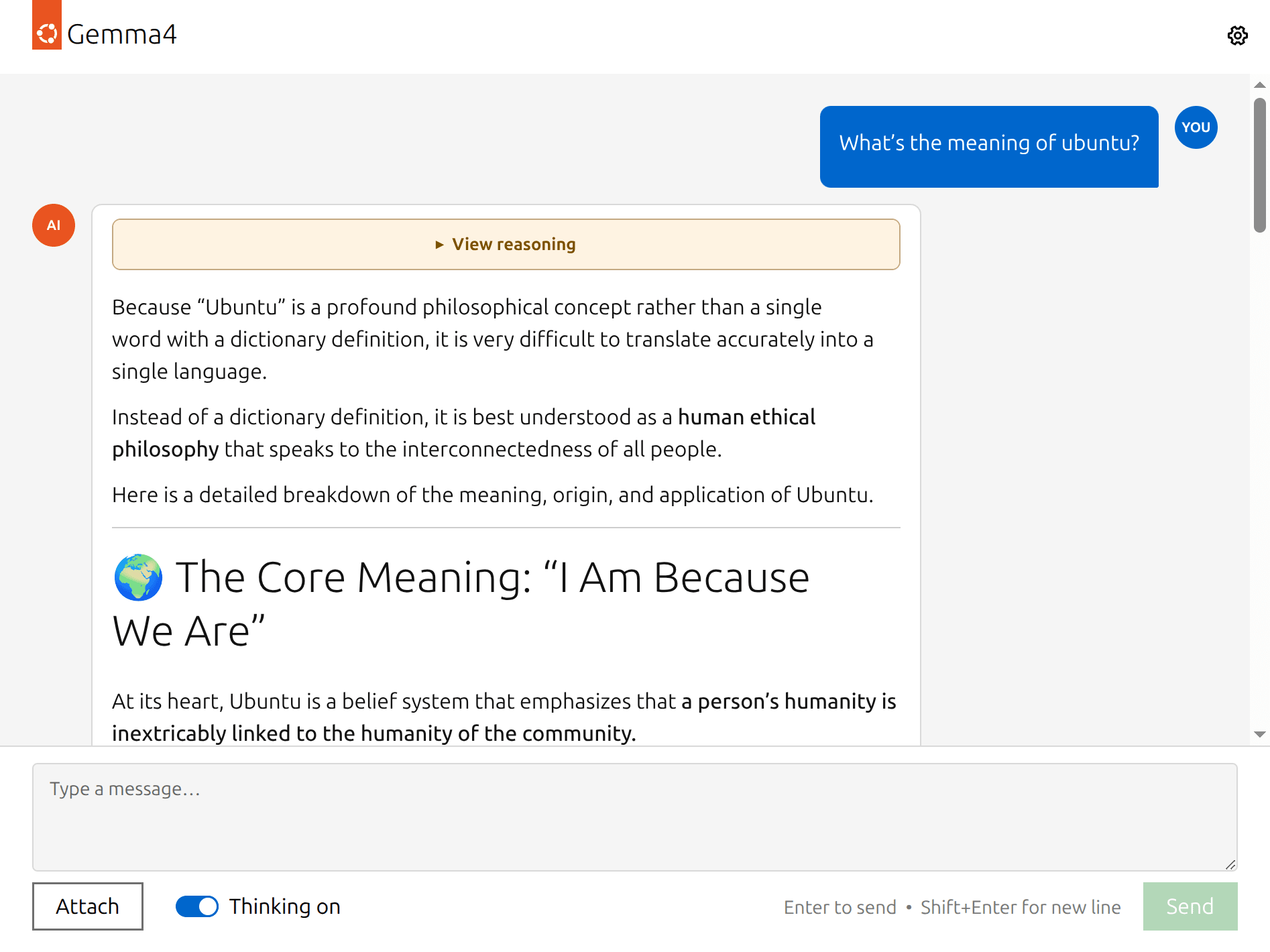
You can also integrate the API with a tool such as Open WebUI or OpenCode to do more.
You now have an AI inference interface running inside Ubuntu Core.
This example may be running in a VM, but the architecture is the same pattern used for real devices.
The Ubuntu Core base system remains separate from the application workload. The AI server is delivered as a snap. The WebUI is delivered as a managed service. The inference endpoint runs inside the Ubuntu Core environment. Configuration is applied through snap options rather than by manually editing system files.
In other words, you are not just installing a package. You are assembling the foundations of an appliance.
This matters because production devices are rarely managed one command at a time. A finished product needs a predictable boot experience, controlled services, reliable updates, and a clear boundary between the operating system and the application layer.
Ubuntu Core provides that boundary.
Installing gemma4 manually is useful for development, but it is not how you would normally ship a product.
In a production deployment, the AI snap and its configuration would typically be included in a custom Ubuntu Core image. That image would be described by a model assertion, which defines the snaps that make up the device image, including required or optional application snaps.
With that approach, the device starts directly into the experience you designed.
Your users do not need to install the snap manually. They do not need to log into the Core instance. They do not need to understand how the inference endpoint is configured. The product boots with the right snaps, services, permissions, and defaults already in place.
This is where Ubuntu Core becomes especially powerful. The same workflow you tested in a VM can evolve into a repeatable product image for hardware, production lines, demos, customer pilots, or fleet deployments.
Once a device is deployed, the work is not finished.
You may want to update the AI model, fix a CVE in the inference server, adjust configuration, or deploy the same image to different customers with different workloads.
Ubuntu Core is designed for this lifecycle. Application snaps can be updated independently from the base system. Updates are transactional. If something goes wrong, the system can roll back to a known good state.
For larger deployments, snaps can also be installed, configured, and managed through fleet management. Landscape provides centralized administration for Ubuntu deployments, including IoT devices.
This gives developers a flexible path: build the experience into the image from day one, or manage and evolve application snaps later across a fleet.
With Multipass, you can launch a Core VM in minutes. With snaps, you can install and manage real workloads. With gemma4, you can turn that VM into a local AI inference appliance that exposes both an API endpoint and a web server.
This is a small example, but it shows the larger pattern.
You can separate your application from the base system. You can run services in a managed way. You can configure the product experience. And when you are ready, you can move from a pre-built VM image to a custom Ubuntu Core image defined by your own model assertion.
Below are some useful links for further reading:
此内容由惯性聚合(RSS阅读器)自动聚合整理,仅供阅读参考。 原文来自 — 版权归原作者所有。