


One endpoint. More free AI than any single provider. Less rate limit headaches.
Don't want to pay $$/month to use AI Models? RelayFreeLLM is an open-source gateway that combines multiple free-tier providers into a single OpenAI-compatible API — so you get aggregately more free inference with automatic failover.
# Your existing code works. Just change the URL.
client = OpenAI(base_url="http://localhost:8000/v1", api_key="fake")
Gemini · Groq · Mistral · DeepSeek · NVIDIA · Cerebras · Cloudflare · Ollama
No code changes. No retry logic. No 429 errors breaking your app.
The Free Tier Problem → The RelayFreeLLM Solution
❌ Groq hits rate limit → Your app crashes       ✅ Gemini fails → Automatically tries Groq
❌ Gemini quota exhausted → User sees error       ✅ One provider down → Traffic routes to others
❌ Switching providers → Rewrite your integration  ✅ Same API for everyone → OpenAI-compatible
❌ Testing 5 providers → 5 different SDKs          ✅ More providers = More throughput
What You Get
| Feature | Why It Matters |
|---|---|
| OpenAI-compatible | Drop-in for your existing code. LangChain, LlamaIndex, any SDK. |
| Automatic Failover | Provider down? One model hit limits? We try the next one automatically. Zero downtime. |
| Session Affinity | Pin conversations to a provider via X-Session-ID for context caching benefits. |
| 4-Mode Context Management | Static, Dynamic, Reservoir, Adaptive — with extractive summarization to preserve long conversations. |
| Consistent Output Style | Universal style guidance + response normalizers eliminate provider-specific quirks. |
| Intent-Based Routing | model_type=coding, model_scale=large, model_name=deepseek — tell us what you need, not which API to call. |
| Real-time Streaming | Full SSE streaming from every backend provider. |
| Chat UI | Built-in web chat interface at /chat — streaming, conversation history, dark/light mode, Browser or Server storage. |
| Local + Cloud | Mix your private Ollama instance with cloud free tiers seamlessly. |
| Admin Dashboard | Visual editor for provider limits and real-time usage monitoring at /admin — no manual JSON editing or server restarts. |
Who It's For
| User | Use Case |
|---|---|
| Independent developers | Ship AI features without a $$$/month API bill |
| Students & hobbyists | GPT-level AI, no credit card or phone number required |
| Self-hosters | Combine Ollama privacy with cloud capacity |
| Researchers | Batch queries across providers for higher throughput |
Community: 90+ GitHub stars, 10+ forks, 8 providers supported. Active development — 40+ commits in 8 weeks.
Quick Start
1. Install
git clone https://github.com/msmarkgu/RelayFreeLLM.git && cd RelayFreeLLM
pip install -r requirements.txt
2. Add free API keys
Create a .env file in the project root folder:
GEMINI_APIKEY=      # ai.google.dev
GROQ_APIKEY=        # console.groq.com
MISTRAL_APIKEY=     # console.mistral.ai
NVIDIA_APIKEY=      # build.nvidia.com
3. Verify connectivity (optional but recommended)
python -m tests.test_models_availability
Click to see expected output (21/21 models available)
======================================================================
MODEL AVAILABILITY SUMMARY
======================================================================
✅ PASS | Cerebras        | zai-glm-4.7                                   | Success
✅ PASS | Groq            | llama-3.3-70b-versatile                       | Success
✅ PASS | Groq            | qwen/qwen3-32b                                | Success
✅ PASS | Groq            | openai/gpt-oss-20b                            | Success
✅ PASS | Groq            | openai/gpt-oss-120b                           | Success
✅ PASS | Groq            | openai/gpt-oss-safeguard-20b                  | Success
✅ PASS | Groq            | groq/compound                                 | Success
✅ PASS | Mistral         | mistral-large-latest                          | Success
✅ PASS | Mistral         | mistral-medium-latest                         | Success
✅ PASS | Mistral         | codestral-latest                              | Success
✅ PASS | Mistral         | mistral-large-2512                            | Success
✅ PASS | Mistral         | mistral-medium-2508                           | Success
✅ PASS | Mistral         | mistral-medium-2505                           | Success
✅ PASS | Mistral         | mistral-medium                                | Success
✅ PASS | Mistral         | codestral-2508                                | Success
✅ PASS | Gemini          | gemini-2.5-flash                              | Success
✅ PASS | Nvidia          | abacusai/dracarys-llama-3.1-70b-instruct      | Success
✅ PASS | Nvidia          | openai/gpt-oss-120b                           | Success
✅ PASS | Nvidia          | stepfun-ai/step-3.5-flash                     | Success
✅ PASS | Nvidia          | mistralai/mistral-large-3-675b-instruct-2512  | Success
✅ PASS | Nvidia          | mistralai/mistral-nemotron                    | Success
======================================================================
TOTAL: 21/21 models available.
======================================================================
4. Start the server
5. Open the Admin Dashboard
Once the server is running, open http://localhost:8000/admin in your browser to manage rate limits, add/remove models, and monitor usage in real time.
6. Open the Chat Interface
Open http://localhost:8000/chat to start chatting — streaming responses, persistent conversation history, dark/light mode, and direct access to all providers.
7. Use it
from openai import OpenAI

client = OpenAI(base_url="http://localhost:8000/v1", api_key="relay-free")
response = client.chat.completions.create(
    model="meta-model",
    messages=[{"role": "user", "content": "Hello!"}]
)
Or route to a specific provider:
response = client.chat.completions.create(
    model="groq/llama-3.3-70b-versatile",
    messages=[{"role": "user", "content": "Hello!"}]
)
Admin Dashboard
Manage everything from your browser. The admin dashboard at http://localhost:8000/admin provides a visual interface for managing provider model limits and viewing real-time usage statistics — no need to edit JSON files by hand or restart the server.
Limits Tab
- Providers are displayed as collapsible cards, each showing its models in an editable table.
- Edit any field inline: model name, type (text/coding/image/etc.), scale (large/medium/small), max context length, and all 7 rate-limit values (requests/tokens per second/minute/hour/day).
- Add/remove models per provider, or add/remove entire providers.
- Save writes your changes to
provider_model_limits.jsonand hot-reloads the rate-limit tracker — no server restart required.
Usage Tab
- Summary cards show total requests, prompt tokens, completion tokens, and total tokens across all providers.
- Per-provider breakdown tables list each model's individual usage.
- Reset Stats zeros out all counters in
usage_stats.jsonwith a confirmation prompt. - Data auto-refreshes every 30 seconds.
All data is stored in JSON files — no database required.
Chat Interface
A full-featured web chat UI ships with the server at /chat.
Features
- Streaming responses — real-time token-by-token output
- Provider attribution — see which provider/model handled each response
- Conversation history — persist chats in your browser (
localStorage) or on the server (opt-in) - Conversation management — sidebar with search, rename, copy, delete
- Edit & delete messages — fix typos or prune unwanted branches mid-conversation
- Intent-based routing — switch models via the dropdown (
meta-modelor specificProvider/Model) - Dark/light mode — toggle in the header, preference saved
Storage
By default, conversations are saved to your browser's localStorage. Switch to Server storage via the header dropdown to persist conversations to conversations.json on disk — survives browser resets and is accessible across devices sharing the same device ID.
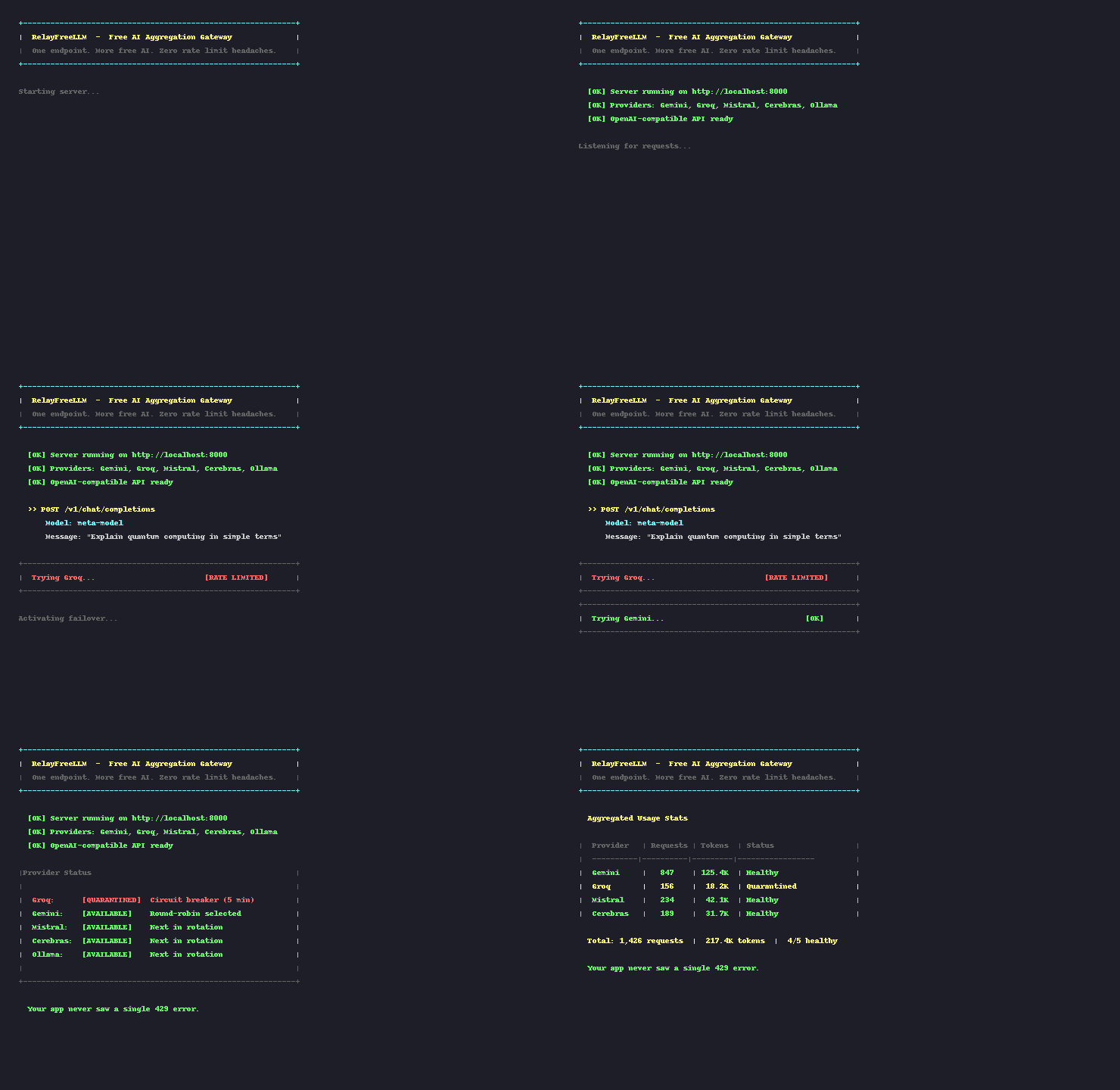
See It In Action
How Routing Works
Intent-Based Selection
{"model": "meta-model"}                              // Any provider, picks the next available
{"model": "meta-model", "model_type": "coding"}      // Any coding model
{"model": "meta-model", "model_scale": "large"}       // Only large models
{"model": "meta-model", "model_name": "deepseek"}     // Prefer DeepSeek models
{"model": "Gemini/gemini-2.5-flash"}                  // Specific provider/model
Automatic Failover
Request → Groq (rate limited)
        → Circuit breaker activates (60s cooldown)
        → Retry → Gemini
        → Retry → Mistral
        → Success ✓
Consistent Output Style
Despite switching between providers, every response is homogenized:
- Style directive injection — universal guide added to every system prompt
- Response normalization — strips "As an AI...", "Certainly!", fixes JSON, standardizes markdown
Advanced Features
Session Affinity
Pass X-Session-ID: user-123 and the gateway pins that user to a single provider. If that provider fails, the session automatically migrates.
Multi-Turn Context Management
| Mode | Behavior |
|---|---|
| Static | Keeps the last N messages verbatim. |
| Dynamic | Adjusts context window based on real-time token usage. |
| Reservoir | Recent messages verbatim + extractive summary of older history. |
| Adaptive | Detects coding vs chat conversations and switches strategy. |
The Reservoir mode uses a TF-scoring algorithm to identify the most informative sentences, applies position bias for topicality, and greedily selects segments to fit your token budget — no LLM calls needed.
API Reference
POST /v1/chat/completions
| Parameter | Type | Description |
|---|---|---|
model |
string | "meta-model" for auto-routing, or "provider/model" for direct |
messages |
array | Standard OpenAI message format |
stream |
bool | Enable SSE streaming |
model_type |
string | Filter: text, coding, ocr |
model_scale |
string | Filter: large, medium, small |
model_name |
string | Match model name substring |
GET /v1/models
curl http://localhost:8000/v1/models?type=coding&scale=large
GET /v1/usage
curl http://localhost:8000/v1/usage
Admin Endpoints
| Method | Endpoint | Description |
|---|---|---|
GET |
/admin |
Admin dashboard UI |
GET |
/admin/api/limits |
Get current provider model limits |
PUT |
/admin/api/limits |
Update and persist limits (hot-reloaded immediately) |
GET |
/admin/api/usage |
Get usage statistics |
POST |
/admin/api/usage/reset |
Reset usage stats to zero |
Tutorial: Build a Free AI CLI in 3 Files
chat.py — A terminal chatbot that uses RelayFreeLLM with session persistence:
from openai import OpenAI
import readline

client = OpenAI(base_url="http://localhost:8000/v1", api_key="relay-free")
history = []

while True:
    user = input("\n> ")
    history.append({"role": "user", "content": user})
    r = client.chat.completions.create(model="meta-model", messages=history)
    reply = r.choices[0].message.content
    print(reply)
    history.append({"role": "assistant", "content": reply})
Run it. No API bill. No rate limits. That's the point.
Provider Model Limits (Optional)
Default rate limits in provider_model_limits.json work for most use cases. If you hit provider caps, adjust the limits for your account tier — either by editing the file directly or using the Admin Dashboard (http://localhost:8000/admin):
{
  "providers": [
    {
      "name": "Groq",
      "models": [
        {
          "name": "llama-3.3-70b-versatile",
          "limits": {
            "requests_per_minute": 30,
            "requests_per_hour": 1800,
            "tokens_per_minute": 12000
          },
          "max_context_length": 131072
        }
      ]
    }
  ]
}
Architecture
Click to expand
        ┌─────────────────────────────────────────────────┐
        │                 Your Application                │
        └─────────────────────┬───────────────────────────┘
                              │ OpenAI-compatible API
        ┌─────────────────────▼───────────────────────────┐
        │              RelayFreeLLM Gateway               │
        │  ┌───────────┐    ┌───────────┐    ┌──────────┐ │
        │  │  Router   │───▶│Dispatcher │───▶│ContextMgr│ │
        │  │ /v1/chat  │    │ (Retries) │    │(Summary) │ │
        │  └───────────┘    └─────┬─────┘    └──────────┘ │
        │                         │          ┌──────────┐ │
        │                         └─────────▶│Affinity  │ │
        │                                    │  Map     │ │
        │                                    └──────────┘ │
        └─────────────────────────┬───────────────────────┘
                                  │
      ┌──────────┬──────────┬─────┴────┬──────────┬──────────┐
      ▼          ▼          ▼          ▼          ▼          ▼
 ┌────────┐ ┌────────┐ ┌────────┐ ┌────────┐ ┌────────┐ ┌────────┐
 │ Gemini │ │  Groq  │ │ Mistral│ │Cerebras│ │DeepSeek│ │ Ollama │
 └────────┘ └────────┘ └────────┘ └────────┘ └────────┘ └────────┘
Roadmap
- Web dashboard for live provider status
- Persistent rate limit state (survives restarts)
- Prompt caching layer
- Embeddings & image generation routing
- One-command Docker deploy
Contributing
Found a new free provider? Adding one takes ~50 lines:
# src/api_clients/my_provider_client.py
class MyProviderClient(ApiInterface):
    PROVIDER_NAME = "myprovider"

    async def call_model_api(self, request, stream):
        # Your API logic here
        pass
PRs welcome.
Acknowledgements
Built with FastAPI, Pydantic, httpx, and AI coding tools.
Powered by the generous free tiers of Google Gemini, Groq, Mistral AI, Cerebras, NVIDIA, DeepSeek, Cloudflare, and Ollama.
Built for developers who want great AI without the bill.