






PDFs are ubiquitous in industry and daily life. Paper is scanned, documents are sent and received as PDF, and they’re often kept as the archival copy. Unfortunately, processing PDFs is hard. In this blog post, I’ll present a new modular workflow for converting PDFs and similar documents to structured data and show how to build end-to-end document understanding and information extraction pipelines for industry use cases.
With more powerful Vision Language Models (VLMs), it’s finally become viable to complete many end-to-end tasks using PDFs as inputs, like question answering or more classic information extraction. This makes it tempting to consider PDF processing “solved” and treat PDF documents like yet another data type. I’ve even heard from people now converting plain text to PDFs because their AI-powered tool of choice was designed for PDFs. (Note: Don’t do this!)
When working with data, you typically want to operate from a “source of truth” with a structure you can rely on and develop against. This is a big reason why we use relational databases. The problem is, saying “I have the data in a PDF” is about as meaningful as saying “I have it on my computer” – it can mean anything. It may be plain text, scanned photos of text with varying image quality, or a combination of both. The layout properties and images embedded in the document may be extremely relevant, or they may not. All of these things fundamentally change the approach required to extract useful information. Machine learning rarely happens in a vacuum. There’s always an end goal: a product feature or a business question you want to answer.
So I believe it’s crucial to get your data out of PDFs as early as possible. If you’re dealing with text, it shouldn’t matter whether it came from a PDF, a Word document or a database. All of these formats are used interchangeably to store the same information.
If you use PDFs as the “source of truth” for machine learning, you end up with a monolithic and operationally complex approach. For example, to sort PDFs into different categories, the model has to do many things at once: process the document, find text, extract it where necessary, embed it all, and predict a classification label. And in the case of Retrieval-Augmented Generation (RAG), additionally parse the question, find the relevant document, find the relevant slice of the document and formulate a response. If we remove the document format PDF and its intricacies from the equation, the task suddenly becomes fairly straightforward: text classification, with optional layout features.
At their core, many NLP systems consist of relatively flat classifications. You can shove them all into a single prompt, or you can decompose them into smaller pieces that you can work on independently. A lot of classification tasks are actually very straightforward to solve nowadays – but they become vastly more complicated if one model needs to do them all at once.
— A practical guide to human-in-the-loop distillation: Making problems easier
These are all considerations that went into developing some of our own workflows for handling PDFs, specifically in the context of Natural Language Processing (NLP) and large-scale information extraction. It’s been one of the bigger missing pieces for smooth, end-to-end NLP in industry and will hopefully be useful for teams working with various input formats, including PDFs, Word documents and scans.
Are you working with PDFs or similar documents and have an interesting use case to share? Or do you need help with implementing a similar workflow in your organization? Feel free to get in touch!
Docling is developed by a team at IBM Research, who have also trained their own layout analysis and table recognition models. It takes a pipeline approach, combining modules for file parsing, layout analysis, Optical Character Recognition (OCR), table structure recognition and postprocessing to generate a unified, structured format. This makes it a great complement to spaCy, which is designed around the structured Doc object, a container for linguistic annotations that always map back into the original document.
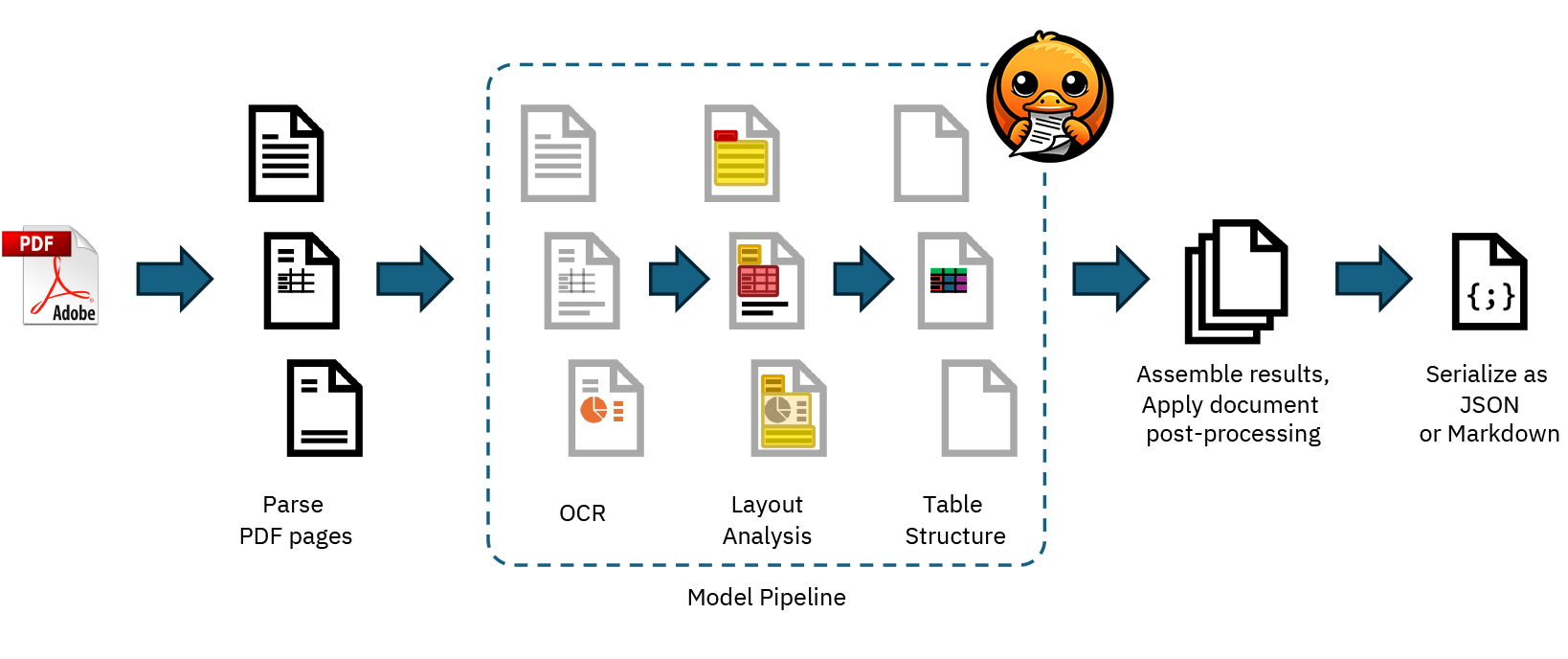
spacy-layout extends spaCy with document processing capabilities for PDFs, Word documents and other formats, and outputs clean, text-based data in a structured format. Document and section layout features are accessible via a layout extension attribute and can be serialized in an efficient binary format.
import spacy
from spacy_layout import spaCyLayout
nlp = spacy.blank("en")
layout = spaCyLayout(nlp)
# Process a document and create a spaCy Doc object
doc = layout("./starcraft.pdf")
# The text-based contents of the document
print(doc.text)
# Document layout including pages and page sizes
print(doc._.layout)
# Layout spans for different sections
for span in doc.spans["layout"]:
# Document section and token and character offsets into the text
print(span.text, span.start, span.end, span.start_char, span.end_char)
# Section type, e.g. "text", "title", "section_header" etc.
print(span.label_)
# Layout features of the section, including bounding box
print(span._.layout)
The Doc object can also be passed to a pretrained NLP pipeline, which means you can easily apply components for linguistic analysis, named entity recognition, rule-based matching or anything else you can do with spaCy. This lets you treat the document contents like any other text, and the fact that it originally came from a PDF becomes secondary.
# Load the transformer-based English pipeline
# Installation: python -m spacy download en_core_web_trf
nlp = spacy.load("en_core_web_trf")
layout = spaCyLayout(nlp)
doc = layout("./starcraft.pdf")
# Apply the pipeline to access POS tags, dependencies, entities etc.
doc = nlp(doc)
By “factoring out” the document conversion, you only need to rely on the computationally expensive conversion during preprocessing. The information extraction itself is performed by robust, tried-and-tested NLP techniques and those components can be developed, evaluated and improved independently.
Tables are an interesting case, because conceptually, they’re exactly what we like: structured information, mostly stripped from natural language. However, if we come across them in documents, they typically need to be interpreted in relation to the rest of the contents. It’s important to remember here that humans often struggle with interpreting figures, too. We also can’t trust them to present data well.
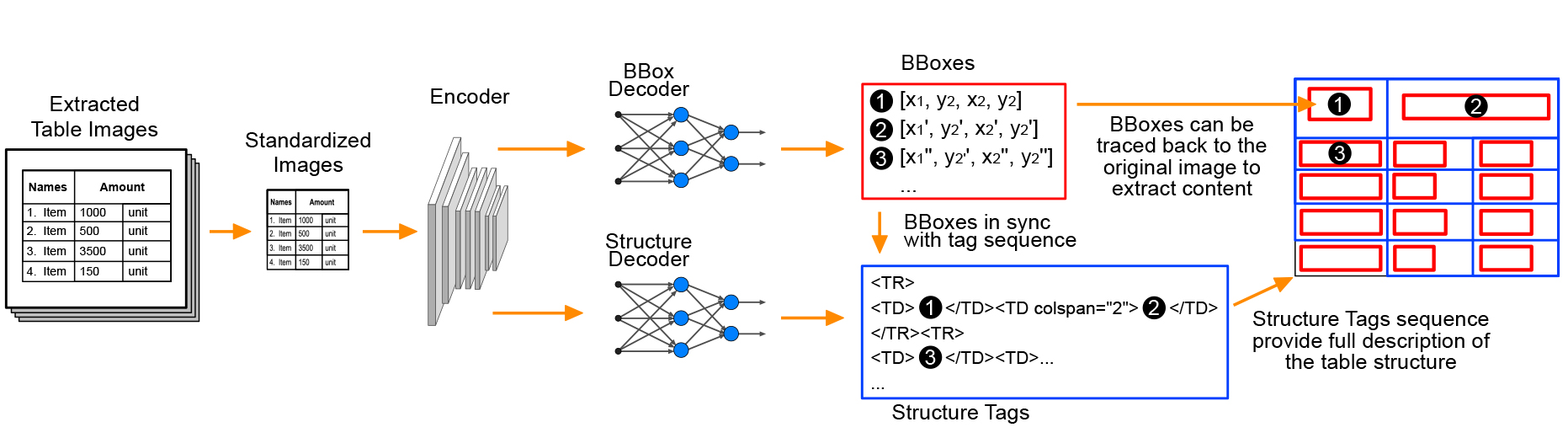
Docling uses the TableFormer model developed by its team, and tables are integrated into spacy-layout via the layout spans, and the shortcut doc._.tables. Each table is anchored into the original document text and also accessible as a pandas.DataFrame, a convenient data structure for storing and manipulating tabular data.
doc = layout("./doc_with_tables.pdf")
for table in doc._.tables:
# Token position and bounding box
print(table.start, table.end, table._.layout)
# pandas.DataFrame of contents
print(table._.data)
An important consideration is how to represent the tabular data in the document text, i.e. the doc.text, which is plain unicode that’s tokenized and then used by further components in the spaCy processing pipeline for predictions like linguistic attributes, named entities and text categories. By default, a placeholder TABLE is used, but this can be customized via a callback function that receives the DataFrame and returns its textual representation:
Customize how tables are presented in text
def display_table(df: pd.DataFrame) -> str:
return f"Table with columns: {', '.join(df.columns.tolist())}"
layout = spaCyLayout(nlp, display_table=display_table)
This offers many opportunities for preprocessing tabular data to make it easier for a model to extract information. One hypothesis we want to test is whether we can achieve better results by using a Large Language Model (LLM) to rephrase the tabular data as natural language, i.e. sentences, so it becomes more accessible for tasks like question answering or classification.
With a workflow for extracting PDF contents as structured Doc objects, we can now choose from an array of NLP techniques, components and pretrained pipelines, and fine-tune our own for specific business use cases. We can also take advantage of LLMs and other models to automate data creation and use human-in-the-loop distillation to produce smaller, faster and fully private task-specific components.
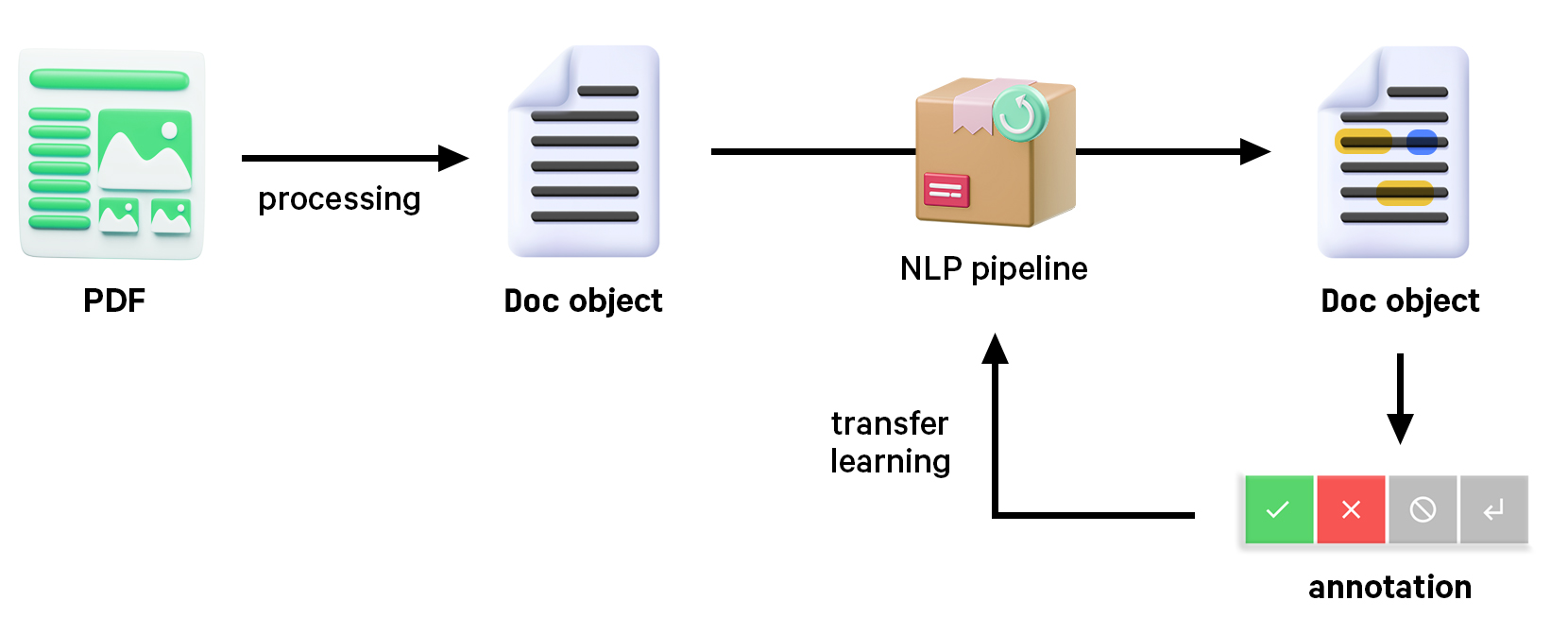
Transfer learning is a robust and very scalable method to improve performance with examples specific to your use case. Even just a few hundred task-specific examples can make a meaningful impact, but these examples need to be of high quality and apply the label scheme consistently. In any case, you’ll always want a stable evaluation – as a rule of thumb, we typically recommend 10 samples per significant figure to avoid reporting meaningless precision. Using models as judges can give you a helpful estimation, but it won’t replace testing your system against questions that you know the answer to.
Humans are pretty bad at performing repetitive, multi-step processes consistently, and they have a limited cache. So in order to “extract” the most relevant information from a human in the loop, we want to provide them with an intuitive interface, as few choices as possible, and a workflow that automates everything else.
Prodigy is a modern, scriptable annotation tool that includes recipes and interfaces for creating structured data from unstructured input, and makes it easy to integrate any custom preprocessing logic, like PDF parsing and model-assisted annotation.
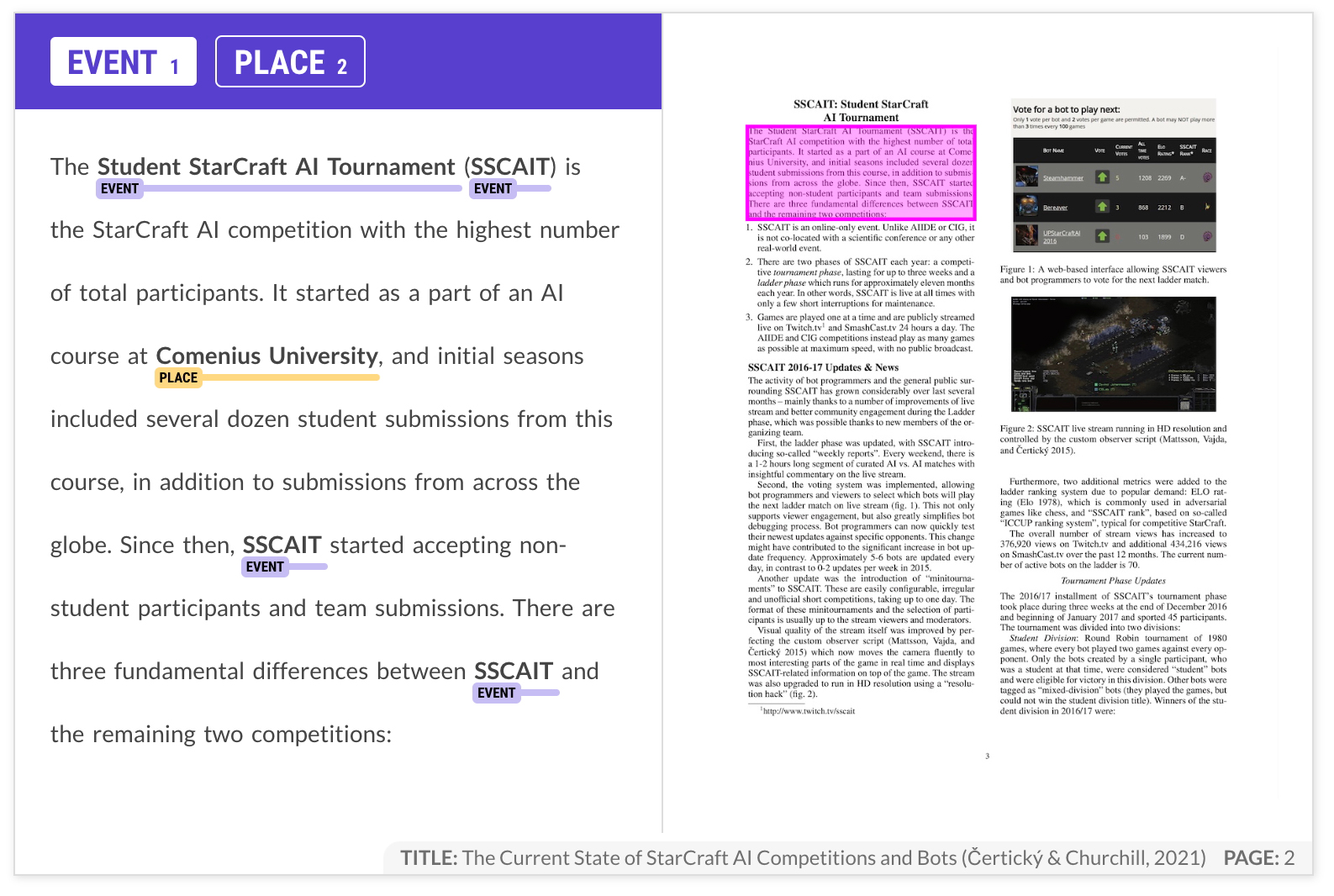
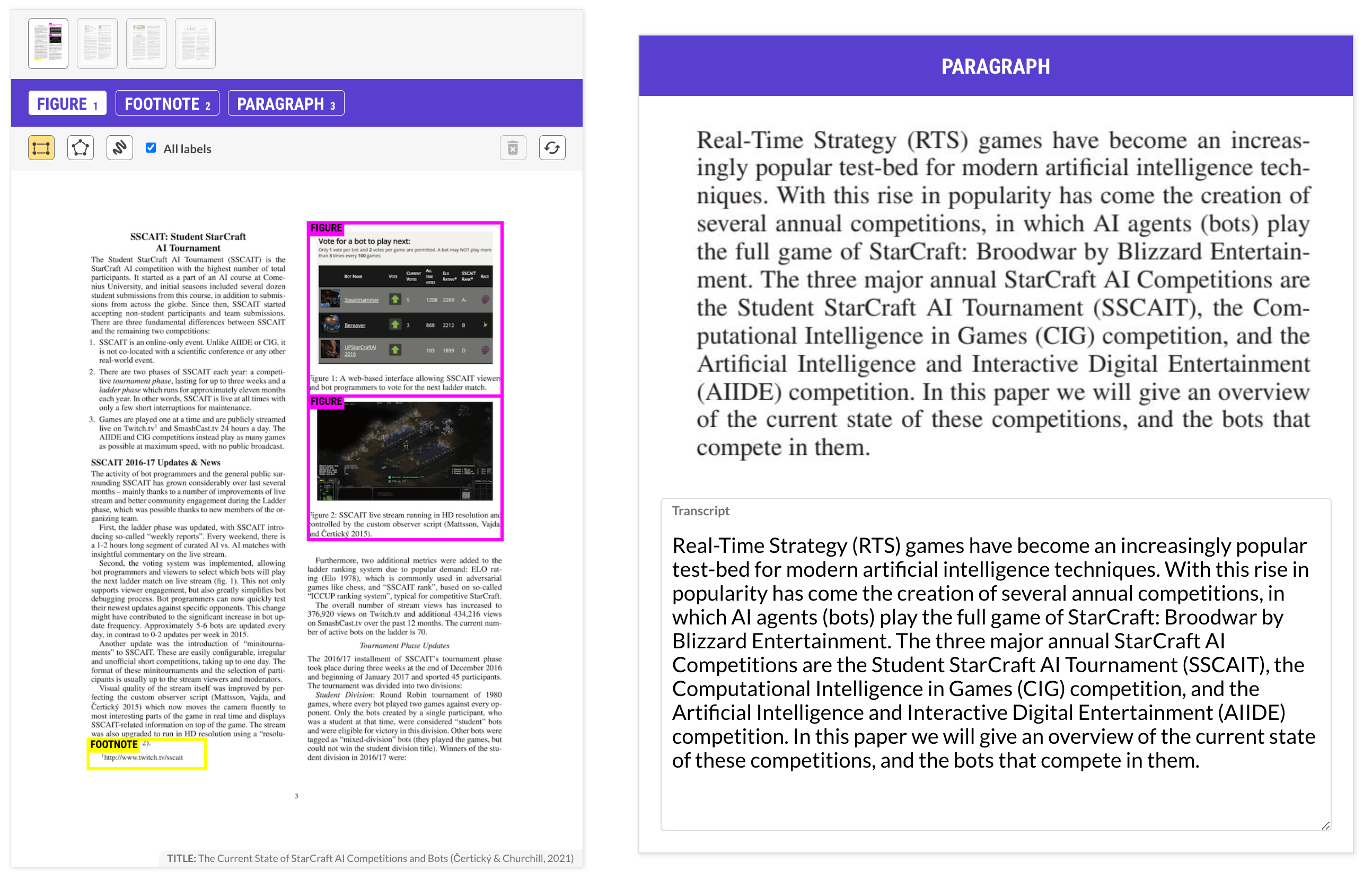
The pdf.spans.manual recipe extracts the PDF contents as text and presents it side-by-side with the original document layout. This example uses “focus mode” and walks through the document section by section. The original layout span and its bounding box coordinates are preserved in the data, in case you need to reference them later on.
Command to start the annotation server
prodigy pdf.spans.manual papers blank:en ./pdfs --label EVENT,PLACE --focus text,list_item
An alternative approach to PDF annotation is to take the pre-selection one step further and start by highlighting the relevant parts of the document visually using a recipe like pdf.image.manual. This can be helpful if the documents contain a lot of information that’s not relevant for the task, like design elements or images. The bounding boxes don’t have to be exact, making the process relatively quick, and can later be extracted individually, e.g. to correct the OCR transcription.
While multi-step workflows may sound like more work, experiments have shown that breaking down tasks into simpler questions can make overall annotation up to 10 times faster, even if it means making more than one pass over the data. This makes sense: you’re reducing the cognitive load and helping the human focus, thus making them significantly faster in total.
When designing efficient workflows to handle documents with layout information, it’s important to examine the role the layout plays in the overall context. Layout and visual cues help us humans convey and understand information, which makes them feel very important. But it helps to take a step back and ask if it actually matters for the task at hand. In many cases, you’ll find that it’s much less relevant for the model than you think.
It’s also worth considering that learning from layout features will make the model worse at generalizing to new documents. If you want the model to make the same predictions on two documents that are formatted differently, it’s best to abstract away the layout. The less incidental information you can give to the model, the better. However, for cases where documents mostly follow the same structure, incorporating layout information can be very beneficial to the model. Doing your own annotation early on can help you make this decision, so it’s a vital part of the development process.
The train recipe is the quickest way to run training experiments from within Prodigy. It takes one or more datasets for the respective NLP components to train, and outputs a loadable spaCy pipeline.
Train from Prodigy annotations
prodigy train ./models --ner papers --eval-split 0.3
You can also run data-to-spacy to export a training config and data in spaCy’s binary format, which you can use with spacy train or load back in. This is especially useful if you want to run annotation and training on different machines, e.g. CPU and GPU, or in the cloud using a serverless platform like Modal.
Processing PDFs with a custom model
nlp = spacy.load("./models/model-best")
layout = spaCyLayout(nlp)
# Apply PDF processing and model
doc = layout("./paper.pdf")
doc = nlp(doc)
# Process documents at scale
docs = layout.pipe(["one.pdf", "two.pdf", "three.pdf", ...])
docs = nlp.pipe(docs)
With this modular approach, you’re able to separately improve the information extraction components and train them on data extracted from PDFs, or other sources to increase the size of your training corpus. You can also work on only the PDF extraction logic by adding fix-up rules and modifying the Doc before it is processed by the model.
Robust extraction workflows should ideally be non-destructive: the result should represent the original document as accurately as possible and at any stage of the process, you should be able to relate annotations back to the original input. This is also a core principle of spaCy’s data structures and tokenization, and is reflected in the Doc object and layout spans created by spaCyLayout.
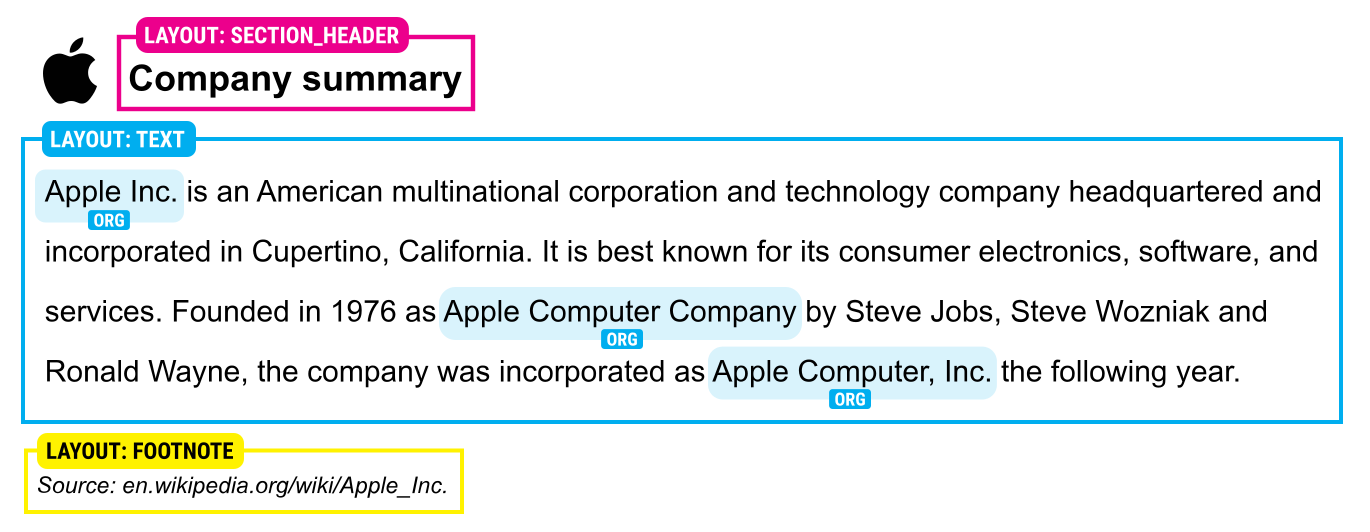
For instance, when you process the Doc with a named entity recognition component, the created entity spans are pointers into the document and can be matched up with layout sections, which are also pointers to document slices:
Find layout span and bounding box containing an entity
span = doc.ents[0] # "Apple Inc." (ORG)
for layout_span in doc.spans["layout"]:
if span.start >= layout_span.start:
print(layout_span._.layout) # bounding box
break
A similar approach is used for the built-in heading detection, which finds the closest heading for a given layout span, including section headers, page headers and page titles:
Find the closest heading
span = doc.spans["layout"][1] # "Apple Inc. is an American..."
heading = span._.heading # "Company summary" (section_header)
print(heading._.layout) # bounding box
Docling runs at 1-3 pages per second on CPU, which makes it feasible to do PDF extraction in the loop during annotation and at runtime. Processing speeds will likely improve further once support for GPU is added. spaCy is very fast, so the overhead it adds is absolutely minimal.
| CPU | Threads | native backend | pypdfium backend | ||||
|---|---|---|---|---|---|---|---|
| TTS | Pages/s | Memory | TTS | Pages/s | Memory | ||
| Apple M3 Max (16 cores) | 4 | 177s | 1.27 | 6.20 GB | 103s | 2.18 | 2.56 GB |
| 16 | 167s | 1.34 | 6.20 GB | 92s | 2.45 | 2.56 GB | |
| Intel(R) Xeon E5-2690 (16 cores) | 4 | 375s | 0.60 | 6.16 GB | 239s | 0.94 | 2.42 GB |
| 16 | 244s | 0.92 | 6.16 GB | 143s | 1.57 | 2.42 GB | |
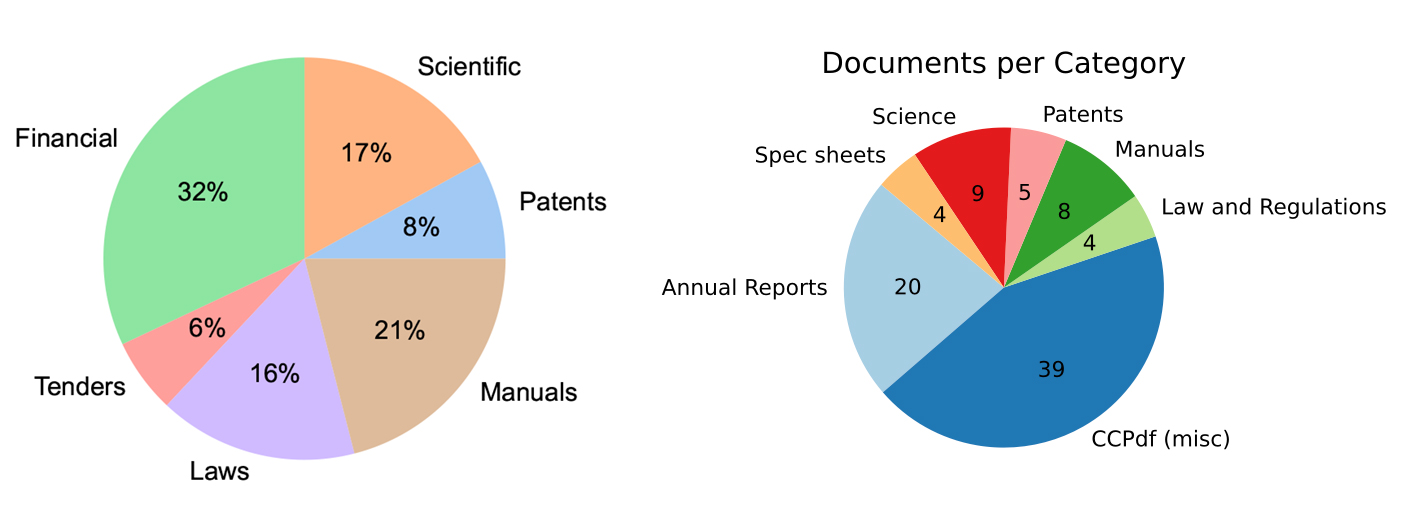
Accuracy on your specific task will depend on the document type. Docling’s layout analysis model is based on their DocLayNet corpus, a human-annotated dataset for document-layout segmentation, as well as other proprietary datasets. There’s a high representation of scientific and financial documents, as well as company reports, which indicates that it’ll translate well to many common industry use cases.
We’re looking forward to continue developing these workflows and provide better support for document understanding capabilities across industry use cases. Some of the relevant research questions we’re looking at are:
Doc, Token and Span to represent data like layout features or bounding boxes?If you’re working with PDFs or similar documents and have tried out spacy-layout, let us know how you go! We’re also always excited to learn more about interesting real-world use cases that you’re able to share. If you need help with implementing a similar workflow in your organization, feel free to get in touch.
此内容由惯性聚合(RSS阅读器)自动聚合整理,仅供阅读参考。 原文来自 — 版权归原作者所有。