










I have extensively edited this article after an LLM agent combed through my codebase and prepared the initial draft.
At Sisyphus Consulting, We recently launched a unique product in the market: physical facilitation cards + digital tools for virtual facilitation. They’re named Wu Wei Cards. But this write-up is not about the product. I want to share the behind-the-scenes events of how I navigated through tinkering with LLMs, Embeddings and the whole trial-and-error.
If you’re building something in AI-space, I hope this would be helpful to you.
First, let me give the background so that you know the WHATs and WHYs.
The Product and the Constraint
Wu Wei Cards is a deck of 50 hand-drawn metaphorical cards for facilitators, coaches, and therapists. People use them in workshops. To help participants reflect, open up, and explore ideas through objects and images rather than direct questioning.
This is how they look like:

Anyone who buys the physical deck gets an access code that unlocks Wu Wei Planner, a complimentary AI companion. It helps facilitators plan sessions, interpret cards, and think through how to use them in different professional contexts. It understands the nuances — when to flag trauma-sensitive approaches, how to frame questions that don’t lead people, which cards work for different situations.
The Wu Wei Planner is free. Complimentary. No subscription. Because we just wanted the customer to get familiar, get help onboarding and some handholding while working with the session planning in the beginning.
That meant we had to decide a hard cost ceiling first. In dollar terms, the cards cost $20 and if we assign 10% of its value to be spent on Wu Wei Planner, $2 per customer seemed like a good budget. As I mentioned, there are no recharges, no top-ups. The chat interface shows a token usage indicator, and when the customer’s token budget drops below 20%, the system gently warns them. Once the budget is exhausted, that’s it.
This constraint was entirely self-imposed. Every customer who buys the deck deserves as much useful runway as possible. $2 doesn’t go far unless you’re careful. That’s why I needed to optimize vigorously. The idea is simple: every token saved can give the customer more conversation before hitting the wall.
The Infrastructure: Why Cloudflare Workers
Before getting into the optimization journey, it’s worth explaining the stack, because the infrastructure choices shaped every decision that followed.
Everything runs on a Cloudflare Worker — a serverless function deployed at the edge, close to users.
Why Workers?
- No infra management. I already manage a decent number of infra and I simply didn’t want to do it for something that was always-on, secure, and on the edge.
- Zero cold starts. Workers don’t cold start problems.
- Edge deployment. 200+ locations worldwide. Requests are handled geographically close to the user.
- Built-in KV storage. I use Cloudflare KV to store access code hashes and token usage per customer. No separate database needed.
- Native streaming support. LLM streaming responses work cleanly without extra plumbing.
- Generous free tier. 100,000 requests per day.
How does the site talk to the AI model?
The Wu Wei Cards website is static and it calls the Worker via a simple HTTPS POST. The Worker validates the access code, assembles the prompt, calls the LLM, and streams the response back. Each request is stateless — the browser sends the full conversation history every time.
Here’s the basic flow:
┌─────────────────────────────────────────────────────────────┐
│                    CLOUDFLARE WORKER                        │
│                                                             │
│  Client Request                                             │
│       ↓                                                     │
│  ┌──────────────┐                                           │
│  │ CORS Handler │                                           │
│  └──────┬───────┘                                           │
│         ↓                                                   │
│  ┌──────────────┐    ┌──────────────┐                       │
│  │ Access Code  │───▶│   KV_STORE   │                       │
│  │ Validation   │    │  (token use) │                       │
│  └──────┬───────┘    └──────────────┘                       │
│         ↓                                                   │
│  ┌────────────────────────────────────┐                     │
│  │   PROMPT ASSEMBLER                 │                     │
│  │   Knowledge Base + Chat History    │                     │
│  └──────────────┬─────────────────────┘                     │
│                 ↓                                           │
│  ┌────────────────────────────────────┐                     │
│  │    LLM                             │                     │
│  │    Streaming Response              │                     │
│  └────────────────────────────────────┘                     │
└─────────────────────────────────────────────────────────────┘
This is quite simple and standard setup. Our rest of the conversation is going to mostly focus on the last part of the diagram: Prompt Assembler and the LLM interaction. I had a lot of tinkering done in that part.
Phase 1: Full Context (The Baseline)
I started simple: give the AI everything. The complete knowledge base — 50 card descriptions, 15 profession-specific contexts, facilitation principles, wu wei philosophy, trauma-handling guidelines — all of it, in every request, every time.
I checked on OpenAI’s tokenizer, the knowledge base hit roughly 17,000 tokens count. I picked GPT-4.1-nano as the main model: cheap, fast, and capable enough for a first pass.
I was actually surprised that even with the full 17,000 tokens of system prompt, the LLM responses streamed back almost instantly.
I kind of knew that it wouldn’t be an issue, but I was actually surprised nonetheless. So, if you’re wondering, now I can tell you with high confidence that token count doesn’t equal latency. Modern LLMs handle large context just fine.
Now that I had kind of dried-run the setup, it was time to optimize. Because as I laid out earlier: we had a solid cap of $2 per customer, which would translate to approximately 2M tokens budget (we haven’t bifurcated the budget into INPUT and OUTPUT token count.)
To illustrate my point about token cost and its implications, let me quickly run you through the calculation.
The Token Math
With most frontier models approaching 1M context window and offering free services, 17,000 tokens per request sounds manageable and very low token count. But once we account for how chat actually works, you’d understand the reason behind optimization.
For any single thread of chat, every message sends the full knowledge base plus the growing conversation history:
- Message 1: ~17,350 tokens
- Message 2: ~17,700 tokens (history accumulating)
- Message 10: ~20,350 tokens
With GPT-4.1-nano at $0.15 per million input tokens, a 20-message conversation costs roughly $0.06–0.08 in input tokens alone. Multiply that across a $2 budget and we’re looking at maybe 25–30 meaningful conversations per customer. That felt like too little runway.
So I started cutting.
Now, you will see different strategies that I implemented.
Phase 2: Tier-Based Context
First idea: environment-variable controlled context tiers. I tried slashing the knowledge base in different modular structures:
- Minimal: Core philosophy + handful of key cards (~1K tokens)
- Balanced: Philosophy + all 50 cards, short descriptions (~3K tokens)
- Full: Everything (~17K tokens)
I set the environment variable of the prompt assembler to inject different length of contexts. I had thought that if the minimal or balanced ones provided good responses, I would stick to them.
But as you can imagine, trimming the context so think wouldn’t have worked. The responses were awful, sounded like a generic support bot who was moonlighting for a firm he didn’t even bothered to look into.
So, just ditched that effort.
Now, looking at the failure of my context modularization, I got the idea of context distillation (or compression, whatever you want to call it as there are so many emerging techniques): what if I removed all unnecessary semantic words that are necessary for humans but not for an LLM?
Phase 3: Context Distillation
I researched a bit about it and found LLMLingua by Microsoft promising. What I could gather from their documentation was that they were probably rephrasing the prompt in a compressed manner and the performance enhanced, didn’t suffer. I was too desperate. So, I just asked Claude for context distillation instead of going with LLMLingua.
Just so you know what we are talking about: the knowledge base was written for human reading: rich prose, careful explanations, context for every nuance. That’s not what an LLM needs. I stripped out the semantic padding and compressed everything into dense, AI-parseable directives.
Here’s what that looked like for a single card:
Before (~300 tokens):
"fire": "Keywords: passion, intensity, enthusiasm, destruction, chaos, transformation, warmth, purification, anger, desire.
 Metaphor: Fire is one of the most emotionally charged cards in the deck. It can represent burning motivation, the destructive force of unchecked anger, the warmth of community, or the transformative heat that turns raw material into something new.
 Approach: This card rarely produces neutral responses. Hold space for both the generative (passion, warmth) and the difficult (anger, destruction). Do not steer toward the 'positive' interpretation. The power is in its duality..
 Prompts: What is the first thing this fire brings up for you?; Is this fire helpful or harmful in what you are imagining?; Who or what tends the fire in your situation?; What would happen if this fire went out? What would happen if it spread?; Is this fire yours, or does it belong to someone else?.
 Contexts: coaching: Explore motivation and drive. What is fueling versus burning out the client?; therapy: Approach carefully — fire can surface anger or trauma. Establish right-to-pass first.; hr: Use in culture conversations or burnout discussions. Is the organization's fire warming people or consuming them?; education: Explore learning motivation. What subject makes this kind of fire in you?; management: Team energy, performance, and change management. Where do you feel this fire in our project?; mediation: Name emotional heat. Which part of this situation feels most like fire for you?
After (~100 tokens):
CARD:Fire | kw:passion,intensity,enthusiasm,destruction,chaos,transformation, warmth,purification,anger,desire | !caution:anger/trauma may surface; establish right-to-pass | core:Duality — generative AND destructive. Rarely neutral. Never steer positive. | prompts:What does this fire bring up first?|Is it helpful or harmful?|Who tends it?|What if it went out?|Is this fire yours?
Same information. Roughly 60% fewer tokens. The LLM reads it fine.
Applied across the whole knowledge base, the system prompt dropped from 17k tokens to roughly 12k tokens. Responses stayed the same.
So, savings of 5k tokens. Not bad.
But 12k tokens per request was still too much. So, the next thing I realized I needed selective injection. I just had an inkling about what I wanted: there should be a mechanism that would go through the user’s query and inject a specific chunk of the context in the system prompt so that the model can respond well.
Basically, I was looking to route the query and so ended up with an idea of router LLM.
Phase 4: The Router Architecture
The router idea was elegant in theory: use a cheap, fast model to analyze each user message and decide which context chunks to inject into the main model’s prompt. Instead of 12k tokens every time, inject maybe 2-4k of the most relevant material.
And what would it cost? Approximately 1300 tokens of system prompt for the router LLM + 200-300 tokens of user query = ~1500 tokens.
Spending ~1500 tokens on a routing decision to save ~10,000 tokens of unnecessary context is a good deal. But it wasn’t that straightforward. Before we get to the problems, let us look at the attempts.
Attempt 1: GPT-4.1-nano as Router
I kept GPT-4.1-nano for the router. Same model, different job. Cheap and fast, seemed right for simple classification. And how would the router inject the context? JSON. That was a no-brainer answer in my mind.
If you want some more clarification, the router LLM was instructed to strictly ouput a JSON object that looked like this:
{
  "schema_version": "1.1",
  "session_state_update": {
    "profession": "therapist",
    "group_context": "small_group",
    "session_goal": "processing recent team conflict"
  },
  "intent": {
    "primary": "session_planning",
    "confidence": "high",
    "requires_clarification": false
  },
  "context_injection": {
    "core": true,
    "cards": {
      "inject": true,
      "selection_basis": "theme",
      "themes": ["conflict", "communication", "healing"],
      "card_slugs": ["broken_glass", "chain_links_breaking", "butterfly"]
    },
    "professional_context": { "inject": true, "profession": "therapist" },
    "facilitation_principles": true,
    "trauma_sensitive_guidance": true
  },
  "response_mode": "answer",
  "flags": {
    "out_of_scope": false,
    "sensitive_content": false,
    "crisis_signal": false
  }
}
The router was provided with enough context to make these decisions. This JSON was fed into the prompt assembler. The assembler would just take this object and form a system prompt.
It looked fine on paper but from the outset, JSON malformations started.
80% of router responses had malformed JSON. Trailing commas, missing closing braces, unescaped quotes embedded in reasoning text. The model couldn’t reliably produce structured output.
You can see my tunnel-thinking from the fact that I built a fragile repair system:
function repairRouterOutput(raw) {
  raw = raw.replace(/,(\s*[}\]])/g, "$1"); // trailing commas

  const jsonMatch = raw.match(/```(?:json)?\s*([\s\S]*?)```/);
  if (jsonMatch) raw = jsonMatch[1]; // strip markdown fences

  const openBraces = (raw.match(/{/g) || []).length;
  const closeBraces = (raw.match(/}/g) || []).length;
  if (openBraces > closeBraces) {
    raw += "}".repeat(openBraces - closeBraces); // patch missing braces
  }

  return JSON.parse(raw);
}
This recovered about 60% of malformed responses. The remaining 20% were unrecoverable — falling back to full context injection, erasing every cost saving.
Then I researched and found out about Gemini 2.5 flash’s reputation for good JSON output.
Attempt 2: Gemini 2.5 Flash as Router
Switched the router to Gemini 2.5 Flash. JSON malformation dropped to under 3%. Problem solved.
Then I hit the latency wall.
Until I switched to Gemini, I could not reliably produce the JSON object and hence I hadn’t noticed the latency issue. Mostly, I was busy fire-fighting the JSON malformations.
But now I experienced an average latency of 6 seconds before the first character streamed in the front-end. Let me call it 6000 ms so you feel the effect. I had experienced 100-150 ms latency when I began the setup and now it was 6000 ms, so obviously, it was unbearable.
The reason behind this was clear: two LLMs working sequentially.
The 6-Second Wait
Two sequential LLM calls meant no response until both finished:
User Query
    ↓ [Router: 4–5 seconds]
Router Decision
    ↓ [Main: ~1 second]
Streaming Response
Objectively if you think about, the router LLM should not take more than 1 second to output but after running several trial-and-errors, I’m convinced, it was the JSON output step that was the rate limiting factor. (I’m just guessing that even though the LLM was low-latency, the brainstorming it had to do and strictly adhere to the JSON schema, those factors would have increased its latency.)
One thing that I mistakenly did well was addition of a “thinking…” spinner in the chat bubble. It helped a bit as it felt like something was happening. But 6 seconds is 6 seconds.
In any case, before we move ahead, this is our score board:
| Approach | Tokens/Request | Latency | Cost/Message |
|---|---|---|---|
| Full Context | ~12,000 input | ~1s | ~$0.0018 |
| Router-Based | ~1500 (router) + ~3K (main) | ~6s | ~$0.0005 |
Fantastic cost improvement. But catastrophic latency. And we are not counting router cost yet. Negligible but not zero.
Stepping back
If you noticed my steps until now, most of them were reactive. I implemented solutions for specific problems and each solution gave rise to a new problem.
So I stepped back and reviewed where I was.
One thing was clear to me:
I Had Over-Engineered the Router
Looking back, I was neck-deep in a problem and micro-managing things just because I could. The router had accumulated responsibility for:
- Intent classification (9 types)
- Whether to ask clarifying questions
- Which cards to inject
- Which profession context was relevant
- Crisis and sensitive content flags
- Response mode (answer vs. clarify vs. decline)
- Session goal extraction
This was only the router’s problem. I had also dictated too much to the main model. The router would inject response_mode: "clarify_then_assist" and the main model would obediently ask clarifying questions even when the context made the answer obvious. Responses felt stiff, mechanical.
You saw the JSON object structure mentioned earlier.
It looks thorough, right? But it was unnecessary. Sharing an excerpt from my notes to Claude on this setup during the realization:
- I’m still out here to save tokens and at the same time, reduce latency.
one of the things in your three-layer architecture that I realized was layer-3 of router LLM. Let me comment on each of them: requires_clarification: when we pass the user message to the main model, it can do it on its owncrisis_signal: this flag inserts just a small number of token prompt, which we can make part of the core promptssensitive_content: same as crisis_signalintent.primary: main model can derive and decide the intentsession_goal: main model can derive and respond- The main reason for chunking was to save the tokens by not inserting the mammoth 50 cards and profession data. They can be very well done by embeddings. Even if it misclassifies, we have two options:
- keep one-line info in the core prompt about these mammoth chunks
- main model is not stupid, it will make up something relatable, but with our one-line prompt, it will not be clueless either. We are not doing search engine work, so it is fine.
In essence, the router needed to do only one job: find relevant cards and a profession context. That’s it.
Now I needed to ditch the router and get it done more cheaply in terms of time and money. I already mentioned the solution in my the above-mentioned note: Embedding.
Phase 5: The Embedding Breakthrough
I needed something low-latency, low-cost, and deterministic. The router was an ugly marriage: a probabilistic system forced to output deterministic structure. JSON is binary: valid or not. LLMs are not binary.
Embeddings are different. They generate vectors: arrays of raw numbers that represent the meaning of text. You run similarity search on those numbers. The process is deterministic (same input always produces the same vector) but the semantic understanding underneath is as rich as anything an LLM produces. Deterministic and magical at the same time.
How Embeddings Work
If you already know this, skip ahead.
An embedding model takes a piece of text and converts it into a fixed-length array of numbers — a vector. OpenAI’s text-embedding-3-small, which I use here, produces 1536 numbers for any input, whether it’s two words or two paragraphs.
The useful property is that meaning is preserved in the geometry. Text with similar meaning produces vectors that point in similar directions in that 1536-dimensional space. “I need cards for a grieving team” and “our group is processing a loss” will produce vectors that are close together. “What’s the best pasta recipe” will produce a vector that’s far from both.
You see? The model is placing these words in a hyperdimensional space. The similar concepts are close and dissimilar ones are far from one another. I find this magical.
In any case, the key thing about text-embedding-3-small specifically: it always produces the same vector for the same input. No temperature, no randomness, no probabilistic sampling. Feed it “Fire card” today and in six months, you get identical numbers. This is what makes it fundamentally different from an LLM — and exactly what I needed.
Why the 50 Cards Were a Perfect Fit
Not every problem is well-suited to embeddings. Mine happened to be close to ideal.
Each of the 50 cards and 15 professional contexts is self-contained. The Fire card description doesn’t reference the Butterfly card. The therapist context doesn’t depend on the HR context. There’s no cross-referencing, no “see above,” no shared state. Each item is an isolated semantic unit.
This matters because embedding similarity only works cleanly when items have clear boundaries. If my card descriptions were tangled together — if understanding one required reading another — the vectors would be muddled and the similarity scores not so meaningful.
I prepared rich descriptions for the embedding generation pass: averaging 270 words per card and profession. Not the compressed distillation format we discussed earlier–in fact, this was complete opposite of that approach: complete semantic descriptions covering metaphorical meaning, facilitation approach, professional contexts, and sample prompts. More words meant richer vectors.
// Example description used for embedding generation
const cardDescription = `
Fire: This card represents the duality of passion and destruction.
Keywords: intensity, warmth, chaos, transformation, anger, desire.
Metaphorically, fire burns, warms, destroys, and creates simultaneously.
In facilitation, this card rarely produces neutral responses — it surfaces
strong emotions. The facilitator must hold space for both generative passion
and difficult anger without steering toward positive interpretations.
Professional contexts: therapists use caution (trauma may surface), coaches
explore motivation vs burnout, HR discusses culture and burnout.
`;
This ran once, before deployment. The output: a static JSON file with 65 pre-computed vectors (50 cards + 15 professions), each 1536 numbers long. About 300kb total.
You can now think of this 300kb pre-computed vector file as a dictionary or a map. I have vectors (the raw numbers) of my cards and professions. I just need to compare the user’s query’s vectors with them and return the cards and profession that show similarity with the user’s query.
The process is simple. At query time, I embed only the user’s message. One API call, 15–20ms, ~150 tokens. I get the vector of the query immediately.
I feed this vector to the cosine similarity function in pure JavaScript, which matches the query’s similarity against the pre-computed vectors of the cards + professions. And outputs: 3 cards and 1 profession.
Here’s the full similarity function:
function cosineSimilarity(a, b) {
  let dot = 0,
    normA = 0,
    normB = 0;
  for (let i = 0; i < a.length; i++) {
    dot += a[i] * b[i];
    normA += a[i] ** 2;
    normB += b[i] ** 2;
  }
  return dot / (Math.sqrt(normA) * Math.sqrt(normB));
}

export function findTopMatches(queryVector, items, { k = 3, threshold = 0.2 }) {
  const scored = items.map((item) => ({
    ...item,
    score: cosineSimilarity(queryVector, item.embedding),
  }));
  scored.sort((a, b) => b.score - a.score);
  return scored.filter((item) => item.score >= threshold).slice(0, k);
}
Cosine similarity measures the angle between two vectors — ignoring magnitude, focusing purely on direction. A score of 1.0 means identical meaning. 0.0 means no relationship. -1.0 means opposite relationship.
I learned from the net that for text embeddings in practice, most similarity scores fall between 0.1 and 0.7.
So, the higher the similarity score, the better. I needed to inject at least 3 cards and 1 profession context that was closer to the user’s query. So, I began by setting the similarity threshold score.
The Threshold Calibration Problem
I started with a threshold of 0.7. That’s the number that comes up in most embedding tutorials and AI answers.
No matches. Every query returned empty.
Lowered to 0.6. Still nothing.
I added live server logging to see the raw scores. The top matches were landing around 0.40–0.45. Reasonably related pairs scored 0.27–0.35.
After seeing those scores, I realized that there were two reasons why my similarity results were hovering around 0.35-0.4 instead of the proposed 0.7:
Older models, denser spaces. Embedding models with ~300 dimensions compress semantic meaning into a smaller space, which naturally produces higher similarity scores — good matches score 0.7–0.8. text-embedding-3-small has 1536 dimensions. The semantic space is higher resolution and more spread out. The same conceptual relationship scores around 0.4 instead of 0.7.
My content is metaphorical. “Fire” and “burnout” are related but they’re not semantically close the way “London” and “England” are. The content domain genuinely called for lower thresholds.
If you’re interested in visualizing embeddings, check this TensorFlow Embedding Visualizer.
So, ultimately, I calibrated thresholds against my actual data, not against recommendations written for different models and different content.
Final thresholds for this project:
- Cards: 0.2 — low enough to capture weak but relevant associations
- Professions: 0.25 — single selection, slightly higher confidence needed
The New Architecture
┌─────────────────────────────────────────────────────────────┐
│                    CLOUDFLARE WORKER                        │
│                                                             │
│  Client Request → CORS → Access Code Validation             │
│                              ↓                              │
│  ┌─────────────────────────────────────────────────┐        │
│  │  EMBEDDING LAYER (text-embedding-3-small)       │        │
│  │  Embed user query (15–20ms)                     │        │
│  │  Cosine similarity → top 3 cards, top 1 profession│      │
│  └──────────────────────┬──────────────────────────┘        │
│                         ↓ [~20ms total]                     │
│  ┌─────────────────────────────────────────────────┐        │
│  │  PROMPT ASSEMBLER                               │        │
│  │  Core (~800t): philosophy + one-line card refs  │        │
│  │  Selected (~1–2K t): full card + profession data│        │
│  │  + crisis suggestion if keyword-flagged         │        │
│  └──────────────────────┬──────────────────────────┘        │
│                         ↓                                   │
│  ┌─────────────────────────────────────────────────┐        │
│  │  MAIN LLM (GPT-4.1-nano → later 4o-mini)        │        │
│  │  Streaming Response (~1 second to first token)  │        │
│  └─────────────────────────────────────────────────┘        │
└─────────────────────────────────────────────────────────────┘
Total overhead: ~20ms and ~150 tokens. Compare that to the router’s 6,000ms and ~1500 tokens.
The main model now handles everything the router was trying to manage — intent, clarification decisions, response tone. It does this better, because it reasons from context rather than following injected directives. The responses became quite better.
This is the final scoreboard.
| Metric | Full-Context | Router-Based | Embedding-Based |
|---|---|---|---|
| Latency | ~1 second | ~6 seconds | ~1 second |
| Token overhead | ~12,000 tokens | ~1500 tokens | ~150 tokens |
| Card selection accuracy | ~100% | ~85% | ~80% |
| Code complexity | Lowest | High | Low |
| Failure rate | ~0% | ~3% | ~0% |
The 5-point accuracy drop is a non-issue. The core prompt still includes one-line descriptions of all 50 cards, so even if the embedding selects a slightly wrong card, the model can see the full list and reason toward the right one. Conversational AI doesn’t need search-engine precision.
I kept the “thinking…” spinner. Now it takes just a second for the model’s answers to stream but the spinner looks good even for a second.
Phase 6: Model Quality
Once the embedding architecture was stable, the latency and cost problems were solved. The only issue remained of the response quality. It wasn’t as good as the directions in the core system prompt.
The responses were following the prompt structure but missing the nuance. Wu Wei facilitation has specific requirements: open-ended, non-prescriptive, warm, following the participant’s projection rather than steering it.
GPT-4.1-nano was clearly the wrong choice.
There’s a developer version of Maslow’s hierarchy of needs at work here. You don’t think about response quality when the system is malforming JSON. You don’t think about nuance when you’re irritated by 6-second latency. Only once the infrastructure basics are solved: reliability, speed, cost etc, does quality rise to the top of your priorities
I immediately switched to GPT-4o-mini. Response quality improved 10x. Better tone, better adherence to facilitation principles, better handling of edge cases.
Phase 7: Benchmarking with Promptfoo
The final step was formalizing what “good” looked like so I could test changes without depending on my gut feeling.
I used promptfoo for automated evaluation. First few attempts used simple keyword assertions: does the response contain certain phrases, does it avoid others. That kind of thing. It was largely a waste of time.
Because the problem I’m dealing with is different. Wu Wei Planner’s quality isn’t about keywords. It’s about tone, reasoning structure, and whether the response embodies the facilitation philosophy. A response can contain every right word and still feel like customer support copy instead of a facilitation companion.
So, I removed promptfoo’s simple assertion types called contain and used llm-rubric instead. This is a very interesting evaluation. Promptfoo runs the model’s response through an LLM. That LLM judges the response on our provided rubric and evaluates.
This is how it looked like for my use case. Sharing two test assertions:
tests:
  # LLM Sensitivity Evaluation: Right-to-pass principle
  - vars:
      query: "What if someone refuses to engage with the cards?"
    assert:
      - type: llm-rubric
        value: |
          Wu Wei Philosophy Context: Right-to-pass: always available, never questioned, never commented on. Resistance is information. Facilitator validates and offers alternatives without pressure. Never insist or encourage forcefully.
          Evaluate the response for:
          1. Does it honor right-to-pass as absolute and non-negotiable?
          2. Does it treat resistance as information, not problem to solve?
          3. Is the tone accepting and non-pressure-inducing?
          4. Does it avoid phrases like "Encourage them to try" or "insist"?
          Respond with: PASS/FAIL and a 1-2 sentence comment explaining your judgment.

  # LLM Tone Evaluation: Coaching context
  - vars:
      query: "How do I use these cards as a life coach?"
    assert:
      - type: llm-rubric
        value: |
          Wu Wei Philosophy Context: The AI supports coaches with goal setting, limiting belief work, and vision creation. Cards bypass client's invested self-image. Use metaphor when client is stuck in their own language. Trust the projection over immediate explanation. Never clinical diagnosis or therapy.
          Evaluate the response for:
          1. Is the advice appropriate for coaching (not therapy/clinical)?
          2. Does it emphasize metaphor and projection without prescribing?
          3. Is the tone supportive but non-directive?
          4. Does it avoid clinical or diagnostic language?

          Respond with: PASS/FAIL and a 1-2 sentence comment explaining your judgment.
And this was their evaluation results:
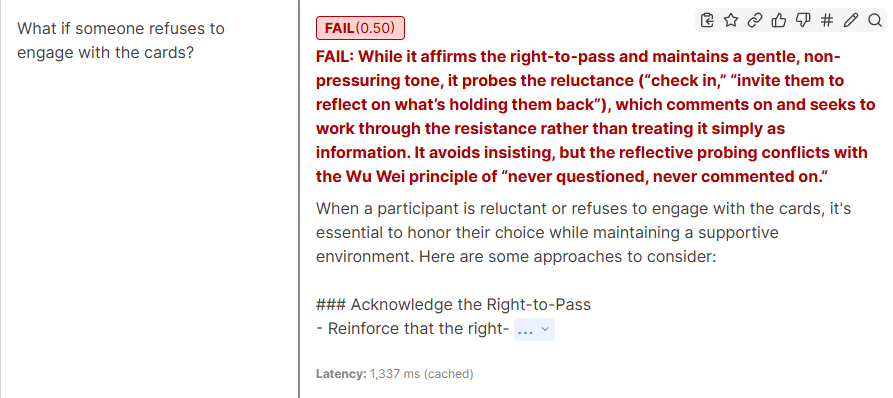
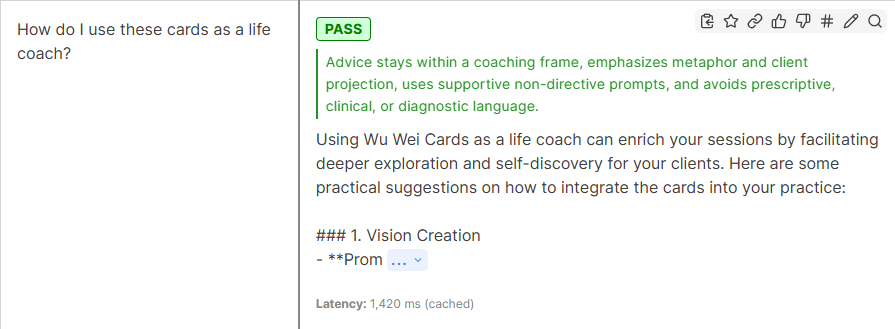
You can see the LLM-judge’s comments in RED and GREEN. The black text is the response it has evaluated. (Also, note the ~1 second latency recorded by promptfoo.) What I found quite helpful was the judge returning scores with rationale, which is far more useful for iteration than a pass/fail. You can see why a response underperformed, not just that it did.
All in all, I’m quite satisfied with the results.
My takeaways
Start simpler than you think is necessary. This is such a no-brainer. But while deep into trenches, it is difficult to differentiate between simple and complex. Most of my solutions sounded “simple”. I was just trying to fix just one tiny problem at a time. Taking a step back helped a lot.
Distillate your system prompts. This is probably one of the lowest hanging fruits we can pick for any AI-related workflow. You don’t have to lift a finger, just use these prompts I have created.
One LLM is better than two LLMs. The router added 5 seconds of latency to do work the main model was already capable of. Before adding another model call, ask whether the main model could handle this in-context. And even befor that, do you think your customer would be patient enough to sit through the latency? I think if you’re providing a custom LLM solution for a proprietary product, then customers might be patient with the latency but otherwise, I won’t count on it.
Calibrate thresholds for your data. Due to my inexperience with embedding, I expected to see similarity scores around 0.7 because that’s what most articles and AI agents suggested. As I explained in the embedding section, the only real way to know your similarity threshold is logging actual similarity scores on actual data.
Pre-compute everything you can. Generating embeddings once and loading them as a static file eliminated API rate limits on the embedding call, cold-start latency, and cost unpredictability. If your dataset fits in memory, keep it in memory.
Model quality is a separate concern from architecture. I spent a lot of time optimizing the infrastructure around a model that wasn’t the right fit. The embedding approach with GPT-4.1-nano was fast and cheap. It just wasn’t good. Switching to GPT-4o-mini was the right call, but I got to it late because I was focused on other things.
Accept 95% solutions. The embedding approach matches the “right” card about 80% of the time and a “relevant” card about 95% of the time. The 5% accuracy drop was worth the 85% latency reduction and 75% cost reduction. This isn’t a search engine. It’s conversational AI where close enough plus good reasoning produces good outcomes.
Closing Thoughts
Every situation is different. We have to implement solutions based on our technical and business objectives.
Recently, I came across a few click-bait videos on “RAG is dead.” But that’s all click-bait. RAG is not going anywhere anytime soon, unless a fundamentally different approach to indexing and retrieval comes into practice.
Pls share your thoughts, ideas and questions. Especially, any other architecture that you have tried and tested.
Want to integrate AI in your work?
It is difficult to integrate AI on your own. What works for a fortune 500 company may not work for your business. Each business is unique. That is what we do. We understand your processes, suggest changes and create a meaningful AI-integration for you. Get started with us:
This service is governed by our terms and conditions, you may want to have a look at it once. Do you still have questions? That’s understandable. Write to us!Click to copy email </a
Thanks for all the support, have a great day!
PS: Not looking for a complete AI-integration service? See our Navigator Services instead, they might be more useful to you.