


Drowning in 15,000 family photos? Apple Photos and Google Photos bury your best shots in their feed. Best Photo Picker runs entirely on your machine, scores every photo on sharpness, lighting, faces, and composition, and lets you curate the perfect 50 in minutes — no cloud, no subscription, no compromise.
It's the only photo tool that auto-scores your whole library for curation without uploading anything, then clusters near-duplicates and lets you boost specific people so the final pick favors the faces that matter — your kid, for the grandparents.
Try it in 30 seconds — no photos needed:
pip install "bppicker[web]" && bpp demoGenerates a sample library, runs the full UI locally, and quits cleanly when you close the tab. Nothing leaves your machine.
By Arkalogy — a PM-directed, AI-built product; the architectural decisions are captured in docs/adr/. Why & how it was built →
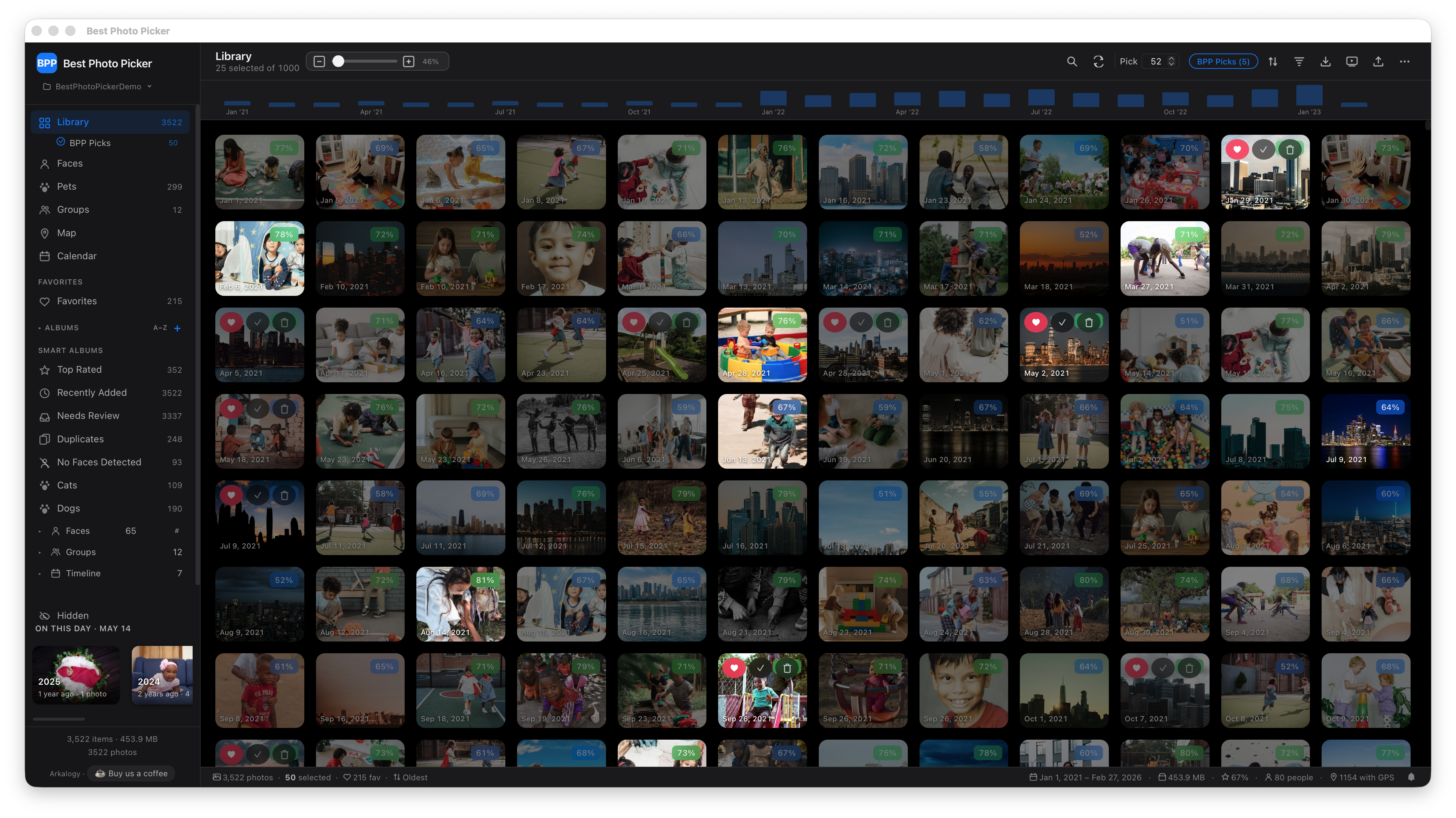 |
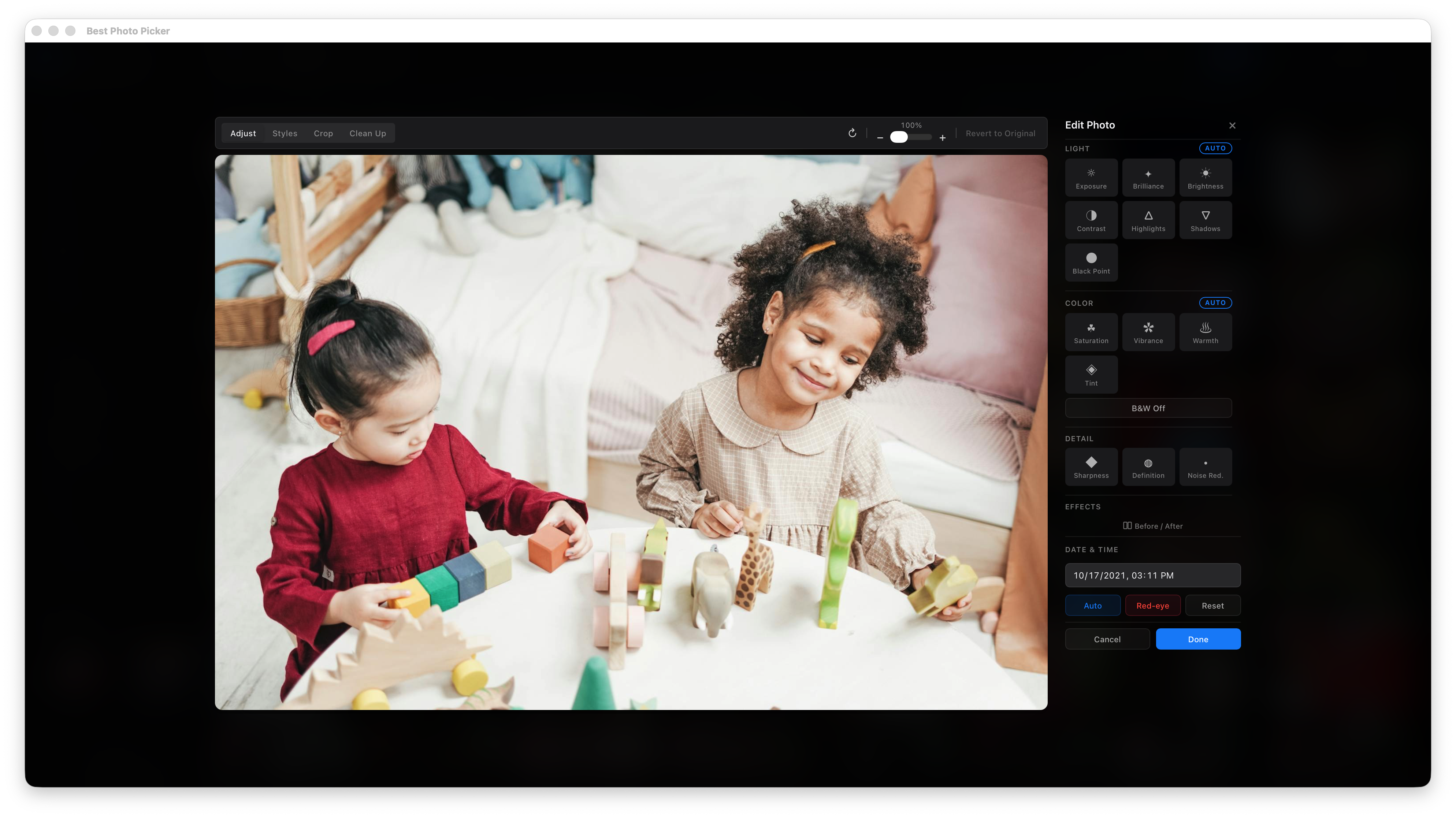 |
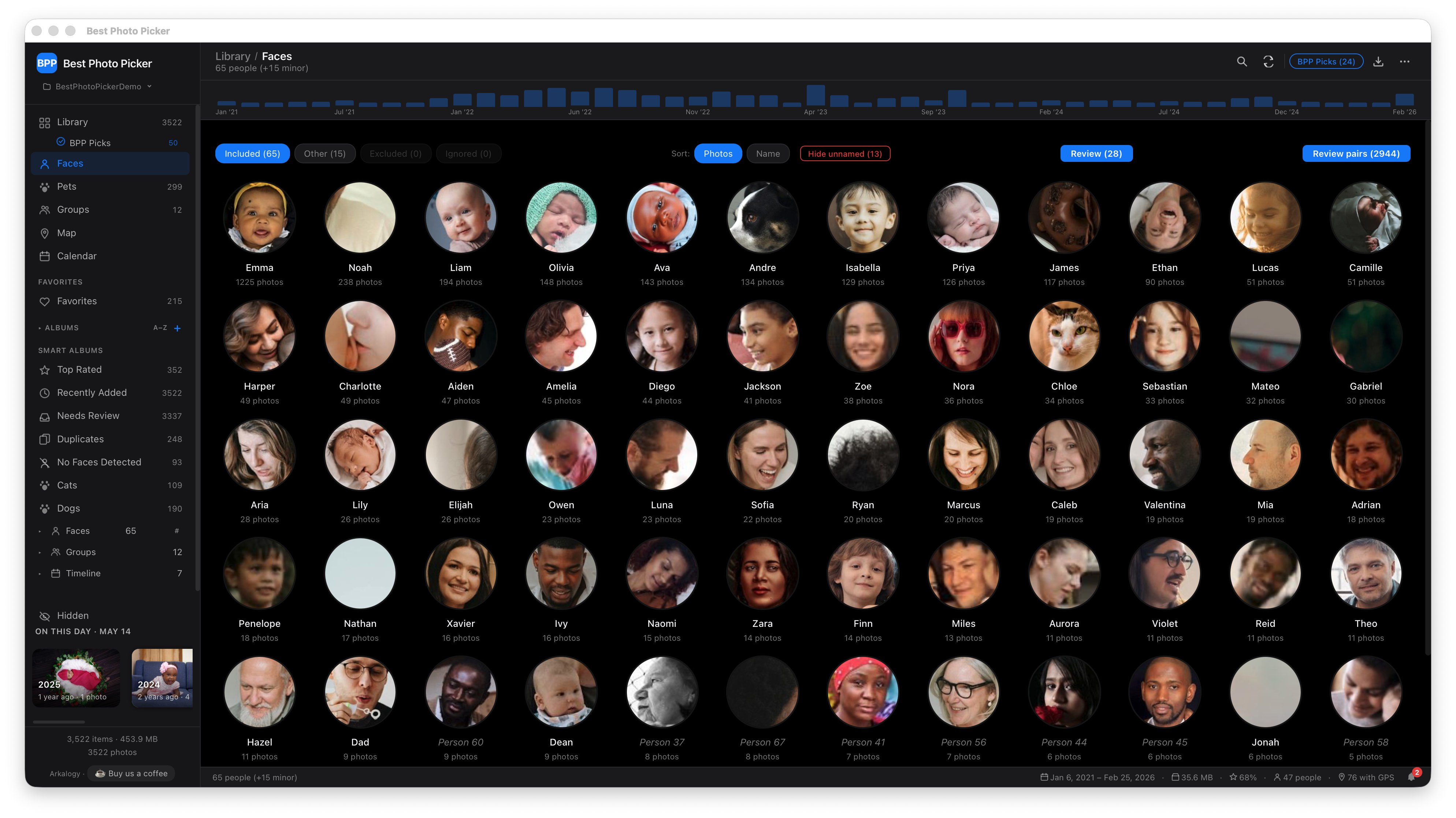 |
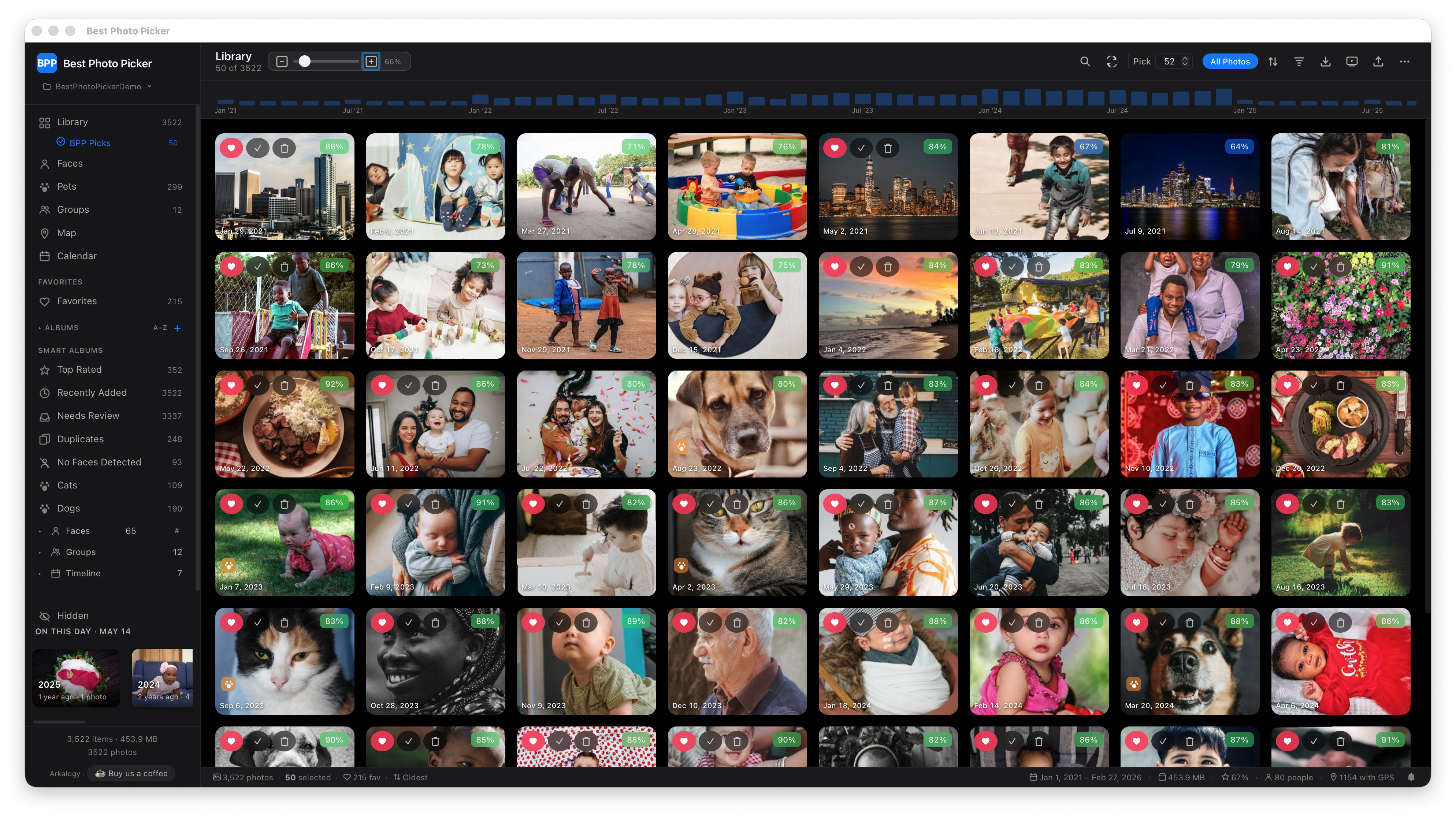 |
 |
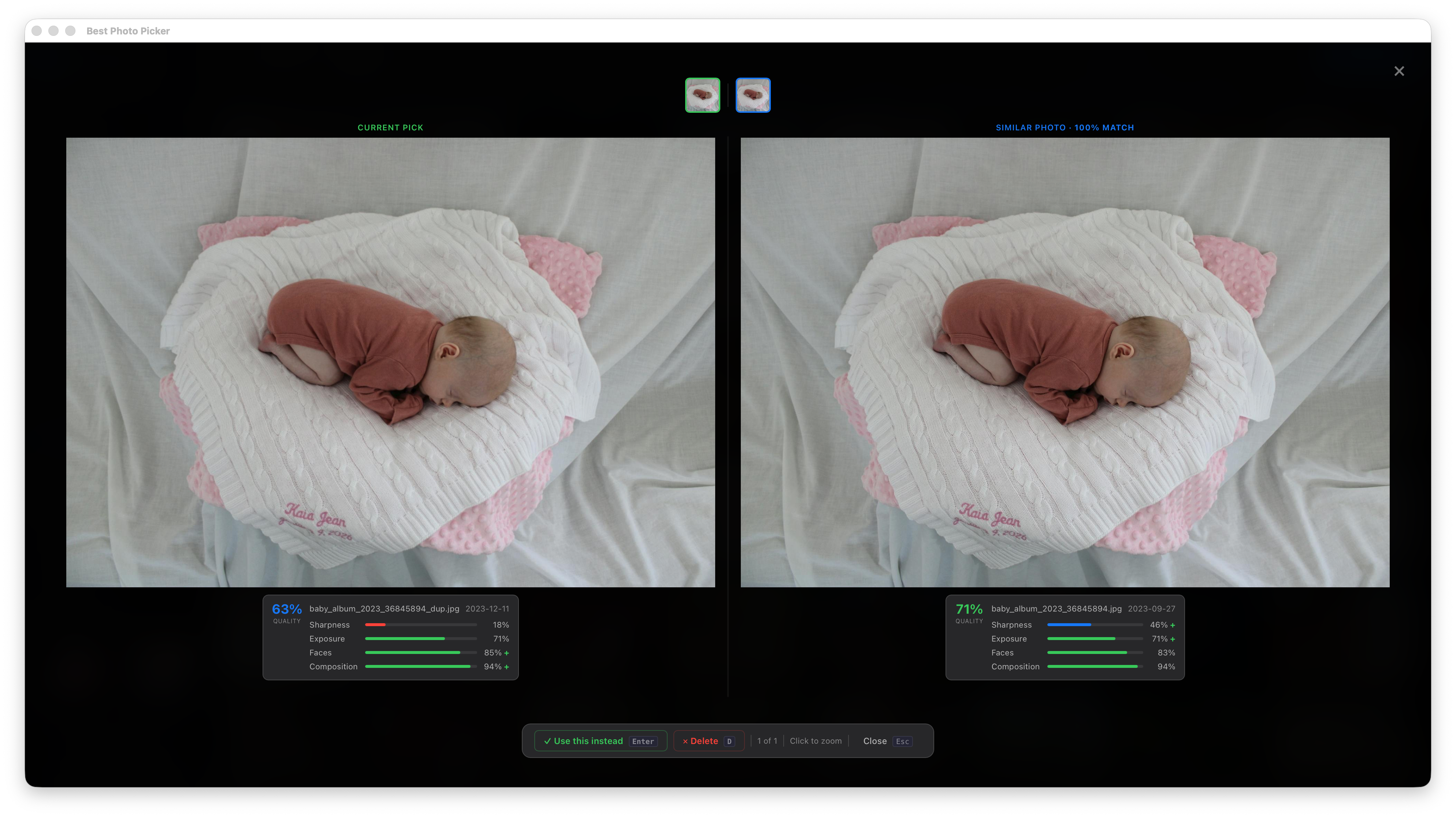 |
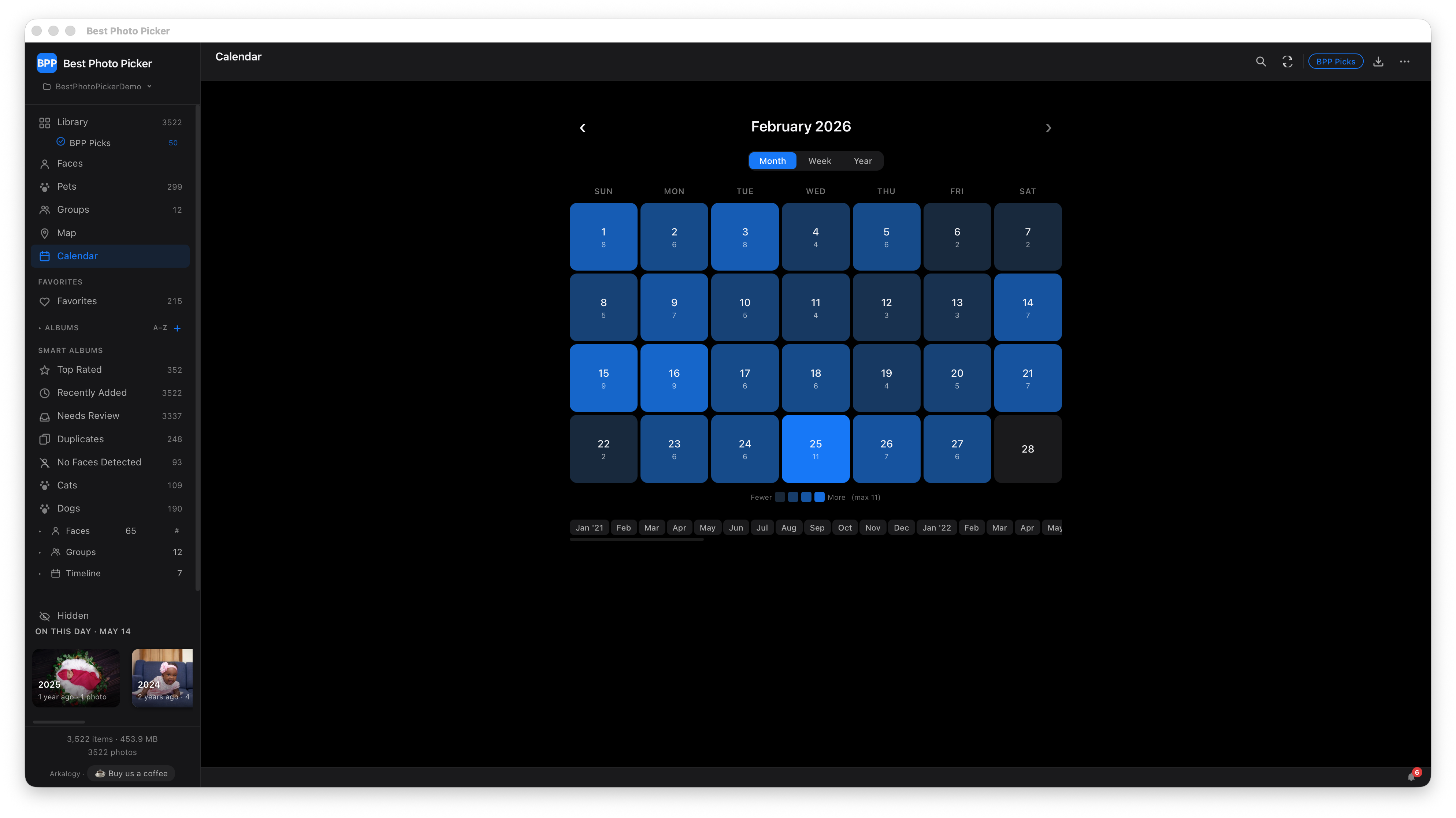
For an annotated walkthrough of the full workflow — import → adjust → pick → export — plus the side surfaces (faces, calendar, map, duplicates), see docs/quickstart-gallery.md.
📣 Found a bug or have a feature idea? Open an issue · Start a discussion · Contributing guide. Security issues: please use private vulnerability reporting, not a public issue.
Why Best Photo Picker?
| Best Photo Picker | Apple Photos | Google Photos | Lightroom | digiKam | |
|---|---|---|---|---|---|
| Local-first / runs offline | ✅ | ⚠️ iCloud-coupled | ❌ cloud | ⚠️ cloud sync | ✅ |
| Auto-scores photos for picking | ✅ | ❌ | ⚠️ "Memories" | ⚠️ flags only | ❌ |
| Boost picks by named person | ✅ | ⚠️ | ⚠️ | ❌ | ❌ |
| Near-duplicate deduplication | ✅ | ⚠️ | ⚠️ | ❌ | ✅ |
| Free + open source | ✅ MIT | ❌ | ❌ | ❌ $120/yr | ✅ GPL |
| No account / no subscription | ✅ | ❌ | ❌ | ❌ | ✅ |
| Optional LAN sharing w/ device pairing | ✅ | ❌ | ❌ | ❌ | ❌ |
If you live in the Apple/Google ecosystem and your collection fits their feeds, those tools work great. bpp exists for the case they're bad at: you have thousands of photos of a specific subject — your kid, your dog, last summer's trip — and you want to find the actual best fifty without uploading anything anywhere.
Features
- Quality scoring — sharpness, exposure, face detection (YuNet + SCRFD + BlazeFace + MediaPipe + dlib), composition
- Smart deduplication — perceptual hashing (dHash + aHash) and CLIP semantic similarity
- Temporal diversity — per-day caps and monthly coverage for balanced selection
- Face recognition — automatic clustering, per-person smart albums, merge, dismiss, reassign, drag-to-fix mis-detected bboxes
- Library management — import by copying to managed library with SHA-256 dedup
- Album system — manual + 19 smart album types (person, time, score, duplicates, pets, etc.)
- Interactive web UI — real-time slider tuning, photo grid, lightbox, compare view, batch operations
- Desktop app — native macOS app via Tauri v2 (wraps the web UI in a native window)
- Soft delete — 30-day recovery, Recently Deleted album
- Demo mode — try instantly with generated sample photos
- Privacy — local-first, no telemetry, no analytics. The few network calls bpp makes (model downloads on first analyze, OpenStreetMap tiles when you open the Map view, update checks against GitHub Releases, optional LAN sharing, optional
pip installof extra features) are all enumerated below and individually disclosable; nothing about your library is ever sent.
Quick Start
Install
Requires Python 3.11 (3.12+ is not yet supported — it's pinned to match the desktop sidecar). On macOS, Homebrew ships a newer Python by default; install 3.11 with
brew install python@3.11orpyenv, or use the no-Python desktop app below.
Recommended — pipx keeps bpp in its own environment and makes updating one command:
pipx install "bppicker[web]"

# Update to the latest release later:
pipx upgrade bppicker
Plain pip works too:
pip install "bppicker[web]"

# Optional: face recognition
pip install "bppicker[web,faces]"

# Optional: HEIC support
pip install "bppicker[heic]"
Most ML-powered features (face recognition, NudeNet, RAW import,
HEIC, AI inpainting) install on demand from Settings → Advanced
→ ML Models in the running app, or you can pre-install
everything at once with pip install "bppicker[heic,faces,raw,nudity,inpaint]".
Desktop app (macOS, Apple Silicon)
Prefer a dock icon over a terminal? Each release ships a standalone Mac app. No Python, no terminal:
- Download BestPhotoPicker-macOS-arm64.dmg (always the latest release).
- Double-click the
.dmgand drag Best Photo Picker into Applications. - Open it from Applications or Spotlight.
The app is signed with an Apple Developer ID and notarized by Apple,
so it opens on double-click — no security warning. To update, download
the newer .dmg the same way; your photo library and settings live
outside the app and carry over untouched.
Apple Silicon (M1/M2/M3 and later) only. On an Intel Mac, or on Windows/Linux, use the
pipx install "bppicker[web]"path above.
Try the Demo
Generates sample photos and launches the web UI — no configuration needed.
Library Mode (Recommended)
# Start the photo management server (default library: ~/Pictures/BestPhotoPicker)
bpp serve

# Or specify a custom library path
bpp serve --library ~/Photos/2024
Open http://127.0.0.1:5001 in your browser. Import folders, adjust scoring weights with sliders, and export your curated selection.
CLI Mode (Batch Processing)
# One-shot: analyze + select best 50 photos
bpp run --input ~/Photos/MyKid --k 50 --out ~/curated --gallery

# Or step-by-step:
bpp analyze --input ~/Photos/MyKid --out ~/workdir
bpp select --workdir ~/workdir --k 50 --out ~/curated --gallery
How It Works
Import → Analyze → Score → Deduplicate → Select → Export
- Import: photos copied to managed library with SHA-256 dedup
- Analyze: parallel feature extraction (blur, exposure, faces, composition) cached in SQLite
- Score: weighted combination of sub-scores, tunable in real-time via sliders
- Deduplicate: perceptual hash clustering removes burst duplicates; optional CLIP semantic dedup
- Select: greedy selection with per-day caps and monthly coverage for temporal diversity
- Export: copy/hardlink/symlink selected photos with optional HTML gallery
Web UI
| Feature | Description |
|---|---|
| Photo grid | Thumbnail grid with score badges, zoom control, sort & filter |
| Lightbox | Full-size viewer with keyboard navigation |
| Sliders | Real-time weight tuning (blur, exposure, face, composition) |
| BPP Picks | Sidebar sub-item picks best K photos across the full library; toolbar chip filters picks in the current album/view |
| Albums | Manual and smart albums (by time, score, person) |
| Faces | Auto-clustered face detection with merge, dismiss, and per-person albums |
| Batch ops | Multi-select with Cmd/Ctrl-click, bulk include/exclude/favorite |
| Import | Drag folders or archives into the library |
| Export | Copy or link selected photos to an output directory |
Tuning Knobs
| Parameter | Default | Description |
|---|---|---|
blur_weight |
0.30 | Weight for sharpness in aggregate score |
exposure_weight |
0.20 | Weight for exposure quality |
face_weight |
0.35 | Weight for face detection & framing |
composition_weight |
0.15 | Weight for composition (rule of thirds) |
max_long_side |
1024 | Downscale images to this before analysis |
hash_distance_threshold |
10 | dHash Hamming distance for "same" image |
time_window_seconds |
15 | Cluster burst photos within this window |
max_per_day |
3 | Max selected photos per calendar day |
min_per_month |
1 | Try to include at least 1 per month |
Hardware
bpp runs all ML inference on CPU by default. ONNX-based models (SCRFD
face detection, CLIP semantic search, YOLOv11n pet detection) can opt
into hardware acceleration through the BPP_ONNX_PROVIDERS env var:
# Apple Silicon (M1/M2/M3) — use the Apple Neural Engine via CoreML
BPP_ONNX_PROVIDERS="CoreMLExecutionProvider,CPUExecutionProvider" \
    bpp serve --library ~/Pictures/BestPhotoPicker

# NVIDIA GPU (Linux) — install onnxruntime-gpu first
pip uninstall -y onnxruntime && pip install onnxruntime-gpu
BPP_ONNX_PROVIDERS="CUDAExecutionProvider,CPUExecutionProvider" \
    bpp serve --library ~/Pictures/BestPhotoPicker

# Windows DirectML
BPP_ONNX_PROVIDERS="DmlExecutionProvider,CPUExecutionProvider" \
    bpp serve --library ~/Pictures/BestPhotoPicker
CPU is always appended as the final fallback so a missing provider in your wheel falls through cleanly with a warning rather than crashing. Ordering matters — providers are tried in the order listed.
Tested vs supported
| Surface | Tested in CI | Supported | Notes |
|---|---|---|---|
| macOS arm64 (M1/M2/M3) — CPU | yes (dev box) | yes | Primary dev target. Tauri desktop app ships only this. |
| Linux x86_64 — CPU | yes (ubuntu-latest) |
yes | Default for PyPI install. |
| Linux arm64 — CPU | no | yes | Docker image builds; runtime not exercised in CI. |
| Windows — CPU | no | yes | Code path exists; never run end-to-end. Reports welcome via GitHub issues. |
| macOS arm64 — CoreMLExecutionProvider (ANE) | no | yes | Code path exists. Expected 5-10× face inference speedup; correctness depends on the specific ONNX graph and ONNX Runtime version. |
| Linux x86_64 — CUDAExecutionProvider | no | yes | Requires pip install onnxruntime-gpu (replaces base onnxruntime). Free-tier CI doesn't have a GPU runner. |
| Windows — DmlExecutionProvider | no | yes | Same caveat as Windows CPU — code path exists, no end-to-end run. |
"Supported" means the code path accepts the configuration and
shouldn't crash; report bugs via GitHub Issues if it does. "Tested in
CI" means we run the full test suite on every push for that surface.
Anything between the two is on the user's risk surface — your
hardware, your driver stack, your call. We'd love to expand the
tested column as users report working setups; PRs welcome that add
matrix entries to .github/workflows/ci.yml.
Throughput tuning
Face extraction is single-threaded per subprocess by default
(_face_extract_workers=1). On a 6,000-photo library that's ~50 min
on Apple Silicon (roughly 0.5 s/photo). Two config knobs let operators
trade RAM for time:
# settings table or YAML config
_face_extract_workers: 4        # number of parallel workers
_face_extract_pool: process     # "process" | "thread"
Recommended combos:
| Setup | workers |
pool |
Expected throughput | Peak RAM |
|---|---|---|---|---|
| Default (safe everywhere) | 1 | thread | 1× baseline (~50 min / 6k photos) | ~700 MB |
| Power user, 16+ GB RAM | 4 | process | ~3-4× (~13 min / 6k photos) | ~3 GB |
Measured on Apple M-series; results vary by photo resolution and system load.
The process pool is the only memory-safe parallel option — there is
an audited race in the embed/landmark thread-stack that can SIGSEGV
a multi-threaded worker. ProcessPool gives each worker its own model
arena so any race is isolated. Trade-off: each worker pays a ~5-10 s
cold start for model loads, so it's only worthwhile for libraries with
hundreds of photos or more.
The native-thread-pool pinning (OMP_NUM_THREADS / OPENBLAS_NUM_THREADS
/ MKL_NUM_THREADS = 1) at bpp/web/face_worker.py and
bpp/web/analyze_worker.py module-import time applies regardless of
pool choice — required to prevent nested-thread oversubscription that
would crash the child silently. See tests/test_face_thread_safety.py
for the full regression guard suite.
Share on your local network
Open the library on a phone, tablet, or another computer connected to the same Wi-Fi. Two-step flow: phone scans QR, owner approves on Mac. After that, the device is trusted and reconnects silently.
Setup
- Open Settings → Share on the host machine
- Toggle LAN sharing on. First time only: if the server started with sharing off, it bound to loopback only and the toggle replies "Restart required". Quit and relaunch bpp once — the next start picks up the persisted flag and binds the LAN interface. Subsequent toggles flip instantly.
- The pane fills in with a share URL, a scannable QR code, and a live Devices list
Pairing a new device
- On phone: point the camera at the QR code → tap the link
- Phone shows a "Waiting for the owner to approve…" page
- On Mac: a new card appears under Pending requests (e.g. "iPhone — 192.168.1.42") within a few seconds
- Click Approve → phone auto-reloads into the full app
- The phone moves into Trusted devices and stays there. Future visits skip the approval step entirely.
Revoking access
- Trusted devices → Revoke kicks the device immediately. The phone shows "Access revoked" within ~3 seconds.
- Pending requests → Block rejects a request you didn't make (e.g. someone else scanned the QR by accident).
- The phone never silently re-requests access. To ask again, the phone user has to actively tap "Request access again" on the revoked page.
Revoking the share link itself
If the URL leaked entirely (someone screenshotted it, you sent it to the wrong person):
- Settings → Share → Revoke rotates the share token. All current URLs stop working immediately. A new URL + QR replaces the old one. Already-trusted devices keep working until you also revoke them individually.
What you can see at a glance
- Pending requests with badge count when phones are waiting
- Trusted devices with last-seen timestamps and a "previously revoked" tag if you'd kicked them before
- Recent access — last 10 share-link auth events (deduped per 10-minute window)
Security model
⚠️ Anyone on your local network whose device the owner has approved can browse your photos. The token is in the URL; the LAN itself is treated as a trusted boundary. Only enable on networks you trust — home Wi-Fi, not coffee shops or hotel networks. This is LAN-only: there is no cloud relay and no internet exposure.
For the threat model, schema, and OSS extension hooks (HTTPS, ProxyFix, future user accounts), see docs/security.md.
CLI Reference
--host defaults to 127.0.0.1 (loopback only) when LAN sharing is
off, and 0.0.0.0 when sharing is on at startup. The canonical way
to enable LAN access is Settings → Share, not the flag — pass
--host explicitly only for reverse-proxy / Docker setups.
A double-clickable launcher template ships at
launch.command.template; copy to launch.command, mark executable
(chmod +x), and Finder-double-click to start the server + Tauri
window with the documented default library path. Override via
BPP_LIBRARY env var.
A Dockerfile ships at the repo root for self-hosters who want to
run bpp behind a reverse proxy. It's a multi-stage build that
installs the [web,faces,nudity,heic] extras; the README's
"native macOS app" framing applies to the Tauri desktop wrapper,
not the server. Bind to loopback inside the container and publish
via -p 127.0.0.1:5001:5001 — the LAN-sharing toggle is owner-
only by design and isn't appropriate for an internet-exposed
container. Set BPP_TRUSTED_PROXIES to your reverse proxy's CIDR
so the LAN gate honors X-Forwarded-For correctly; see
docs/security.md.
bpp serve [--library PATH] [--host HOST] [--port 5001] [--no-browser] [--config FILE]
bpp demo [--port 5001] [--no-browser] [--keep]
bpp web [--input DIR] [--workdir DIR] [--port 5001] [--no-browser]
bpp analyze --input DIR --out WORKDIR [--config FILE] [--max N] [--workers K]
bpp select --workdir DIR --k N --out DIR [--copy|--hardlink|--symlink] [--gallery]
bpp run --input DIR --k N --out DIR [all options from analyze + select]
bpp pick LIBRARY [--top N] [--boost-face NAME]... [--out DIR] [--json|--paths-only]
                 [--quality original|high|medium|low] [--dry-run]
bpp model {list|accept|accepted|use-context|byom|remove|registry}
                 — text-mode parity with the GUI click-through for
                   restricted-license models. Use when running headless,
                   in CI, or scripting the acceptance flow.
bpp db restore-backup --library PATH [--previous] [--yes] [--accept-stale] [--force]

Global: --seed INT (default 42), --extensions STR (default "jpg,jpeg,png,heic")
Privacy
This tool is local-first — your photos never leave your machine for analysis, scoring, or selection. There is no telemetry and no cloud account.
Network usage is limited to the following — each is independently disclosable, and the ones that fire automatically (update check, map tiles, model downloads on first analyze) can be turned off:
- Model downloads (first-run only) — face detection, CLIP, etc.,
fetched from public model hosts: HuggingFace (
huggingface.co), Google Storage (storage.googleapis.com), the OpenCV opencv_zoo onmedia.githubusercontent.com, OpenAI's Azure CDN for the CLIP tokenizer vocab (openaipublic.azureedge.net), GitHub releases for Ultralytics/YOLO (github.com/ultralytics), and GitHub releases for LaMa inpainting weights (github.com/enesmsahin, only whenbppicker[inpaint]is installed and the user clicks "Remove object") - Runtime dependency installs (only when you click Install in
Settings → Advanced → ML Models) — runs
pip installagainst PyPI to fetch optional packages like face recognition, NudeNet, ONNX Runtime, or AI inpainting. TLS-only trust; transitive dependencies are not hash-pinned (same trust level aspip installfrom a terminal). Model weights fetched at first use are all SHA-256 pinned and verified by bpp before loading, including the LaMa inpainting weights (big-lama.pt). - Update check (background, default-on) — calls api.github.com to see if a new version is out; can be turned off in Settings → App. Sends only a generic User-Agent and your current version — no library data, no telemetry. 256 KB response cap enforced in bpp (client-side) — oversized responses are refused before any bytes are parsed
- Map tiles (only when viewing photo locations on the Map view or in the lightbox for a geo-tagged photo) — OpenStreetMap is queried with the tile coordinates around your photo. Each visited tile reveals approximate photo coordinates to OSM's tile-server access logs. The map view is opt-in by user action (you have to open it); no tile fetches happen on first paint
- LAN sharing (only if you enable it) — phone access over your local Wi-Fi; never traverses the internet
All photo analysis runs on your machine. Originals are never sent anywhere, and soft-delete keeps recoverable copies for 30 days.
Development Setup
Prerequisites
- Python 3.11 (CI tests this version only — 3.12+ is not validated). On macOS, Homebrew ships 3.14 by default — install 3.11 via
brew install python@3.11orpyenv install 3.11. - Node.js 18+ and npm (for desktop app only)
- Rust (stable, for desktop app only) — install via rustup.rs
- CMake + C++ compiler (for dlib face recognition) — macOS:
brew install cmake
1. Python environment
git clone https://github.com/Arkalogy/best-photo-picker.git
cd best-photo-picker

python3.11 -m venv .venv
source .venv/bin/activate
pip install -e ".[dev,web,faces]"

# Optional: HEIC support
pip install -e ".[heic]"
2. Run the web server
bpp serve --library ~/Pictures/BestPhotoPicker --no-browser
# Open http://127.0.0.1:5001
3. Desktop app (Tauri v2)
The desktop app wraps the web UI in a native macOS window via Tauri.
# Install JS dependencies
cd desktop && npm install && cd ..

# Dev mode (starts Python server + Tauri window)
cd desktop && npm run dev
For a standalone .app bundle (launchable from Finder/Spotlight):
# Build sidecar (PyInstaller-bundled Python server)
cd desktop && ./build-sidecar.sh

# Build .app + .dmg
npm run build
# Output: desktop/src-tauri/target/release/bundle/
The sidecar binary lands at desktop/src-tauri/binaries/bpp-server-{target-triple} (e.g., bpp-server-aarch64-apple-darwin).
4. Lint and test
# Python
ruff check . && ruff format --check .
pytest -v                        # full pytest suite

# Frontend (JS) — requires `npm install` once
npm run lint                     # ESLint + auto-generated globals allowlist
npm run format:check             # Prettier (scoped to dev-tool JS)
npm run typecheck                # tsc --noEmit on @ts-check files
npm run test:js                  # Vitest + jsdom unit tests under tests-js/

# End-to-end smoke tests (Playwright)
npx playwright install chromium  # one-time browser install
# (start `bpp serve` first, then:)
npm run test:e2e                 # full Playwright suite under tests-e2e/
Project structure
bpp/
  cli.py, commands.py       # CLI entry points
  scoring/                  # Blur, exposure, face (SCRFD/BlazeFace/dlib), composition
  dedupe/                   # Perceptual hash + CLIP semantic dedup
  selection/                # Greedy chooser with diversity constraints
  db/                       # SQLite schema, migrations, CRUD
  web/                      # Flask app, blueprint-per-feature, background workers
    static/js/              # Vanilla JS SPA (modules under static/js/modules/)
    templates/index.html    # Single-page HTML shell
desktop/
  src-tauri/                # Tauri v2 Rust app
  build-sidecar.sh          # PyInstaller sidecar build
  scripts/dev-macos.sh      # Dev launcher
Git workflow
develop— integration branch. Feature branches merge here.main— stable/release. Onlydevelop→mainmerges.- CI runs on PRs to
mainonly (lint + pytest, Python 3.11).
Installing on a New Machine
Desktop app (.app bundle)
cd desktop
./build-sidecar.sh   # builds the Python server into a standalone binary
npm run build         # builds .app + .dmg
The .dmg is at desktop/src-tauri/target/release/bundle/dmg/. Open it and drag to /Applications.
Note: Without an Apple Developer certificate, macOS Gatekeeper will block the app. To open it: right-click → Open → Open. This only needs to be done once.
Transferring your photo library
The library folder (default ~/Pictures/BestPhotoPicker/) contains everything:
BestPhotoPicker/
  photos/    # your imported photos (organized by batch)
  data/      # SQLite database (scores, faces, albums, settings)
  cache/     # thumbnails and face crops (regenerated automatically)
  logs/      # server logs
To move to a new machine:
- Copy the entire
BestPhotoPicker/folder to the new machine (same path or any location) - Install the app on the new machine
- Start it:
bpp serve --library ~/Pictures/BestPhotoPicker
The app automatically detects that file paths have changed (different username, different OS path) and remaps all photos by SHA-256 hash on first startup. Your scores, albums, face clusters, favorites — everything is preserved. The cache/ folder can be skipped to save transfer time; thumbnails regenerate on demand.
Troubleshooting
dlib fails to install — Requires CMake and a C++ compiler. macOS: brew install cmake. Ubuntu: sudo apt install cmake build-essential.
HEIC photos not recognized — pip install "bppicker[heic]". Linux may also need libheif-dev.
Port 5001 in use — bpp serve --port 8080, or check what's holding it: lsof -i :5001.
ImportError: cv2-related errors after upgrading or installing extras — bpp declares opencv-python-headless as its base OpenCV. bppicker[faces] (mediapipe) pulls in opencv-contrib-python and bppicker[inpaint] (simple-lama-inpainting) pulls in opencv-python. All three install into the same cv2 namespace and the last-installed one wins on disk. With matching version numbers it's harmless, but a future minor bump in any of them can produce hard-to-diagnose import-order errors. If you hit one, reset to the headless variant: pip uninstall opencv-python opencv-contrib-python && pip install --force-reinstall opencv-python-headless.
Desktop app won't reopen from dock — Quit fully (Cmd+Q), then relaunch. The Tauri app handles dock-click reopen.
App fails to start after an upgrade / failed migration — every
schema migration writes a verified data/photopicker.db.backup
before mutating anything. To roll back the live DB to that
snapshot:
# Stop any running server first.
pkill -f 'bpp serve'

# Restore. The current DB is moved aside with a timestamped
# suffix so nothing is destroyed. Use --previous to roll back
# to the older `.backup.prev` snapshot if `.backup` is also
# bad.
bpp db restore-backup --library ~/Pictures/BestPhotoPicker
The command verifies the backup's integrity before swapping it in and refuses if the backup is corrupt. Once the app starts and your library looks correct, you can delete the moved-aside files manually.
Downgrading bpp to an older version — bpp's schema migrations are forward-only. Once a newer bpp version migrates your library DB, an older bpp will refuse to open it (or crash on missing columns). To roll back:
- Install the older bpp version (
pip install bppicker==X.Y.Zor reinstall the matching bundle). - Restore the pre-migration snapshot:
pkill -f 'bpp serve'
bpp db restore-backup --library ~/Pictures/BestPhotoPicker --previous
- Start the older bpp.
The --previous flag restores .backup.prev — the snapshot taken
before the most recent backup rotation, which is what bpp wrote
just before the upgrade migration ran. This works for single-
version rollbacks (upgraded once, want to go back). If you've
already started the new version multiple times or run multi-step
migrations, .backup.prev may have been overwritten — at that
point the only path back is restoring from your own external
backup of the library directory.
Changelog
User-facing release notes live in CHANGELOG.md.
Support
If you find this useful, star the repo and spread the word. Bug reports and PRs welcome.
- ☕ Buy us a coffee — covers a model-download CDN bill and a focused afternoon of bug fixes
- 📬 Hire Arkalogy — custom integrations, AI-assisted product work, or PM consulting
About
Built and maintained by Arkalogy. bpp started as a tool to triage a large family photo library without sending it to anyone's cloud — most existing options either live in someone else's data center or are designed for professional photographers. If you have the same problem and this helps, that's the win.
This codebase was built with Claude (Anthropic) — implementation and line-by-line code review are both AI-driven, not human. The maintainer works as the product owner and architect: directing the work, approving every commit, and capturing load-bearing architectural decisions in docs/adr/. It's a deliberate experiment in how far a PM-led, AI-built product can go while staying disciplined — hence the registries, the test gates, the legal posture in MODEL_POLICY.md, and the ADRs.
License
MIT — see LICENSE. See NOTICE.txt for the full third-party license breakdown.
bpp itself and every dependency installed by default are permissively licensed (MIT / Apache-2.0 / BSD / HPND). Copyleft components are strictly opt-in and never installed without an explicit extra:
bppicker[heic]pulls inpillow-heif(GPLv2 binary wheel, due to bundled x265; Python source is BSD-3) for HEIC support.bppicker[nudity]pulls inNudeNet(GPL-3.0) for the optional NSFW filter. If you distribute a derived work that bundles NudeNet, GPL-3.0 terms attach to the whole work — that's why we ship it as an opt-in extra and never as a default dependency.bppicker[raw]pulls inrawpy(MIT, links to LibRaw which is LGPL-2.1) for camera-RAW support.bppicker[inpaint]pulls insimple-lama-inpainting(Apache 2.0) for AI object removal, plustorchandtorchvision(both BSD-3) transitively. The LaMa model weights are downloaded on first use from the upstream LaMa research project (advimman/lama) and have their own license terms — review them before redistributing a derived work.
The Ultralytics YOLOv11n weights downloaded for pet detection are AGPL-3.0; we use the ONNX-exported weights only (no Ultralytics Python code runs in your process). See NOTICE.txt for the full picture.
Models, commercial use, and bppicker's monetization stance
Bppicker bundles no model weights. Every optional model is downloaded by your local installation directly from the upstream provider on first use, subject to upstream model terms — bppicker does not redistribute or relicense them.
Arkalogy will not monetize, sell, or market Best Photo Picker for commercial workflows. Because the source code is MIT-licensed, third parties may still use it commercially; restricted-model access is separately controlled by model-specific terms and app-level gates (commercial-use gate, hard-block, click-through acknowledgment). Optional third-party models may have separate licenses, including non-commercial or research-only restrictions — commercial users must select commercial-safe models or provide their own licensed weights.
For face recognition specifically, bppicker's default embedder (SFace) is permissively licensed and commercial-use-safe. Other face embedders are available behind an opt-in click-through; some are research-only / non-commercial and are hard-blocked when you select "Commercial" as your use context. The Bring-Your-Own-Model path lets you point bppicker at a local ONNX file you have your own rights to.